1. Uvod
Thank you for choosing the MIATONE BOOMBOX Bluetooth Speaker. This portable and waterproof wireless speaker is designed to deliver high-quality audio for various environments, from indoor relaxation to outdoor adventures. Please read this manual carefully before using the product to ensure proper operation and to maximize its lifespan.

Audio visoke rezolucije: Experience crisp highs, rich mids, and deep bass with advanced DSP-enhanced sound technology.
2. Sigurnosne informacije
- Do not expose the speaker to extreme temperatures (heat or cold) or high humidity.
- Izbjegavajte ispuštanje ili izlaganje zvučnika jakim udarcima.
- Ne rastavljajte, ne popravljajte niti modificirajte zvučnik sami. Obratite se kvalifikovanom servisnom osoblju.
- Držite zvučnik dalje od medicinskih uređaja, jer njegovo magnetsko polje može ometati njihov rad.
- Ensure the charging port cover is securely closed when using the speaker near water to maintain its waterproof rating.
- Koristite samo priloženi kabel za punjenje ili njegov certificirani ekvivalent.
- Nemojte slušati muziku na pretjerano visokim glasnoćama tokom dužeg perioda kako biste spriječili oštećenje sluha.
3. Sadržaj paketa
Molimo Vas da provjerite paket za sljedeće stavke:
- MIATONE BOOMBOX Bluetooth Speaker
- Micro USB kabl za punjenje
- Kabl za pomoćni ulaz
- Uputstvo za upotrebu
4. Proizvod je gotovview
Familiarize yourself with the various parts and controls of your MIATONE BOOMBOX speaker.
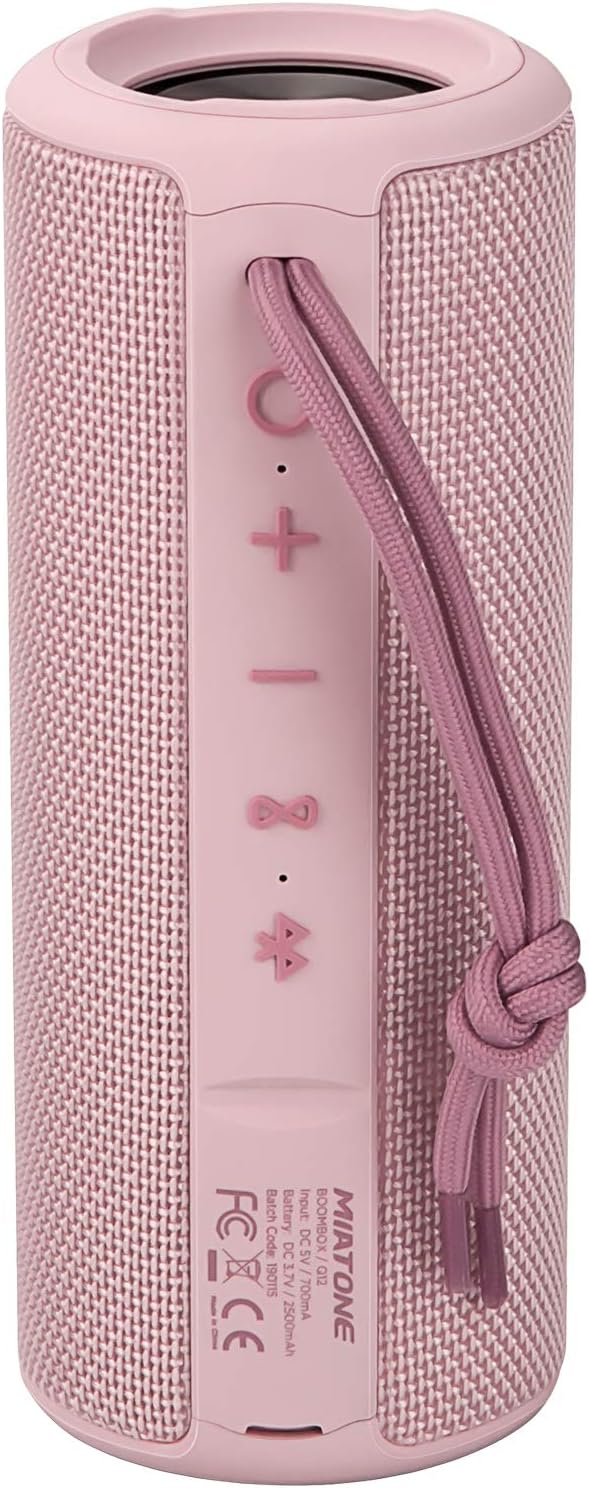
Front View: Shows the speaker grille and the MIATONE logo.

Pozadi View: Displays the control buttons (+, -, Play/Pause, Bluetooth, TWS) and the charging/AUX ports under a protective flap.

Reinforced Silicone End Caps: The speaker features durable silicone bumpers on both ends to absorb impact and prevent slipping.
Funkcije dugmadi:
| Dugme | Funkcija |
|---|---|
| + | Short press: Volume Up; Long press: Next Track |
| - | Short press: Volume Down; Long press: Previous Track |
| Pusti/Pauza | Short press: Play/Pause; Short press (incoming call): Answer/End Call; Long press (incoming call): Reject Call |
| Bluetooth ikona | Long press: Disconnect current Bluetooth device and enter pairing mode |
| TWS Icon | Short press: Initiate TWS pairing (True Wireless Stereo) |
| Dugme za napajanje | Dug pritisak: Uključivanje/isključivanje |
5. Podešavanje
5.1 Punjenje zvučnika
- Open the protective flap on the back of the speaker to reveal the charging port.
- Connect the Micro USB charging cable to the speaker's charging port and the other end to a USB power adapter (not included) or a computer's USB port.
- LED indikator će prikazivati status punjenja (npr. crvena boja za punjenje, isključena za potpuno napunjeno).
- A full charge takes approximately 12 hours. Ensure the protective flap is sealed after charging.
5.2 Uključivanje/isključivanje
- Uključeno: Long press the Power button until you hear a power-on prompt.
- Iskljuciti: Long press the Power button until you hear a power-off prompt.
5.3 Bluetooth uparivanje
- Ensure the speaker is powered on and in Bluetooth pairing mode (indicated by a flashing blue LED). If not, long press the Bluetooth icon button.
- Omogućite Bluetooth na svom uređaju (pametni telefon, tablet, računar).
- Traži "BOOMBOX" in your device's Bluetooth list.
- Select "BOOMBOX" to connect. You will hear a confirmation sound once paired.
- Zvučnik će se automatski ponovo povezati sa posljednjim uparenim uređajem kada se uključi, ako je u dometu.

Nadograđeni Bluetooth 5.3: Pruža brže i stabilnije bežične veze.
5.4 TWS (Pravi bežični stereo) uparivanje
TWS allows you to pair two MIATONE BOOMBOX speakers together for a true stereo sound experience.
- Ensure both BOOMBOX speakers are powered on and not connected to any Bluetooth device.
- On one speaker (this will be the primary speaker), short press the TWS icon button. It will enter TWS pairing mode.
- Dva zvučnika će se automatski povezati jedan s drugim. Čut ćete zvuk potvrde nakon uspješnog uparivanja putem TWS-a.
- Once TWS paired, connect your device to the primary speaker via Bluetooth as described in section 5.3.
- To disconnect TWS, short press the TWS icon button on either speaker.
6. Uputstvo za upotrebu
6.1 Reprodukcija muzike
- Pusti/pauza: Kratko pritisnite dugme Play/Pause.
- Povećavanje glasnoće: Kratko pritisnite + dugme.
- Smanjivanje jačine zvuka: Kratko pritisnite - dugme.
- Sljedeća pjesma: Dugo pritisnite + dugme.
- Prethodni zapis: Dugo pritisnite - dugme.
6.2 Pozivi bez upotrebe ruku
- Odgovori na poziv: Kratko pritisnite dugme Reprodukuj/Pauziraj kada zvoni dolazni poziv.
- Završi poziv: Kratko pritisnite dugme Reprodukuj/Pauziraj tokom poziva.
- odbiti poziv: Dugo pritisnite dugme Reprodukuj/Pauziraj kada zvoni dolazni poziv.
6.3 Auxiliary Input (AUX Mode)
You can connect non-Bluetooth devices to the speaker using the provided 3.5mm auxiliary cable.
- Open the protective flap on the back of the speaker.
- Connect one end of the 3.5mm AUX cable to the speaker's AUX port and the other end to your audio device's headphone jack.
- Zvučnik će se automatski prebaciti u AUX način rada.
- Kontrolirajte reprodukciju i jačinu zvuka sa povezanog uređaja.
- Ensure the protective flap is sealed after use to maintain water resistance.
7. Održavanje
7.1 Čišćenje
- Obrišite zvučnik mekom, damp tkanina.
- Ne koristite abrazivna sredstva za čišćenje, alkohol ili hemijske rastvarače.
- Ensure the speaker is completely dry before charging or storing.
7.2 Skladištenje
- Čuvajte zvučnik na hladnom i suhom mjestu, dalje od direktne sunčeve svjetlosti i ekstremnih temperatura.
- If storing for a long period, charge the battery to about 50% every few months to preserve battery life.
7.3 Vodootpornost (IPX6)
The MIATONE BOOMBOX is IPX6 waterproof, meaning it can withstand powerful water jets. It is not designed for submersion.
- Always ensure the charging port and AUX port protective flap is securely closed before exposing the speaker to water.
- If the speaker gets wet, wipe it dry with a clean cloth before opening the port flap or charging.
- Do not charge the speaker if the ports are wet.

IPX6 Waterproof Speaker: Designed to float and withstand water splashes, making it ideal for poolside or beach use.
8. Otkrivanje problema
| Problem | Mogući uzrok | Rješenje |
|---|---|---|
| Zvučnik se neće uključiti. | Baterija je slaba ili mrtva. | Potpuno napunite zvučnik. |
| Nije moguće upariti s Bluetooth uređajem. | Speaker is not in pairing mode; device's Bluetooth is off; speaker is already connected to another device; device list needs refresh. | Ensure speaker is in pairing mode (flashing blue LED). Turn device's Bluetooth off and on. Disconnect from other devices. Forget "BOOMBOX" on your device and re-scan. |
| Nema zvuka ili je jačina zvuka niska. | Volume too low on speaker or device; incorrect input mode; speaker not connected. | Increase volume on both speaker and device. Ensure correct input mode (Bluetooth/AUX). Re-establish Bluetooth connection. |
| Izobličenje zvuka. | Previsoka jačina zvuka; slaba baterija; smetnje. | Reduce volume. Charge the speaker. Move speaker closer to the device or away from other electronic devices. |
| Uparivanje TWS-a nije uspjelo. | Zvučnici su previše udaljeni; jedan zvučnik je već povezan s uređajem. | Prije pokretanja TWS uparivanja provjerite jesu li oba zvučnika blizu jedan drugom i nisu povezana ni sa jednim Bluetooth uređajem. |
9. Specifikacije
| Feature | Detalj |
|---|---|
| Naziv modela | BOOMBOX (Q12) |
| Tehnologija povezivanja | Bluetooth 5.3, USB, AUX |
| Vrsta zvučnika | Portable Speaker, Bluetooth Speaker |
| Maksimalna izlazna snaga | 20 Watts |
| Frekvencijski odziv | 20 KHz |
| Trajanje baterije | Do 17 sati (pri 50% volumena) |
| Vrijeme punjenja | 12 sati |
| Waterproof Rating | IPX6 |
| Bluetooth domet | Do 100 stope (30.5 metara) |
| Dimenzije (D x Š x V) | 7.11 x 7.11 x 18.54 cm (2.8 x 2.8 x 7.3 inča) |
| Težina | 421.84 grama (0.93 lbs) |
| Materijal | Aluminijum |
| Kompatibilni uređaji | Personal Computer, Laptop, Tablet, Smartphone |

Dugotrajno vrijeme reprodukcije: Enjoy up to 17 hours of playback at 50% volume.
10. Garancija i podrška
MIATONE products are designed and manufactured to the highest quality standards. For information regarding warranty coverage, technical support, or service inquiries, please refer to the contact information provided on the product packaging or visit the official MIATONE website.
Molimo sačuvajte svoj dokaz o kupovini za zahtjeve u vezi s garancijom.


