Uvod
This manual provides detailed instructions for the installation, operation, and maintenance of the Hanwha Techwin HCV-6070R 2MP Outdoor Vandal-Resistant Dome Camera. This camera is designed for outdoor security surveillance, offering 2-megapixel resolution, a 2.8-12mm manual varifocal lens, and night vision capabilities with a BNC connection.
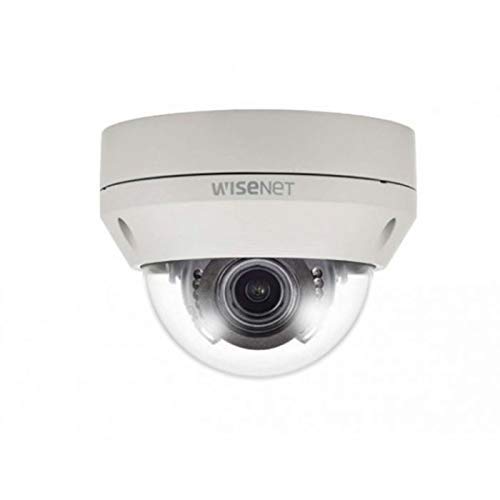
Figure 1: Hanwha Techwin HCV-6070R 2MP Outdoor Vandal-Resistant Dome Camera.
Sigurnosne informacije
Please read all safety instructions carefully before installing or operating the camera. Keep this manual for future reference.
- Ensure the power supply matches the camera's requirements to prevent electrical shock or fire.
- Ne izlažite kameru ekstremnim temperaturama, vlazi ili korozivnim okruženjima.
- Instalaciju treba izvršiti kvalificirano osoblje u skladu s lokalnim električnim propisima.
- Izbjegavajte direktno izlaganje objektiva jakim izvorima svjetlosti tokom dužeg perioda.
- Ne pokušavajte rastavljati ili modificirati kameru. To će poništiti garanciju.
Sadržaj paketa
Provjerite da li su sve stavke prisutne u paketu:
- Hanwha Techwin HCV-6070R Dome Camera (1 unit)
- Montažni vijci i ankeri
- Predložak za instalaciju
- Vodič za brzi početak
- Waterproof Cap (if applicable)
Setup
1. Montaža kamere
The HCV-6070R is designed for wall mounting. Choose a suitable outdoor location that provides the desired surveillance coverage and is protected from direct impact.
- Use the provided installation template to mark the drilling holes on the wall.
- Drill holes according to the template and insert the wall anchors.
- Secure the camera base to the wall using the mounting screws.
- Podesite kameru viewing angle as needed before tightening all screws.
2. Ožičenje i priključci
The camera utilizes a BNC connection for video output and requires a separate power supply. Ensure all connections are secure and weatherproof for outdoor use.
- Video veza: Connect a BNC cable from the camera's BNC port to the video input of your DVR (Digital Video Recorder).
- Priključak za napajanje: Connect a 12V DC power adapter (not included) to the camera's power input. The camera operates at 8 watts.
- Bežična povezanost: The camera supports Wi-Fi for remote control and monitoring. Refer to the operating section for initial Wi-Fi setup.

Slika 2: Prample of a BNC coaxial cable for video connection. Ensure a secure connection to the camera and DVR.
3. Početna konfiguracija
After physical installation and power-up, access the camera settings via your connected DVR or a compatible mobile application (Android controller type specified).
- Podesite datum i vreme.
- Configure network settings for Wi-Fi connectivity.
- Adjust video quality and recording preferences.
Upravljanje kamerom
1. Video nadzor i snimanje
The camera provides 2MP effective video resolution, capturing video at 1080p and a frame rate of 30 fps. Video is typically recorded in MPEG-4 format.
- Pristupite uživo view i snimljena hranatage through your connected DVR or the remote control application.
- Ensure your DVR is configured to record from the correct channel.
2. Adjusting Focus and Zoom
The HCV-6070R features a 2.8-12mm manual varifocal lens with optical zoom. Adjustments are made manually on the camera body.
- Loosen the focus and zoom locking screws on the camera lens assembly.
- Adjust the zoom ring to achieve the desired field of view.
- Adjust the focus ring until the image is clear and sharp.
- Tighten the locking screws to secure the settings.
3. Night Vision and Low Light Performance
Equipped with night vision and "Night Color" low light technology, the camera automatically switches to infrared mode in low light conditions to provide clear surveillance footage. The light source type is LED.
- Ensure no obstructions block the infrared LEDs on the camera.
- The camera will automatically activate its infrared illuminators when ambient light levels drop.
4. Detekcija pokreta
The camera supports motion-only alerts. Configure motion detection zones and sensitivity settings through your DVR or the remote control application.
- Definišite specifična područja unutar kamere view za detekciju pokreta.
- Set the sensitivity level to minimize false alarms.
- Configure alert notifications (e.g., email, push notifications) via your DVR or application.
5. Daljinski upravljač
The camera can be controlled remotely using a compatible Android application. Ensure the camera is connected to your Wi-Fi network.
- Download and install the Hanwha Techwin mobile application on your Android device.
- Follow the in-app instructions to add and connect to your HCV-6070R camera.
- Preko aplikacije možete view live footage, access recordings, and adjust certain camera settings.
Održavanje
Redovno održavanje osigurava optimalne performanse i dugotrajnost vašeg fotoaparata.
- Čišćenje sočiva: Gently wipe the camera lens with a soft, clean, lint-free cloth. For stubborn dirt, use a lens cleaning solution specifically designed for optical surfaces.
- Čišćenje kućišta: Očistite vanjsko kućište kamere pomoćuamp tkanina. Nemojte koristiti jake hemikalije ili abrazivna sredstva za čišćenje.
- Inspekcija kablova: Periodically check all cables and connections for signs of wear, damage, or corrosion, especially for outdoor installations.
- Ažuriranja firmvera: Check the Hanwha Techwin website for any available firmware updates to ensure your camera has the latest features and security patches.
Rješavanje problema
| Problem | Mogući uzrok | Rješenje |
|---|---|---|
| Nema video izlaza | No power; Loose BNC connection; Incorrect DVR input selected. | Check power supply; Secure BNC cable; Select correct channel on DVR. |
| Mutna ili nejasna slika | Lens out of focus; Dirty lens. | Manually adjust focus (refer to Operating section); Clean the lens. |
| Noćni vid ne radi | IR LEDs blocked; Insufficient power; Camera stuck in day mode. | Clear obstructions; Verify power supply; Restart camera. |
| Detekcija pokreta se ne aktivira | Incorrect sensitivity settings; Motion detection zone not configured. | Adjust sensitivity; Configure motion detection zones in DVR/app. |
| Cannot connect via Wi-Fi | Incorrect Wi-Fi password; Camera out of range; Network issues. | Verify Wi-Fi credentials; Move camera closer to router; Check network status. |
Specifikacije
| Model | HCV-6070R |
| Brand | HANWHA Techwin |
| Efektivna video rezolucija | 2 MP (1080p) |
| Frame Rate | 30 fps |
| Lens Type | 2.8-12mm Manual Varifocal Lens |
| Focus Type | Manual Focus |
| Vrsta zumiranja | Optički zum |
| Tehnologija povezivanja | Wireless (Wi-Fi), BNC Connection |
| Izvor napajanja | Manual (requires external 12V DC power adapter) |
| Wattage | 8 vati |
| Unutrašnja/vanjska upotreba | Na otvorenom |
| Posebna karakteristika | Night Vision (Night Color low light technology) |
| Form Factor | Dome |
| Vrsta montaže | Zidni nosač |
| Kompatibilni uređaji | DVR |
| Kontrolni metod | Remote (Android Controller Type) |
| Međunarodna ocjena zaštite | IP54 |
| Tehnologija foto senzora | CMOS |
| Format video snimanja | MPEG-4 |
| Vrsta upozorenja | Motion Only |
Garancija i podrška
For warranty information and technical support, please refer to the official Hanwha Techwin webweb-mjesto ili direktno kontaktirajte njihovu korisničku službu. Sačuvajte račun kao dokaz o kupovini za reklamacije u slučaju garancije.
Proizvođač: Hanwha
Datum prve dostupnosti: 19. februara 2019


