1. Uvod
1.1 Proizvod završenview
This document provides essential instructions for the safe and effective use of the Hercules 1575H Foam Rubber Cutter 3-Inch Blade Set. This set includes two replacement blades specifically designed for the Hercules 1575H electric foam rubber cutter, ensuring precise and clean cuts in various foam and rubber materials.
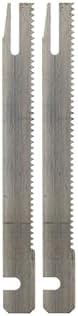
Figure 1: Hercules 1575H 3-Inch Blade Set. This image displays the two serrated blades included in the set, highlighting their design for foam and rubber cutting.
1.2 Šta se nalazi u kutiji
- dva (2) Hercules 1575H Foam Rubber Cutter Blades (3 Inch)
2. Sigurnosne informacije
Always prioritize safety when handling and installing these blades. Failure to follow safety guidelines can result in serious injury.
- Isključite napajanje: Before installing or removing blades, always ensure the Hercules 1575H foam rubber cutter is unplugged from its power source.
- Nosite zaštitnu opremu: Always wear appropriate personal protective equipment, including cut-resistant gloves and safety glasses, when handling blades.
- Oštre ivice: Blades are extremely sharp. Handle them with extreme care to prevent cuts.
- Pravilno skladištenje: Store blades in a safe, dry place, out of reach of children and unauthorized personnel.
- Pregledajte oštrice: Before each use, inspect blades for damage, dullness, or bending. Do not use damaged blades.
- Koristiti u svrhu: These blades are designed for cutting foam and rubber only. Do not use them for other materials.
3. Podešavanje: Instalacija lopatice
Follow these steps carefully to install the new blade set into your Hercules 1575H Foam Rubber Cutter. Refer to your cutter's original instruction manual for specific details on blade replacement if available.
- Provjerite je li napajanje isključeno: Verify that the foam rubber cutter is unplugged from the electrical outlet.
- Uklonite stare oštrice: Locate the blade release mechanism on your Hercules 1575H cutter. Carefully disengage and remove the old blades. Dispose of old blades safely.
- Prepare New Blades: Gently remove the new 3-inch blades from their packaging. Handle them by the non-cutting edges as much as possible.
- Align Blades: Insert the new blades into the cutter's blade slots, ensuring they are correctly oriented and aligned with the internal mechanism. The serrated edges should face the direction of cutting as indicated in your cutter's manual.
- Sigurne oštrice: Engage the blade release mechanism to securely lock the new blades in place. Gently tug on the blades to confirm they are firmly seated and do not wobble.
- Vizuelni pregled: Double-check that both blades are properly installed, parallel, and free from any obstructions.

Figure 2: Single Hercules 1575H 3-Inch Blade. This image provides a detailed view of one blade, illustrating its serrated cutting edge and the specific attachment points for the cutter.
4. Operating with New Blades
Once the new blades are securely installed, you can resume using your Hercules 1575H Foam Rubber Cutter. Always follow the operating instructions provided with your original cutter.
- Probni rez: Before cutting your main material, perform a test cut on a scrap piece of foam or rubber to ensure the blades are cutting cleanly and efficiently.
- Pravilna tehnika: Guide the cutter smoothly and steadily through the material. Avoid forcing the blades, as this can lead to uneven cuts or premature blade wear.
- Kompatibilnost materijala: These blades are optimized for foam and rubber. Using them on harder materials may damage the blades or the cutter.
- ventilacija: Ensure adequate ventilation when cutting, especially with certain types of foam that may release dust or fumes.
5. Održavanje
Proper maintenance extends the life of your blades and ensures consistent cutting performance.
- čišćenje: After each use, unplug the cutter and carefully clean any foam or rubber residue from the blades using a soft brush or cloth. Avoid using harsh chemicals that could damage the blade material.
- inspekcija: Regularly inspect the blades for signs of wear, dullness, or damage. Replace blades when they become dull or damaged to maintain cutting quality and safety.
- Skladištenje: Store the blades, either installed in the cutter or separately, in a dry environment to prevent corrosion. If storing separately, use the original packaging or a protective sheath.
6. Otkrivanje problema
Ovaj odjeljak se bavi uobičajenim problemima vezanim za performanse lopatica.
| Problem | Mogući uzrok | Rješenje |
|---|---|---|
| Poor cut quality (ragged edges, tearing) | Dull or damaged blades; incorrect blade installation; forcing the cut. | Replace blades; ensure blades are correctly installed and secured; guide the cutter smoothly without excessive force. |
| Blades not moving or jamming | Residue buildup; improper installation; internal cutter issue. | Unplug cutter and clean blades and blade slots; re-install blades correctly; if issue persists, consult the cutter's manual or contact Hercules support. |
| Prekomjerne vibracije ili buka | Loose or improperly installed blades; damaged blades. | Ensure blades are securely fastened; inspect blades for damage and replace if necessary. |
7. Specifikacije
Key technical details for the Hercules 1575H 3-Inch Blade Set.
- Brand: Hercules
- Kompatibilnost modela: Hercules 1575H Foam Rubber Cutter
- Dužina oštrice: 3 inča
- Materijal: legirani čelik
- Item Weight (per set): Otprilike 0.02 kilograma (0.67 unce)
- Dimenzije paketa: 5.35 x 0.75 x 0.55 inča
- UPC: 850054307071
- ASIN: B07LH36VF9
8. Garancija i korisnička podrška
For information regarding warranty coverage, replacement parts, or technical assistance, please contact Hercules customer support. Refer to the original Hercules 1575H Foam Rubber Cutter manual or visit the official Hercules webweb mjesto za kontakt detalje.
Često možete pronaći informacije o podršci na Hercules Store on Amazon.


