1. Uvod
This user manual provides comprehensive instructions for the setup, operation, and maintenance of your SHARP LC-32HI5012E HD Ready Smart LED TV. Please read this manual thoroughly before using your television to ensure proper functionality and safety.
The SHARP LC-32HI5012E is an 81 cm (32-inch) HD Ready Smart LED TV featuring Active Motion 200 technology for enhanced picture quality and a Triple Tuner for versatile reception options. It includes integrated Wi-Fi and a Harman/Kardon sound system for a complete entertainment experience.
2. Sadržaj paketa
Prilikom otvaranja paketa, molimo Vas da provjerite da li se nalaze svi sljedeći artikli:
- SHARP LC-32HI5012E Main Unit
- Daljinski upravljač (sa baterijama)
- Korisnički priručnik (ovaj dokument)

Slika: Front view of the SHARP LC-32HI5012E television, displaying a vibrant city skyline on its screen. This image shows the slim bezel design and the central SHARP logo.
3. Podešavanje
3.1 Sastavljanje postolja
Carefully place the TV screen-down on a soft, flat surface to prevent damage. Attach the two stand feet to the designated slots at the bottom of the TV, securing them with the provided screws. Ensure the stand is firmly attached before proceeding.
3.2 Povezivanje perifernih uređaja
Your TV offers various connection options for external devices:
- HDMI portovi (x3): Povežite Blu-ray plejere, igraće konzole ili set-top box uređaje.
- USB portovi (x2): Za reprodukciju medija sa USB diskova.
- Antenna In (RF): Connect your terrestrial antenna for DVB-T/T2HD reception.
- Sat In: Povežite svoju satelitsku antenu za DVB-S/S2 prijem.
- RJ45 (LAN): Za žičanu internet vezu.
- CI+ Port: Za module uvjetnog pristupa (CAM) za view šifrovane kanale.
- Mini Component/YPbPr, Mini AV Composite: Za starije analogne uređaje.
- Digitalni optički audio izlaz: Za povezivanje sa eksternim audio sistemima.
- Audio out / Headphone: Za slušalice ili eksterne zvučnike.

Slika: Stražnja strana view of the SHARP LC-32HI5012E television, highlighting the arrangement of various input and output ports for connecting external devices.
3.3 Početno uključivanje i prvo podešavanje
After connecting all necessary cables, plug the power cord into an electrical outlet. Press the power button on the remote control or the TV. The first-time setup wizard will guide you through:
- Odabir jezika.
- Mrežna veza (Wi-Fi ili žična LAN mreža).
- Channel scanning for DVB-C, DVB-S/S2, or DVB-T/T2HD.
- Time zone and other basic settings.
4. Uputstvo za upotrebu
4.1 Osnovne funkcije televizora
- Uključivanje/isključivanje: Koristite dugme za napajanje na daljinskom upravljaču ili televizoru.
- Kontrola jačine zvuka: Koristite dugmad VOL +/-.
- Odabir kanala: Use CH +/- or number buttons.
- Izvor ulaza: Press the SOURCE button to switch between HDMI, AV, TV, etc.
- Navigacija menijem: Use arrow keys and OK button to navigate menus.
4.2 Funkcije pametnog TV-a
Your SHARP LC-32HI5012E is equipped with integrated Wi-Fi and offers access to various smart features:
- Unaprijed instalirane aplikacije: Access popular streaming services like Netflix and YouTube directly.
- Web Preglednik: Pretražujte internet direktno sa svog televizora.
- Aquos Net+: Access additional online content and services provided by Sharp.
Ensure your TV is connected to the internet for full Smart TV functionality.
4.3 Audio sistem
The integrated Harman/Kardon sound system provides a high-quality audio experience with excellent dynamics and clarity. Adjust audio settings in the TV menu to customize your sound preferences.
5. Održavanje
5.1 Čišćenje ekrana
Da biste očistili ekran, nježno ga obrišite mekom krpom koja ne ostavlja dlačice. Za tvrdokorne mrlje, lagano ga obrišiteampobrišite krpu vodom ili specijaliziranim sredstvom za čišćenje ekrana. Nemoj prskajte tekućinu direktno na ekran.
5.2 Opšta njega
- Držite TV dalje od direktne sunčeve svjetlosti i izvora toplote.
- Osigurajte odgovarajuću ventilaciju oko televizora.
- Isključite televizor iz električne utičnice tokom oluje sa grmljavinom ili kada ga ostavljate bez nadzora duži period.
6. Otkrivanje problema
If you encounter any issues with your TV, please refer to the following common problems and solutions before contacting support.
| Problem | Mogući uzrok | Rješenje |
|---|---|---|
| Nema snage | Power cord unplugged, power outlet issue. | Provjerite priključak kabla za napajanje. Pokušajte s drugom utičnicom. |
| Nema slike, ali je zvuk prisutan | Incorrect input source, faulty cable. | Verify correct input source. Check HDMI/AV cable connections. |
| Nema zvuka | Volume muted or too low, external audio system issue. | Unmute volume, increase volume. Check external audio connections. |
| Nije moguće povezivanje na Wi-Fi | Incorrect password, router issue, TV too far from router. | Re-enter password. Restart router. Move TV closer or use wired connection. |
7. Specifikacije
| Feature | Detalj |
|---|---|
| Brand | SHARP |
| Broj modela | LC-32HI5012E |
| Tehnologija ekrana | LED |
| Rezolucija | HD Ready (1366 x 768 piksela) |
| Dijagonala ekrana | 81.3 cm (32 inča) |
| Refresh Rate | 60 Hz |
| Posebna karakteristika | Internet (Pametni TV) |
| Podržane Internet usluge | Netflix, YouTube, Browser |
| Tehnologija povezivanja | USB, HDMI, LAN, Wi-Fi |
| Tuneri | DVB-C, DVB-S/S2, DVB-T/T2HD |
| Audio sistem | Harman/Kardon |
| Dimenzije proizvoda (Š x V x D) | 74 x 49.1 x 18 cm (sa postoljem) |
| Težina | 4.8 kilograma |
| Vrsta montaže | Table Mount |
7.1 Energetska efikasnost
The SHARP LC-32HI5012E has an energy efficiency rating of F. For detailed energy consumption information, please refer to the energy label and product information sheet.

Image: Energy efficiency label for the SHARP LC-32HI5012E television, showing its energy class F and power consumption details.
Za više detalja posjetite službenu EPREL bazu podataka: https://eprel.ec.europa.eu/qr/402565
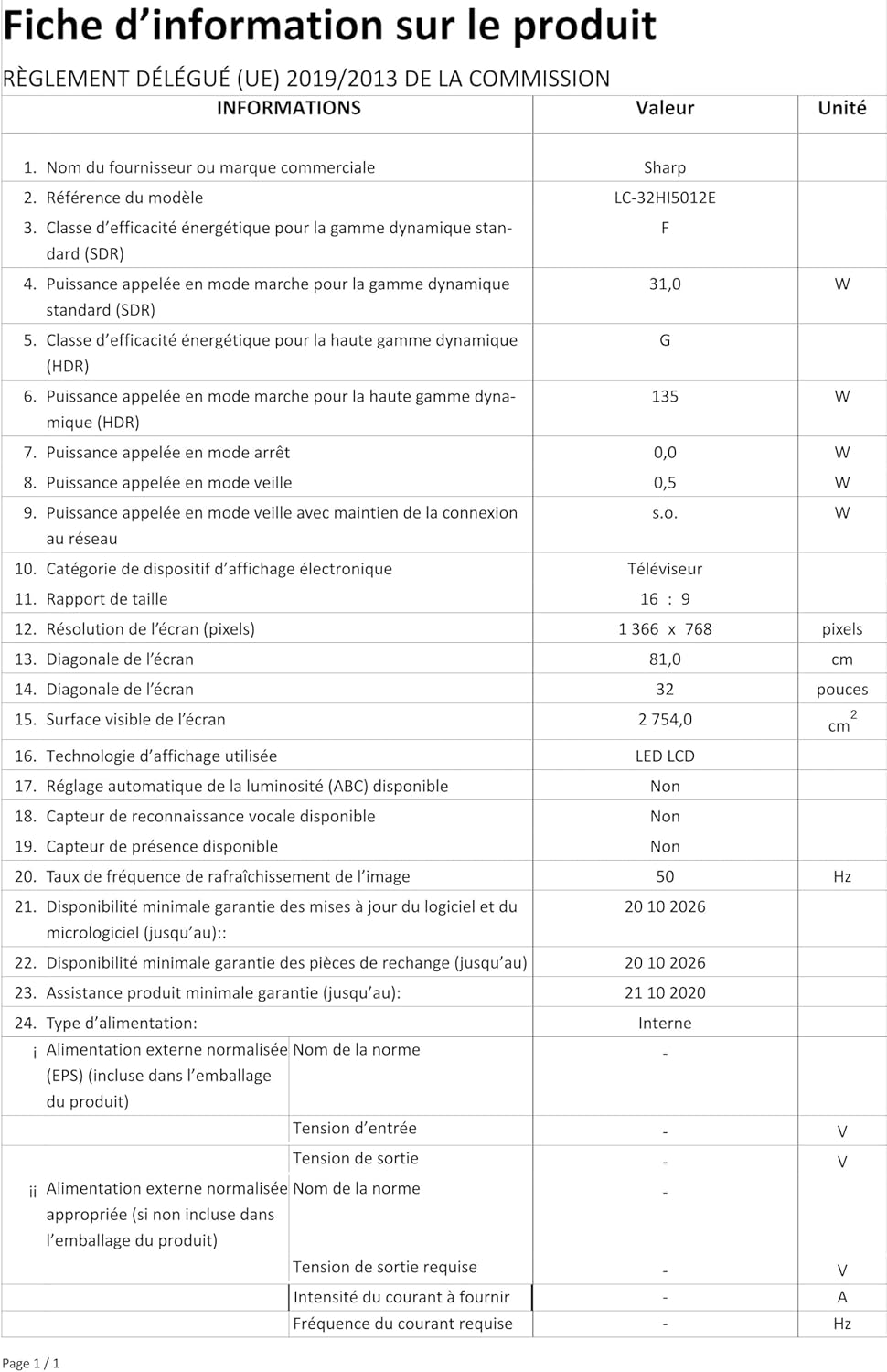
Image: Product information sheet detailing technical specifications and compliance information for the SHARP LC-32HI5012E television.
8. Garancija i podrška
For warranty information, please refer to the warranty card included with your product or visit the official SHARP webSačuvajte račun kao dokaz o kupovini u slučaju bilo kakvih reklamacija.
For technical support or service inquiries, please contact SHARP customer service. Contact details can typically be found on the SHARP official websajtu ili u pakovanju proizvoda.


