1. Uvod
This manual provides essential instructions for the safe and effective use of your Zoom H1n Handy Recorder. Please read this manual thoroughly before using the device to ensure proper operation and to prevent damage.
2. Proizvod je gotovview
2.1 Sadržaj paketa
- Zoom H1n Handy Recorder (Blue Edition)
- 2 AA baterije
Note: A microSD card and USB cable are not included and must be purchased separately.
2.2 Identifikacija komponente
Familiarize yourself with the various parts of your H1n recorder.

Slika 1: Prednja strana View of Zoom H1n Handy Recorder. This image displays the front of the blue Zoom H1n recorder, highlighting the built-in stereo microphones at the top, the LCD screen, the large red record button, and playback controls.

Slika 2: Pod uglom View of Zoom H1n Handy Recorder. This image shows the Zoom H1n from an angled perspective, revealing the side controls such as the volume buttons, power switch, and various input/output ports.
- Ugrađeni stereo mikrofoni: X/Y configuration for wide stereo imaging.
- Input Level Dial: Adjusts recording input sensitivity.
- LCD ekran: Shows recording status, file informacije i opcije menija.
- Gumb REC: Pokreće i zaustavlja snimanje.
- Dugme OPCIJA: Accesses menu settings.
- Kontrole reprodukcije: Play/Pause, Stop, Fast Forward, Rewind.
- LINE IN Jack: 3.5mm stereo input for external microphones or line-level devices.
- LINE OUT/HEADPHONE Jack: 3.5mm stereo output for monitoring or connecting to other devices.
- VOLUME Buttons: Podešava jačinu zvuka reprodukcije.
- USB port: Micro-USB port for data transfer and use as a USB microphone.
- Utor za microSD karticu: For recording media.
- Pretinac za baterije: Drži dvije AA baterije.
3. Podešavanje
3.1 Instaliranje baterija
- Otvorite poklopac pretinca za baterije na stražnjoj strani uređaja.
- Umetnite dvije AA baterije, pazeći na ispravan polaritet (+/-).
- Čvrsto zatvorite poklopac odeljka za baterije.
3.2 Umetanje MicroSD kartice
The H1n requires a microSD or microSDHC card (up to 32 GB) for recording. Ensure the card is formatted correctly (FAT32).
- Locate the microSD card slot on the side of the unit.
- Umetnite microSD karticu s kontaktima okrenutim prema dolje dok ne klikne na svoje mjesto.
- To remove, push the card in gently until it clicks, then release to eject.
3.3 Uključivanje/isključivanje
- Za uključivanje: Slide the POWER switch (located on the side) downwards and hold until the display lights up.
- Za isključivanje: Slide the POWER switch downwards and hold until the display turns off.
4. Uputstvo za upotrebu
4.1 Osnovno snimanje
- Uključite H1n.
- Adjust the input level using the dial at the top. Monitor the level meter on the LCD to avoid clipping (distortion).
- Press the large red REC button once to enter record standby mode.
- Pritisnite REC button again to start recording. The REC indicator will light up.
- Za zaustavljanje snimanja pritisnite REC dugme. The file će se automatski sačuvati.
4.2 Reprodukcija
- Use the Fast Forward (>>) or Rewind (<<) buttons to select a file.
- Pritisnite Play/Pause (>/II) za pokretanje reprodukcije.
- Adjust the playback volume using the VOLUME buttons on the side.
- Pritisnite Stop (■) za zaustavljanje reprodukcije.
4.3 Postavke menija
Pritisnite OPCIJA button to access the menu and adjust various settings. Use the playback control buttons to navigate and select options.
- AUDIO: Select recording format (WAV/MP3), sampbrzina i bitna dubina.
- LO CUT: Activates a low-cut filter to reduce unwanted low-frequency noise.
- LIMITER: Prevents input overload and distortion by compressing loud signals.
- AUTOLEVEL: Automatically adjusts the recording level.
- TONE GENERATOR: Produces a test tone for calibrating audio levels with cameras or other devices.
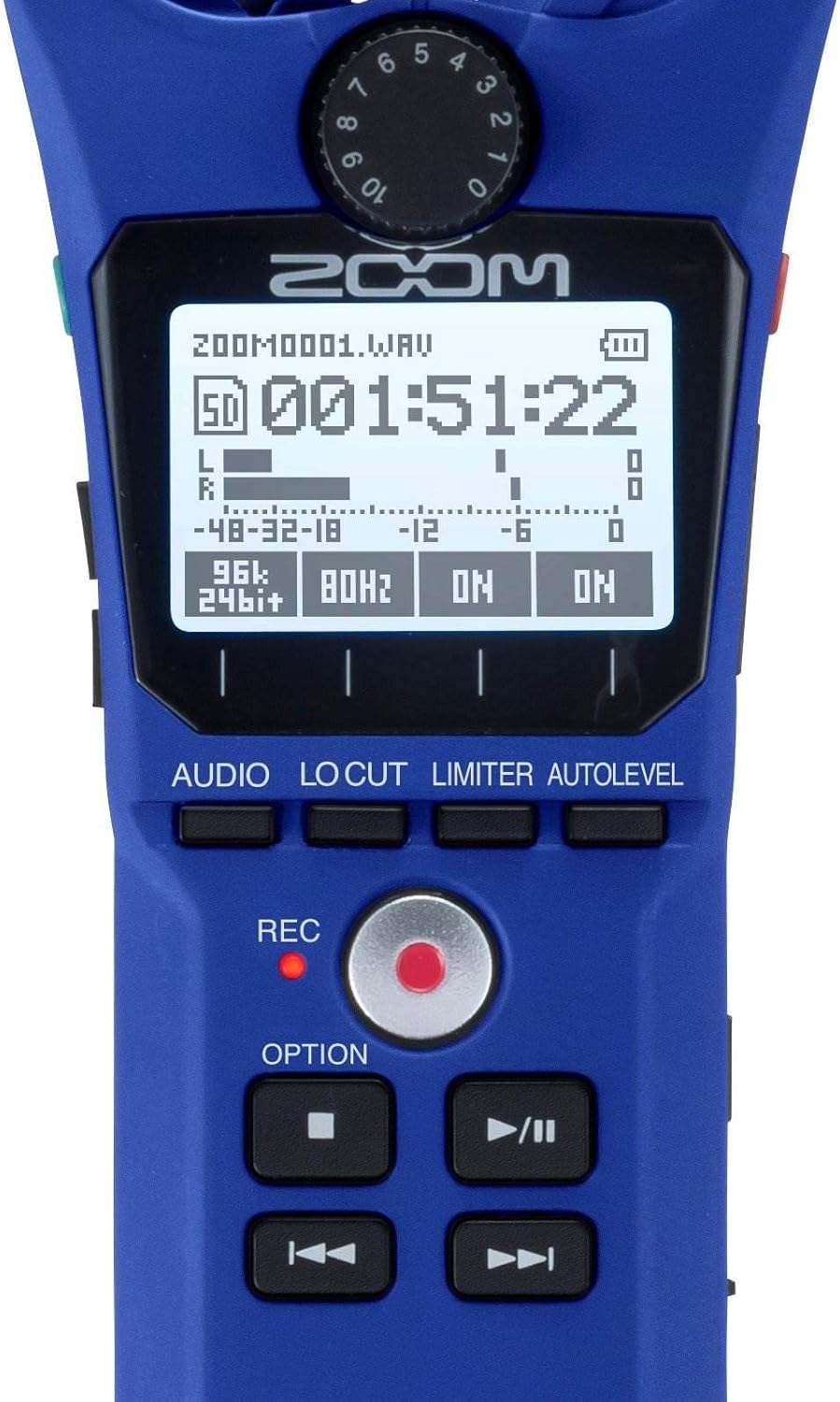
Figure 3: Close-up of H1n Display and Controls. Ova slika pruža detaljan view of the H1n's LCD screen, showing recording parameters, and the main control buttons including REC, OPTION, and playback controls.
4.4 USB Functionality
Connect the H1n to a computer using a micro-USB cable (sold separately).
- USB Microphone: The H1n can function as a USB microphone for your computer.
- Čitač SD kartica: Pristup files on the microSD card directly from your computer.
5. Održavanje
- čišćenje: Use a soft, dry cloth to clean the unit. Do not use liquid cleaners or solvents.
- Skladištenje: Store the H1n in a cool, dry place away from direct sunlight and extreme temperatures. Remove batteries if storing for extended periods.
- Rukovanje: The H1n is a precision instrument. Avoid dropping it or subjecting it to strong impacts.
6. Otkrivanje problema
- Uređaj se ne uključuje: Provjerite instalaciju baterije i uvjerite se da su baterije napunjene.
- Recording issues (no sound, distorted sound): Verify input level settings. Ensure microphones are not obstructed. Check if an external microphone is properly connected to the LINE IN jack.
- SD card errors: Ensure the microSD card is properly inserted and formatted. Try a different microSD card if issues persist.
- Rattling sound from volume rocker: This is a known characteristic of the design. To minimize noise during recording, avoid shaking the device or secure the rocker with a finger if recording while moving.
- Computer does not recognize H1n via USB: Ensure the USB cable is securely connected. Try a different USB port or cable. Select the correct USB mode on the H1n (Audio Interface or SD Card Reader).
7. Specifikacije
| Feature | Specifikacija |
|---|---|
| Mediji za snimanje | microSD/microSDHC card (up to 32 GB) |
| Formati snimanja | WAV (16/24-bit, 44.1/48/96 kHz), MP3 (48-320 kbps) |
| Mikrofon | 90° X/Y stereo condenser microphones |
| Inputs | 3.5mm stereo mini jack (LINE IN) |
| Izlazi | 3.5mm stereo mini jack (LINE OUT/HEADPHONE) |
| USB port | Micro-USB (USB 2.0 High Speed) |
| Snaga | 2 x AAA batteries (Alkaline or NiMH) or AC adapter (AD-17, sold separately) |
| Trajanje baterije | Approximately 10 hours (Alkaline batteries, WAV 44.1 kHz/16-bit) |
| Dimenzije | 1.5 cm D x 5.5 cm Š x 1 cm V (približno) |
| Težina | 0.5 Pounds (approximate, without batteries) |
8. Garancija i podrška
Za informacije o garanciji i tehničkoj podršci, molimo pogledajte službenu Zoom stranicu. webweb-mjesto ili kontaktirajte lokalnog Zoom distributera. Sačuvajte račun kao dokaz o kupovini za reklamacije u slučaju garancije.


