1. Uvod
This manual provides detailed instructions for the installation, configuration, and operation of the Supermicro MBD-X11SCA-F-O motherboard. Designed for server and workstation applications, this motherboard supports Intel 8th/9th Generation Core i9/i7/i5/i3/Pentium/Celeron and Intel Xeon E Processors, offering robust performance and reliability. Please read this manual thoroughly before proceeding with installation.
2. Karakteristike
- Podrška za procesor: Single Socket H4 (LGA 1151) for Intel 8th/9th Generation Core i9/i7/i5/i3/Pentium/Celeron and Intel Xeon E Processors (Coffee Lake-S), with CPU TDP support up to 95W.
- Čipset: Intel C246.
- Memorija: DDR4 ECC/Non-ECC UDIMM, up to 64GB across 4 DIMM slots.
- Skladištenje: 8x SATA3 (6Gbps) ports via Intel C246 controller, supporting RAID 0, 1, 5, 10.
- Slotovi za proširenje: Multiple PCI-Express 3.0 slots for various expansion cards.
- Integrirana grafika: Onboard graphics with VGA output.
- umrežavanje: Dual Gigabit Ethernet LAN ports.
- Menadžment: Integrated Platform Management Interface (IPMI) for remote management.
- Form Faktor: ATX.
3. Sadržaj paketa
Verify that all items are present and in good condition. If any items are damaged or missing, contact your vendor.
- Supermicro MBD-X11SCA-F-O Motherboard
- I / O štit
- SATA kablovi
- Brzi referentni vodič
- CD/DVD s upravljačkim programima
4. Podešavanje
4.1. Instalacija komponente
Before installing any components, ensure the motherboard is placed on a non-conductive surface and you are grounded to prevent electrostatic discharge (ESD).
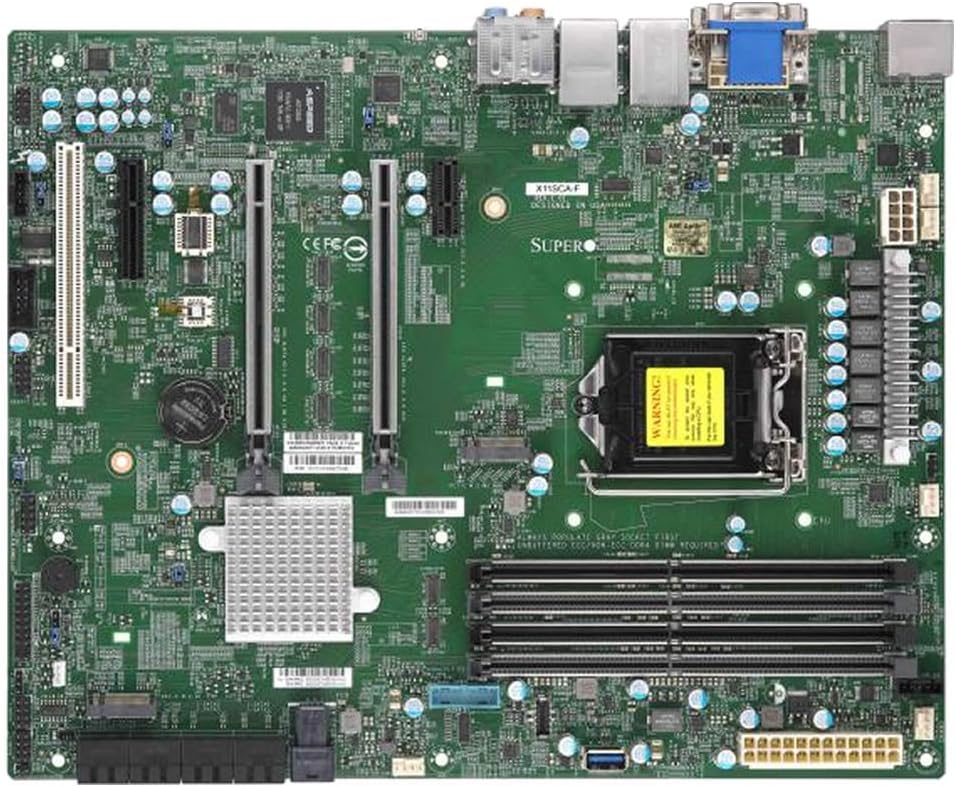
Nad glavom view of the Supermicro MBD-X11SCA-F-O motherboard, showcasing its various components including the CPU socket, RAM slots, PCIe slots, SATA ports, and I/O panel.
4.1.1. Instalacija CPU-a
- Otvorite polugu CPU utičnice i podignite ploču za opterećenje.
- Carefully align the CPU with the socket, ensuring the gold triangle on the CPU matches the triangle on the socket. Do not force the CPU into the socket.
- Lower the load plate and secure it with the lever.
- Nanesite termalnu pastu na procesor i instalirajte hladnjak procesora prema uputama proizvođača.
4.1.2. Instalacija memorije (RAM)
- Otvorite kopče na oba kraja DIMM utora.
- Poravnajte zarez na DDR4 memorijskom modulu s ključem u DIMM utoru.
- Insert the module firmly until the clips snap into place. For optimal performance, install memory in matched pairs for dual-channel operation.
4.1.3. Instalacija uređaja za pohranu podataka
- Connect SATA data cables from your storage drives (HDDs/SSDs) to the SATA ports on the motherboard.
- Ensure power cables are connected to your storage devices from the power supply.
4.1.4. Instalacija kartice za proširenje
- Locate an available PCI-Express slot.
- Remove the corresponding expansion slot cover from your chassis.
- Čvrsto umetnite karticu za proširenje u utor dok ne sjedne ispravno.
- Secure the card with a screw or retention clip.
4.2. Priključci za napajanje
- Spojite 24-pinski ATX glavni konektor za napajanje iz vašeg napajanja na odgovarajući priključak na matičnoj ploči.
- Connect the 8-pin EPS/CPU power connector to the CPU power header.
4.3. Priključci na prednjoj ploči
Connect the cables from your chassis's front panel (power button, reset button, HDD LED, power LED, USB ports, audio ports) to the corresponding headers on the motherboard. Refer to the motherboard's silkscreen labels for correct pin assignments.
5. Operativni
5.1. Početno pokretanje i podešavanje BIOS-a/UEFI-ja
- Nakon što sastavite sistem, povežite monitor, tastaturu i miš.
- Power on the system. During POST (Power-On Self-Test), press the designated key (usually DEL or F2) to enter the BIOS/UEFI setup utility.
- Configure boot order, date/time, and other system settings as required. Save changes and exit.
5.2. Instalacija operativnog sistema
Insert your operating system installation media (USB drive or DVD) and follow the on-screen prompts to install the operating system. After installation, install all necessary drivers from the provided driver CD or Supermicro's official website.
5.3. IPMI Remote Management
The MBD-X11SCA-F-O features Integrated Platform Management Interface (IPMI), allowing for remote monitoring and management of the system, even when the operating system is not running. Connect a dedicated LAN cable to the IPMI port and configure network settings via the BIOS/UEFI or IPMI web interfejs.
6. Održavanje
- Uklanjanje prašine: Regularly clean dust from the motherboard and components using compressed air to ensure proper airflow and prevent overheating.
- Ažuriranja BIOS-a: Periodically check the Supermicro website for BIOS/UEFI updates. Updates can improve stability, add support for new hardware, or fix bugs. Follow the provided instructions carefully when performing a BIOS update, often involving a USB drive.
- Provjere veze: Periodically verify that all cables (power, data, expansion cards) are securely connected.
7. Otkrivanje problema
7.1. No Power / No POST
- Ensure the power supply is connected correctly to the motherboard (24-pin ATX and 8-pin EPS).
- Provjerite je li napajanje uključeno i ispravno.
- Check that the CPU is correctly seated and the CPU cooler is properly installed.
- Reseat RAM modules. Try booting with only one RAM module installed.
- Disconnect all non-essential peripherals and expansion cards to isolate the issue.
7.2. Operativni sistem se ne pokreće
- Check the boot order in the BIOS/UEFI settings to ensure the correct drive is selected.
- Verify that the storage drive containing the operating system is properly connected and detected by the BIOS/UEFI.
- If recently installed, ensure all necessary drivers are loaded.
7.3. Component Not Detected
- For RAM, ensure modules are fully seated in their slots.
- For expansion cards, ensure they are correctly inserted into the PCIe slot and secured.
- For SATA devices, check both data and power cable connections.
- Consult the full motherboard manual for specific troubleshooting steps or beep codes.
8. Specifikacije
| Feature | Specifikacija |
|---|---|
| Brand | Supermicro |
| Naziv modela | MBD-X11SCA-F-O |
| CPU Socket | LGA 1151 |
| Kompatibilni procesori | Intel 8th/9th Gen Core i9/i7/i5/i3/Pentium/Celeron, Intel Xeon E Processors |
| Čipset | Intel C246 |
| Tehnologija RAM memorije | DDR4 (ECC/Non-ECC UDIMM) |
| Maksimalni kapacitet RAM-a | Do 64 GB |
| SATA portovi | 8x SATA3 (6Gbps) with RAID 0, 1, 5, 10 support |
| USB 2.0 portovi | 2 (additional USB 3.x ports available) |
| Integrirana grafika | Yes (VGA output) |
| Form Factor | ATX |
| Težina artikla | 2.61 funte |
| Dimenzije proizvoda | 14 x 13 x 3 inča (ambalaža) |
9. Garancija i podrška
Supermicro products are covered by a manufacturer's warranty. For specific warranty terms and conditions, please refer to the warranty information included with your product or visit the official Supermicro website. For technical support, driver downloads, and further documentation, please visit the Supermicro support portal.
Supermicro Support: https://www.supermicro.com/support


