1. Uvod
This manual provides detailed instructions for the proper setup, operation, and maintenance of your SUNLUX XL5500 CCD USB Barcode Reader. Please read this manual thoroughly before using the device to ensure optimal performance and longevity.
2. Sigurnosne informacije
Pridržavajte se sljedećih sigurnosnih mjera opreza kako biste spriječili oštećenje uređaja ili ozljede sebe:
- Ne izlažite uređaj ekstremnim temperaturama, vlazi ili direktnoj sunčevoj svjetlosti.
- Izbjegavajte ispuštanje uređaja ili izlaganje jakim udarcima.
- Do not attempt to disassemble or modify the barcode reader. This will void the warranty.
- Keep the scanning window clean to ensure accurate barcode reading.
- Za povezivanje koristite samo priloženi USB kabel.
3. Sadržaj paketa
Provjerite da li su sve stavke prisutne u paketu:
- SUNLUX XL5500 CCD USB Barcode Reader
- USB priključni kabel
- Korisnički priručnik (ovaj dokument)
4. Proizvod je gotovview
The SUNLUX XL5500 is a handheld CCD barcode reader designed for efficient and reliable scanning of various 1D barcodes. Its ergonomic design ensures comfortable use during extended periods.
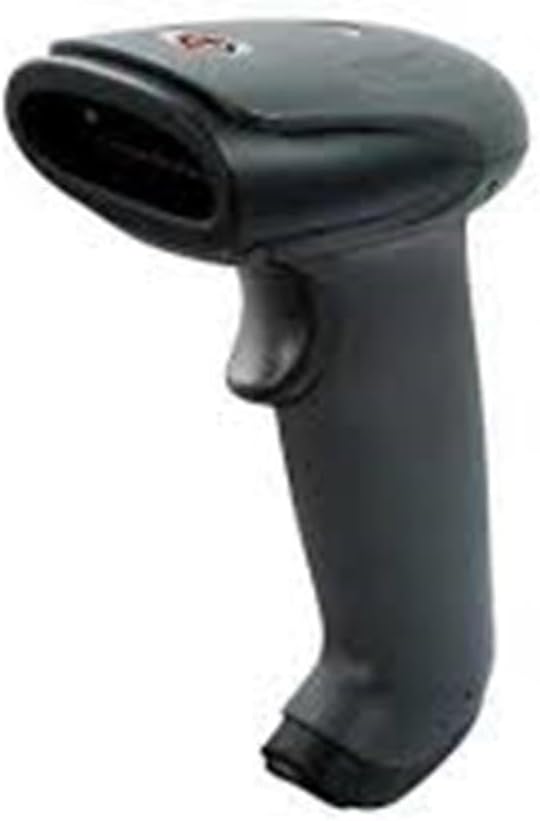
An image showing the SUNLUX XL5500 handheld barcode reader. It features a dark gray ergonomic handle, a trigger button on the top, and a scanning window at the front.
5. Podešavanje
Slijedite ove korake za postavljanje čitača barkodova:
- Povežite USB kabl: Insert the smaller end of the USB cable into the port at the base of the barcode reader.
- Povežite se na računar: Priključite veći kraj USB kabla u slobodni USB priključak na računaru.
- Instalacija drajvera: The barcode reader is typically plug-and-play. Your operating system should automatically detect and install the necessary drivers. Wait for the installation to complete (usually indicated by a notification).
- Testna veza: Open a text editor (e.g., Notepad, Word) or any application that accepts keyboard input. The device is ready for use when it is recognized by the system.
6. Uputstvo za upotrebu
To operate the SUNLUX XL5500 barcode reader:
- Uključeno: The device powers on automatically when connected to a USB port.
- Ciljaj i skeniraj: Point the scanning window of the reader at the barcode you wish to scan. Ensure the entire barcode is within the scanning area.
- Pritisnite okidač: Press the trigger button located on the handle. A red scanning line will emit from the window.
- Potvrda: A successful scan is typically indicated by an audible beep and/or a visual LED indicator. The scanned data will appear in the active application on your computer.
Podržane vrste barkodova:
- EAN-8, EAN-13, UPC-A, UPC-E
- Code 39, Code 93, Code 128
- Codabar, Interleaved 2 of 5, Industrial 2 of 5
- Matrix 2 of 5, MSI, China Post
7. Održavanje
Proper maintenance ensures the longevity and performance of your barcode reader:
- Čišćenje prozora za skeniranje: Koristite meku krpu koja ne ostavlja dlačice, laganoampened with water or a mild, non-abrasive cleaner, to gently wipe the scanning window. Do not use harsh chemicals or abrasive materials.
- Čišćenje eksterijera: Obrišite vanjski dio uređaja mekom, suhom krpom.
- Skladištenje: When not in use, store the barcode reader in a clean, dry environment, away from direct sunlight and extreme temperatures.
8. Otkrivanje problema
If you encounter issues with your barcode reader, refer to the following table:
| Problem | Mogući uzrok | Rješenje |
|---|---|---|
| Čitač se ne uključuje. | USB kabel nije pravilno spojen ili je USB priključak neispravan. | Ensure the USB cable is securely connected to both the reader and the computer. Try a different USB port. |
| Barkod se ne skenira. | Barcode damaged, scanning window dirty, or incorrect aiming. | Clean the scanning window. Ensure the barcode is not damaged. Aim the scanning line directly across the entire barcode. |
| Skenirani podaci se prikazuju neispravno. | Keyboard language settings mismatch or corrupted data. | Verify your computer's keyboard language settings. Rescan the barcode. |
| No beep sound after scanning. | Beeper disabled or faulty. | Refer to advanced configuration options (if available) to enable the beeper. If not, the scan may still be successful if data appears. |
9. Tehničke specifikacije
| Feature | Specifikacija |
|---|---|
| Model | XL5500 |
| Kategorija | CCD Reader |
| Brand | Sunlux |
| Tehnologija povezivanja | USB kabel |
| Izvor napajanja | Wired Electric |
| Dimenzije proizvoda | 20 x 15 x 10 cm |
| Težina | 500 grama |
| Broj dijela | 2053871 |
10. Garancija i podrška
Informacije o garanciji:
The SUNLUX XL5500 CCD USB Barcode Reader comes with a standard manufacturer's warranty. Please refer to your purchase documentation or contact your retailer for specific warranty terms and conditions.
Korisnička podrška:
For technical assistance, troubleshooting beyond this manual, or warranty claims, please contact your point of purchase or the official SUNLUX customer support channels. Have your product model and serial number ready when contacting support.


