1. Uvod
This manual provides detailed instructions for the setup, operation, and maintenance of your DIERYA DK68 60% Wireless Mechanical Gaming Keyboard. Please read this manual thoroughly before using the product to ensure proper functionality and to maximize your user experience.

Image 1.1: DIERYA DK68 keyboard highlighting its main features.
2. Sadržaj paketa
Provjerite da li su sve stavke prisutne u paketu:
- DIERYA DK68 60% Wireless Mechanical Gaming Keyboard
- USB-C na USB-A kabel
- Izvlakač ključeva
- Korisnički priručnik (ovaj dokument)
3. Proizvod je gotovview
The DIERYA DK68 is a compact 60% mechanical keyboard designed for versatility and performance. It features a 68-key layout, tri-mode connectivity, RGB backlighting, and durable mechanical switches.
Ključne karakteristike:
- Trostruka povezanost: Podržava Bluetooth 5.0, bežičnu vezu od 2.4GHz i žičanu USB-C vezu.
- Kompaktni raspored sa 68 tipki: Saves desk space while retaining essential keys.
- Clicky Blue Mechanical Switches: Provide tactile feedback and an audible click, ideal for typing and gaming.
- RGB pozadinsko osvjetljenje: Customizable lighting with multiple modes and brightness levels.
- N-Key Rollover i Anti-Ghosting: Osigurava tačnu registraciju više istovremenih pritisaka tipki.
- 3000mAh baterija: Long-lasting rechargeable battery for extended wireless use.
- Dvostruko pritiskanje tipki: Durable and fade-resistant keycaps.
- Ergonomski dizajn: Features two-stage adjustable feet and anti-slip pads for comfortable and stable use.

Image 3.1: Details of the Clicky Blue Mechanical Switches.

Image 3.2: Ergonomic features including double-shot keycaps, adjustable feet, and anti-slip pads.
4. Podešavanje
The DK68 keyboard offers three connection modes: wired, 2.4GHz wireless, and Bluetooth. Choose the mode that best suits your device and needs.
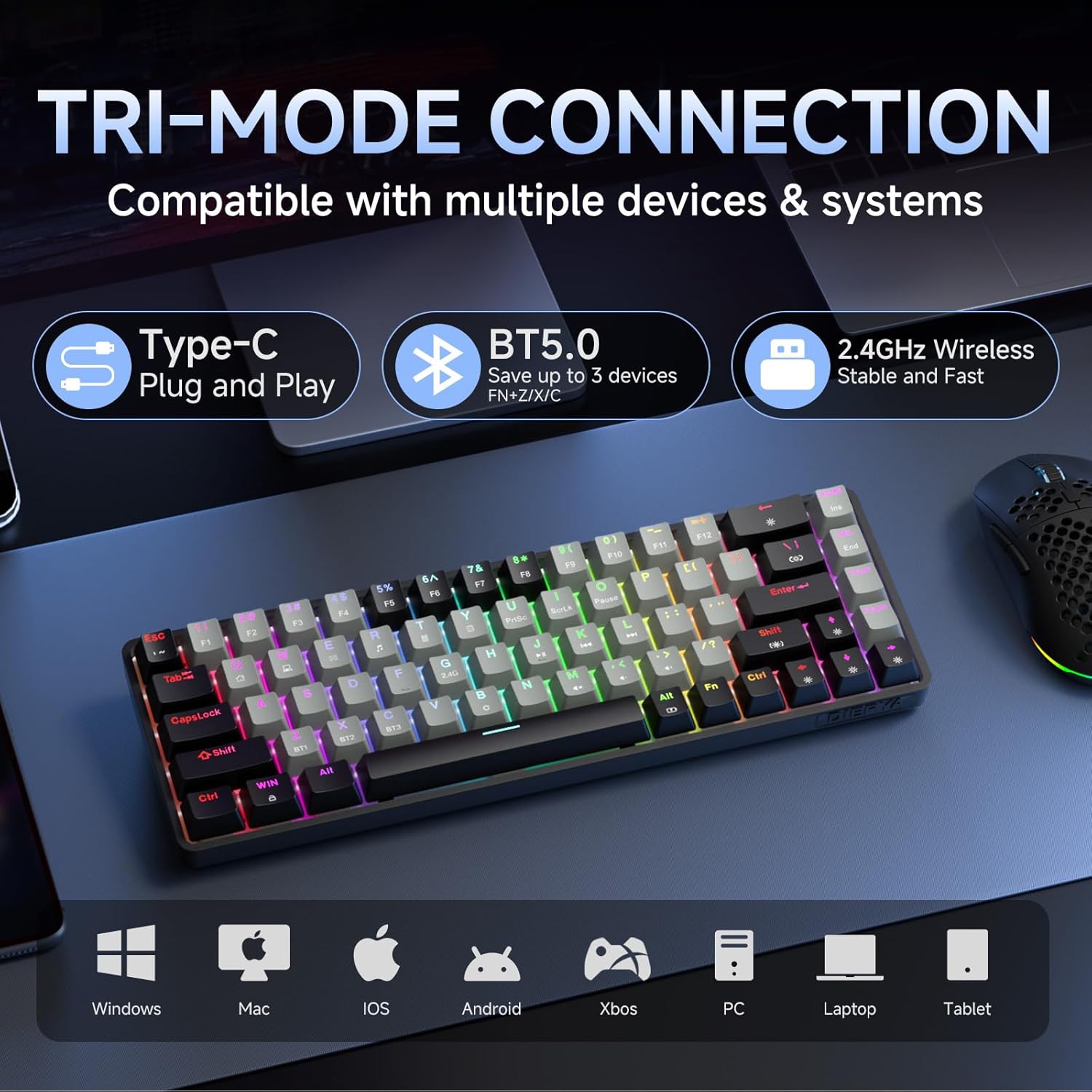
Image 4.1: Tri-mode connectivity and device compatibility.
4.1 Žičana veza (USB-C)
- Spojite priloženi USB-C kabel na USB-C priključak tastature.
- Spojite USB-A kraj kabla na dostupan USB port na računaru.
- The keyboard will automatically be recognized and ready for use. The keyboard will also charge in this mode.
4.2 Bežična veza od 2.4 GHz
- Locate the 2.4GHz USB receiver (usually stored in a compartment on the keyboard or included separately).
- Uključite USB prijemnik od 2.4 GHz u slobodan USB port na vašem računaru.
- Uključite tastaturu. Tastatura bi se trebala automatski povezati s prijemnikom.
- If connection is not established, press Fn + 2.4G (usually indicated by a specific keycap legend) to activate 2.4GHz pairing mode.
4.3 Bluetooth veza
Tastatura podržava povezivanje sa do tri Bluetooth uređaja.
- Uvjerite se da je tastatura uključena.
- Pritisnite i držite Fn + BT1, Fn + BT2, ili Fn + BT3 for 3-5 seconds until the corresponding key (BT1, BT2, or BT3) flashes rapidly. This indicates pairing mode.
- Na svom uređaju (računaru, tabletu, pametnom telefonu) otvorite postavke Bluetootha i potražite nove uređaje.
- Select "DIERYA DK68" (or similar name) from the list of available devices to pair.
- Once paired, the BT key will stop flashing and remain steadily lit.
- Za prebacivanje između uparenih Bluetooth uređaja, jednostavno pritisnite Fn + BT1/BT2/BT3.
5. Uputstvo za upotrebu
5.1 RGB kontrola pozadinskog osvjetljenja
The DK68 features dynamic RGB backlighting with multiple modes and customization options.
- Fn + Backspace: Turn backlighting on/off.
- Fn + Shift: Switch between different lighting colors (for static modes).
- Fn + \|: Cycle through 20 different lighting modes.
- Fn + ↓: Smanjite svjetlinu.
- Fn + ↑: Povećajte svjetlinu.
- Fn + ←: Decrease lighting speed (for dynamic modes).
- Fn + →: Increase lighting speed (for dynamic modes).

Image 5.1: RGB Backlighting control key combinations.
5.2 Kombinacije funkcijskih tipki
Due to its compact 60% layout, many functions are accessed via the Fn ključ u kombinaciji s drugim ključevima.
- Fn + F1-F12: Access multimedia and system functions (e.g., volume, media control). Specific functions are often indicated by secondary legends on the keycaps.
- Fn + Win: Zaključavanje/otključavanje tipke Windows.
- Fn + P: Print Screen.
- Fn + [: Dom.
- Fn + ]: Kraj.
- Fn + ;: Page Up.
- Fn + ': Page Down.
- Fn + Enter: Insert.
- Fn + Izbriši: Izbriši.
- Fn + razmaknica: Check battery indicator (when wired, it pulsates blue while charging).
5.3 Punjenje
The keyboard is equipped with a 3000mAh rechargeable lithium battery.
- Connect the keyboard to a USB power source using the provided USB-C cable.
- The spacebar will typically indicate charging status (e.g., pulsating blue).
- A full charge provides approximately 12 hours of use with backlighting on, or up to 333 hours with backlighting off.
- The keyboard features an auto-stop function after 3 minutes of inactivity to conserve battery.

Image 5.2: Battery life and charging information.
6. Održavanje
Pravilno održavanje osigurava dugotrajnost i performanse vaše tastature.
- Čišćenje tipki: Koristite priloženi alat za izvlačenje kapica tipki da pažljivo uklonite kapice tipki. Očistite ih mekom,amp krpu i blagi sapun ako je potrebno. Prije ponovnog pričvršćivanja provjerite jesu li potpuno suhi.
- Čišćenje kućišta tastature: Koristite meku, suhu krpu za brisanje kućišta tastature. Za prašinu između tipki koristite komprimirani zrak.
- Izbjegavajte tečnosti: Do not expose the keyboard to excessive moisture or liquids. If spills occur, immediately disconnect the keyboard and allow it to dry completely before reuse.
- Skladištenje: Tastaturu čuvajte na hladnom i suhom mjestu, dalje od direktne sunčeve svjetlosti i ekstremnih temperatura.
7. Otkrivanje problema
If you encounter issues with your DIERYA DK68 keyboard, refer to the following common solutions:
- Tastatura ne reaguje:
- Ensure the keyboard is charged. Connect it via USB-C cable to check if it works in wired mode.
- For wireless modes, ensure the keyboard is powered on and correctly paired (2.4GHz receiver plugged in, or Bluetooth paired to the correct channel).
- Pokušajte ponovo pokrenuti računar ili uređaj.
- Problemi s Bluetooth vezom:
- Provjerite je li Bluetooth omogućen na vašem uređaju.
- Forget the keyboard in your device's Bluetooth settings and re-pair it.
- Provjerite da nijedan drugi uređaj ne ometa Bluetooth signal.
- 2.4GHz wireless lag or disconnection:
- Ensure the 2.4GHz receiver is plugged into a direct USB port, not a hub.
- Move the keyboard closer to the receiver.
- Izbjegavajte postavljanje velikih metalnih predmeta između tastature i prijemnika.
- RGB pozadinsko osvjetljenje ne radi:
- Pritisnite Fn + Backspace to ensure backlighting is turned on.
- Povećajte svjetlinu pomoću Fn + ↑.
- Keys not registering correctly (ghosting):
- The keyboard features N-Key rollover, so this should be rare. Ensure no debris is under the keycap.
- If the issue persists, try resetting the keyboard (refer to manufacturer's website for specific reset procedures if available).
8. Specifikacije
| Feature | Specifikacija |
|---|---|
| Model | DK68 |
| Layout | 68 tipki (60% kompaktnost) |
| Tip prekidača | Clicky Blue Mechanical Switches |
| Actuation Force | 60gf (±15gf) |
| Keystroke Travel | 2.3 mm (±0.6 mm) |
| Prebacite životni vek | 50 miliona klikova |
| Povezivanje | Bluetooth 5.0, 2.4GHz bežični, USB-C žični |
| Pozadinsko osvetljenje | RGB (20 Modes) |
| Kapacitet baterije | 3000mAh litijum -polimer |
| Battery Life (Light On) | Pribl. 12 sati |
| Battery Life (Light Off) | Pribl. 333 sati |
| Automatsko spavanje | 3 minuta neaktivnosti |
| Key Rollover | N-Key Rollover |
| Dimenzije (D x Š x V) | 372 x 115 x 51 mm (14.65 x 4.53 x 2.01 inča) |
| Težina | 820 g (1.79 funti) |
| Kompatibilan OS | Windows, macOS, Linux, iOS, Android |

Slika 8.1: Dimenzije tastature.
9. Garancija i podrška
DIERYA products are designed for reliability and performance. For warranty information and technical support, please refer to the official DIERYA webweb-mjesto ili direktno kontaktirajte njihovu korisničku službu.
- Službeno Webstranica: Visit the DIERYA Store on Amazon
- Služba za korisnike: Pogledajte kontakt informacije navedene na pakovanju proizvoda ili službene websajt za podršku.
Molimo sačuvajte svoj dokaz o kupovini za zahtjeve u vezi s garancijom.


