1. Uvod
This manual provides instructions for the installation, operation, and maintenance of your GAMEMAX G561 FRGB Black ATX Mid Tower Gaming Case. The G561 is designed to accommodate ATX, Micro ATX, and Mini-ITX motherboards, featuring an acrylic front panel, an acrylic side window, and integrated FRGB fans for system cooling.
Please read this manual thoroughly before beginning installation to ensure proper setup and to prevent damage to the product or other components.
2. Sigurnosne informacije
- Uvijek isključite napajanje iz zidne utičnice prije instaliranja ili uklanjanja bilo kakvih komponenti.
- Nosite antistatičku narukvicu kako biste spriječili oštećenje osjetljivih komponenti uzrokovano elektrostatičkim pražnjenjem (ESD).
- Handle all components with care. Avoid touching circuit boards or connector pins directly.
- The case features rolled edges to minimize the risk of injury during installation. Exercise caution when working inside the case.
- Keep the case and components away from moisture, dust, and extreme temperatures.
3. Proizvod je gotovview
The GAMEMAX G561 case features a transparent acrylic front panel and a clear acrylic side window, allowing visibility of internal components and the integrated FRGB fans. The I/O ports are located on the top panel for convenient access.

Slika 3.1: Prednja strana view of the GAMEMAX G561 case with illuminated FRGB fans.
3.1 Front Panel and I/O Ports
The front panel includes three fixed-color FRGB fans. The top panel provides essential connectivity and control options.

Slika 3.2: Raspored gornje I/O ploče.
- Dugme za resetiranje: Za resetovanje sistema.
- USB 3.0 port: Prijenos podataka velikom brzinom.
- USB 2.0 portovi (x2): Standard data transfer.
- Utičnica za mikrofon: Audio ulaz.
- Priključak za slušalice: Audio izlaz.
- Fan Control Key: Toggles fan speed and FRGB lighting (Off, Low speed/no LEDs, High speed/LEDs on).
3.2 Internal Layout and Component Support
The G561 case offers ample space for various components, including support for CPU coolers up to 160mm and VGA cards up to 360mm.

Figure 3.3: Internal dimensions for CPU cooler (160mm) and VGA card (360mm).
Drive bays are located behind the motherboard tray and at the bottom of the case for efficient cable management and airflow.

Figure 3.4: Drive bay locations for 2x 2.5" SSDs and 2x 3.5" HDDs.
4. Postavljanje i instalacija
4.1 Priprema slučaja
- Postavite kućište na stabilnu, ravnu površinu.
- Uklonite bočnu ploču odvrtanjem vijaka s palcem na stražnjoj strani i povlačenjem ploče unazad.
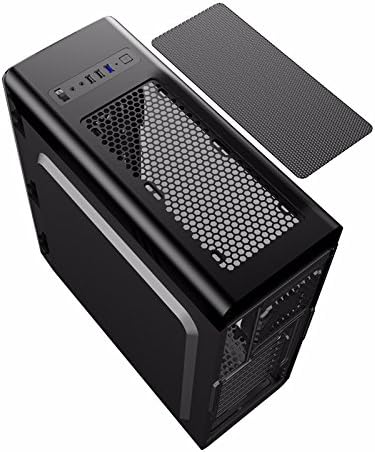
Figure 4.1: Side panel removal.
4.2 Instalacija matične ploče
- Instalirajte I/O štitnik koji dolazi s vašom matičnom pločom u otvor na stražnjoj strani kućišta.
- Align the motherboard with the standoffs inside the case. Ensure the standoffs match your motherboard's form factor (ATX, Micro ATX, or Mini-ITX).
- Pričvrstite matičnu ploču odgovarajućim vijcima.
4.3 Instalacija diska (SSD/HDD)
- For 2.5" SSDs: Mount SSDs to the designated trays behind the motherboard tray using screws. Note that some mounts may use a combination of screws and retention clips.
- For 3.5" HDDs: Slide HDDs into the drive cages located at the bottom of the case. Secure them with screws or tool-less clips if available.
4.4 Instalacija napajanja
- Postavite jedinicu za napajanje (PSU) u predviđeni odjeljak na donjoj stražnjoj strani kućišta.
- Pričvrstite napajanje na kućište pomoću vijaka sa stražnje strane.
4.5 Instalacija grafičke kartice i kartice za proširenje
- Uklonite potrebne poklopce PCI-E utora sa stražnje strane kućišta.
- Insert the graphics card or other expansion cards into the appropriate PCI-E slots on the motherboard.
- Pričvrstite kartice vijcima.
4.6 Upravljanje kablovima
Utilize the cutouts and tie-down points behind the motherboard tray to route and secure cables. This improves airflow and maintains a clean internal appearance.
4.7 Ugradnja ventilatora i radijatora
The case comes with four pre-installed FRGB fans (three front, one rear). The front panel supports a 240mm radiator for liquid cooling solutions.
- If installing an additional radiator, ensure it is compatible with the designated mounting points.
- Secure the radiator and any additional fans using the provided screws.
5. Uputstvo za upotrebu
5.1 Uključivanje/isključivanje
Press the power button on the top I/O panel to turn your system on or off. A short press typically powers on, while a longer press (usually 4-5 seconds) forces a shutdown.
5.2 Fan and Lighting Control
Use the 'Fan Control Key' on the top I/O panel to adjust the speed of the pre-installed FRGB fans and their lighting:
- Isključeno: Fans and FRGB lighting are turned off.
- nisko: Fans operate at a lower speed; FRGB lighting is off.
- visoka: Fans operate at a higher speed; FRGB lighting is active.
6. Održavanje
6.1 Čišćenje kućišta
Regular cleaning helps maintain optimal airflow and component longevity.
- Eksterijer: Koristite meku, damp krpom obrišite vanjske površine. Izbjegavajte abrazivna sredstva za čišćenje.
- Filteri za prašinu: The top panel features a magnetic dust filter. Periodically remove and clean it with water or a soft brush. Ensure it is completely dry before reattaching.
- unutrašnjost: Use compressed air to remove dust from internal components and fans. Hold fan blades gently to prevent over-spinning during cleaning.

Figure 6.1: Top magnetic dust filter.
7. Otkrivanje problema
- Sistem se ne uključuje: Check all power connections, including the 24-pin ATX power, 8-pin CPU power, and front panel power switch headers. Ensure the power supply is switched on.
- Fans not spinning/LEDs not lighting up: Verify that the fan control key is set to 'High'. Check fan power connections to the motherboard or fan controller.
- USB ports not working: Ensure the USB headers from the case are correctly connected to the motherboard.
- Audio jacks not working: Confirm the front panel audio header is securely connected to the motherboard's audio pins.
8. Specifikacije
| Feature | Specifikacija |
|---|---|
| Brand | GAMEMAX |
| Broj modela | casegamemax (G561) |
| Tip slučaja | Mid Tower |
| Kompatibilnost matične ploče | ATX, Micro ATX, Mini-ITX |
| Dimenzije proizvoda | 44 x 20.5 x 47 cm |
| Težina artikla | 5.3 kilograma |
| Boja | Crna |
| Materijal | Akril |
| Metoda hlađenja | Vazduh |
| Uključeni ventilatori | 4x Fixed Color FRGB Fans (3 front, 1 rear) |
| Prednji nosač hladnjaka | Do 240 mm |
| Maksimalna visina CPU hladnjaka | 160mm |
| Maksimalna dužina VGA kartice | 360mm |
| Drive Bays | 2x 2.5" SSD, 2x 3.5" HDD |
| Ukupni USB portovi | 3 (1x USB 3.0, 2x USB 2.0) |
| Preporučena upotreba | Gaming |
9. Garancija i podrška
Za informacije o garanciji i tehničkoj podršci, molimo vas da se obratite službenim stranicama GAMEMAX-a. webweb-mjesto ili kontaktirajte lokalnog prodavača. Sačuvajte dokaz o kupovini za slučaj reklamacije.


