1. Uvod
Thank you for choosing the Armor All Heads Up Display Universal Phone Mount. This device is designed to enhance your driving experience by providing a secure and convenient way to view navigation or other Heads Up Display (HUD) app information directly in your line of sight, without obstructing your view of the road. Its non-slip surface ensures your phone and the mount remain stable on your dashboard.
2. Proizvod je gotovview
The Armor All Heads Up Display is a versatile accessory for your vehicle, offering:
- A non-slip grip pad to keep your phone and the mount securely in place on your dashboard.
- Compatibility with most navigation or HUD applications, projecting information onto a reflective screen.
- Support for all smartphones with screen sizes up to 6 inches.
- Dual functionality as a dedicated phone mount for dashboards.

Slika 1: Armor All Heads Up Display in its packaging, showing the device and its primary function as a universal phone mount.
3. Sadržaj paketa
Molimo označite kućicu za sljedeće stavke:
- Armor All Heads Up Display Unit
- Korisnički priručnik (ovaj dokument)
4. Upute za postavljanje
- Odaberite lokaciju: Select a flat, stable area on your vehicle's dashboard that does not obstruct your view of the road or interfere with airbag deployment. Ensure the surface is clean and dry for optimal grip.
- Postavite nosač: Position the Armor All Heads Up Display unit on the chosen dashboard location. The non-slip base will help secure it.
- Open the Display Panel: Gently lift the transparent display panel to its upright position.
- Place Your Smartphone: Place your smartphone horizontally onto the non-slip pad on the base of the unit, ensuring it is centered and stable. The phone's screen should face upwards towards the transparent display panel.
- Launch HUD App: Open your preferred Heads Up Display (HUD) compatible navigation or information app on your smartphone. Many apps have a specific HUD mode that mirrors the display for projection.
- Podesite View: Adjust the angle of the transparent display panel and the position of your phone as needed to achieve a clear, reflected image in your line of sight.
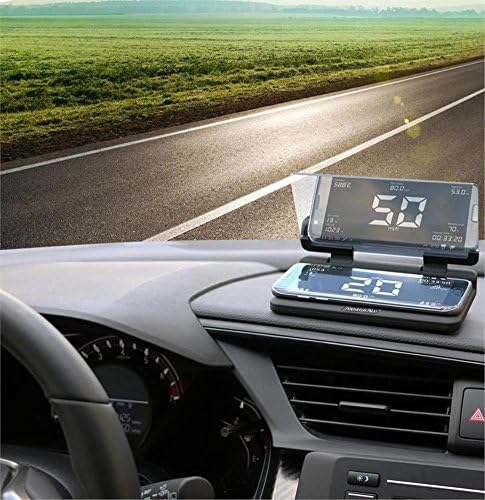
Slika 2: The Armor All Heads Up Display installed on a car dashboard, showing a smartphone projecting speed information onto the reflective screen.
5. Uputstvo za upotrebu
Once set up, the Armor All Heads Up Display functions as a passive projector for your smartphone's screen. It does not require power or connectivity to operate.
- Using HUD Apps: For optimal performance, use smartphone applications that feature a dedicated "HUD mode" or "mirror mode." This mode inverts the display on your phone's screen, so it appears correctly when reflected by the display panel.
- Vidljivost: The clarity of the projected image may vary depending on ambient light conditions. It performs best in moderate to low light. In bright sunlight, the reflection may be less distinct.
- sigurnost: Always prioritize safe driving. Ensure the device is securely placed and does not obstruct your view of the road or any vehicle controls. Avoid making adjustments while driving.
6. Održavanje
- Čišćenje ploče ekrana: Koristite meku krpu koja ne ostavlja dlačice, laganoampened with water or a mild glass cleaner, to gently wipe the transparent display panel. Avoid abrasive materials or harsh chemicals that could scratch the surface.
- Cleaning the Non-Slip Pad: If the non-slip pad loses its grip, it may have accumulated dust or debris. Wipe it with a damp cloth and allow it to air dry. Its adhesive properties should be restored.
- Skladištenje: When not in use, you can fold down the transparent display panel for compact storage. Store the unit in a cool, dry place away from direct sunlight to prolong its lifespan.
7. Otkrivanje problema
- Slika je mutna ili nejasna:
Ensure your smartphone screen is clean. Adjust the angle of the transparent display panel and the phone's position until the reflection is sharp. Check if your HUD app is properly configured for mirror mode.
- Phone or mount is slipping:
Clean the dashboard surface and the non-slip pad on the mount. Ensure the dashboard is dry before placing the mount. Avoid placing the mount on uneven or heavily textured surfaces.
- Reflection is too dim in bright light:
The device's performance is affected by ambient light. For best visibility, use in moderate to low light conditions. Some HUD apps allow adjusting screen brightness, which may help.
- Image appears reversed:
Activate the "HUD mode" or "mirror mode" within your smartphone's navigation or HUD application. This feature is designed to flip the display horizontally so it appears correctly when reflected.
8. Specifikacije
| Feature | Detalj |
|---|---|
| Brand | Armor All |
| Broj modela | AHD6-1001-BLK |
| Dimenzije proizvoda | 4.25 x 2 x 7 inča |
| Težina artikla | 6.3 unce |
| Posebne karakteristike | Neklizajuća površina |
| Kompatibilni uređaji | Smartphones (up to 6" screen size) |
| Kompatibilni modeli telefona | LG, Samsung Galaxy, iPhone |
| Vrsta montaže | Surface (Dashboard) |
| Boja | Crna |
9. Garancija i podrška
For warranty information or technical support, please refer to the documentation provided at the time of purchase or contact Armor All customer service. Keep your purchase receipt as proof of purchase.
For further assistance, please visit the official Armor All webweb-mjesto ili kontaktirajte njihove kanale za korisničku podršku.


