1. Uvod
The Pyle PRJG98.5 is a compact digital multimedia projector designed for versatile projection of images, videos, audio, and text files. It supports Full HD 1080p resolution and features multiple input interfaces, making it suitable for home entertainment, office presentations, and educational use. This manual provides detailed instructions for setting up, operating, and maintaining your projector.
2. Sigurnosne informacije
- Ne gledajte direktno u sočivo projektora kada je lamp je uključen.
- Osigurajte odgovarajuću ventilaciju oko projektora kako biste spriječili pregrijavanje. Ne blokirajte ventilacijske otvore.
- Koristite samo strujni adapter koji je isporučen s jedinicom.
- Izbjegavajte postavljanje projektora na direktnu sunčevu svjetlost, u blizinu izvora topline ili u okruženja s visokom vlagom ili prašinom.
- Ne pokušavajte rastavljati ili modificirati projektor. Za sve servisne radove obratite se kvalificiranom osoblju.
- Držite projektor dalje od vode ili drugih tekućina.
3. Sadržaj paketa
Molimo Vas da provjerite da li se u paketu nalaze svi artikli:
- Digital Projector (Pyle PRJG98.5)
- Daljinski upravljač
- VGA kabel
- AC kabel
- Kabl za napajanje
4. Proizvod je gotovview
The Pyle PRJG98.5 projector features a compact design with various input options and controls for an optimal viewing iskustvo.

Slika 4.1: Pyle PRJG98.5 Digital Multimedia Projector and included remote control. The projector is black with a lens on the front and control buttons on top. The remote is also black with various function buttons.
4.1 Front and Top Panel
- Projekciono sočivo: Emituje sliku na ekran.
- Prsten za fokus: Podešava oštrinu slike.
- Keystone podešavanje: Corrects trapezoidal distortion.
- Kontrolna dugmad: Power, menu navigation, input selection.
4.2 Rear Panel (Connectivity)

Slika 4.2: Rear panel of the Pyle PRJG98.5 Projector, displaying various input ports including AV, USB (x2), HDMI, VGA, and DC power input. This allows connection to multiple devices.
- HDMI ulaz: Connects to devices like Blu-Ray players, game consoles, laptops.
- USB portovi (x2): For multimedia file playback from USB drives or charging devices.
- VGA (RGB) Input: Connects to computers and laptops.
- AV (RCA) Input: Connects to older video sources.
- DC ulaz napajanja: Povezuje se na strujni adapter.
- Audio izlaz: Za povezivanje eksternih zvučnika ili slušalica.
5. Podešavanje
5.1 Postavljanje
Position the projector on a stable, flat surface or mount it overhead. Ensure the projector is perpendicular to the projection surface for the best image quality. The adjustable screen size ranges up to 120 inches.
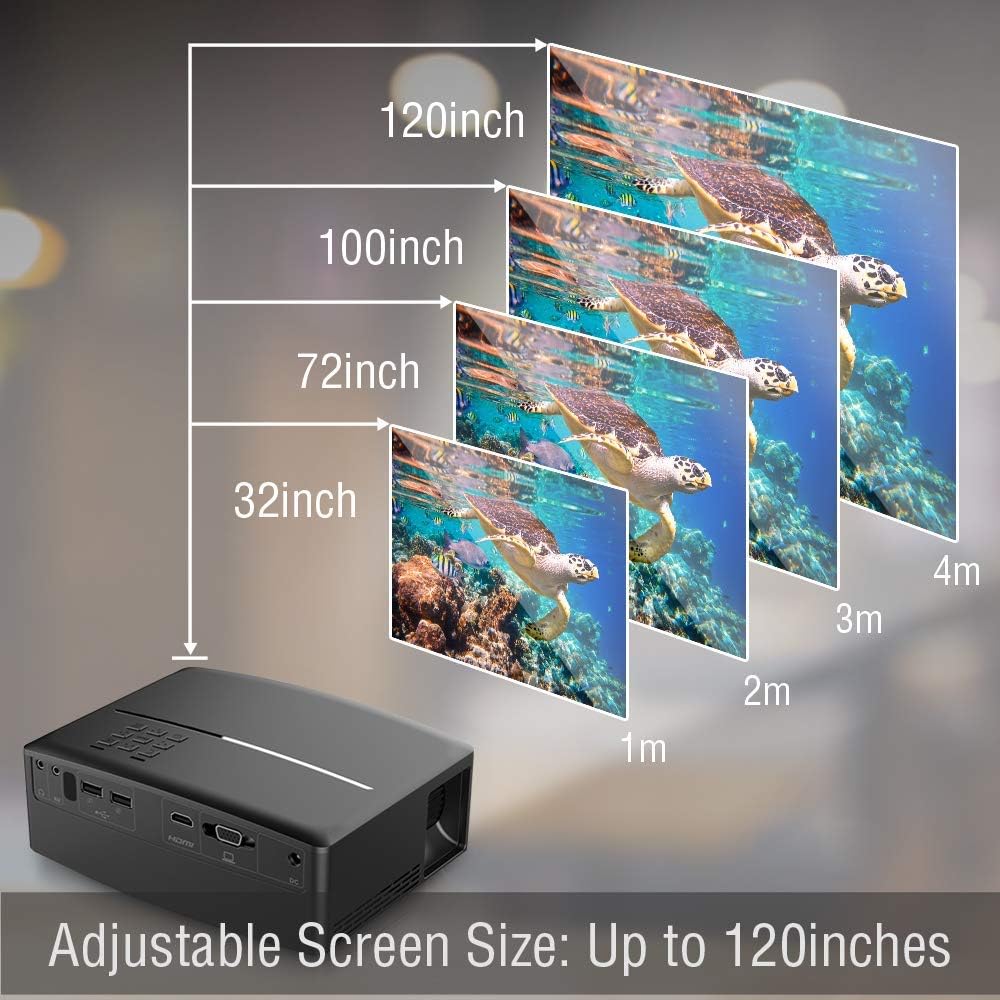
Slika 5.1: Illustration of the adjustable screen size capability of the Pyle PRJG98.5 Projector, showing projection sizes from 32 inches to 120 inches at varying distances from the screen.
5.2 Priključak za napajanje
- Connect the power cord to the AC cable.
- Plug the AC cable into the DC Power Input port on the projector.
- Uključite drugi kraj kabla za napajanje u zidnu utičnicu.
5.3 Povezivanje ulaznih uređaja
Projektor podržava različite ulazne izvore:
- HDMI: Connect an HDMI cable from your device (e.g., laptop, game console, Blu-Ray player) to the HDMI port on the projector.
- USB: Insert a USB flash drive into one of the USB ports for multimedia playback.
- VGA: Connect a VGA cable from your computer to the VGA port on the projector.
- OD: Use an RCA cable to connect to devices with AV output.
5.4 Podešavanje slike
After powering on the projector, adjust the image for clarity and proper display.
- Podešavanje fokusa: Rotate the focus ring around the lens until the projected image is sharp and clear.
- Keystone korekcija: If the image appears trapezoidal (wider at the top or bottom), use the keystone adjustment dial or lever on the projector to correct the distortion. The projector supports a 15-degree keystone angle adjustment.

Slika 5.2: Visual representation of keystone angle adjustment, showing how to correct a distorted rectangular display to a proper rectangular display using the projector's adjustment mechanism. The projector supports a 15-degree keystone adjustment.
6. Operacija
6.1 Uključivanje/isključivanje
- Za uključivanje: Press the power button on the projector or the remote control. The indicator light will turn on.
- Za isključivanje: Press the power button again. Confirm shutdown if prompted.
6.2 Odabir ulaznog izvora
After connecting your input device, select the corresponding source:
- Press the "Input" button on the projector or remote control.
- Use the arrow keys to navigate through the input options (HDMI, USB, VGA, AV).
- Press "OK" or "Enter" to confirm your selection.
6.3 Multimedia Playback (USB)
The projector supports various digital media file formats including AVI, MPG, MOV, MP3, WMV, and TXT.
- Umetnite USB fleš disk u USB port.
- Odaberite "USB" kao ulazni izvor.
- Krećite se kroz file browser to select the desired media file (image, video, audio, text).
- Press "OK" or "Enter" to play the file.
6.4 Navigacija izbornikom
Use the "Menu" button on the projector or remote to access settings. Navigate with arrow keys and confirm with "OK" or "Enter". Options include picture adjustment, sound settings, and system settings.
7. Održavanje
7.1 Čišćenje objektiva
Koristite meku krpu koja ne ostavlja dlačice, posebno dizajniranu za optička sočiva, da biste nježno obrisali sočivo projektora. Nemojte koristiti abrazivna sredstva za čišćenje ili pretjeranu silu.
7.2 Čišćenje tijela projektora
Wipe the exterior of the projector with a soft, dry cloth. For stubborn dirt, slightly dampnavlažite krpu vodom, a zatim odmah obrišite suhom krpom.
7.3 Lamp Život
LED lamp in your projector has an estimated life of 30,000+ hours. No user-replaceable lamp potrebno je održavanje.
8. Otkrivanje problema
| Problem | Mogući uzrok | Rješenje |
|---|---|---|
| Nema prikazane slike | Napajanje nije spojeno; Neispravan ulazni izvor; Uređaj nije pravilno spojen. | Check power connection; Select correct input source; Ensure cables are securely connected. |
| Slika je mutna | Fokus nije podešen; Projektor je previše daleko/blizu platnu. | Adjust the focus ring; Reposition the projector. |
| Slika je trapezoidna | Projektor nije okomit u odnosu na platno. | Adjust keystone correction. |
| Nema zvuka | Volume too low; Muted; External speakers not connected. | Increase volume; Unmute; Connect external speakers if desired. |
| Daljinski upravljač ne radi | Baterije su slabe/prazne; Prepreka između daljinskog upravljača i projektora. | Replace batteries; Ensure clear line of sight to IR receiver. |
9. Specifikacije
| Tehnologija snimanja | 4.0'' LCD + LED Lamp |
| Adjustable Screen Size | Up to 120'' -inches |
| Native Resolution | 800 x 480 SVGA, 1080p Support |
| Temperatura boje | Full Color, 16.7K |
| Kontrast Ratio | 2,200:1 (Dynamic: 10,000:1) |
| Osvetljenost | 1,800 lumena |
| Lamp Život | 30,000+ sati |
| Scale Ratio | 16:9, 4:3 |
| Refresh Rate | 60Hz |
| Keystone Angle Adjustment | 15 ° Stepen |
| Digital File Podrška | AVI, MPG, MOV, MP3, WMV, TXT & More |
| Snaga zvučnika | 2 x 5W |
| Napajanje | 120V (12V Power Adapter) |
| Dimenzije (D x Š x V) | 7.5'' x 6.3'' x 2.7'' |
| Težina artikla | 1.99 funte |
10. Garancija i podrška
For warranty information or technical support, please refer to the warranty card included with your product or visit the official Pyle webSačuvajte račun kao dokaz o kupovini.


