Uvod
The Invision GT1200 ScreenStation offers a versatile and stable solution for displaying your television. Designed for effortless maneuverability, this mobile TV stand allows you to easily move your screen between rooms, making it ideal for both home and office environments. This manual provides detailed instructions for assembly, operation, and maintenance to ensure safe and optimal use of your GT1200 ScreenStation.
Product Overview
The GT1200 ScreenStation is engineered for strength and durability, featuring a robust carbon steel construction and high-quality components. It supports a wide range of TV sizes and offers adjustable height for optimal viewing.

Figure 1: The Invision GT1200 ScreenStation with a mounted television, showcasing its mobile design.

Figure 2: The GT1200 ScreenStation in a professional setting, demonstrating its versatility for presentations and collaborative work.
Postavljanje i montaža
Assembly of the GT1200 ScreenStation is straightforward. All necessary parts and instructions are included in the product packaging. Please ensure you have adequate space and assistance if needed, especially when mounting the television.
1. Provjera VESA kompatibilnosti
Before assembly, verify that your television's VESA mounting pattern is compatible with the GT1200 ScreenStation. This stand supports VESA patterns from 100 x 100 mm to 600 x 400 mm (Width x Height).
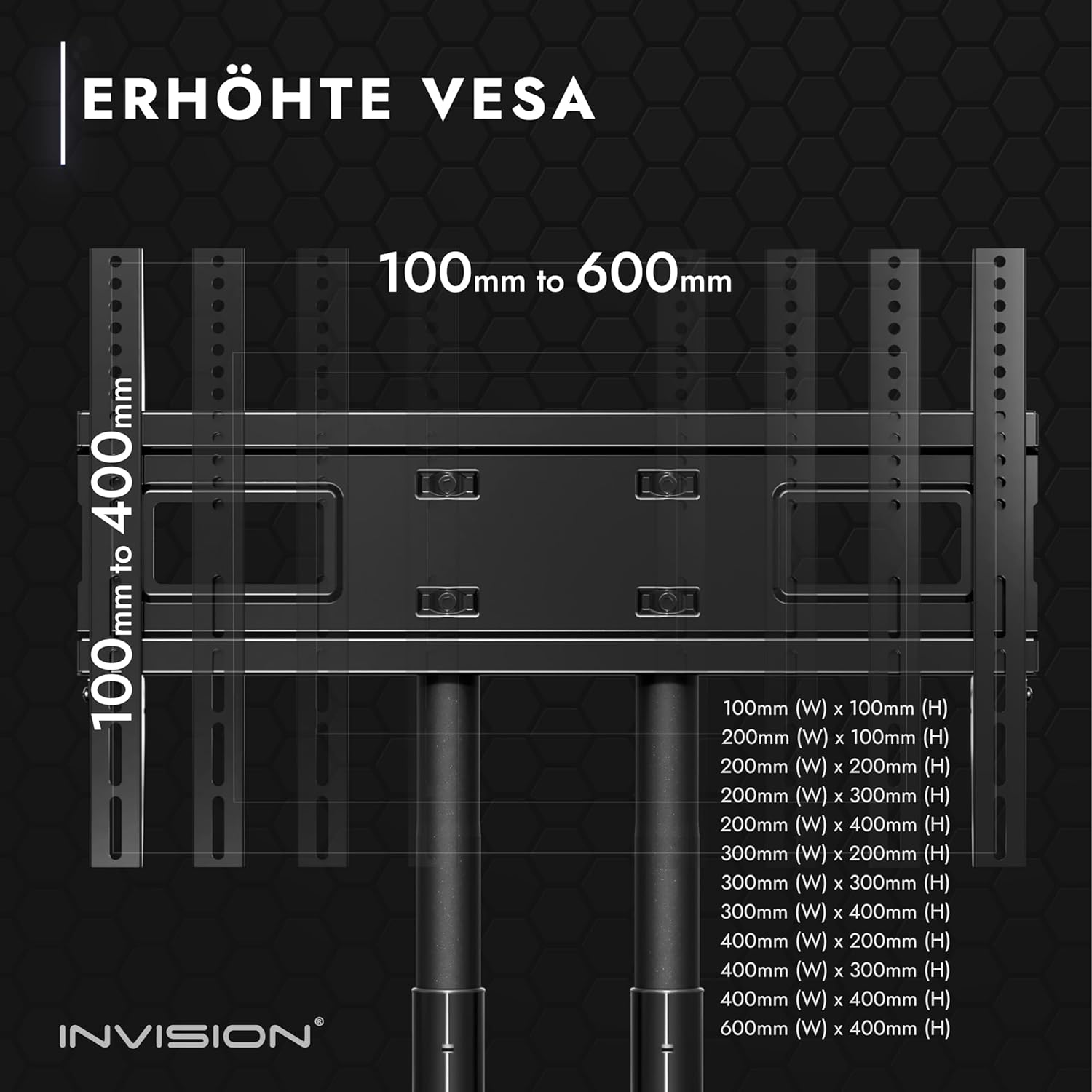
Figure 3: Detailed VESA compatibility chart, illustrating supported mounting hole patterns.
2. Identifikacija komponente
Unpack all components and identify them using the parts list provided in your product box. Ensure all parts are present and undamaged before proceeding.
3. Sklop baze
Assemble the base of the stand, attaching the durable, non-slip castors. Each castor is equipped with an integrated brake for secure positioning.
4. Column and Shelf Installation
Attach the double support columns to the base. Install the adjustable AV shelf at your desired height. The shelf is made of durable plastic and can hold up to 4.5 kg.

Figure 4: Key features of the stand, including integrated cable management access, high-strength adjustment pins, and the adjustable AV shelf.
5. TV Bracket Attachment
Secure the TV mounting brackets to the back of your television. Ensure the brackets are aligned with your TV's VESA holes and are securely fastened.
6. Montiranje televizora
Carefully lift and attach the television with the mounted brackets onto the stand's main frame. Ensure the TV is securely hooked and locked into place. The stand supports screen sizes from 32" to 75" and a maximum load of 45.5 kg (100 lbs).
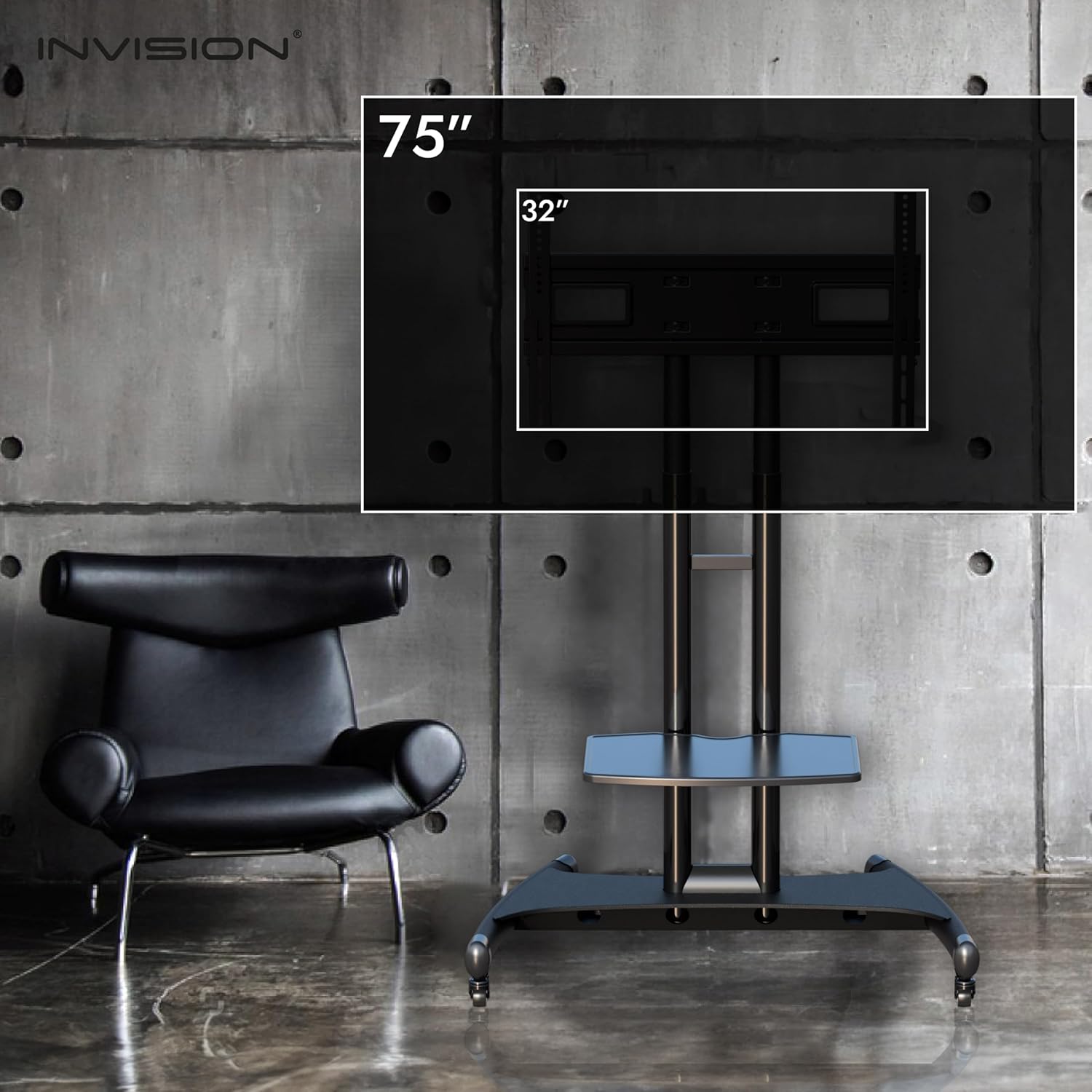
Figure 5: Illustration of the stand's compatibility with television sizes ranging from 32 inches to 75 inches.
Uputstvo za upotrebu
1. Podešavanje visine
The television height can be adjusted from 119 cm (47 inches) to 150 cm (59 inches) to achieve optimal viewing angles. Use the high-strength adjustment pins to secure the desired height.

Figure 6: Visual representation of the maximum and minimum central screen heights and shelf heights.
2. Mobilnost i stabilnost
The GT1200 ScreenStation is designed for easy movement. Its multi-directional casters allow smooth transportation across various floor types. For stationary use, engage the foot-operated parking brakes on each wheel to prevent accidental movement and ensure absolute stability.

Figure 7: Design elements contributing to the stand's enhanced stability, such as reinforced U-clamps, welded struts, an extra-wide steel base, and robust lockable 360° casters.
3. Orijentacija ekrana
Screens can be mounted in both landscape and portrait orientations. Please note that portrait mounting may require specific TV compatibility and potentially retrofitting of the rear TV brackets.
Održavanje
To ensure the longevity and optimal performance of your Invision GT1200 ScreenStation, follow these simple maintenance guidelines:
- čišćenje: Obrišite postolje mekom krpom, damp krpom. Izbjegavajte upotrebu abrazivnih sredstava za čišćenje ili rastvarača koji bi mogli oštetiti završnu obradu.
- Njega kotačića: Periodically check the casters for any debris or hair that might impede their movement. Clean as necessary.
- Provjera pričvršćivača: Regularly inspect all screws and bolts to ensure they remain tight. Re-tighten any loose fasteners to maintain stability.
- Nosivost: Do not exceed the maximum load capacity of 45.5 kg (100 lbs) for the TV or 4.5 kg for the shelf.
Rješavanje problema
If you encounter any issues with your Invision GT1200 ScreenStation, please consider the following:
- Nestabilnost stajanja: Ensure all casters are locked when the stand is stationary. Verify that all assembly fasteners are securely tightened. Ensure the TV weight does not exceed the maximum load capacity.
- Teškoće pri kretanju: Check casters for debris or engaged brakes. Ensure the floor surface is clear.
- TV nije nivelisan: Re-check the TV mounting brackets and ensure they are evenly installed and secured to the stand.
For any issues not resolved by these steps, please contact Invision customer service for assistance.
Specifikacije
| Feature | Specifikacija |
|---|---|
| Model | Invision GT1200 ScreenStation |
| Kompatibilne veličine ekrana | 32" do 75" |
| VESA Mounting Patterns (W x H) | 100 x 100 mm do 600 x 400 mm |
| Maximum TV Load Capacity | 45.5 kg (100 lbs) |
| Adjustable TV Height Range | 119 cm (47 inča) do 150 cm (59 inča) |
| Nosivost police | 4.5 kg |
| Materijal | Reinforced Carbon Steel (Stand), Durable Plastic (Shelf) |
| Boja | Crna |
| Točkovi | 4 durable non-slip, smooth-running castors with integrated brakes |
| Dimenzije paketa | 94 x 62.6 x 13.5 cm |
| Težina paketa | 18.37 kg |
| Vrsta montaže | Podni nosač |
| Movement Type | Tilt |

Figure 8: Comprehensive dimensional drawing of the Invision GT1200 ScreenStation, including VESA mounting area and overall height/width.
Garancija i podrška
The Invision GT1200 ScreenStation comes with a 5 godine garancije and a compatibility guarantee, ensuring peace of mind with your purchase.
If you have any questions, require assistance with assembly, or need support regarding your product, please do not hesitate to contact our friendly customer service team. They will be happy to help you.
For the most up-to-date contact information, please refer to the Invision webweb-mjesto ili kontakt podatke navedene u pakovanju vašeg proizvoda.


