1. Uvod
The Hioki CM3286 Clamp On Power Tester is a versatile instrument designed for precise measurement of electrical parameters. It is capable of measuring voltage, current, power, power factor, phase angle, reactive power, and frequency. Additionally, it can detect phase sequence on live lines within single-phase or three-phase circuits at any desired point. This manual provides essential information for the safe and effective operation, maintenance, and troubleshooting of your CM3286 device.
2. Sigurnosne informacije
UPOZORENJE: Prije upotrebe ovog proizvoda pročitajte sva sigurnosna upozorenja i upute. Nepoštivanje upozorenja i uputa može dovesti do strujnog udara, požara ili ozbiljnih ozljeda.
- Uvijek se pridržavajte lokalnih i nacionalnih sigurnosnih propisa.
- Ne koristite uređaj ako izgleda oštećeno ili ako ne funkcioniše ispravno.
- Ensure the device is rated for the voltage and current levels you intend to measure.
- Wear appropriate personal protective equipment (PPE), such as insulated gloves and eye protection.
- Avoid touching live conductors with bare hands or non-insulated tools.
- Ne koristite uređaj u vlažnim okruženjima ili eksplozivnim atmosferama.
- Keep fingers behind the tactile barrier on the instrument during measurements.
- Disconnect the device from the circuit before opening the battery compartment.
3. Sadržaj paketa
Verify that all items listed below are present and undamaged upon opening the package:
- Hioki CM3286 Clamp On Power Tester Unit
- Ispitni kablovi (crveni i crni)
- Torbica za nošenje
- AAA baterije (x2)
- Uputstvo za upotrebu (ovaj dokument)
4. Karakteristike i komponente proizvoda

Figure 4.1: Hioki CM3286 Clamp On Power Tester (Overall View)
This image displays the complete Hioki CM3286 Clamp On Power Tester, showcasing its ergonomic design, the large clamp jaw for current measurement, and the clear digital display. The function dial and various control buttons are visible on the front panel.
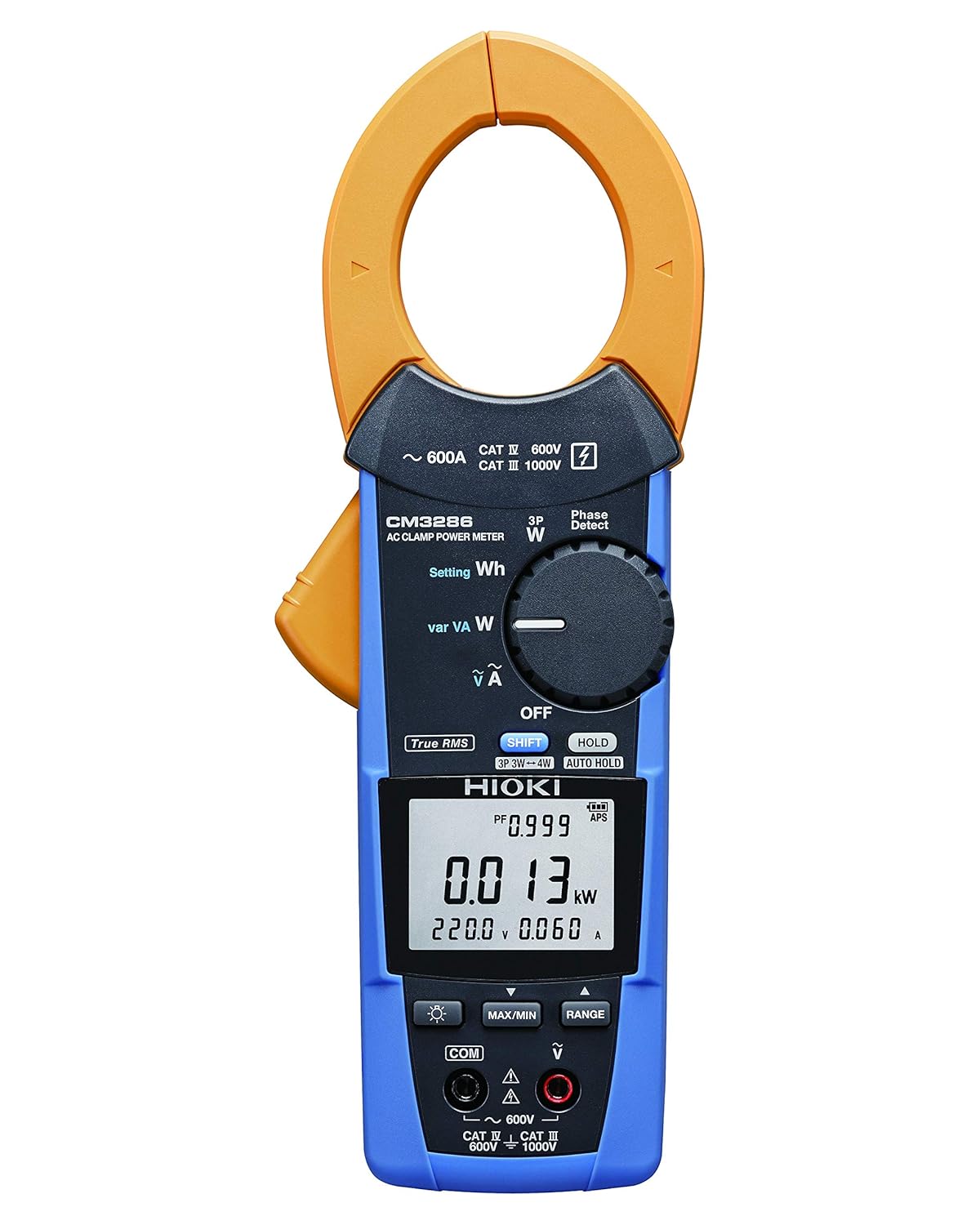
Figure 4.2: Hioki CM3286 Clamp On Power Tester (Front Panel Detail)
This image provides a closer look at the front panel of the Hioki CM3286, highlighting the digital display, the rotary function dial with various measurement settings (e.g., W, Wh, V, A), and the control buttons such as SHIFT, HOLD, MAX/MIN, and RANGE. The input terminals for voltage measurement are also visible at the bottom.
Ključne komponente:
- Clamp vilica: Koristi se za beskontaktno mjerenje naizmjenične struje.
- Funkcijski kotačić: Selects the desired measurement mode (e.g., Voltage, Current, Power, Frequency).
- LCD ekran: Prikazuje očitanja mjerenja, jedinice i indikatore.
- Ulazni priključci: Za spajanje mjernih kabela za volumentage and other measurements.
- Dugme HOLD: Zamrzava trenutno očitavanje ekrana.
- Dugme MAX/MIN: Records maximum and minimum readings.
- Dugme RANGE: Ručno bira opseg mjerenja.
- Dugme SHIFT: Accesses secondary functions marked in blue on the dial.
5. Podešavanje
5.1. Instalacija baterije
- Uvjerite se da je uređaj isključen.
- Locate the battery compartment cover on the rear of the unit.
- Koristite odvijač (ako je potrebno) da biste otvorili poklopac.
- Insert two (2) AAA batteries, observing the correct polarity (+/-) as indicated inside the compartment.
- Vratite poklopac odeljka za baterije i pričvrstite ga.
5.2. Početno uključivanje
After battery installation, turn the function dial from "OFF" to any measurement setting to power on the device. The display should illuminate, indicating readiness for use.
6. Uputstvo za upotrebu
6.1. Uključivanje/isključivanje
- To power on, rotate the function dial from the "OFF" position to the desired measurement function.
- To power off, rotate the function dial back to the "OFF" position.
6.2. Mjerenje naizmjenične struje (Clamp)
- Rotate the function dial to the "A" (Current) setting.
- Otvorite clamp čeljust pritiskom na polugu.
- Enclose only one conductor (live or neutral) within the clamp vilica. Provjerite je li vilica potpuno zatvorena.
- Očitajte trenutnu vrijednost na LCD zaslonu.
6.3. svtage mjerenje (V)
- Rotate the function dial to the "V" (Voltage) postavljanje.
- Connect the red test lead to the "V" input terminal and the black test lead to the "COM" input terminal.
- Spojite mjerne kablove paralelno preko strujnog kola ili komponente koju treba mjeriti.
- Pročitajte voltage vrijednost na LCD zaslonu.
6.4. Power Measurement (W, Wh, var, VA)
The CM3286 can measure various power parameters. Select the appropriate setting on the function dial (W for active power, Wh for energy, var for reactive power, VA for apparent power). Connect test leads for voltage i clamp the jaw around the current conductor as per the specific measurement method outlined in the full manual (not provided here, but implied by the device's capabilities).
6.5. Mjerenje frekvencije (Hz)
Select the "Hz" setting on the function dial. Connect test leads across the circuit where frequency is to be measured, similar to voltage mjerenje.
6.6. Detekcija faznog slijeda
The device features a "Phase Detect" function. Refer to the detailed instructions in the complete manual for proper connection and interpretation of phase sequence on single-phase or three-phase circuits.
6.7. Using Buttons (HOLD, MAX/MIN, RANGE, SHIFT)
- DRŽI: Pritisnite da zamrznete trenutno očitanje na ekranu. Pritisnite ponovo da otpustite.
- MAX/MIN: Press to enter Max/Min recording mode. The display will show the maximum or minimum value recorded since activation. Press again to cycle through Max, Min, and current readings.
- RANGE: Pritisnite za prebacivanje između automatskog i ručnog podešavanja raspona. U ručnom režimu podešavanja raspona, pritiskajte više puta za ciklično prebacivanje između dostupnih raspona.
- SHIFT: Press to access secondary functions indicated in blue text next to the primary function on the dial.
7. Održavanje
7.1. Čišćenje
Obrišite uređaj mekom krpom, damp krpom. Ne koristite abrazivna sredstva za čišćenje ili rastvarače. Prije skladištenja ili sljedeće upotrebe provjerite je li uređaj potpuno suh.
7.2. Zamjena baterije
When the low battery indicator appears on the display, replace the batteries promptly to ensure accurate measurements. Follow the battery installation steps outlined in Section 5.1.
7.3. Skladištenje
Store the device in its carrying case in a cool, dry place, away from direct sunlight and extreme temperatures. If storing for extended periods, remove the batteries to prevent leakage.
8. Otkrivanje problema
| Problem | Mogući uzrok | Rješenje |
|---|---|---|
| Uređaj se ne uključuje. | Prazne ili nepravilno instalirane baterije. | Provjerite polaritet baterija; zamijenite baterije. |
| Nema očitavanja na ekranu. | Incorrect function selected; open circuit; test leads not connected properly. | Select correct function; ensure circuit is complete; check test lead connections. |
| Prikazuje se "OL" ili "OVER". | Measurement exceeds selected range or device maximum. | Select a higher range (if manual ranging) or ensure measurement is within device limits. |
| Netačna očitavanja. | Low battery; environmental interference; damaged test leads. | Replace batteries; move away from strong electromagnetic fields; inspect and replace test leads if damaged. |
9. Specifikacije
| Parametar | Vrijednost |
|---|---|
| Broj modela | CM3286 |
| Brand | Hioki |
| Dimenzije paketa | 9.92 x 2.76 x 2.05 inča |
| Težina artikla | 0.45 kilograma (15.87 unci) |
| Baterije | 2 AAA baterije (uključene) |
| Izvor napajanja | Električni s kablom (Note: This refers to the type of power it measures, not its own power source. The device is battery-powered.) |
| Proizvođač | Hioki |
| Datum prve dostupnosti | 20. avgusta 2020 |
10. Garancija i podrška
For detailed warranty information, please refer to the warranty card included with your product or visit the official Hioki website. Hioki provides comprehensive customer support for its products.
If you encounter any issues not covered in this manual or require technical assistance, please contact Hioki customer support through their official channels. Ensure you have your product model number (CM3286) and purchase details ready when contacting support.
Napomena: Uslovi garancije mogu se razlikovati u zavisnosti od regije.