Uvod
The DigiTech Multi-Function LCD Wall Clock (Model XC0225) is a versatile device designed to provide convenient time display along with additional environmental information. This clock features a large LCD screen displaying time, date, day of the week, indoor temperature, and humidity. It also includes alarm and snooze functions, making it suitable for various settings, whether mounted on a wall or placed on a desktop.
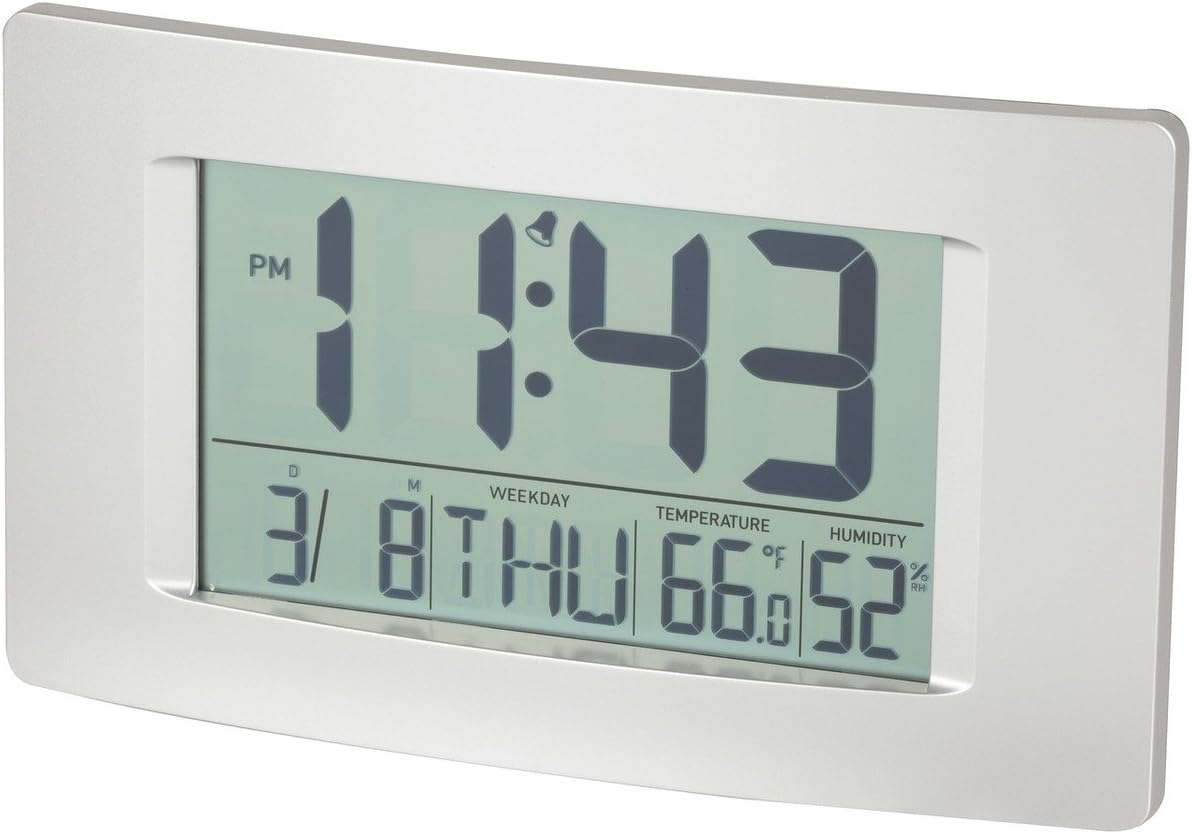
Slika 1: Prednja strana view of the Multi-Function LCD Wall Clock.
Sadržaj paketa
- DigiTech Multi-Function LCD Wall Clock (Model XC0225)
- Korisnički priručnik (ovaj dokument)
Napomena: Za rad su potrebne 3 x AA baterije i nisu uključene u pakovanje.

Figure 2: Product packaging illustrating the clock and its features.
Setup
1. Instalacija baterije
- Pronađite odeljak za baterije na poleđini sata.
- Otvorite poklopac odeljka za baterije.
- Insert 3 x AA batteries, ensuring correct polarity (+ and -) as indicated inside the compartment.
- Čvrsto zatvorite poklopac odeljka za baterije.
2. Početno uključivanje
Upon battery installation, the clock will power on automatically and display default settings. You may need to adjust the time, date, and other settings as described in the "Operating Instructions" section.
3. Opcije montaže
- Položaj na radnoj površini: Utilize the integrated stand on the back of the clock to place it on any flat surface.
- Montaža na zid: Use the integrated hang-hole on the back of the clock to mount it securely on a wall using a suitable screw or hook (not included).
Uputstvo za upotrebu
The clock features several buttons on the back for setting and adjusting functions. Refer to the labels next to each button for their specific functions (e.g., MODE, UP, DOWN, ALARM, SNOOZE/LIGHT).
1. Podešavanje vremena i datuma
- Pritisnite MODE button repeatedly until the time display starts flashing.
- Koristite UP or DOLJE dugmad za podešavanje sata.
- Pritisnite MODE ponovo da biste prešli na minute, a zatim koristite UP or DOLJE prilagoditi.
- Nastavite pritiskati MODE za ciklično mijenjanje postavki godine, mjeseca i dana, podešavajući svaku od njih pomoću UP or DOLJE.
- Pritisnite MODE još jednom za izlazak iz načina podešavanja.
2. Postavljanje alarma
- Pritisnite ALARM jednom pritisnite dugme da biste prikazali trenutno vrijeme alarma.
- Pritisnite i držite ALARM dugme dok sat alarma ne počne treptati.
- Koristite UP or DOLJE dugmad za podešavanje sata alarma.
- Pritisnite ALARM again to move to alarm minutes, then use UP or DOLJE prilagoditi.
- Pritisnite ALARM one last time to confirm and exit alarm setting mode.
- Da biste aktivirali/deaktivirali alarm, pritisnite dugme ALARM button briefly when not in setting mode. An alarm icon will appear/disappear on the display.
3. Funkcija odgode alarma
Kada se oglasi alarm, pritisnite SNOOZE / LIGHT button to activate the snooze function. The alarm will temporarily stop and sound again after the set snooze interval (1-60 minutes, adjustable in settings).
4. Izbor temperaturne jedinice (°C/°F)
Kratko pritisnite UP button (or a dedicated °C/°F button if present) to toggle between Celsius (°C) and Fahrenheit (°F) temperature display.
5. Format 12/24 sata
Kratko pritisnite DOLJE button (or a dedicated 12/24H button if present) to switch between 12-hour and 24-hour time formats.
Održavanje
1. Čišćenje
- Obrišite površinu sata mekom, suhom krpom.
- Do not use abrasive cleaners, solvents, or chemical sprays, as these may damage the display or casing.
2. Zamjena baterije
When the display becomes dim or functions become erratic, it is time to replace the batteries. Follow the "Battery Installation" steps in the Setup section to replace the 3 x AA batteries. Always replace all batteries at the same time with new ones.
Rješavanje problema
| Problem | Mogući uzrok | Rješenje |
|---|---|---|
| Ekran je prazan ili taman. | Baterije su prazne ili nepravilno instalirane. | Replace batteries with new 3 x AA batteries, ensuring correct polarity. |
| Vrijeme/datum je netačan. | Not set correctly after battery installation or power interruption. | Slijedite upute "Podešavanje vremena i datuma" za resetiranje. |
| Alarm se ne oglašava. | Alarm is not activated or alarm time is incorrect. | Ensure the alarm icon is displayed. Verify the alarm time setting. |
| Očitavanja temperature/vlažnosti izgledaju netačna. | Clock placed near heat sources, vents, or in direct sunlight. | Relocate the clock to an area with stable ambient temperature and humidity. Allow time for readings to stabilize. |
Specifikacije
| Feature | Detalj |
|---|---|
| Model | XC0225 |
| Display Type | Digitalni LCD |
| Veličina LCD-a | 194 mm (Š) x 110 mm (V) |
| Funkcije | Time, Date, Day of Week, Alarm, Snooze, Indoor Temperature, Indoor Humidity |
| Format vremena | 12 Hour / 24 Hour selectable |
| Temperaturni opseg | -9.9°C do +50°C (14.1°F do 122.0°F) |
| Raspon vlažnosti | 20% do 95% Relativna vlažnost (RH) |
| Trajanje odgode | 1 - 60 minutes (adjustable) |
| Izvor napajanja | 3 x AA baterije (nisu uključene) |
| Dimensions (Overall, W x H x D) | 306 mm x 176 mm x 36 mm (približno) |
| Težina | 540g (without batteries) / 660g (shipping weight) |
| Opcije montaže | Integrated Stand, Wall Hang-hole |

Figure 3: Main display area dimensions of the clock for reference.
Garancija i podrška
This DigiTech product comes with a 1-godišnja garancija od datuma kupovine. Ova garancija pokriva nedostatke u materijalu i izradi pri normalnoj upotrebi.
For technical support, warranty claims, or further assistance, please contact your retailer or the DigiTech customer service department. Please have your model number (XC0225) and proof of purchase ready when contacting support.


