1. prekoview
This manual provides essential instructions for the safe and efficient use of your HP 120W AC Adapter Power Charger. This adapter is designed to provide reliable power to compatible HP laptops and other devices, ensuring optimal performance and charging.
Ključne karakteristike uključuju:
- Univerzalni ulaz Voltage: Supports AC input from 100V to 240V, 50-60Hz, for worldwide compatibility.
- Velika izlazna snaga: Delivers 19.5V at 6.15A, totaling 120W, suitable for various HP devices requiring this power profile.
- Pametni ventilator za hlađenje: Incorporates a smart cooling fan for efficient heat dissipation, contributing to the adapter's longevity and stable operation.
- Izdržljiv dizajn: Constructed for everyday use, resisting wear and bending.
2. Šta se nalazi u kutiji
Upon unpacking your HP 120W AC Adapter, you should find the following components:
- 1 x HP 120W AC Adapter Unit
- 1 x AC Power Cord (for wall outlet connection)
- 1 x DC Output Cable with 7.4mm Tip (integrated with adapter)
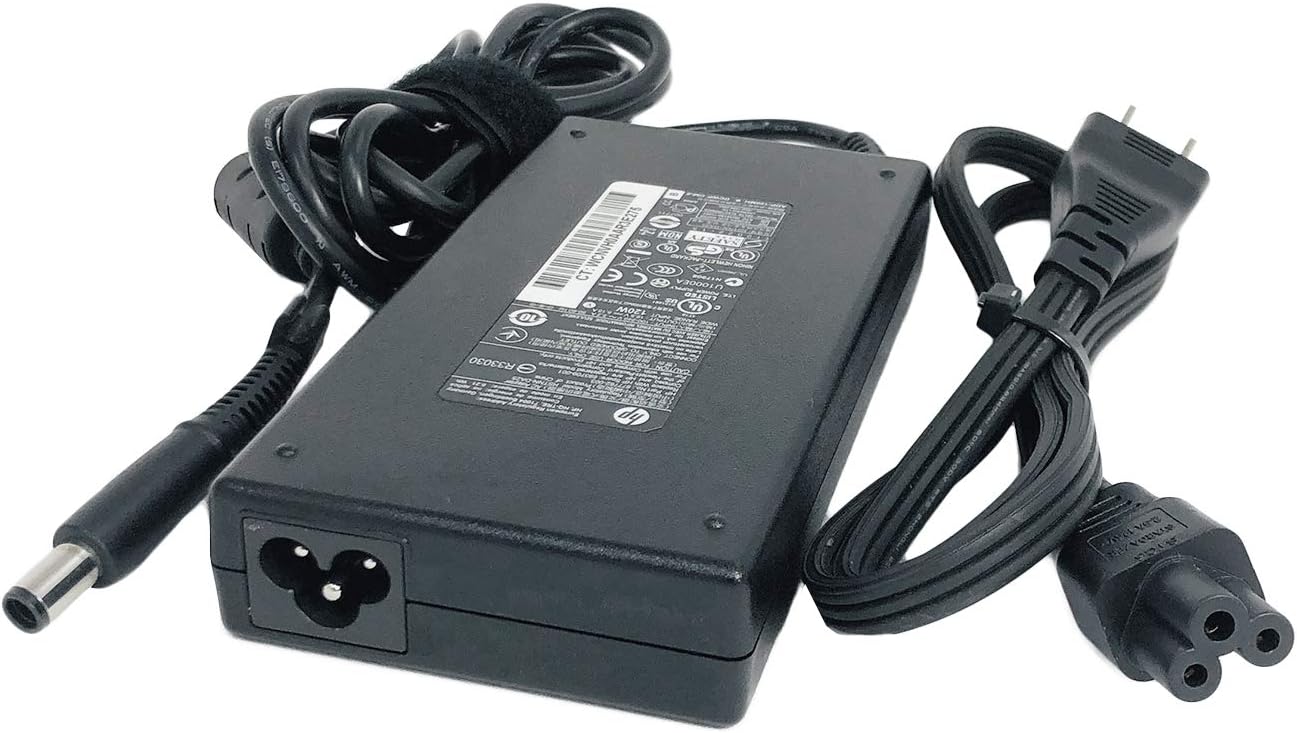
Image: The HP 120W AC Adapter unit shown with its detachable AC power cord and the integrated DC output cable featuring a 7.4mm tip.
3. Upute za postavljanje
Follow these steps to correctly set up your HP 120W AC Adapter:
- Povežite kabl za napajanje naizmeničnom strujom: Insert the female end of the AC power cord firmly into the input port on the HP 120W AC Adapter unit.
- Povežite se s laptopom: Plug the 7.4mm DC output tip of the adapter's integrated cable into the power input port on your compatible HP laptop. Ensure the connection is secure.
- Spojite na utičnicu: Insert the male end of the AC power cord into a standard wall power outlet.

Slika: Krupni plan view of the 7.4mm DC output tip, which connects to the laptop's power port.

Image: The HP 120W AC Adapter with its label clearly visible, displaying technical specifications and various safety certifications. The product identifier WCNVH0AAR3E275 is also visible on the label.
4. Operacija
Once properly connected, the HP 120W AC Adapter will begin charging your laptop. Most HP laptops have an indicator light near the power port or on the adapter itself to show charging status.
The adapter is designed to operate within a wide input voltage range (100-240V), making it suitable for use in various regions. Its 120W output ensures efficient power delivery for demanding tasks and quick battery charging.
For optimal performance, ensure the adapter is placed in a well-ventilated area to allow the smart cooling fan to function effectively.
Video: This video demonstrates the connection and use of an HP 120W charger with a 7.4mm tip, highlighting its compatibility and ease of use. It shows the adapter being connected to a laptop and a power outlet.
5. Održavanje
To ensure the longevity and optimal performance of your HP 120W AC Adapter, consider the following maintenance tips:
- Pažljivo rukujte: Avoid dropping the adapter or subjecting it to physical impact.
- Upravljanje kablovima: Do not sharply bend, twist, or crimp the cables. Use the included Velcro straps (if applicable) to keep cables neatly organized when not in use or during travel.
- Održavati suhom: Protect the adapter from moisture and liquids. Do not operate it in wet conditions.
- ventilacija: Ensure the adapter is placed in an area with adequate airflow to prevent overheating. Do not cover it with cloths or place it on soft surfaces that can block ventilation.
- čišćenje: Disconnect the adapter from power before cleaning. Use a soft, dry cloth to wipe the exterior. Avoid using harsh chemicals or abrasive materials.
6. Otkrivanje problema
If you encounter issues with your HP 120W AC Adapter, refer to the following common troubleshooting steps:
- Nema napajanja/punjenja:
- Verify that both the AC power cord and the DC output cable are securely connected to the adapter and your laptop.
- Provjerite da li zidna utičnica funkcioniše tako što ćete je testirati s drugim uređajem.
- Check for any visible damage to the cables or adapter unit.
- pregrijavanje:
- Pazite da se adapter nalazi u dobro prozračenom prostoru i da nije pokriven.
- Confirm that your laptop's power requirements do not exceed 120W.
- Povremeno punjenje:
- Check for loose connections at both the adapter and laptop ends.
- Inspect the DC tip for any bending or damage.
If these steps do not resolve the issue, contact HP customer support for further assistance.
7. Specifikacije
| Feature | Specifikacija |
|---|---|
| AC Input Voltage | 100 ~ 240 V, 50 ~ 60 Hz |
| DC Output Voltage | 19.5V |
| AmpDob | 6.15 Amps |
| Wattage | 120 Watts |
| Tip konektora | Proprietary 7.4mm Tip |
| Kompatibilni uređaji | HP laptops and other devices requiring 19.5V, 6.15A, 120W with a 7.4mm tip. |
| Kompatibilni brojevi dijelova | 677762-002, 644699-001, 644699-003, 645156-001, 463556-001, 463555-002, 463556-002, 463557-001, 391174-001, 463953-001, 463959-001, 384023-001, ADP-120MH D, ADP-120MH B, PA-1121-52HH, HSTNN-CA25, HSTNN-DA25, HSTNN-LA25, VE025AA#ABA, NW199AA#ABA, ED519AA |
| Boja | Crna |
| Težina artikla | 1.39 funte |
| Dimenzije paketa | 8.66 x 4.92 x 2.52 inča |
| Posebna karakteristika | Pametni ventilator za hlađenje |
8. Garancija i podrška
This HP 120W AC Adapter is subject to a 30-day return policy. For specific warranty details, please refer to the documentation provided with your purchase or contact HP customer support.
Za prošireno pokriće dostupni su opcionalni planovi zaštite:
- Dvogodišnji plan zaštite
- Dvogodišnji plan zaštite
- Complete Protect (covers eligible past and future purchases)
For technical assistance or warranty claims, please visit the official HP support webstranice ili kontaktirajte njihovu korisničku službu.