1. Uvod
This manual provides detailed instructions for the safe and proper installation, operation, and maintenance of your RICOO S3811 TV Wall Mount. Please read this manual thoroughly before installation to ensure correct setup and to prevent damage or injury.

Image: The RICOO S3811 TV Wall Mount, a black, articulated arm mount designed for flat-panel displays.
2. Sigurnosne informacije
WARNING: Failure to read and follow these instructions may result in serious personal injury, property damage, or voiding of your warranty.
- Osigurajte da površina za montažu može sigurno podnijeti ukupnu težinu nosača i ekrana.
- Nemojte prekoračiti maksimalnu nosivost od 20 kg (44 lbs).
- This mount is designed for VESA patterns 75x75mm and 100x100mm. Verify your display's VESA pattern before installation.
- Use appropriate tools and follow all drilling instructions carefully.
- Always use a stud finder to locate wooden studs or ensure you are drilling into solid concrete/brick walls.
- Držite djecu i kućne ljubimce podalje tokom instalacije.
- Ako niste sigurni u vezi bilo kojeg dijela procesa instalacije, obratite se kvalificiranom stručnjaku.
3. Sadržaj paketa
Prije početka instalacije provjerite jesu li sve komponente prisutne i neoštećene.
- Pre-assembled Wall Mount Unit (1)
- Wall Plugs for Concrete Walls (Quantity as needed)
- Screws for TV/Monitor Attachment (Various sizes)
- Wall Mounting Screws (Quantity as needed)
- Installation Hardware and Accessories (Washers, spacers, etc.)
4. Vodič za instalaciju
4.1 Provjere prije instalacije
- VESA kompatibilnost: Ensure your TV or monitor has a VESA mounting pattern of 75x75mm or 100x100mm.
- Kapacitet težine: Confirm your display's weight does not exceed 20 kg (44 lbs).
- Vrsta zida: Identify your wall type (solid concrete, brick, wood stud). Use appropriate anchors/screws.
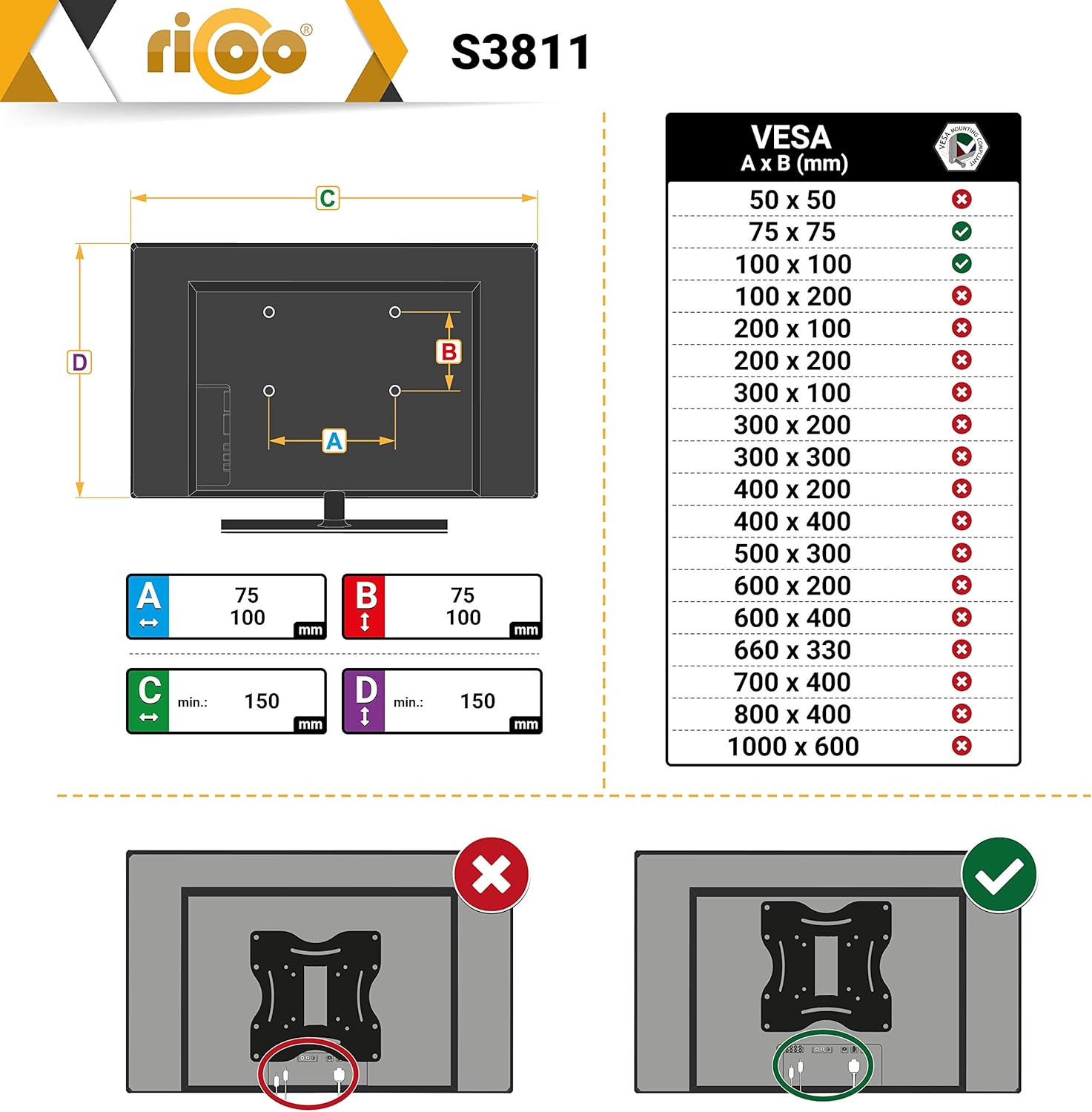
Image: A diagram illustrating VESA compatibility, showing supported (green check) and unsupported (red X) VESA patterns. The S3811 supports 75x75mm and 100x100mm.
4.2 Montiranje zidne ploče
- Determine the desired height and position for your display.
- Place the wall plate against the wall and mark the drilling holes. Use a level to ensure it is straight.
- Drill pilot holes at the marked locations. For wood studs, drill directly. For concrete/brick, insert wall plugs.
- Secure the wall plate to the wall using the provided wall mounting screws. Ensure it is firmly attached.
4.3 Attaching the Bracket to the Display
- Carefully place your TV/monitor face down on a soft, clean surface to prevent scratches.
- Align the mounting bracket of the S3811 to the VESA holes on the back of your display.
- Select the appropriate screws from the provided hardware kit that fit your display's VESA holes. Use washers and spacers if necessary to ensure a secure fit without overtightening.
- Čvrsto pritegnite zavrtnje, ali nemojte previše zategnuti.
4.4 Mounting the Display to the Wall Plate
- With assistance, carefully lift the display with the attached bracket.
- Hook the bracket onto the wall plate. Ensure it is securely seated.
- Secure the display to the wall plate using any locking mechanisms or screws provided with the mount.
5. Rad i podešavanja
The RICOO S3811 offers various adjustment options for optimal viewing.
- Podešavanje nagiba: The display can be tilted +12°/-5° to reduce glare and achieve a comfortable viewing angle. Loosen the tilt knobs, adjust, and then retighten.
- Podešavanje okretanja: The mount allows for 180° swivel (left/right) depending on screen width, providing flexible viewing from different positions in the room.
- rotacija: The front panel can be rotated +/-3° for fine-tuning the horizontal level of your display after installation.
- Udaljenost od zida: The distance from the wall can be adjusted between 50mm and 180mm by extending or retracting the arm.

Image: A composite image demonstrating the various adjustment capabilities of the mount, including tilt, swivel, rotation, and cable management.
5.1 Upravljanje kablovima
The mount includes integrated cable management clips or channels to keep cables tidy and out of sight. Route your display cables through these features for a clean installation.
6. Održavanje
- Povremeno provjeravajte sve vijke i spojeve kako biste bili sigurni da su čvrsto zategnuti i sigurni.
- Očistite nosač mekom, suhom krpom. Ne koristite abrazivna sredstva za čišćenje ili rastvarače.
- Do not lubricate any parts of the mount.
7. Otkrivanje problema
| Problem | Mogući uzrok | Rješenje |
|---|---|---|
| Nosač se čini nestabilnim nakon instalacije. | Screws not fully tightened; incorrect wall anchors used; wall not strong enough. | Re-tighten all screws. Ensure correct anchors for your wall type. Consult a professional if wall strength is a concern. |
| Prikaz nije ravan. | Wall plate not level; front panel rotation needs adjustment. | Use the +/-3° rotation feature to level the display. If the wall plate is significantly off, re-install. |
| Teškoće s podešavanjem nagiba/okretanja. | Adjustment knobs/screws are too tight. | Loosen the relevant adjustment knobs/screws slightly, make the adjustment, then re-tighten. |
8. Specifikacije
| Broj modela | S3811 |
| Brand | RICOO |
| Kompatibilne veličine ekrana | 13 - 27 inča (33 - 69 cm) |
| VESA kompatibilnost | 75x75mm, 100x100mm |
| Maksimalni kapacitet opterećenja | 20 kg (44 lbs) |
| Ugao nagiba | +12° / -5° |
| Ugao okretanja | 180° (screen dependent) |
| Rotacija | +/-3° |
| Udaljenost od zida | 50 mm - 180 mm |
| Materijal | legirani čelik |
| Boja | Crna |

Image: A technical diagram showing the detailed dimensions and adjustable angles of the RICOO S3811 wall mount in millimeters.
9. Garancija i podrška
RICOO products are manufactured with quality and durability in mind. For specific warranty information, please refer to the warranty card included with your product or visit the official RICOO website.
If you encounter any issues or have questions regarding your RICOO S3811 TV Wall Mount, please contact RICOO customer support for assistance. Contact details can typically be found on the product packaging or the official brand website.


