1. Uvod
Hvala na kupoviniasing the Ematic EMHD130LED HD 16GB Music Player. This compact and portable device allows you to enjoy your favorite music on the go. Featuring a 1.3-inch OLED display and a MicroSD slot for expanded storage, it is designed for ease of use and portability. This manual provides detailed instructions for setting up, operating, and maintaining your music player.
2. Važne informacije o sigurnosti
- Ne izlažite uređaj ekstremnim temperaturama, direktnoj sunčevoj svjetlosti ili visokoj vlažnosti.
- Izbjegavajte ispuštanje ili izlaganje uređaja jakim udarima.
- Ne pokušavajte sami rastavljati ili popravljati uređaj. Za sve servisne radove obratite se kvalifikovanom osoblju.
- Držite uređaj dalje od vode i drugih tečnosti.
- Koristite samo pribor koji je odobrio proizvođač.
- Uređaj i njegovu bateriju odložite odgovorno u skladu s lokalnim propisima.
3. Sadržaj paketa
Molimo Vas da provjerite paket za sljedeće stavke:
- Ematic EMHD130LED HD 16GB Music Player
- Korisnički priručnik (ovaj dokument)
- Note: A USB charging/data transfer cable is typically required and may be sold separately.
4. Proizvod je gotovview
Familiarize yourself with the components and controls of your Ematic music player.
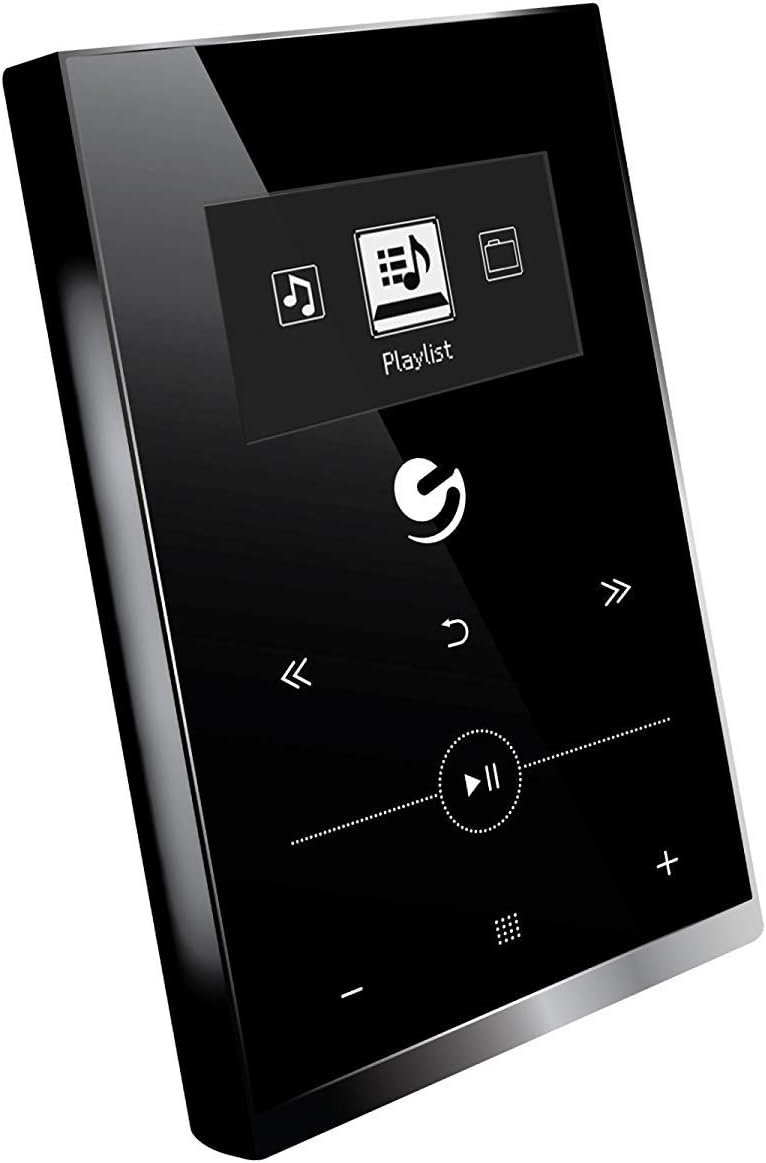
Slika 4.1: Front view of the Ematic EMHD130LED Music Player, highlighting its 1.3-inch OLED display and touch-sensitive controls for navigation and playback.

Slika 4.2: The Ematic EMHD130LED Music Player shown in a typical usage scenario, demonstrating its small form factor suitable for connection to a computer for media transfer.
Kontrole i portovi:
- OLED zaslon: 1.3-inch screen for track information and menu navigation.
- Navigacijski gumbi: (Implied from image) Up, Down, Left, Right, Select/Play/Pause.
- Kontrole jačine zvuka: (Implied from image) Plus (+) and Minus (-) buttons for adjusting audio output.
- MicroSD slot: For expanding storage capacity beyond the internal 16GB.
- USB port: For connecting to a computer for charging and data transfer.
5. Podešavanje
5.1 Punjenje uređaja
Before first use, fully charge your music player. Connect the device to a computer's USB port or a compatible USB wall adapter using a USB cable. The OLED display will indicate charging status. A full charge typically takes a few hours.
5.2 Učitavanje muzike
The Ematic EMHD130LED has 16GB of internal storage. You can add more music using a MicroSD card (sold separately).
- Putem računara: Plug your media player directly into your computer using a USB cable. The device will appear as a removable drive. Drag and drop your MP3 audio files into the player's music folder.
- Via MicroSD Card: Insert a MicroSD card into the designated slot on the player. You can transfer music files directly to the MicroSD card via a card reader on your computer, or transfer them to the card once it's in the player and connected to the computer.
6. Uputstvo za upotrebu
6.1 Uključivanje/isključivanje napajanja
Press and hold the Power button (location not specified, typically a side button or integrated with Play/Pause) for a few seconds to turn the device on or off.
6.2 Osnovna navigacija
Use the navigation buttons (Up, Down, Left, Right) to browse through menus and select options on the 1.3-inch OLED display. Press the central Select button to confirm a selection or play a track.
6.3 Reprodukcija muzike
- From the main menu, navigate to 'Music' or 'Playlist'.
- Browse through your stored music by artist, album, genre, or all songs.
- Select a track and press the Play/Pause button to begin playback.
- Use the Skip Forward/Backward buttons to change tracks.
- Adjust the volume using the Volume Up (+) and Volume Down (-) buttons.
6.4 Using the MicroSD Card
Once a MicroSD card is inserted and contains music, the player will automatically detect it. You can typically switch between internal storage and MicroSD card content through the music menu settings.
7. Održavanje
- čišćenje: Use a soft, dry, lint-free cloth to clean the device. Do not use abrasive cleaners or solvents.
- Skladištenje: Kada se uređaj ne koristi duži period, čuvajte ga na hladnom i suhom mjestu, dalje od direktne sunčeve svjetlosti.
- Održavanje baterije: Da biste produžili vijek trajanja baterije, izbjegavajte često potpuno pražnjenje baterije. Redovno punite uređaj, čak i ako ga ne koristite.
8. Otkrivanje problema
| Problem | Mogući uzrok | Rješenje |
|---|---|---|
| Uređaj se ne uključuje. | Baterija je prazna. | Punite uređaj najmanje 30 minuta. |
| Nema zvuka. | Volume is too low or muted; Headphones not connected properly. | Increase volume; Ensure headphones are fully plugged in. |
| Nije moguće prenijeti files. | Incorrect USB connection; Driver issue; Corrupted files. | Ensure USB cable is securely connected; Try a different USB port or cable; Restart computer and player; Check file formatu (podržan je samo MP3). |
| Prikaz je prazan ili zamrznut. | Softverski kvar. | Pritisnite i držite dugme za napajanje 10-15 sekundi da biste prisilno ponovo pokrenuli računar. |
9. Specifikacije
| Feature | Detalj |
|---|---|
| Brand | Ematic |
| Model | EMHD130LED |
| Naziv modela | 16GB High Definition Music Player with 1.3-inch OLED Display |
| Kapacitet memorije | 16 GB (interna) |
| Digital Storage Capacity | 16 GB |
| Kompatibilni uređaji | Laptop, personalni računar |
| Display Type | OLED |
| Veličina ekrana | 1.3 inča |
| Tip konektora | USB |
| Kompatibilni tip medija | MP3 |
| Vrsta medija | Micro SD |
| Dimenzije proizvoda | 11.99 x 8.48 x 2.84 cm; 312.98 g |
| Sastav baterije baterije | Lithium Ion |
| Punjiva baterija | Da |
| Proizvođač | Shaghai LTD |
| Prvi raspoloživi datum | 26. mart 2018 |
10. Garancija i podrška
For warranty information and customer support, please refer to the warranty card included with your product or visit the official Ematic website. You may also contact Ematic customer service directly for assistance with product issues or inquiries.
Ematic Official Webstranica: www.ematic.us (Note: This is a general placeholder link for Ematic's website. Please verify the correct support URL za vaš region.)


