1. Uvod
This manual provides detailed instructions for the installation, operation, and maintenance of your Thomson SB260IBT 2.1 Channel Soundbar. Please read this manual thoroughly before using the product and retain it for future reference.
1.1 Sigurnosne informacije
- Osigurajte napajanje voltage odgovara zahtjevima navedenim na etiketi proizvoda.
- Ne izlažite soundbar ili subwoofer kiši, vlazi ili ekstremnim temperaturama.
- Izbjegavajte postavljanje jedinice u blizini izvora topline ili na direktnu sunčevu svjetlost.
- Osigurajte odgovarajuću ventilaciju oko jedinice kako biste spriječili pregrijavanje.
- Ne otvarajte casing; sve servisne radove prepustite kvalifikovanom osoblju.
- Čistite jedinicu samo mekom, suvom krpom.
2. Sadržaj paketa
Provjerite da li su sve stavke prisutne u paketu:
- Thomson SB260IBT Soundbar
- Subwoofer
- Daljinski upravljač
- Power Cable
- Audio Cables (e.g., Optical, AUX - may vary by region)
- Uputstvo za upotrebu
3. Proizvod je gotovview
3.1 Soundbar i subwoofer

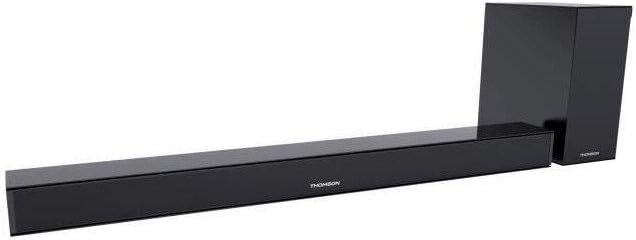
This image displays the Thomson SB260IBT soundbar unit alongside its accompanying subwoofer. The soundbar is a long, slender black unit, and the subwoofer is a compact black cube, both designed to complement modern home entertainment systems.
3.2 Kontrolna ploča i portovi
This image shows a close-up of the soundbar's side panel, revealing various control buttons and input/output ports. These include buttons for power, mode selection, volume control, and ports such as USB, SD card slot, and auxiliary input.
3.2.1 Prednja ploča
- LED indikator: Prikazuje trenutni način rada ili status.
- IC prijemnik: Za signale daljinskog upravljanja.
3.2.2 Zadnja ploča
- Ulazna snaga: Povezuje se na kabel za napajanje izmjeničnom strujom.
- OPTIČKI ulaz: For digital audio connection from a TV or other device.
- AUX ulaz: For analog audio connection using a 3.5mm cable.
3.2.3 Bočna ploča
- USB port: Za reprodukciju zvuka files sa USB drajva.
- Utor za SD karticu: Za reprodukciju zvuka files sa SD kartice.
- Kontrolna dugmad: Power, Mode, Volume Up/Down.
3.2.4 Daljinski upravljač
The remote control provides full functionality for power, input selection, volume adjustment, and playback controls.
4. Podešavanje
4.1 Postavljanje
Place the soundbar on a stable, flat surface directly in front of your television. Position the subwoofer on the floor near the soundbar for optimal bass response. Ensure adequate ventilation around both units.
4.2 Priključivanje na napajanje
- Spojite kabel za napajanje na ulaz za napajanje soundbara.
- Uključite drugi kraj kabla za napajanje u zidnu utičnicu.
- Connect the subwoofer to its power source (if separate).
4.3 Audio veze
4.3.1 Optička veza
For high-quality digital audio, connect an optical cable from your TV's optical output to the soundbar's OPTICAL input. Select 'Optical' mode on the soundbar.
4.3.2 AUX veza
Use a 3.5mm audio cable to connect your device's audio output (e.g., smartphone, MP3 player) to the soundbar's AUX input. Select 'AUX' mode on the soundbar.
4.3.3 Bluetooth veza
For wireless audio, select 'Bluetooth' mode on the soundbar. Refer to section 5.4 for detailed pairing instructions.
5. Uputstvo za upotrebu
5.1 Uključivanje/isključivanje napajanja
Pritisnite Snaga dugme na soundbaru ili daljinskom upravljaču da biste uključili ili isključili uređaj.
5.2 Odabir ulaza
Pritisnite Mode button on the soundbar or remote control to cycle through available input sources: Bluetooth, Optical, AUX, USB, SD Card. The LED indicator will show the selected mode.
5.3 Kontrola jačine zvuka
Koristite Jačina zvuka + i Zapremina - dugmad na soundbaru ili daljinskom upravljaču za podešavanje glavnog nivoa jačine zvuka.
5.4 Bluetooth uparivanje
- Uključite zvučnu traku i pritisnite Mode button to select Bluetooth mode. The LED indicator will flash, indicating it is in pairing mode.
- Na uređaju koji podržava Bluetooth (npr. pametni telefon, tablet) omogućite Bluetooth i potražite dostupne uređaje.
- Select "SB260IBT" from the list of found devices to pair.
- Once successfully paired, the soundbar's LED indicator will stop flashing and remain solid. You can now play audio from your device through the soundbar.
5.5 Reprodukcija sa USB-a/SD kartice
Insert a USB drive or SD card (containing compatible audio files) into the corresponding port on the soundbar's side panel. The soundbar will automatically switch to USB/SD mode and begin playback. Use the remote control for playback functions such as Play/Pause, Next Track, and Previous Track.
6. Održavanje
6.1 Čišćenje
Disconnect the soundbar from the power supply before cleaning. Use a soft, dry cloth to gently wipe the surfaces. Do not use liquid cleaners, abrasive materials, or chemical solvents, as these may damage the finish.
6.2 Skladištenje
If storing the unit for an extended period, disconnect it from power and store it in a cool, dry place, away from direct sunlight and extreme temperatures. It is recommended to keep the original packaging for storage.
7. Otkrivanje problema
| Problem | Rješenje |
|---|---|
| Nema snage | Check if the power cable is securely connected to the soundbar and the wall outlet. Ensure the wall outlet is functional. |
| Nema zvuka | Ensure the correct input source (e.g., Optical, AUX, Bluetooth) is selected. Check all audio cable connections. Increase the volume on both the soundbar and the connected device. |
| Bluetooth Disconnection or Failure to Pair | Ensure the device is within the Bluetooth operating range (approximately 10 meters). Turn off and on Bluetooth on your device, then try re-pairing. Ensure no other devices are actively connected to the soundbar. |
| Daljinski upravljač ne radi | Check the battery in the remote control and replace if necessary. Ensure there are no obstacles between the remote control and the soundbar's IR receiver. |
8. Specifikacije
- Naziv modela: SB260IBT
- Brand: Thomson
- Konfiguracija kanala: 2.1 Channel
- Maksimalna izlazna snaga: 200 Watts
- Tehnologija povezivanja: Bluetooth, Wired/Wireless
- Tip unosa: Multiple (Optical, AUX, USB, SD Card)
- Izvor napajanja: Corded Electric
- Metoda kontrole: Via App, Remote Control, On-unit Buttons
- Posebne karakteristike: Bluetooth
- Preporučena upotreba: For Computers, Gaming Consoles, Music Players, Smartphones or Tablets, Televisions
- Dimenzije proizvoda: 100 x 15 x 7 cm (Soundbar)
- Težina proizvoda: Approximately 3 kg (Soundbar and Subwoofer combined)
- Broj jedinica: 2 (Soundbar and Subwoofer)
- Otporan na vodu: br
- Vrsta montaže: Tabletop
9. Garancija i podrška
9.1 Informacije o garanciji
This product comes with a limited warranty. Please refer to the warranty card included in your package for specific terms and conditions, including the warranty period and coverage details. Retain your proof of purchase for warranty claims.
9.2 Korisnička podrška
For technical assistance, troubleshooting, or service inquiries, please contact Thomson customer support. Contact details can typically be found on the manufacturer's official website or in your product documentation. Please have your model number (SB260IBT) and purchase information ready when contacting support.


