1. Uvod
The Transcell TI-500 SL is a robust and reliable digital weighing indicator designed for industrial applications. This NTEP and Canadian certified device features a durable NEMA 4X stainless steel enclosure, ensuring protection in harsh environments. It is equipped with a large 0.8-inch backlit LCD screen for clear readability of up to 50,000 display divisions. The TI-500 SL supports up to four 350 Ohm load cells and offers full duplex RS-232 serial communication for integration with various support equipment. Power is supplied via an AC adapter or a rechargeable lead-acid battery, providing flexibility for continuous operation.
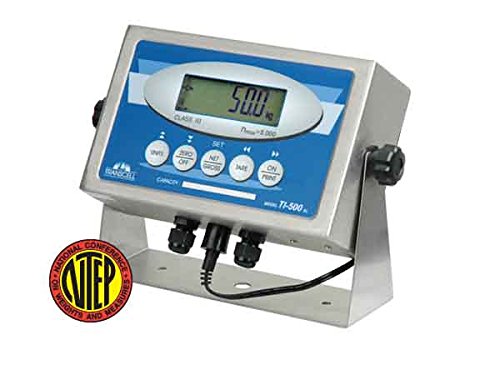
Okrenut prema naprijed view of the Transcell TI-500 SL Weighing Indicator. The device features a stainless steel enclosure with a blue and white control panel. A large digital LCD screen displays '50.0 kg'. Below the screen are several circular buttons for functions like 'UNITS', 'ZERO OFF', 'SET', 'NET GROSS', 'TARE', and 'ON PRINT'. A black cable extends from the bottom of the unit, and an NTEP certification seal is visible in the lower left corner.
2. Sigurnosne informacije
Please read all safety instructions carefully before operating the TI-500 SL indicator. Failure to comply with these instructions may result in injury or damage to the device.
Opća sigurnost
- Operate the device only in environments suitable for its NEMA 4X / IP65 rating.
- Do not attempt to open or repair the indicator yourself. Refer all servicing to qualified personnel.
- Keep the device away from excessive heat, moisture, and corrosive substances.
Električna sigurnost
- Use only the provided AC adapter for power and battery charging.
- Provjerite da li je utičnica pravilno uzemljena.
- Isključite napajanje prije čišćenja ili bilo kakvog održavanja.
3. Sadržaj paketa
Provjerite da li su sve stavke prisutne u paketu:
- Transcell TI-500 SL Weighing Indicator
- Stainless Steel Swivel Stand (pre-attached or separate)
- Napajanje ispravljač
- Korisnički priručnik (ovaj dokument)
4. Podešavanje
Fizička instalacija
- Place the TI-500 SL indicator on a stable, level surface. The integrated stainless steel swivel stand allows for adjustable viewing angles.
- Osigurajte adekvatnu ventilaciju oko uređaja.
Power Connection
- Connect the AC power adapter to the power input port on the indicator.
- Plug the AC adapter into a suitable power outlet. The internal rechargeable lead-acid battery will begin charging automatically.
Veza ćelije za opterećenje
The TI-500 SL is designed to drive up to four 350 Ohm load cells.
- Locate the load cell input terminals on the indicator. These are typically sealed connections to maintain the NEMA 4X rating.
- Carefully connect the load cell cables to the corresponding terminals, ensuring correct polarity and wiring as per the load cell manufacturer's instructions.
- Secure all connections to maintain the enclosure's integrity.
Početno uključivanje
Pritisnite ON/OFF button to power on the indicator. The display will perform a self-test and then show the current weight reading.
5. Uputstvo za upotrebu
The TI-500 SL features a user-friendly front panel with dedicated function keys.
Osnovno vaganje
Once powered on, the indicator will display the weight detected by the connected load cells. Ensure the scale platform is clear before taking a measurement.
Zeroing the Display
To set the display to zero when there is no load on the platform:
- Pritisnite ZERO OFF button. The display will reset to 0.00.
Taring (Net/Gross Weight)
To measure the net weight of an item by subtracting the weight of a container:
- Place the empty container on the scale platform.
- Pritisnite TARE button. The display will show 0.00 and the 'NET' indicator will illuminate.
- Add the item to be weighed into the container. The display will now show the net weight of the item.
- To return to gross weight, press the NETO BRUTO dugme.
Unit Conversion
To switch between available weighing units (e.g., kg, lb):
- Pritisnite JEDINICE button. The display will cycle through the configured units.
Printing Weight Data
If connected to a compatible printer via the RS-232 port:
- Pritisnite ON PRINT button to send the current weight reading to the connected device.
Kalibracija
Calibration procedures are typically performed by qualified technicians. Refer to the detailed technical manual or contact Transcell Technology support for calibration instructions. All setup parameters can be entered via the front panel keys during calibration mode.
6. Održavanje
Čišćenje
The NEMA 4X stainless steel enclosure allows for easy cleaning.
- Prije čišćenja isključite adapter za napajanje.
- Wipe the indicator with a damp krpom i blagim deterdžentom.
- Do not use abrasive cleaners or solvents that could damage the display or enclosure.
- Ensure all connections are sealed after cleaning.
Battery Care
The TI-500 SL is equipped with a rechargeable lead-acid battery.
- U potpunosti napunite bateriju prije prve upotrebe.
- Recharge the battery when the low battery indicator appears or when the display dims.
- For long-term storage, ensure the battery is fully charged and store the unit in a cool, dry place. Recharge periodically if stored for extended periods.
7. Otkrivanje problema
This section addresses common issues you might encounter with your TI-500 SL indicator.
| Problem | Mogući uzrok | Rješenje |
|---|---|---|
| Indicator does not power on. | No power from AC adapter; discharged battery; faulty power button. | Check AC adapter connection and power outlet. Charge battery for several hours. If problem persists, contact support. |
| Display shows 'OVERLOAD' or '-----'. | Load cell overload; faulty load cell connection. | Remove excess weight from the scale. Check load cell wiring and connections. |
| Netačna očitavanja težine. | Scale not level; calibration required; damaged load cell. | Ensure scale is on a level surface. Perform calibration (if qualified) or contact service. Inspect load cells for damage. |
| RS-232 communication failure. | Incorrect cable; wrong baud rate/settings; faulty port. | Verify cable type and connection. Check communication settings on both indicator and connected device. |
For issues not listed here or if solutions do not resolve the problem, please contact Transcell Technology customer support.
8. Specifikacije
| Feature | Opis |
|---|---|
| Model | TI-500 SL |
| Izgradnja | Stainless Steel NEMA 4X / IP65 |
| Display | 0.8 inch, 6 Digit LCD with LED backlight |
| Load Cells | Drives up to four 350 Ohm Load Cells |
| Serial Port | Full Duplex RS-232C |
| Snaga | AC Adapter or Rechargeable Lead Acid Battery |
| Posebne karakteristike | Backlit Display, High Weight Capacity (up to 50,000 display divisions), Large Display |
| Boja | Srebro |
| Dimenzije proizvoda | 2.9 x 5.5 x 8.9 inča |
| Težina | 3 funti |
9. Informacije o garanciji
Transcell Technology products are manufactured to high quality standards. For specific warranty terms and conditions, please refer to the warranty card included with your product or visit the official Transcell Technology webSačuvajte račun kao dokaz o kupovini za reklamacije u slučaju reklamacije.
10. Informacije o podršci
For technical assistance, troubleshooting beyond this manual, or service inquiries, please contact Transcell Technology customer support. Contact details can typically be found on the manufacturer's official webweb-mjestu ili na ambalaži proizvoda.
Manufacturer: Transcell Technology


