1. Uvod
The VisionTek VT1000 Universal Dual Full HD USB 3.0 Laptop Monitor Docking Station is designed to expand the connectivity of your laptop, whether it runs Windows, macOS, or Chrome OS. This docking station allows you to connect to dual displays and a variety of peripherals through a single USB connection, transforming your laptop into a complete workstation.
Product Overview
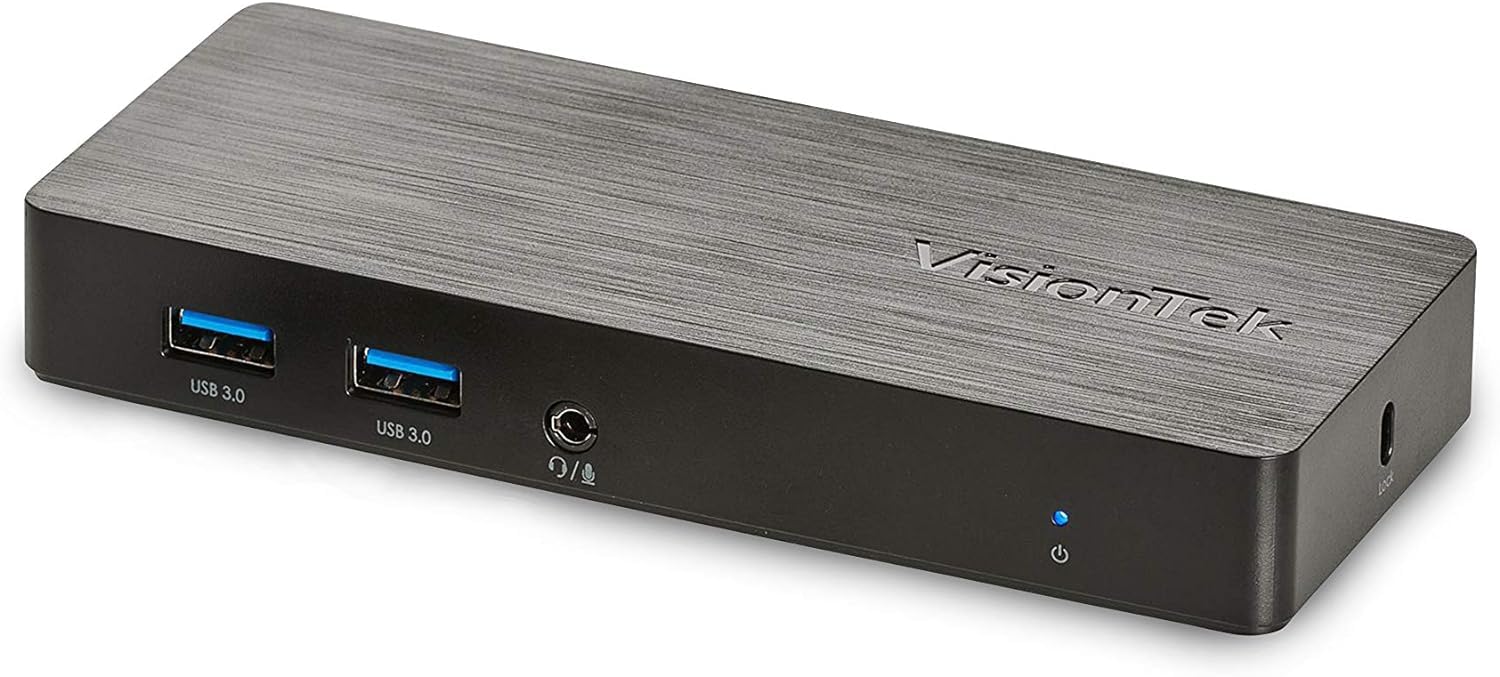
Slika: Front view of the VisionTek VT1000 docking station.
Šta je u kutiji
- VT1000 Dual Display Univerzalna USB 3.0 priključna stanica
- USB 3.0 kabel
- Korisnički priručnik (Vodič za brzu instalaciju)
- Adapter za napajanje

Image: The VisionTek VT1000 docking station and its included accessories.
2. Ključne karakteristike
- Dual Full HD Displays: Connect two monitors to your laptop with full HD resolution (1920 x 1080 @ 60Hz) via 1x DisplayPort, 1x HDMI, and 1x 1080P VGA.
- Prošireno povezivanje: Features 3x USB 3.0 ports (5 Gbps transfer speed), 1x RJ45 (10/100/1000) Gigabit Ethernet port, and a headphone audio line in/out jack.
- Plug and Display: Utilizes DisplayLink drivers for plug-and-play functionality, simplifying setup for various workspaces.
- Široka kompatibilnost operativnog sistema: Compatible with Ultrabook, MacBook, Microsoft Surface Pro, Chromebook, Windows 11, Windows 10, Windows 8.1, Windows 7, and Mac OS 10.13 and up operating systems.
- Kompaktan dizajn: Designed to be compact, taking up minimal desk space while providing extensive functionality.
3. Portovi i indikatori
The VT1000 docking station provides a comprehensive set of ports for various connectivity needs. Refer to the video below for a visual guide to the ports.
Prednja ploča
- 2x USB 3.0 porta: Za povezivanje USB uređaja velike brzine.
- Audio izlaz (priključak za slušalice): Za spajanje slušalica ili eksternih zvučnika.
- Ulaz mikrofona: Za povezivanje mikrofona.
- LED indikator napajanja: Illuminates when the dock is powered on.
Zadnja ploča
- 1x VGA priključak: For connecting a VGA monitor.
- 1x HDMI priključak: For connecting an HDMI monitor.
- 1x DisplayPort: For connecting a DisplayPort monitor.
- 1x RJ45 Gigabit Ethernet Port: Za žičanu mrežnu vezu.
- 1x USB 3.0 priključak: Za povezivanje USB uređaja velike brzine.
- USB-B Port (Upstream): For connecting the dock to your laptop via the included USB 3.0 cable.
- DC 5V Ulaz napajanja: Za povezivanje strujnog adaptera.
- Utor za sigurnosnu bravu: For securing the docking station.
Official Product Video: VisionTek VT1000 Universal Dual Display USB 3.0 Dock
Video: This official VisionTek video provides a visual overview of the VT1000 docking station, highlighting its features, ports, and connectivity options. It demonstrates how the dock can expand your laptop's capabilities into a full workstation.
4. Upute za postavljanje
- Priključite napajanje: Plug the included power adapter into the DC 5V input port on the rear of the VT1000 docking station, then plug the adapter into a power outlet. The power indicator LED on the front of the dock should illuminate.
- Povežite se s laptopom: Use the provided USB 3.0 cable to connect the USB-B port on the rear of the docking station to an available USB 3.0 port on your laptop.
- Povežite monitore: Connect your external monitors to the desired video output ports on the rear of the docking station (HDMI, DisplayPort, or VGA). The VT1000 supports dual displays.
- Povežite periferne uređaje: Connect your keyboard, mouse, external hard drives, printers, webcams, or other USB devices to the USB 3.0 ports on the front and rear of the docking station.
- Poveži mrežu (opciono): For a wired internet connection, connect an Ethernet cable from your router or network switch to the RJ45 Gigabit Ethernet port on the rear of the docking station.
- Povežite audio (opcionalno): If desired, connect headphones or speakers to the audio out jack and a microphone to the mic in jack on the front of the docking station.
- Instalacija drajvera: The VT1000 features DisplayLink Plug and Play technology, typically requiring no manual driver installation on compatible operating systems. If prompted, follow on-screen instructions or visit the VisionTek support website for the latest DisplayLink drivers.
5. Uputstvo za upotrebu
Once the VT1000 docking station is set up, it operates seamlessly with your connected laptop.
- Konfiguracija zaslona: After connecting your monitors, your operating system should automatically detect them. You can configure display settings (e.g., extend, duplicate, primary display) through your computer's display settings.
- Upotreba USB uređaja: Povezani USB uređaji će funkcionirati kao da su direktno povezani s vašim laptopom.
- Pristup mreži: The Gigabit Ethernet port provides a stable and fast wired network connection.
- Funkcionalnost zvuka: The audio ports allow for external audio output and microphone input. Ensure your operating system's sound settings are configured to use the docking station's audio device.
- Upravljanje napajanjem: The docking station requires external power and does not supply power to your laptop. Ensure your laptop's power adapter is connected for charging.
6. Specifikacije
| Feature | Detalj |
|---|---|
| Brand | VisionTek |
| Broj modela | 901147 (VT1000 Series) |
| Kompatibilnost operativnog sistema | Windows 11, Windows 10, Windows 8.1, Windows 7, macOS 10.13 and later, Chrome OS |
| Težina artikla | 8 unce |
| Dimenzije proizvoda (DxŠxV) | 5.95 x 2.8 x 0.8 inča |
| Hardversko sučelje | DisplayPort, Ethernet, HDMI, USB, USB 3.0, VGA |
| Kompatibilni uređaji | Laptop |
| Ukupni USB portovi | 3 (USB 3.0) |
| Ukupni HDMI portovi | 1 |
| Wattage | 20 Watts |
7. Otkrivanje problema
- Nema izlaza za prikaz:
- Ensure the docking station's power adapter is securely connected and the power indicator LED is on.
- Verify that the USB 3.0 cable connecting the dock to your laptop is firmly seated at both ends.
- Check that monitor cables (HDMI, DisplayPort, VGA) are securely connected to both the dock and the monitors.
- Provjerite jesu li vaši monitori uključeni i postavljeni na ispravan ulazni izvor.
- Ponovo pokrenite laptop i priključnu stanicu.
- Ensure DisplayLink drivers are installed and up-to-date, if necessary. Although typically plug-and-play, some systems may benefit from manual driver installation from the DisplayLink website.
- USB uređaji ne rade:
- Provjerite je li priključna stanica uključena i povezana s vašim laptopom.
- Try connecting the USB device to a different USB port on the dock or directly to your laptop to rule out device issues.
- Some high-power USB devices may require their own external power supply.
- Problemi s mrežnom vezom:
- Verify the Ethernet cable is securely connected to both the dock and your network.
- Check your laptop's network settings to ensure the Ethernet adapter is enabled.
- Restart your router/modem, the docking station, and your laptop.
- Zvuk ne radi:
- Check your laptop's sound settings to ensure the docking station's audio output is selected as the default playback device.
- Ensure headphones/speakers are properly connected to the audio out jack.
- Adjust volume levels on both your laptop and the connected audio device.
8. Održavanje
- čišćenje: Za čišćenje vanjske strane priključne stanice koristite meku, suhu krpu. Izbjegavajte upotrebu tečnih sredstava za čišćenje ili rastvarača.
- Skladištenje: Store the docking station in a cool, dry place away from direct sunlight and extreme temperatures when not in use for extended periods.
- Upravljanje kablovima: Pazite da kablovi nisu previše savijeni ili zapetljani kako biste spriječili oštećenje.
9. Garancija i podrška
The VisionTek VT1000 Universal Dual Full HD USB 3.0 Laptop Monitor Docking Station comes with a 2 godine ograničene garancije. To ensure coverage, register your product with VisionTek within 30 days of purchase.
VisionTek offers excellent US-based customer support for any technical assistance or inquiries you may have. For support, please visit the official VisionTek webweb-mjesto ili pogledajte kontakt informacije navedene na pakovanju vašeg proizvoda.
For further information and driver downloads, please visit: VisionTek podrška


