1. Uvod
Hvala na kupoviniasing the Sharp HT-SB140MT 2.0 150W Soundbar. This soundbar is designed to enhance your audio experience, providing clear and powerful sound for your television, music, and other media. With its sleek design and versatile connectivity options, including Bluetooth, HDMI ARC/CEC, Optical, and Auxiliary inputs, it integrates seamlessly into any home entertainment setup. This manual provides essential information for safe and effective use, including setup, operation, maintenance, and troubleshooting.
2. Sigurnosne informacije
- Izvor napajanja: Osigurajte napajanje voltage matches the requirements specified on the soundbar. Use only the provided power cable.
- ventilacija: Do not block any ventilation openings. Maintain adequate space around the soundbar for proper airflow.
- Voda i vlaga: Ne izlažite zvučnu traku kapanju ili prskanju vode. Ne stavljajte na uređaj predmete napunjene tekućinom, poput vaza.
- toplina: Do not place the soundbar near heat sources such as radiators, heat registers, stoves, or other apparatus (including ampLifiers) koji proizvode toplotu.
- čišćenje: Unplug the soundbar from the power outlet before cleaning. Use a dry, soft cloth for cleaning. Do not use liquid cleaners or aerosol cleaners.
- servisiranje: Ne pokušavajte sami servisirati ovaj proizvod. Sve servise prepustite kvalificiranom servisnom osoblju.
- baterije: The remote control uses a CR2 battery. Ensure correct polarity when inserting batteries. Do not mix old and new batteries.
3. Sadržaj paketa
Molimo Vas da provjerite da li se u paketu nalaze svi artikli:
- Sharp HT-SB140MT Soundbar
- Daljinski upravljač
- Power Cable
- Korisnički priručnik (ovaj dokument)
4. Proizvod je gotovview

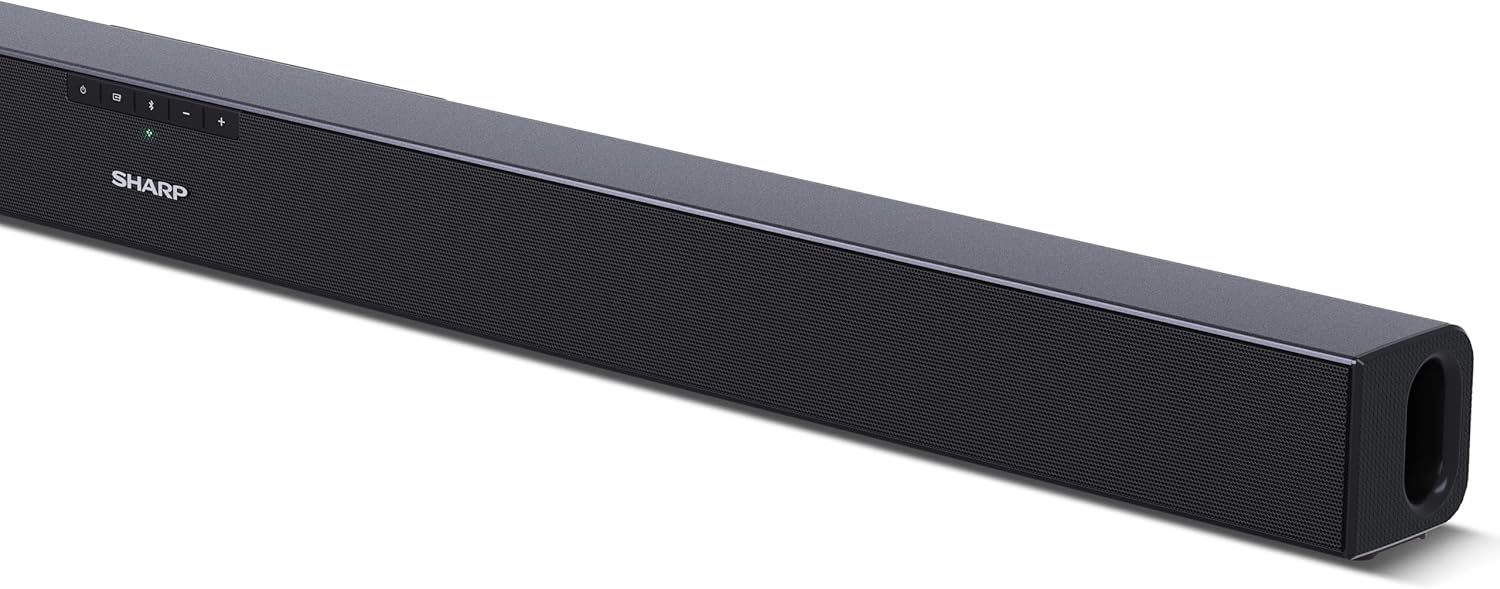
Slika 4.1: Prednja strana View
The front of the soundbar features the Sharp logo and LED indicators for source selection and status. Control buttons for power, input, and volume are located on the top panel.
Slika 4.2: Pozadi View (Connections)
The rear panel provides all necessary connection ports: HDMI ARC, Optical (S/PDIF), and Auxiliary (3.5mm) input, along with the power input.

Slika 4.3: Daljinski upravljač
The included remote control allows for convenient operation of the soundbar, including power, input selection, volume, bass, and treble adjustments.
5. Podešavanje
5.1 Postavljanje
The Sharp HT-SB140MT Soundbar can be placed on a flat surface, such as a TV stand, or wall-mounted. Its slim profile of 6 cm allows it to fit easily under most TV screens without obstructing the view.

Figure 5.1: Soundbar Placement
The soundbar is ideally positioned directly in front of your television for optimal sound projection.
5.2 Povezivanje s TV-om
Odaberite jedan od sljedećih načina povezivanja:
- HDMI ARC/CEC (Recommended): Connect an HDMI cable (not included) from the HDMI ARC port on your TV to the HDMI ARC port on the soundbar. This allows your TV remote to control the soundbar's volume and power. Ensure HDMI ARC/CEC is enabled in your TV's settings.
- Digital Optical Audio (S/PDIF): Connect an optical cable (not included) from the Optical Out port on your TV to the OPTICAL IN port on the soundbar. Select the Optical input on the soundbar.
- Pomoćni (AUX): Connect a 3.5mm audio cable (not included) from the headphone jack or AUX Out port on your TV to the AUX IN port on the soundbar. Select the AUX input on the soundbar.
5.3 Priključak za napajanje
After connecting the audio cable, plug the power cable into the soundbar's power input and then into a wall outlet (220-240V / 50Hz).
6. Uputstvo za upotrebu
6.1 Uključivanje/isključivanje napajanja
Press the Power button on the soundbar or the remote control to turn the unit on or off.
6.2 Odabir izvora
Press the Input button on the soundbar or the remote control repeatedly to cycle through the available input sources: HDMI ARC, Optical, AUX, and Bluetooth. The LED indicator on the soundbar will change to reflect the selected source.
6.3 Podešavanje jačine zvuka
Use the Volume Up (+) and Volume Down (-) buttons on the soundbar or the remote control to adjust the sound level.
6.4 Bluetooth uparivanje
Za povezivanje Bluetooth uređaja:
- Select Bluetooth input on the soundbar. The Bluetooth LED indicator will flash, indicating pairing mode.
- Na svom pametnom uređaju (pametnom telefonu, tabletu itd.) omogućite Bluetooth i potražite dostupne uređaje.
- Select "SHARP HT-SB140MT" from the list of devices.
- Once connected, the Bluetooth LED indicator will stop flashing and remain solid. You can now stream audio wirelessly to the soundbar.
6.5 Sound Modes (Equalizer)
The soundbar features an equalizer with different sound modes to optimize audio for various content types. Use the EQ button on the remote control to cycle through these modes (e.g., Movie, Music, News). You can also adjust Bass and Treble levels using dedicated buttons on the remote.
7. Održavanje
7.1 Čišćenje
To clean the soundbar, unplug it from the power outlet. Use a soft, dry, lint-free cloth to wipe down the surfaces. Do not use abrasive cleaners, waxes, or solvents as they may damage the finish.
7.2 Skladištenje
If you plan to store the soundbar for an extended period, disconnect it from the power supply and store it in a cool, dry place, away from direct sunlight and extreme temperatures.
8. Otkrivanje problema
Ako naiđete na probleme sa soundbarom, pogledajte sljedeće uobičajene probleme i rješenja:
| Problem | Mogući uzrok | Rješenje |
|---|---|---|
| Nema zvuka sa soundbara. | Soundbar je isključen ili je zvuk utišan. Odabran je pogrešan ulazni izvor. Cables are not connected properly. Postavke audio izlaza TV-a su netačne. | Ensure the soundbar is powered on and not muted. Select the correct input source (HDMI ARC, Optical, AUX). Check all cable connections (HDMI, Optical, AUX). Verify your TV's audio output settings are set to external speakers or the correct digital output. |
| Bluetooth uređaj se ne može povezati. | Soundbar is not in pairing mode. Uređaj je izvan dometa. Smetnje od drugih uređaja. | Ensure the soundbar is in Bluetooth input mode and the LED is flashing. Približite svoj Bluetooth uređaj soundbaru (unutar 10 metara). Turn off other Bluetooth devices nearby. Try unpairing and re-pairing. |
| Daljinski upravljač ne radi. | Battery is low or inserted incorrectly. Prepreka između daljinskog upravljača i soundbara. Remote control is faulty. | Zamijenite bateriju CR2 i provjerite ispravan polaritet. Remove any obstructions between the remote and the soundbar's sensor. Ako problemi i dalje postoje, kontaktirajte korisničku podršku. |
9. Specifikacije
| Naziv modela | HT-SB140(MT) |
| Vrsta zvučnika | Soundbar |
| Konfiguracija kanala surround zvuka | 2.0 |
| Maksimalna izlazna snaga zvučnika | 150 Watts |
| Frekvencijski odziv | 60 Hz |
| Tehnologija povezivanja | Bluetooth, HDMI ARC/CEC, Digital Optical Audio (S/PDIF), 3.5mm Auxiliary (AUX) |
| Bežična komunikacijska tehnologija | Bluetooth |
| Maksimalni domet (Bluetooth) | 10 metara |
| Kontrolni metod | Daljinski upravljač |
| Izvor napajanja | AC (Mains) |
| Ulazni voltage | 220-240 Volti |
| Boja | Crna |
| Materijal | Plastika, metal |
| Vrsta montaže | Zidni nosač, stolna ploča |
| Dimenzije proizvoda (D x Š x V) | 95 x 6 x 6 cm |
| Težina artikla | 1.5 kilograma |
| Uključene komponente | Daljinski upravljač |
| Potrebna baterija | 1 baterija CR2 |
| Vodootporan | br |
| Dostupnost rezervnih dijelova | 5 godina |
| Ažuriranja softvera zagarantovana do | Informacije nisu dostupne |
10. Garancija i podrška
The Sharp HT-SB140MT Soundbar comes with a Limited Warranty. Please refer to the warranty card included in your package for specific terms and conditions. Spare parts are available for up to 5 years from the date of purchase.
For technical support, service, or warranty claims, please contact Sharp customer service through their official website or the contact information provided in your product documentation. When contacting support, please have your product model number (HT-SB140(MT)) and purchase details ready.


