1. Proizvod je gotovview
The Sharp EL-531TG-GY is a scientific calculator designed for students and professionals requiring advanced mathematical functions. It features a 2-line display and Multi-Line Playback, facilitating the input and review of complex equations. This model is suitable for general math, algebra, geometry, trigonometry, statistics, biology, chemistry, and general science applications.
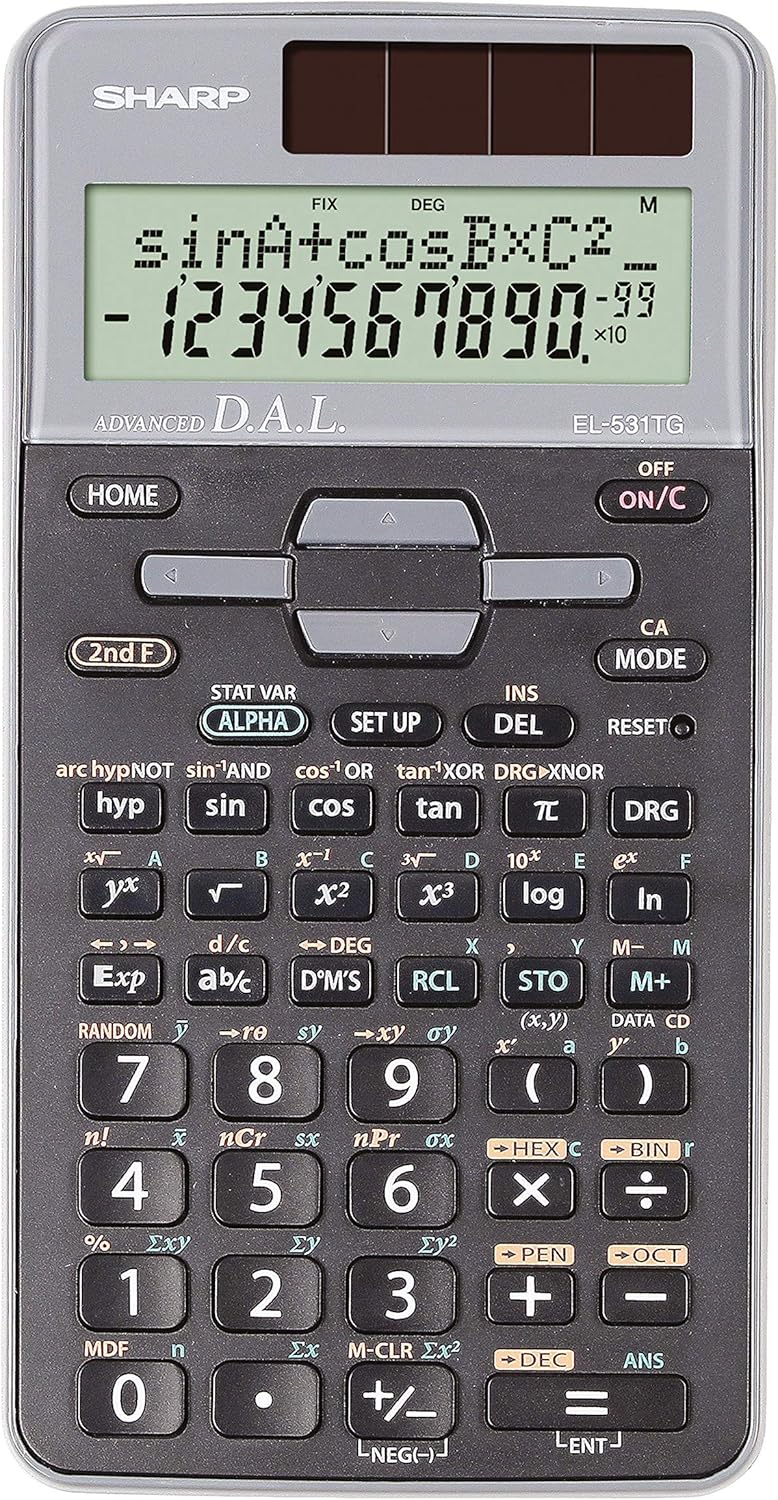
Slika 1: Prednja strana view of the Sharp EL-531TG-GY Scientific Calculator, showing the display, keypad, and solar panel.
2. Postavljanje i početna upotreba
2.1 Izvor napajanja
The EL-531TG-GY calculator operates using both solar power and a single LR44 button cell battery. The solar panel provides power in well-lit environments, while the battery ensures operation in low-light conditions or when solar power is insufficient. An LR44 battery is included with the calculator.
2.2 Uključivanje/isključivanje
- Da biste uključili kalkulator ON, pritisnite ON/C ključ.
- Da biste uključili kalkulator OFF, pritisnite 2. F nakon čega slijedi OFF key (which is typically the same as ON/C).
2.3 Initial Display Settings
Upon first use or after a reset, the calculator will typically default to certain settings (e.g., DEG for angle units). Refer to Section 3.3 for details on changing mode settings.
3. Uputstvo za upotrebu
3.1 Osnovne aritmetičke operacije
Unesite brojeve pomoću numeričke tastature. Koristite +, -, ×, i ÷ tipke za sabiranje, oduzimanje, množenje i dijeljenje, respektivno. Pritisnite = da se dobije rezultat.
3.2 Naučne funkcije
The calculator performs over 273 advanced scientific functions. Many functions are accessed by pressing the 2. F tipku prije željene funkcijske tipke.
- Trigonometrijske funkcije: Koristi grijeh, cos, tan. Inverse functions (sin⁻¹, cos⁻¹, tan⁻¹) se pristupa putem 2. F.
- Logaritamske funkcije: Koristi log (baza 10) i ln (prirodni logaritam).
- Moći i korijeni: Koristi x², √, x³, ³√.
- razlomci: Koristite danak tipka za unos i pretvorbu razlomaka.
3.3 Mode Settings (DEG/RAD/GRAD)
To change the angle unit mode (Degrees, Radians, Gradians):
- Pritisnite DRG ključ.
- Više puta pritisnite DRG to cycle through DEG (Degrees), RAD (Radians), and GRAD (Gradians). The current mode is indicated on the display.
3.4 Funkcije memorije
The calculator includes memory functions for storing and recalling values.
- STO (Store): Pritisnite STO followed by a variable key (e.g., A, B) to store the displayed value.
- RCL (Recall): Pritisnite RCL followed by the variable key to recall the stored value.
- M+ (Memorija Plus): Dodaje prikazanu vrijednost u nezavisnu memoriju.
- M- (minus memorije): Oduzima prikazanu vrijednost od nezavisne memorije.
3.5 Multi-Line Playback
The 2-line display allows for Multi-Line Playback, enabling users to review previous calculations and expressions. Use the directional arrow keys (up/down) to scroll through past entries and results. This feature is useful for checking work or re-using parts of previous calculations.
4. Održavanje
4.1 Čišćenje
To clean the calculator, wipe the surface gently with a soft, dry cloth. Do not use abrasive cleaners, solvents, or excessive moisture, as these can damage the display or internal components.
4.2 Zamjena baterije
The calculator uses one LR44 button cell battery. If the display becomes dim or erratic in low-light conditions, the battery may need replacement. To replace the battery:
- Provjerite je li kalkulator isključen.
- Pronađite odjeljak za baterije na stražnjoj strani kalkulatora.
- Pažljivo otvorite poklopac pretinca.
- Izvadite staru LR44 bateriju i umetnite novu, pazeći na ispravan polaritet (+/-).
- Čvrsto zatvorite poklopac odeljka za baterije.
4.3 Skladištenje
When not in use, store the calculator in a cool, dry place away from direct sunlight and extreme temperatures. The hard cover included with the calculator provides protection from scratches and minor impacts.
5. Otkrivanje problema
5.1 Problemi sa prikazom
- Prazan ili taman ekran: Ensure sufficient light for the solar panel. If the issue persists, replace the LR44 battery.
- Erratic Display: This may indicate a low battery. Replace the LR44 battery.
5.2 Netačni rezultati
- Check Mode Settings: Verify that the angle unit (DEG, RAD, GRAD) is set correctly for trigonometric calculations.
- Input Error: Review your input using the Multi-Line Playback feature to ensure the expression was entered correctly.
- Memory Contents: If using memory functions, ensure the stored values are correct.
5.3 Kalkulator ne reaguje
Ako kalkulator prestane reagirati, pokušajte izvršiti resetiranje. Pronađite RESET button (often a small recessed button requiring a thin object like a paperclip to press). Pressing this button will clear all memory and return the calculator to its factory default settings.
6. Specifikacije

Slika 2: Prednja strana view of the Sharp EL-531TG-GY Scientific Calculator, illustrating its dimensions.
| Feature | Opis |
|---|---|
| Broj modela | SH-EL531TGGY |
| Display Type | 2-line LCD with Multi-Line Playback |
| Funkcije | Over 273 advanced scientific functions |
| Izvor napajanja | Solar and 1 x LR44 battery (included) |
| Materijal | Plastika |
| Dimenzije (D x Š x V) | 16.1 x 8 x 1.5 cm (otprilike) |
| Težina | 100 g (približno) |

Slika 3: Bočna strana view of the Sharp EL-531TG-GY Scientific Calculator, showing its slim profile.
7. Garancija i podrška
7.1 Informacije o garanciji
This product is covered by a manufacturer's warranty. Please refer to the warranty card included with your purchase or visit the official Sharp webweb stranicu za detaljne uslove garancije specifične za vašu regiju.
7.2 Korisnička podrška
For technical assistance, troubleshooting not covered in this manual, or service inquiries, please contact Sharp customer support. Contact information can typically be found on the Sharp official webweb-mjestu ili na ambalaži proizvoda.


