1. Uvod
This manual provides essential information for the safe and efficient operation of your AUXUS iRis AX32LSP01-SM 32-inch Smart Android LED TV. Please read these instructions thoroughly before using the product and retain them for future reference.
The AUXUS iRis AX32LSP01-SM features a 32-inch HD Ready LED display, integrated Android operating system for smart functionality, wireless display capabilities, and multiple connectivity options. It is designed to provide an immersive viewing and interactive experience.

Slika 1.1: Prednja strana view of the AUXUS iRis 32-inch Smart Android LED TV, showcasinnjegov prikaz.
2. Sigurnosne informacije
Pridržavajte se sljedećih sigurnosnih mjera opreza kako biste spriječili oštećenje televizora i osigurali ličnu sigurnost:
- Ne izlažite TV kiši ili vlazi kako biste spriječili požar ili strujni udar.
- Ne otvarajte TV casing. Za sve servisne radove obratite se kvalifikovanom osoblju.
- Osigurajte odgovarajuću ventilaciju. Ne blokirajte ventilacijske otvore.
- Postavite televizor na stabilnu, ravnu površinu kako biste spriječili njegov pad.
- Zaštitite kabl za napajanje od gaženja ili priklještenja.
- Isključite televizor iz struje tokom oluje sa grmljavinom ili kada ga ne koristite duži period.
3. Sadržaj paketa
Provjerite da li su sve stavke prisutne u paketu:
- 1 x AUXUS iRis 32-inch LED TV
- 1 x Table Top Stand (set)
- 1 x Korisnički priručnik (ovaj dokument)
- 1 x Garantni list
- 1 x daljinski upravljač
4. Podešavanje
4.1 Raspakivanje
Pažljivo izvadite TV i svu dodatnu opremu iz ambalaže. Sačuvajte ambalažni materijal za budući transport ili servisiranje.
4.2 Instalacija postolja
If using the table-top stand, attach the stand bases to the bottom of the TV using the provided screws. Ensure the stand is securely fastened before placing the TV on a flat, stable surface.
4.3 Montaža na zid
The TV supports VESA-compatible wall mounts (not included). Consult a professional for wall mounting to ensure proper installation and safety.
4.4 Povezivanje perifernih uređaja
Refer to the back panel diagram for port locations. Ensure the TV is powered off before making any connections.
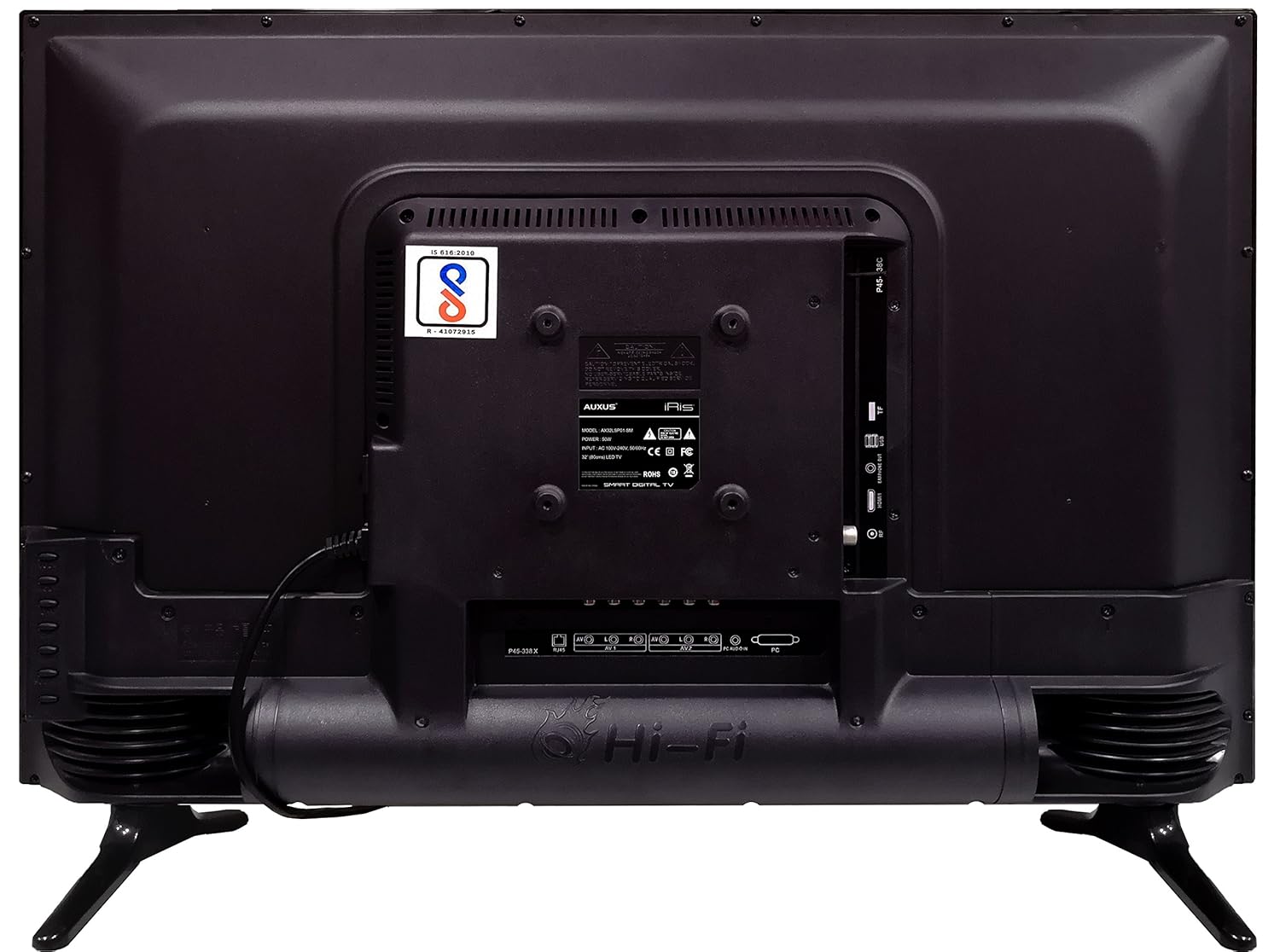
Figure 4.1: Rear panel of the TV with various input/output ports.

Slika 4.2: Detaljno view of the bottom interface ports.

Figure 4.3: Icons representing multiple connectivity options.
- Snaga: Spojite kabel za napajanje na TV, a zatim na zidnu utičnicu.
- Antena/kabel: Connect an antenna or cable TV signal to the RF port.
- USB: Insert USB drives for media playback or software updates into the USB ports. The TV has 2 USB ports.
- Ethernet (RJ45): Spojite Ethernet kabel za žičanu internetsku vezu.
- AV (Audio/Video): Use RCA cables for older devices. The TV has AV1 and AV2 inputs.
- PC IN (VGA): Connect a computer using a VGA cable for video and a 3.5mm audio cable for sound (PC AUDIO IN).
- slušalice: Connect headphones to the 3.5mm jack for private listening.
5. Upravljanje televizorom
5.1 Prvo podešavanje
- After connecting the power, press the Power button on the remote control or TV.
- Follow the on-screen prompts to select your language, country, and time zone.
- Connect to your network: Choose Wi-Fi and enter your password, or ensure an Ethernet cable is connected.
- Complete the channel scan if connecting an antenna/cable.
5.2 Daljinski upravljač
The remote control allows you to navigate menus, adjust volume, change channels, and access smart features. Familiarize yourself with its buttons for optimal use.
5.3 Funkcije pametnog TV-a (Android OS)
Your TV runs on the Android operating system, providing access to a variety of applications and internet services.

Figure 5.1: TV displaying a smart interface, such as Netflix.
- Navigacija: Use the directional pad and 'OK' button on the remote to browse the Android interface.
- Bežični ekran: Utilize the built-in wireless display feature to mirror content from compatible smartphones or tablets to your TV.
- Internet Browsing & Apps: Connect to the internet to browse websites or download and use applications from the app store.
- igranje igara: The Android platform supports various games, offering an adrenaline-pumping gaming experience.
5.4 Postavke slike i zvuka
Pristupite meniju postavki televizora da biste prilagodili postavke slike i zvuka.
- slika: Adjust brightness, contrast, color, sharpness, and select picture modes (e.g., Standard, Dynamic, Movie).
- zvuk: Optimize audio with settings for volume, balance, equalizer, and sound modes. The TV features 'Boomr Speakers' for enhanced audio output.
5.5 Odabir ulaznog izvora
Press the 'Source' or 'Input' button on your remote to switch between connected devices (HDMI 1, HDMI 2, AV 1, AV 2, PC, TV).
6. Održavanje
6.1 Čišćenje televizora
- Uvijek isključite TV iz struje prije čišćenja.
- Use a soft, dry cloth to wipe the screen and TV casing.
- For stubborn marks on the screen, use a screen cleaner specifically designed for LED displays, applied to the cloth, not directly to the screen.
- Izbjegavajte korištenje abrazivnih sredstava za čišćenje, voskova ili rastvarača.
6.2 Ažuriranja softvera
Povremeno provjeravajte ažuriranja softvera putem menija postavki televizora kako biste osigurali optimalne performanse i pristup najnovijim funkcijama.
7. Otkrivanje problema
Ako imate problema s televizorom, pogledajte sljedeće uobičajene probleme i rješenja:
| Problem | Moguće rješenje |
|---|---|
| Nema struje | Check if the power cord is securely connected and the power outlet is working. |
| Nema slike, ali je zvuk prisutan | Provjerite je li odabran ispravan ulazni izvor. Provjerite kablovske veze s vanjskim uređajima. |
| Nema zvuka, ali je slika prisutna | Provjerite nivo jačine zvuka i status isključivanja zvuka. Provjerite veze audio kabla. |
| Daljinski upravljač ne radi | Zamijenite baterije. Provjerite da nema prepreka između daljinskog upravljača i televizora. |
| Android system hangs or is slow | Restart the TV by unplugging it for a few minutes. Close unused applications. |
| Problemi s mrežnom vezom | Check Wi-Fi password or Ethernet cable connection. Restart your router. |
8. Specifikacije
| Feature | Specifikacija |
|---|---|
| Brand | AUXUS |
| Naziv modela | AX32LSP01-SM |
| Veličina ekrana | 32 inča (82 cm) |
| Display Technology | LED, IPS panel |
| Rezolucija | HD Ready (1366 x 768p) |
| Viewing Angle | 178 stepeni |
| Operativni sistem | Android |
| Digital Storage Capacity | 8 GB |
| RAM | 1 GB |
| Način audio izlaza | Surround (Boomr Speakers) |
| HDMI portovi | Višestruko |
| USB portovi | 2 |
| Tehnologija povezivanja | Ethernet, Wi-Fi (Wireless Display) |
| Ostale luke | AV (RCA), PC IN (VGA), PC Audio In, Headphone (3.5mm), RF (Antenna) |
| Vrsta montaže | Zidni nosač / Stolni stalak |
| Dimenzije proizvoda (DxŠxV) | 84 x 13 x 59 cm |
| Težina artikla | 6.5 kg |
9. Garancija i podrška
Your AUXUS iRis AX32LSP01-SM TV comes with a warranty. Please refer to the included Warranty Card for specific terms, conditions, and duration of the warranty coverage.
For technical support, service requests, or further inquiries, please contact AUXUS customer service. Contact details can typically be found on the warranty card or the official AUXUS website.


