1. Uvod i krajview
The DJI Mavic Air is a compact, foldable drone designed for portability and advanced aerial photography. It features a 3-axis gimbal with a 4K camera, 32 MP sphere panoramas, and intelligent flight modes for an enhanced user experience. This manual provides essential information for setting up, operating, and maintaining your Mavic Air drone.

Figure 1: DJI Mavic Air drone in Arctic White.
2. Sadržaj paketa
The DJI Mavic Air Fly More Combo package includes the following items:
- MAVIC AIR avion
- Daljinski upravljač za MAVIC AIR
- Three Intelligent Flight Batteries
- Zaštitnik za gimbal MAVIC AIR
- Six pairs of Quick-Release Propellers
- Two Control Sticks
- Torba za nošenje MAVIC AIR-a
- Propeller Guards (set)
- MAVIC AIR Travel Bag
- MAVIC AIR Battery Charging Hub
- MAVIC AIR Battery to Power Bank Adapter
- RC kabel (Lightning konektor)
- RC kabl (standardni mikro USB konektor)
- RC kabel (USB priključak tipa C)
- Communication Cable (USB 3.0 Type-C)
- USB adapter
- Two RC Cable Sliders (large)
- Two RC Cable Sliders (small)
- Ostala dodatna oprema
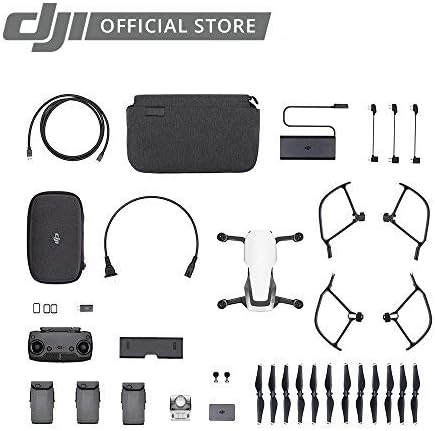
Figure 2: Contents of the DJI Mavic Air Fly More Combo.
3. Podešavanje
3.1 Rasklapanje aviona
- Gently unfold the front arms of the drone.
- Rasklopite zadnje krakove. Provjerite da li su svi krakovi sigurno uglavljeni na svoje mjesto.
Video 1: Demonstrating the folding and unfolding of the DJI Mavic Air drone arms.
3.2 Instalacija baterije
- Uvjerite se da je baterija Intelligent Flight baterija potpuno napunjena.
- Slide the battery into the battery compartment on the top of the aircraft until it clicks into place.
3.3 Podešavanje daljinskog upravljača
- Rasklopiti mobilni uređaj klamps on the remote controller.
- Attach your smartphone to the remote controller using the appropriate RC cable (Lightning, Micro USB, or USB Type-C).
- Ensure the control sticks are securely screwed into place.
Video 2: Attaching a smartphone to the DJI Mavic Air remote controller.
3.4 DJI GO 4 App
Download and install the DJI GO 4 app on your mobile device. This app is essential for controlling the drone, accessing flight modes, and viewučitavanje videa s kamere.
4. Uputstvo za upotrebu
4.1 Uključivanje/isključivanje
- To power on the aircraft and remote controller, press the power button once, then press and hold it for two seconds.
- To power off, repeat the same procedure.
4.2 Polijetanje i slijetanje
- Automatsko poletanje: In the DJI GO 4 app, tap the auto-takeoff icon and confirm. The drone will ascend to a preset height.
- Ručno polijetanje: Push both control sticks to the bottom inner or outer corners to start the motors. Then, push the left stick up to ascend.
- Automatsko slijetanje: In the DJI GO 4 app, tap the auto-landing icon and confirm. The drone will descend and land automatically.
- Ručno sletanje: Pull the left control stick down slowly to descend. Once landed, hold the stick down for a few seconds to stop the motors.
4.3 Režimi letenja
The Mavic Air offers various flight modes:
- P-Mode (Positioning): Provides GPS and vision positioning for stable flight and obstacle avoidance.
- S-Mode (Sport): Increases flight speed and agility, disabling obstacle avoidance. Use with caution.
- T-Mode (Tripod): Limits flight speed for precise control and stable shots.
4.4 Inteligentni režimi letenja
Access these modes via the DJI GO 4 app:
- QuickShots: Pre-programmed flight paths for cinematic shots (Rocket, Dronie, Circle, Helix, Asteroid, Boomerang).
- ActiveTrack: Follows a selected subject automatically.
- TapFly: Tap a point on your screen, and the drone will fly to it while avoiding obstacles.
- Pametno snimanje: Control the drone with hand gestures for intuitive photo and video capture.
5. Karakteristike
- 32 MP Sphere Panoramas: Stitches 25 photos in eight seconds for crystal clear sphere panoramas.
- Lightweight and Compact Foldable Design: Jednostavan za transport i skladištenje.
- 3-Axis Gimbal & 4K Camera: Supports 4K video at 30 fps and 12 MP stills with Adobe DNG RAW support. The gimbal stabilizes the camera for smooth footage.
- Prošireni raspon kontrole: Control your drone from up to 6562 feet away.
- Inteligentna baterija za letenje: Provides up to 21 minutes of flight time per charge.
- Dedicated Remote Controller: Features a foldable, ergonomic design with detachable control sticks.
- 3-Directional Environment Sensing: Equipped with five vision sensors, GPS, GLONASS, ultrasonic range finders, and redundant sensors for safe flight and obstacle avoidance.
- 8 GB interne memorije: Allows for direct storage of photos and videos, expandable via microSD card.

Figure 3: The DJI Mavic Air in its folded, compact state.
Video 3: Krajview of the DJI Mavic Air drone's features, including its compact size and camera capabilities.
6. Održavanje
6.1 Održavanje propelera
- Redovno provjeravajte propelere na pukotine, savijanja ili oštećenja. Oštećene propelere odmah zamijenite.
- Prije svakog leta provjerite jesu li propeleri sigurno pričvršćeni.
6.2 Održavanje baterije
- Čuvajte baterije na hladnom i suvom mestu.
- Nemojte previše puniti ili prazniti baterije.
- If storing for extended periods, discharge batteries to 50-60% capacity.
6.3 Zaštita gimbal-a
Always attach the gimbal protector when transporting the drone to prevent damage to the camera and gimbal system.
Video 4: Demonstrating the installation and removal of the gimbal protector on the DJI Mavic Air drone.
7. Otkrivanje problema
- Nema GPS signala: Ensure you are flying in an open area away from tall buildings or interference.
- Prekid veze aplikacije: Check the connection cable between your smartphone and the remote controller. Restart the app or drone if necessary.
- Izbjegavanje prepreka ne funkcioniše: Ensure vision sensors are clean and unobstructed. Obstacle avoidance may be limited in certain lighting conditions or flight modes (e.g., Sport Mode).
- Kratko vrijeme leta: Ensure batteries are fully charged. Cold weather can reduce battery performance.
8. Specifikacije
| Feature | Specifikacija |
|---|---|
| Brand | DJI |
| Naziv modela | Mavic Air |
| Boja | Bijelo |
| Rezolucija video snimanja | 1080p (up to 4K at 30 fps) |
| Efektivna rezolucija mirovanja | 12 MP |
| Tehnologija povezivanja | USB 3.0 Type-C port, Wi-Fi |
| Težina artikla | 15.2 unce (0.95 funte) |
| Format video snimanja | MP4/MOV (H.264/MPEG-4 AVC) |
| Maksimalni domet | 6562 stopa |
| Sastav baterije baterije | Lithium Ion |
| Baterije su potrebne | 3 litijum-polimerska baterija (uključena) |
| Dimenzije proizvoda | 6.5 x 1.57 x 3.24 inča |
9. Garancija i podrška
Za detaljne informacije o garanciji i tehničkoj podršci, molimo vas da se obratite službenom DJI-ju. webweb-mjesto ili kontaktirajte DJI korisničku službu. Sačuvajte dokaz o kupovini za slučaj reklamacije.
Video 5: Demonstrating the DJI Mavic Air carrying case, highlighting its hard shell for protection during travel.
Video 6: Demonstrating the DJI Mavic Air shoulder bag, showing its compartments for accessories and drone storage.


