1. Uvod
Thank you for choosing the XTUGA BK510 Single Channel Wireless In-Ear Monitor System. This system is designed to provide professional-grade audio monitoring for musicians, performers, and presenters. It features UHF wireless technology with 100 selectable channels, ensuring clear and reliable sound transmission. This manual will guide you through the setup, operation, and maintenance of your new in-ear monitor system.
2. Sigurnosne informacije
Molimo vas da pročitate i razumjete sva sigurnosna uputstva prije upotrebe ovog uređaja. Sačuvajte ovaj priručnik za buduću upotrebu.
- Usklađenost sa FCC-om: Most users do not need a license to operate this wireless microphone system. However, operation is subject to certain restrictions: the system must not cause harmful interference, must operate at a low power level (not exceeding 50 milliwatts), and has no protection from interference received from any other device.
- FCC propisi: Purchasers should be aware that the FCC is currently evaluating the use of wireless microphone systems, and these rules are subject to change. For more information, contact the FCC at 1-888-CALL-FCC (TTY: 1-888-TELL-FCC) or visit the FCC's wireless microphone webstranica: fcc.gov/cgb/wirelessmicrophones.
- električna sigurnost: To prevent electric shock, do not open the device casing. Za sve servisne radove obratite se kvalifikovanom osoblju.
- Izvor napajanja: Koristite samo priloženi adapter za napajanje. Provjerite jačinu zvukatage odgovara zahtjevima uređaja.
- Voda i vlaga: Do not expose the device to water, rain, or excessive moisture.
- toplina: Držite uređaj dalje od izvora toplote kao što su radijatori, grijalice, peći ili drugi uređaji koji proizvode toplotu.
- ventilacija: Ensure proper ventilation around the transmitter unit. Do not block any ventilation openings.
- Earphone Volume: Izbjegavajte slušanje na visokim nivoima glasnoće tokom dužeg perioda kako biste spriječili oštećenje sluha.
3. Sadržaj paketa
Provjerite da li se u vašem paketu nalaze sve dolje navedene stavke. Ako neke stavke nedostaju ili su oštećene, obratite se prodavaču.
- 1x XTUGA BK510 Transmitter Unit
- 1x XTUGA BK510 Bodypack Receiver
- 1x Detachable Antenna
- 1x Power Adapter (DC 12V-18V)
- 2x Audio Cables (1/4" TS to 1/4" TS)
- 1x Pair of Earbud Headphones (White)

slika: XTUGA BK510 Single Channel Wireless In-Ear Monitor System package contents, showing the transmitter, bodypack receiver, antenna, power adapter, two audio cables, and white earbud headphones.
4. Proizvod je gotovview
4.1 Jedinica predajnika
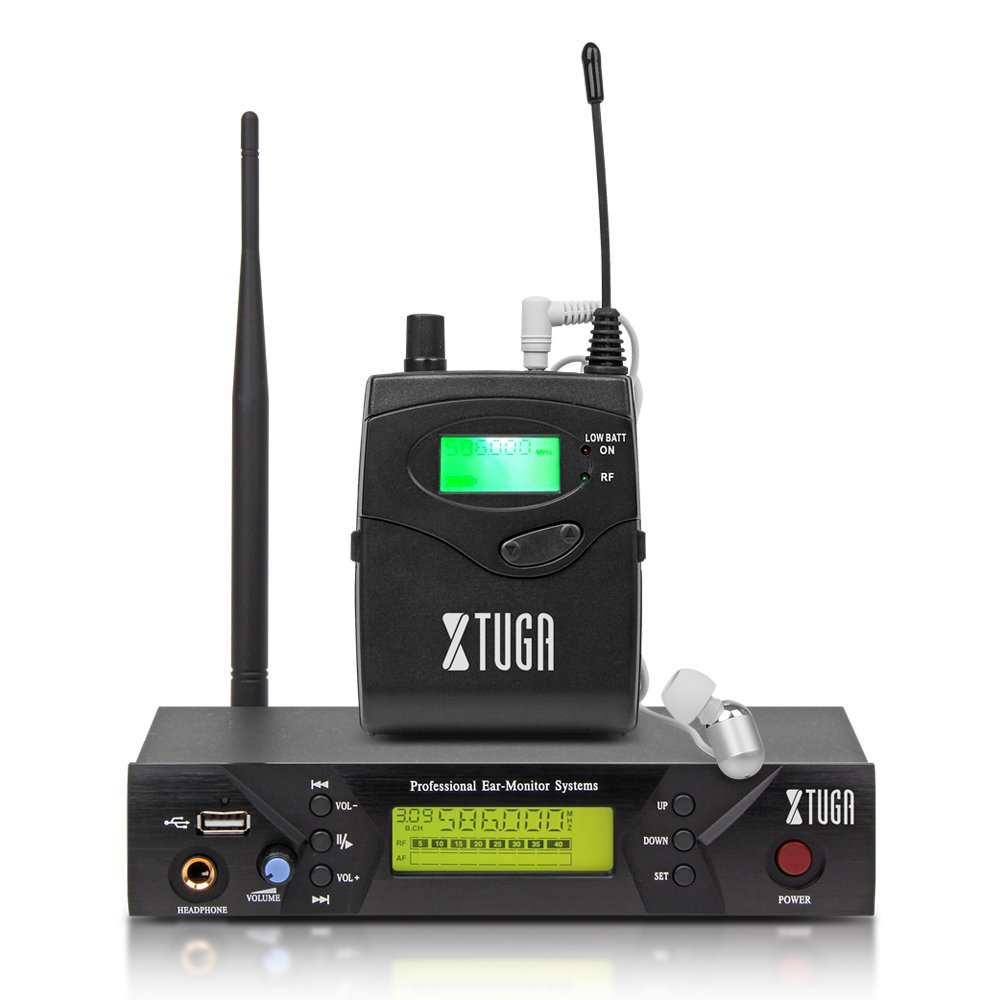
slika: Front panel of the XTUGA BK510 transmitter unit, featuring a USB port, headphone output, volume control, channel selection buttons (UP/DOWN), SET button, power button, and an LCD display.
- USB port: For connecting USB devices (e.g., for playback or recording, specific functionality may vary).
- Izlaz za slušalice: 3.5mm jack for wired headphone monitoring directly from the transmitter.
- Dugme za jačinu zvuka: Adjusts the output volume for the HEADPHONE output.
- GORE/DOLJE tipke: Used to navigate and select channels or frequencies.
- Dugme SET: Potvrđuje odabire ili ulazi u menije postavki.
- Dugme POWER: Turns the transmitter unit on or off.
- LCD ekran: Shows current channel, frequency, and other operational information.

slika: Rear panel of the XTUGA BK510 transmitter unit, showing the DC IN power input, AF IN (L) and AF IN (R) combo XLR/TRS inputs, AF LEVEL (Left/Right) adjustment knobs, and the ANTENNA connector.
- DC IN (12V-18V): Ulaz za napajanje za priloženi adapter za napajanje.
- AF IN (L)/(R): Combo XLR/TRS inputs for connecting audio sources (e.g., mixer output).
- AF LEVEL (Left/Right): Rotary knobs to adjust the input audio level for each channel.
- ANTENNA Connector: For attaching the detachable antenna.
4.2 Bodypack Receiver

slika: Front view of the XTUGA BK510 bodypack receiver, showing the LCD display, LOW BATT indicator, RF indicator, and control buttons.
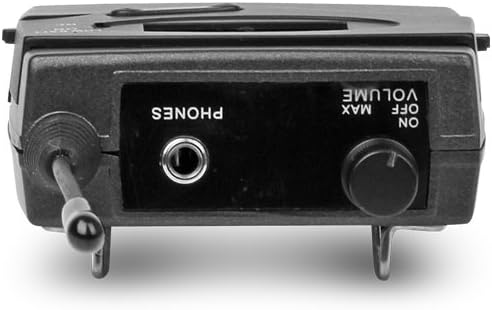
slika: Top view of the XTUGA BK510 bodypack receiver, showing the PHONES output jack and the ON/OFF/VOLUME knob.

slika: XTUGA BK510 bodypack receiver with the battery compartment open, showing slots for two AA batteries and the belt clip on the back.
- LCD ekran: Prikazuje trenutni kanal, frekvenciju i status baterije.
- LOW BATT Indicator: Svetli kada je baterija slaba.
- RF indikator: Illuminates when receiving a radio frequency signal from the transmitter.
- ON/OFF/VOLUME Knob: Turns the receiver on/off and adjusts the headphone volume.
- Izlaz za telefone: 3.5mm jack for connecting in-ear headphones.
- Pretinac za baterije: Drži dvije AA baterije.
- kopča za pojas: For attaching the bodypack to clothing or a belt.
5. Vodič za postavljanje
- Connect Transmitter Antenna: Screw the detachable antenna onto the ANTENNA connector on the rear panel of the transmitter unit. Ensure it is securely fastened.
- Napajanje odašiljača: Connect the provided power adapter to the DC IN (12V-18V) port on the rear of the transmitter, then plug the adapter into a suitable power outlet.
- Povežite audio izvor: Use the included 1/4" TS cables (or XLR cables, not included) to connect your audio source (e.g., mixer's auxiliary output, monitor send) to the AF IN (L) and/or AF IN (R) inputs on the transmitter's rear panel. For mono operation, typically use AF IN (L).
- Instalirajte baterije prijemnika: Open the battery compartment on the bodypack receiver and insert two AA batteries, observing correct polarity (+/-). Close the compartment securely.
- Connect Headphones to Receiver: Plug your in-ear headphones into the PHONES output jack on the bodypack receiver.
6. Uputstvo za upotrebu
- Power On Transmitter: Press the POWER button on the transmitter's front panel. The LCD display will illuminate.
- Prijemnik po uključenju: Rotate the ON/OFF/VOLUME knob on the bodypack receiver clockwise until it clicks and the LCD display illuminates.
- Select Channel/Frequency (Transmitter):
- Use the UP/DOWN buttons on the transmitter to browse through the available 100 UHF channels.
- Press the SET button to confirm your desired channel. The display will show the selected frequency.
- Choose a channel that is clear of interference in your operating environment.
- Sync Receiver to Transmitter: The bodypack receiver should automatically sync to the transmitter's frequency. If not, consult the receiver's specific instructions (often involves holding a SET or SYNC button on the receiver while the transmitter is broadcasting). Ensure the RF indicator on the receiver is lit, indicating a successful connection.
- Adjust Audio Input Level (Transmitter): Play audio through your connected source. Adjust the AF LEVEL (Left/Right) knobs on the rear of the transmitter until the audio level is appropriate without clipping (distortion). Monitor the audio through the transmitter's HEADPHONE output if desired.
- Adjust Monitoring Volume (Receiver): Put on your in-ear headphones. Slowly rotate the ON/OFF/VOLUME knob on the bodypack receiver to adjust the listening volume to a comfortable level. Avoid excessively high volumes to protect your hearing.
- Započni praćenje: Your XTUGA BK510 system is now ready for use.
7. Održavanje
- čišćenje: Obrišite uređaje mekom, suhom krpom. Ne koristite tekuća sredstva za čišćenje ili rastvarače.
- Zamjena baterije: When the LOW BATT indicator on the bodypack receiver illuminates, replace both AA batteries with fresh ones. Remove batteries if the receiver will not be used for an extended period.
- Skladištenje: Sistem čuvajte na hladnom i suhom mjestu, dalje od direktne sunčeve svjetlosti i ekstremnih temperatura.
- Održavanje antene: Pažljivo rukujte antenom kako biste izbjegli savijanje ili lomljenje.
8. Otkrivanje problema
| Problem | Mogući uzrok | Rješenje |
|---|---|---|
| No sound from receiver. |
|
|
| Interference or static. |
|
|
| Low audio quality (e.g., lack of bass). |
|
|
| LOW BATT indicator on receiver is lit. | Baterije su slabe. | Odmah zamijenite obje AA baterije. |
9. Specifikacije
| Feature | Detalj |
|---|---|
| Model | BK510 |
| Brand | XTUGA |
| Tehnologija povezivanja | Wired, Wireless (RF) |
| Bežična komunikacija | UHF (100 Channels) |
| Transmitter Material | Metal |
| Bodypack Receiver Batteries | 2 AA baterije (obavezne) |
| Ulaz snage predajnika | DC 12V-18V |
| Dimenzije predajnika | 17.72 x 11.81 x 4.72 inča |
| Težina artikla (približno) | 3.34 funti (ukupno pakovanje) |
| Posebne karakteristike | Lightweight (receiver), Volume Control |
| Proizvođač | Proizvedeno u Kini |
10. Garancija i podrška
garancija: No specific warranty information is provided within this user manual. For details regarding warranty coverage, terms, and conditions, please refer to the product packaging, the purchase receipt, or contact the manufacturer directly.
Podrška: For technical assistance, troubleshooting beyond this guide, or inquiries about your XTUGA BK510 system, please contact XTUGA customer support. You may find contact information on the official XTUGA webweb-mjestu ili putem vašeg originalnog mjesta kupovine.
FCC informacije: For regulatory questions concerning wireless microphone systems, you can contact the FCC at 1-888-CALL-FCC (TTY: 1-888-TELL-FCC) or visit fcc.gov/cgb/wirelessmicrophones.


