1. Uvod
The Bionik Tetra Power is a compact charging dock designed for Nintendo Switch Joy-Con controllers. It allows for simultaneous charging of up to four Joy-Con controllers, providing a convenient and organized charging solution. This manual provides essential information for the proper setup, operation, and maintenance of your Tetra Power charging dock.

Image 1.1: Bionik Tetra Power Charging Dock in its retail packaging. The packaging highlights its ability to charge four Joy-Con controllers and its compatibility with Nintendo Switch.
Ključne karakteristike:
- Kompaktan dizajn: Unique cross formation allows simultaneous charging of up to four Joy-Con controllers without occupying excessive space.
- Integrisano upravljanje kablovima: Features a built-in system for adjusting and storing the charging cable, promoting a tidy setup.
- LED Charge Status Indicators: Provides clear visual feedback on the charging status of each connected Joy-Con controller.
- Estetska integracija: Designed to complement the visual style of the Nintendo Switch console.
2. Upute za postavljanje
- Raspakujte uređaj: Carefully remove the Bionik Tetra Power charging dock from its packaging.
- Povežite se na napajanje: The charging dock features a built-in USB cable. Connect this USB cable to an available USB port on your Nintendo Switch dock or to a compatible USB power adapter (not included).

Image 2.1: The Bionik Tetra Power charging dock viewed from the side, showing its integrated USB cable for power connection.
- Upravljanje kablovima: Utilize the built-in cable management system located at the base of the dock to adjust the cable length and store any excess, ensuring a neat setup.
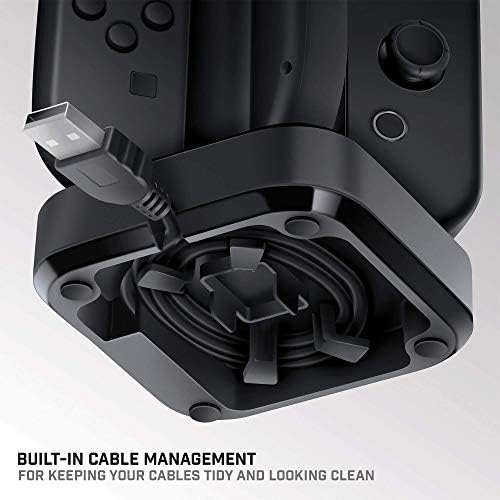
Image 2.2: The underside of the Tetra Power dock, illustrating the integrated cable management system for organizing the USB cable.
- plasman: Place the charging dock on a stable, flat surface near your Nintendo Switch console for convenient access.
3. Uputstvo za upotrebu
Charging Joy-Con Controllers:
- Ensure the Tetra Power charging dock is connected to a power source.
- Align a Joy-Con controller with one of the four charging slots on the dock. Gently slide the Joy-Con downwards until it clicks into place and makes contact with the charging pins.
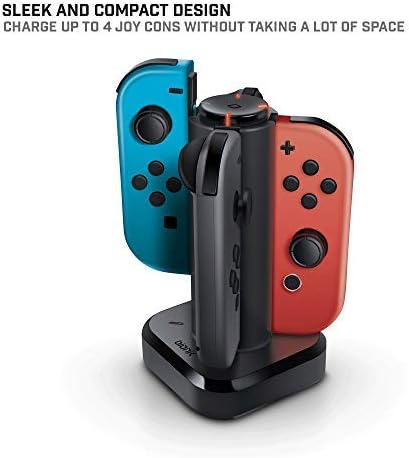
Image 3.1: The Tetra Power charging dock with two Nintendo Switch Joy-Con controllers inserted into their respective charging slots.
- Repeat for additional Joy-Con controllers, up to a maximum of four.
LED Charge Status Indicators:
Each charging slot is equipped with an LED indicator to display the charging status of the connected Joy-Con controller:
- Crveni LED: Označava da se Joy-Con kontroler trenutno puni.
- Zelena LED: Indicates that the Joy-Con controller is fully charged.
- Nema LED diode: Indicates no Joy-Con is connected or the dock is not receiving power.
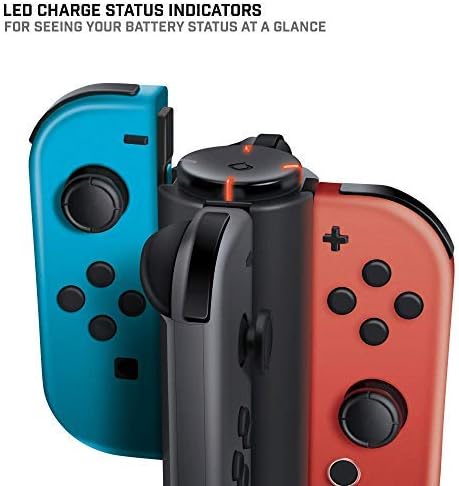
Slika 3.2: Krupni plan view of the LED charge status indicators on the Tetra Power dock, showing the illuminated status lights.
4. Održavanje
- čišćenje: Disconnect the charging dock from its power source before cleaning. Use a soft, dry cloth to wipe the exterior surfaces. Avoid using abrasive cleaners, solvents, or harsh chemicals.
- Skladištenje: Kada se ne koristi duži period, punjač čuvajte na hladnom i suhom mjestu, dalje od direktne sunčeve svjetlosti i ekstremnih temperatura.
- Rukovanje: Pažljivo rukujte uređajem. Izbjegavajte ispuštanje ili izlaganje jakim udarcima, jer bi to moglo oštetiti unutrašnje komponente.
5. Otkrivanje problema
- Joy-Con not charging:
- Ensure the charging dock is properly connected to a powered USB port.
- Verify that the Joy-Con controller is correctly seated in the charging slot and making full contact with the charging pins.
- Check if the USB cable is securely connected to both the dock and the power source.
- Try connecting the dock to a different USB port or power adapter.
- LED indikator se ne pali:
- Confirm the charging dock is receiving power.
- Ensure a Joy-Con controller is properly inserted into the slot.
- If the Joy-Con is fully charged, the LED will be green. If no Joy-Con is present, the LED will be off.
6. Specifikacije
| Broj modela | BNK-9019 |
| Brand | Bionik |
| Dimenzije proizvoda | 6.1 x 4.1 x 3.9 inča |
| Težina artikla | 6.4 unce |
| Kompatibilni uređaji | Nintendo Switch Joy-Con Controllers |
| Tip konektora | Mini USB (integrated cable) |
| Ulazni voltage | 5.4 Volts |
| AmpDob | 5 Amps |
| Ukupni USB portovi | 4 (for Joy-Cons) |
| Posebna karakteristika | Fast Charging, LED Charge Status Indicators, Cable Management |
7. Garancija i podrška
Bionik products are manufactured with quality and reliability in mind. For specific warranty information, product support, or to register your product, please visit the official Bionik webweb-mjesto ili direktno kontaktirajte njihovu korisničku službu. Sačuvajte račun kao dokaz o kupovini za bilo kakve reklamacije u vezi s garancijom.
Proizvođač: Bionik
Webstranica: bionikgaming.com

Image 7.1: The back of the Tetra Power retail box, displaying multilingual features, specifications, and manufacturer contact details including the website.


