1. Uvod
This manual provides instructions for the ROCCAT KONE Aimo Gaming Mouse. The KONE Aimo features an Owl-Eye Optical Sensor, customizable RGB AIMO LED illumination, and 23 programmable keys. It is designed for precision and ergonomic comfort during extended use.
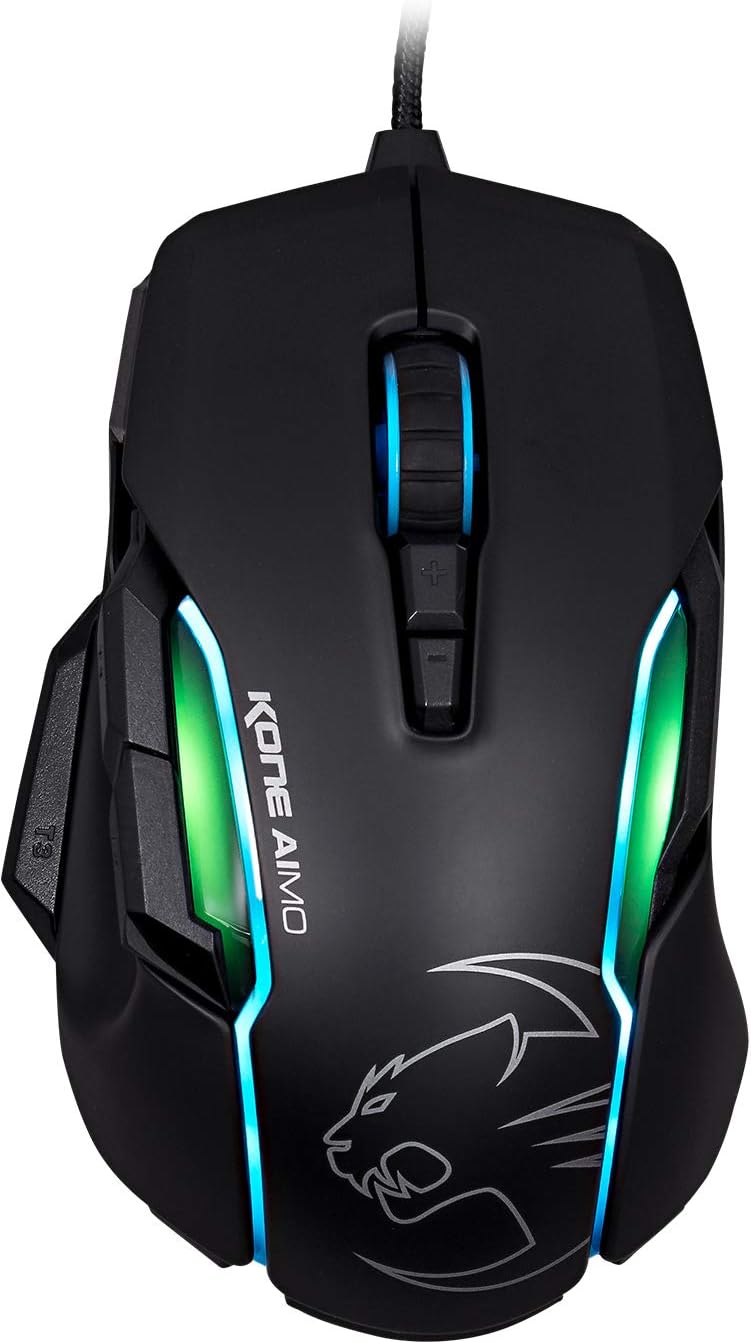
Slika 1: Vrh view of the ROCCAT KONE Aimo Gaming Mouse, showcasing its ergonomic shape and RGB lighting zones.
2. Sadržaj paketa
Provjerite da li su sve stavke prisutne u paketu:
- KONE AIMO Mouse with Attached Braided USB Cable
- Kratki vodič
- ROCCAT Stickers

Figure 2: Retail packaging of the ROCCAT KONE Aimo Gaming Mouse.
3. Podešavanje
- Povežite miša: Plug the USB cable of the ROCCAT KONE Aimo mouse into an available USB port on your computer.
- Instalacija drajvera: Your operating system (Windows 7, 8, 8.1, 10) should automatically detect and install the necessary drivers.
- Install ROCCAT Swarm Software: For full customization of DPI settings, button assignments, and AIMO lighting, download and install the ROCCAT Swarm software from the official ROCCAT website. This software allows you to create and manage profiles.

Figure 3: The ROCCAT KONE Aimo mouse in use on a mouse pad, connected to a computer.
4. Uputstvo za upotrebu
4.1. Funkcije gumba
The KONE Aimo features 23 programmable keys, including a tri-button thumb zone and a 4D tilting Titan wheel. These can be customized via the ROCCAT Swarm software.
- Lijevi/Desni klik: Standardne funkcije miša.
- Scroll Wheel (4D Titan Wheel): Scrolls vertically and can tilt horizontally for additional functions. Also acts as a clickable button.
- Dugmad za podešavanje DPI-ja: Located above and below the scroll wheel, these buttons allow for on-the-fly DPI sensitivity changes. Settings are configured in the Swarm software.
- Thumb Buttons (T1, T2, T3): Three buttons located on the left side, easily accessible by the thumb. The bottom-most button (T3) is often defaulted to the Easy-Shift[+] function.
- Easy-Shift[+] Button: This exclusive ROCCAT feature doubles the number of programmable functions for other buttons when held down, effectively expanding the total programmable keys.

Slika 4: Detaljno view of the programmable thumb buttons (T1, T2, T3) on the left side of the mouse.
4.2. AIMO Lighting System
The AIMO lighting system provides intelligent, reactive RGB illumination across four independently configurable LED light zones and the glowing mouse wheel. It can synchronize with other compatible ROCCAT devices and is programmable through the ROCCAT Swarm software.

Figure 5: The KONE Aimo mouse displaying its multi-zone RGB AIMO illumination.
4.3. Owl-Eye Optical Sensor
The mouse is equipped with the ROCCAT Owl-Eye Optical Sensor, a modified PixArt 3361 sensor, offering adjustable DPI from 100 to 12,000. This sensor provides precise tracking and responsiveness. A built-in tracking distance control unit monitors the lift-off distance for enhanced accuracy.

Figure 6: The bottom of the mouse, highlighting the Owl-Eye Optical Sensor.
4.4. Ergonomija
The KONE Aimo features refined ergonomics designed for comfort during extended use. Its shape provides a natural fit for the hand, with a dedicated thumb rest area.

Figure 7: A hand gripping the KONE Aimo mouse, illustrating its ergonomic design.
5. Održavanje
- čišćenje: Za čišćenje površine miša koristite meku, suhu krpu. Za tvrdokornu prljavštinu, laganoamp Može se koristiti krpa, pazeći da vlaga ne uđe u unutrašnje komponente.
- Održavanje senzora: Keep the optical sensor on the underside of the mouse clean and free of dust or debris to ensure optimal tracking performance.
- Upravljanje kablovima: Izbjegavajte oštre savijanja ili pretjerano povlačenje pletenog USB kabela kako biste spriječili oštećenje.
6. Otkrivanje problema
- Miš ne reaguje:
- Provjerite je li USB kabel sigurno priključen u ispravan USB priključak.
- Try a different USB port or another computer to rule out port or system issues.
- Ponovo pokrenite računar.
- Tracking Issues / Inaccurate Movement:
- Očistite optički senzor na donjoj strani miša.
- Ensure you are using the mouse on a clean, suitable mouse pad or surface.
- Check DPI settings in the ROCCAT Swarm software.
- RGB Lighting Not Working / Incorrect:
- Verify that the ROCCAT Swarm software is running and updated.
- Check lighting settings within the Swarm software.
- Provjerite da RGB osvjetljenje ne kontrolira konfliktni softver.
- Dugmad ne funkcioniraju:
- Check button assignments in the ROCCAT Swarm software.
- Ensure the software is not experiencing issues (try restarting it).
7. Specifikacije
| Feature | Detalj |
|---|---|
| Brand | ROCCAT |
| Broj modela | ROC-11-815-BK |
| Senzor | Owl-Eye Optical Sensor (modified PixArt 3361) |
| Raspon DPI-ja | 100 to 12,000 DPI |
| Programabilna dugmad | 23 (with Easy-Shift[+]) |
| Iluminacija | RGBA AIMO LED Illumination (4 independent zones + scroll wheel) |
| Povezivanje | USB (žični) |
| Kompatibilnost operativnog sistema | Windows 7, Windows 8, Windows 8.1, Windows 10 (32-bit and 64-bit versions) |
| Težina artikla | 11.2 unci (otprilike 317.5 grama) |
| Dimenzije proizvoda (DxŠxV) | 5.12 x 2.95 x 1.57 inča (približno 13 x 7.5 x 4 cm) |
8. Jamstvo i podrška
For warranty information, technical support, and additional resources, please visit the official ROCCAT website or contact ROCCAT customer service. Keep your proof of purchase for warranty claims.
Također možete posjetiti ROCCAT Store on Amazon za više informacija o proizvodu.


