1. Uvod
This manual provides essential information for the safe and effective use of your Vivibright GP90 UP Portable Video Projector. Please read it thoroughly before operating the device and retain it for future reference. The Vivibright GP90 UP is a portable video projector featuring an Android 4.42 operating system, 3200 lumens brightness, and 1280x800 native resolution, designed for multimedia entertainment and presentations.
2. Sigurnosna uputstva
- Ne blokirajte ventilacijske otvore. Osigurajte dovoljan protok zraka oko projektora kako biste spriječili pregrijavanje.
- Ne izlažite projektor kiši ili vlazi kako biste izbjegli strujni udar ili požar.
- Izbjegavajte gledanje direktno u sočivo projektora kada je lamp je uključen, jer jarko svjetlo može uzrokovati oštećenje oka.
- Postavite projektor na stabilnu, ravnu površinu kako biste spriječili njegov pad.
- Koristite samo adapter za napajanje koji dolazi s projektorom.
- Ne pokušavajte sami rastavljati ili popravljati projektor. Za sve servisne radove obratite se kvalifikovanom osoblju.
- Držite projektor dalje od izvora toplote i direktne sunčeve svjetlosti.
3. Sadržaj paketa
Provjerite da li su sve stavke prisutne u paketu:
- Vivibright GP90 UP Projector
- Power Cable
- Remote Control (may not be included with all models)
- Korisnički priručnik (ovaj dokument)
4. Proizvod je gotovview
Upoznajte se s komponentama projektora i priključnim portovima.
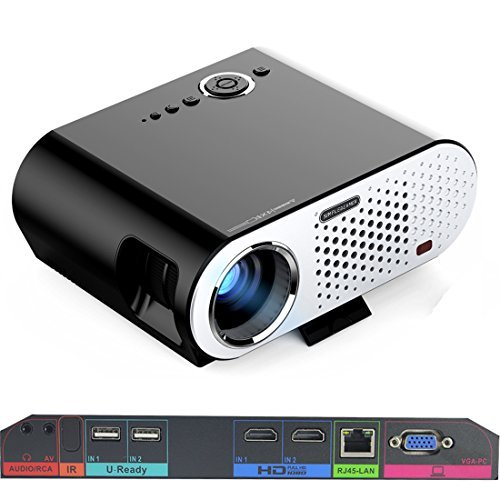
Image: The Vivibright GP90 UP projector showing its top controls, lens, and various input/output ports on the rear panel. The top features power and navigation buttons. The front has the projection lens. The rear panel includes Audio/RCA, IR receiver, two USB ports (U-Ready), two HDMI ports (HD), an RJ45-LAN port, and a VGA-PC port.
4.1 Prednja ploča
- Projekciono sočivo: Emituje sliku.
4.2 Gornja ploča
- Kontrolna dugmad: Power, navigation, and menu access.
4.3 Zadnja ploča (ulazni/izlazni portovi)
- AUDIO/RCA: Audio output and composite video input.
- IR: Infracrveni prijemnik za daljinsko upravljanje.
- IN 1 / IN 2 (USB): Two USB ports for connecting USB storage devices.
- IN 1 / IN 2 (HDMI): Two HDMI inputs for digital video and audio sources.
- RJ45-LAN: Ethernet port za žičanu mrežnu vezu.
- VGA-PC: VGA input for connecting to computers.
5. Podešavanje
5.1 Postavljanje
- Place the projector on a flat, stable surface or mount it on a ceiling or tripod.
- Ensure the projector is positioned directly in front of the screen or wall. Avoid angled placement as horizontal keystone correction is not available.
- The optimal projection distance ranges from 1.2m to 8.5m, producing screen sizes from 35 to 280 inches. For a 100-inch image, a distance of approximately 3 meters is recommended.
5.2 Priključak za napajanje
- Spojite kabel za napajanje na ulaz za napajanje projektora.
- Plug the other end of the power cable into a suitable electrical outlet (90~240V/50~60Hz).
5.3 Povezivanje ulaznih uređaja
- HDMI: Connect an HDMI cable from your source device (e.g., laptop, Blu-ray player, gaming console) to one of the projector's HDMI ports.
- USB: Insert a USB flash drive or external hard drive into a USB port to access media files.
- VGA: Connect a VGA cable from your computer to the projector's VGA-PC port.
- OD: Use an RCA cable to connect older devices to the AV input.
- LAN: Connect an Ethernet cable to the RJ45-LAN port for a wired internet connection.
5.4 Fokus i podešavanje trapezoidne korekcije
- Fokus: Rotate the focus ring around the lens until the projected image is sharp and clear.
- Keystone korekcija: Use the manual vertical keystone correction feature (±15°) to adjust the image shape if the projector is not perfectly perpendicular to the screen. This corrects trapezoidal distortion.
6. Uputstvo za upotrebu
6.1 Uključivanje/isključivanje
- Uključeno: Press the power button on the projector or the remote control. The indicator light will change, and the projector will start.
- Iskljuciti: Press the power button again. Confirm shutdown if prompted. Allow the projector to cool down before unplugging.
6.2 Navigacija kroz Android OS
- The projector runs on Android 4.42. Use the remote control or connect a wireless mouse (recommended for easier navigation) to interact with the interface.
- Access pre-installed apps or download compatible applications from the app store. Note that some newer applications may not be compatible with Android 4.42.
6.3 Bežična projekcija
- Wi-Fi: Connect to a wireless network via the settings menu. Supports dual-band Wi-Fi 2.4G.
- Bluetooth: Supports Bluetooth 4.0 for connecting wireless devices such as speakers. Note that Bluetooth audio output may only be available when using USB or Android sources, not HDMI.
- Wireless Push (EZCast / Miracast / Airplay): Use compatible apps on your smartphone or tablet to mirror your device's screen to the projector. Ensure your device and the projector are on the same Wi-Fi network.
6.4 Audio postavke
- The projector features built-in 4Ω, 5W stereo speakers with SRS sound technology.
- For enhanced audio, connect external speakers via the Audio Out port or wirelessly via Bluetooth (when using Android or USB sources).
7. Održavanje
7.1 Čišćenje
- Objektiv: Koristite meku krpu bez dlačica, posebno dizajniranu za optička sočiva. Ne koristite abrazivna sredstva za čišćenje.
- Casing: Obrišite vanjski dio projektora mekom, suhom krpom. Za tvrdokornu prljavštinu koristite blago suhu krpu.amp krpom, a zatim dobro osušite.
- Otvori za ventilaciju: Povremeno čistite ventilacijske otvore mekom četkom ili komprimiranim zrakom kako biste spriječili nakupljanje prašine, što može utjecati na performanse i vijek trajanja.
7.2 Skladištenje
- Kada se projektor ne koristi duži period, čuvajte ga na hladnom i suhom mjestu, dalje od direktne sunčeve svjetlosti i ekstremnih temperatura.
- Cover the lens with its cap to protect it from dust and scratches.
8. Otkrivanje problema
| Problem | Mogući uzrok | Rješenje |
|---|---|---|
| Nema projicirane slike | Napajanje nije priključeno; Ulazni izvor nije odabran; Poklopac objektiva je na | Provjerite priključak za napajanje; Odaberite ispravan ulazni izvor; Skinite poklopac objektiva |
| Slika je mutna | Focus not adjusted; Projector too close/far | Adjust focus ring; Adjust projection distance |
| Slika je trapezoidna | Projektor nije okomit u odnosu na platno | Adjust vertical keystone correction; Reposition projector to be centered |
| Nema zvuka | Volume too low; Muted; External speakers not connected/selected | Increase volume; Unmute; Check external speaker connections/settings |
| Wireless projection unstable | Weak Wi-Fi signal; Device incompatibility; Outdated Android OS | Ensure strong Wi-Fi signal; Check device compatibility with Miracast/Airplay; Consider wired connection if issues persist with older Android version. |
9. Specifikacije
| Feature | Detalj |
|---|---|
| Brand | Vivibright |
| Model | GP90 UP |
| Operativni sistem | Android 4.42 |
| Osvetljenost | 3200 Lumens (LED Luminous efficiency) |
| Native Resolution | 1280 x 800 (supports up to 1080P) |
| Kontrast Ratio | 3000:1 (Dynamic up to 10,000:1) |
| Veličina projekcije | 35-280 inča |
| Udaljenost projekcije | 1.2m - 8.5m |
| Throw Ratio | 1.45:1 |
| Ispravka Keystone-a | Ručno Vertikalno ± 15 ° |
| Život izvora svjetlosti | Do 30,000 sati |
| Povezivanje | Wi-Fi (2.4G), Bluetooth 4.0, 2x HDMI, 2x USB, VGA, AV, RJ45-LAN |
| Audio | Built-in 4Ω, 5W stereo speakers with SRS sound |
| Napajanje | 90~240V/50~60Hz |
| Dimenzije proizvoda | 27 x 22 x 9 cm |
| Težina artikla | 3.17 kg |
10. Garancija i podrška
For warranty information and technical support, please refer to the documentation provided at the time of purchase or contact Vivibright customer service. Keep your purchase receipt as proof of purchase for warranty claims.


