1. Proizvod je gotovview
The LANBON L6 WiFi Smart IR Repeater is an advanced device designed to extend the control of your infrared (IR) devices through your WiFi network. It allows you to control traditional IR-controlled appliances such as TVs, air conditioners, and set-top boxes from anywhere using a mobile application, providing convenient remote access and smart home integration.
Ključne karakteristike:
- LED indikator: Pruža vizualne povratne informacije o statusu uređaja.
- Daljinski pristup: Control your IR devices from anywhere via the mobile app.
- WiFi konekcija: Integrates seamlessly with your existing home WiFi network.
- Universal IR Control: Compatible with a wide range of IR-controlled appliances.

Slika 1.1: Vrh view of the LANBON L6 WiFi Smart IR Repeater. This image shows the compact, black, oval design of the device, with a subtle LED indicator at the front, signifying its operational status.

Slika 1.2: Bočna strana view of the LANBON L6 WiFi Smart IR Repeater. This perspective highlights the device's low-profile and elegant curved form factor, featuring a glossy black upper shell and a matte white base.
2. Getting Started: Setup and Installation
Follow these steps to set up your LANBON L6 WiFi Smart IR Repeater and connect it to your home network.
2.1. Uključivanje
- Place the LANBON L6 in a central location within the room where you intend to control IR devices, ensuring it has a clear line of sight to the appliances.
- Connect the provided power adapter to the LANBON L6 and plug it into a standard wall outlet.
- The LED indicator on the device will illuminate, indicating it is powered on and ready for configuration.
2.2. Konfiguracija mobilne aplikacije
The LANBON L6 is configured and controlled via a dedicated mobile application. Ensure your smartphone is connected to the same 2.4GHz WiFi network that the L6 will use.
- Download the official LANBON smart home application from your device's app store (e.g., Apple App Store or Google Play Store).
- Otvorite aplikaciju i kreirajte račun ili se prijavite ako ga već imate.
- Follow the in-app instructions to add a new device. Select the LANBON L6 IR Repeater from the list of available devices.
- The app will guide you through connecting the L6 to your home WiFi network. This typically involves entering your WiFi password.
- Once connected, the LED indicator on the L6 will change to a steady state, confirming successful network connection.
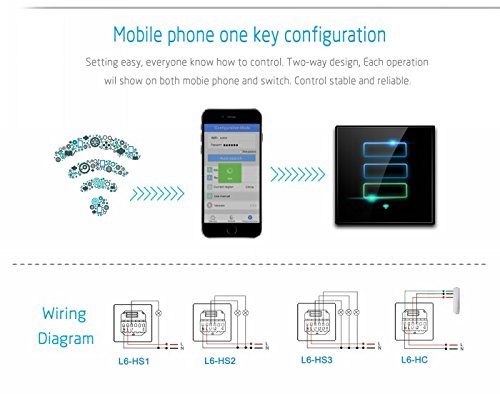
Figure 2.1: Mobile phone one-key configuration. This image illustrates the simplified process of connecting the LANBON L6 to your home network using the mobile application, emphasizing ease of setup.
3. Operating Your LANBON L6
Once your LANBON L6 is set up, you can begin controlling your IR devices and managing your smart home environment.
3.1. Controlling Devices Directly
The mobile application allows direct control of your IR devices without the need for a separate host server. You can add and manage various IR appliances within the app.
- Open the LANBON app on your smartphone.
- Navigate to the device list and select the LANBON L6.
- Add new IR devices (e.g., TV, AC) by selecting their type and brand from the app's database. The app will guide you through the process of pairing the L6 with your IR device, often by testing various remote codes.
- Once paired, you can use the virtual remote control within the app to operate your appliances.
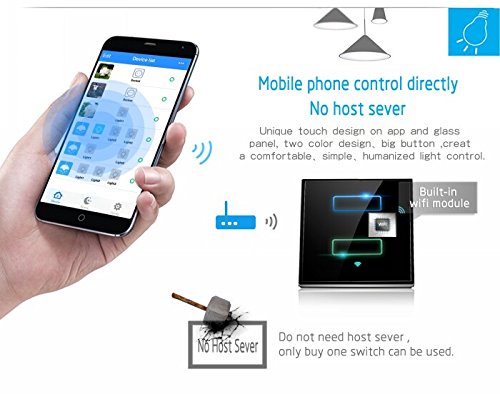
Figure 3.1: Mobile phone control directly. This image demonstrates the user-friendly interface of the mobile app, allowing direct control of various smart devices, including IR appliances, from your smartphone.
3.2. Unique Room Classification System
The LANBON app features a unique room classification system, allowing you to organize your devices by room for easier management and control. This system helps in quickly locating and operating devices within specific areas of your home.
- Within the app, access the 'Device List' or 'Room Management' section.
- Create new rooms (e.g., Living Room, Bedroom, Hall).
- Assign your paired IR devices to their respective rooms.
- Onda možeš view and control devices based on their assigned room, simplifying your smart home experience.
- The system also allows for one-key operation to turn all devices in a specific room on or off.
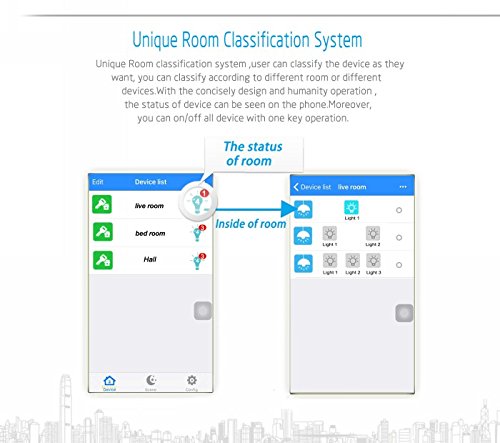
Figure 3.2: Unique Room Classification System. This visual demonstrates how the app allows users to categorize and manage devices by room, providing an organized and intuitive control interface.
4. Connectivity and Signal Optimization
The LANBON L6 is designed for stable and reliable WiFi connectivity. For optimal performance, consider the following:
4.1. Stable WiFi Signal
Ensure your LANBON L6 is placed within a strong WiFi signal area. A stable connection is crucial for uninterrupted remote control and responsiveness. If the WiFi signal is weak in certain areas, consider using a WiFi repeater or extender to boost coverage.
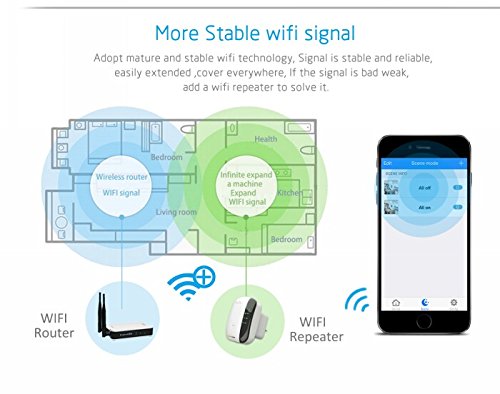
Figure 4.1: More Stable WiFi Signal. This diagram illustrates how a WiFi repeater can expand the coverage of your wireless network, ensuring a strong and stable signal for your LANBON L6 and other smart devices throughout your home.
5. Specifikacije
| Feature | Opis |
|---|---|
| Brand | LANBON |
| Model | L6 |
| Posebna karakteristika | LED Indicator, Remote Access |
| Tip konektora | RJ45 (for network connection, though primary is WiFi) |
| Boja | Crna |
| Težina artikla | 400 g |
| Dimenzije paketa | 16.9 x 13.7 x 4.9 cm |
| Zemlja porijekla | Kina |
| ASIN | B07428RTM5 |
6. Otkrivanje problema
If you encounter issues with your LANBON L6, refer to the following common problems and solutions:
6.1. Device Not Connecting to WiFi
- Provjerite WiFi lozinku: Ensure you have entered the correct WiFi password in the app.
- 2.4 GHz mreža: Confirm your router is broadcasting a 2.4GHz network and your phone is connected to it during setup. The L6 may not support 5GHz networks.
- Udaljenost rutera: Move the L6 closer to your WiFi router during initial setup.
- Ponovno pokretanje rutera: Try restarting your WiFi router.
- Resetuj uređaj: Refer to the app or device instructions for how to reset the L6 to factory settings and try the setup process again.
6.2. IR Devices Not Responding
- Linija vida: Ensure the LANBON L6 has a clear line of sight to the IR receiver of your appliance. Obstructions can block the IR signal.
- Udaljenost: The L6 should be within effective range of the IR device (typically 5-8 meters, depending on the environment).
- Correct IR Code: In the app, ensure you have selected the correct brand and model for your IR device. If the default codes don't work, try alternative codes provided by the app or use the learning function if available.
- Snaga: Verify that both the LANBON L6 and the IR appliance are powered on.
6.3. App Not Responding or Crashing
- Ažuriranje aplikacije: Ensure your LANBON app is updated to the latest version.
- Ponovo pokreni aplikaciju: Zatvorite i ponovo otvorite aplikaciju.
- Ponovo pokrenite telefon: Ponovo pokrenite pametni telefon.
- Obriši keš memoriju: On Android, try clearing the app's cache. On iOS, reinstalling the app might be necessary.
7. Održavanje i njega
To ensure the longevity and optimal performance of your LANBON L6 WiFi Smart IR Repeater, follow these simple maintenance guidelines:
- čišćenje: Gently wipe the device with a soft, dry cloth. Do not use liquid cleaners, aerosols, or abrasive chemicals, as they may damage the surface or internal components.
- plasman: Keep the device in a dry environment, away from direct sunlight, excessive heat, and moisture. Avoid placing it near strong electromagnetic fields.
- ventilacija: Ensure the device is not covered or placed in an enclosed space that could hinder proper ventilation.
- Napajanje: Koristite samo originalni adapter za napajanje koji dolazi s uređajem.
8. Sigurnosne informacije
Please read and adhere to the following safety precautions to prevent damage to the device or personal injury:
- Do not disassemble, repair, or modify the device yourself. This may cause electric shock, fire, or damage to the product.
- Držite uređaj van domašaja djece i kućnih ljubimaca.
- Ne izlažite uređaj vodi ili bilo kojoj drugoj tečnosti.
- Izbjegavajte ispuštanje ili izlaganje uređaja jakim udarima.
- If the device emits smoke, unusual odors, or makes strange noises, immediately unplug it from the power outlet and contact customer support.
9. Garancija i podrška
LANBON products are manufactured to the highest quality standards. For information regarding warranty coverage, technical support, or service, please refer to the warranty card included with your product or visit the official LANBON website. You can also contact the seller or distributor from whom you purchased the product for assistance.
Molimo sačuvajte svoj dokaz o kupovini za zahtjeve u vezi s garancijom.


