1. Uvod
This manual provides essential information for the safe and efficient use of your Brother DCP-L8410CDW Color Laser Multifunction Printer. This 3-in-1 device is designed for professional environments, offering printing, copying, and scanning functionalities. It features an intuitive touchscreen, Wi-Fi, and Ethernet connectivity, making it suitable for various work settings.
Ključne karakteristike uključuju:
- Print, copy, and scan capabilities
- High-quality color laser printing (up to 2400 dpi)
- Automatsko obostrano štampanje
- Flexible paper handling with a maximum capacity of 300 sheets
- Integrated Wi-Fi and Gigabit Ethernet for versatile connectivity

Slika 1.1: Prednja strana view of the Brother DCP-L8410CDW printer.
2. Podešavanje
Follow these steps to set up your Brother DCP-L8410CDW printer:
- Raspakivanje: Carefully remove the printer from its packaging. Ensure all protective tapes and packing materials are removed from the exterior and interior of the device.
- Instalirajte toner kertridže: Open the front cover and install the toner cartridges into their respective slots. Refer to the labels for correct color placement.
- Umetnite papir: Open the paper tray and adjust the paper guides to fit your paper size (e.g., A4). Load paper into the tray and close it securely.
- Priključite napajanje: Spojite kabel za napajanje na pisač, a zatim na uzemljenu električnu utičnicu.
- Connect to Network/Computer:
- Bežično (Wi-Fi): On the printer's touchscreen, navigate to Network settings and follow the prompts to connect to your Wi-Fi network.
- Žični (Ethernet): Spojite Ethernet kabel iz LAN priključka pisača na mrežni usmjerivač ili prekidač.
- USB: Povežite USB 2.0 kabl sa štampača na računar.
- Instalirajte drajvere: Umetnite instalacijski CD (ako je priložen) u računar ili preuzmite najnovije upravljačke programe i softver sa službene Brother podrške. webstranica. Slijedite upute na ekranu da biste dovršili instalaciju.

Slika 2.1: Bočna strana view of the Brother DCP-L8410CDW, showing the paper tray.
3. Uputstvo za upotrebu
The Brother DCP-L8410CDW features an intuitive touchscreen for easy operation.
3.1. Štampanje
- Provjerite je li štampač uključen i povezan s mrežom ili računarom.
- Otvorite dokument ili sliku koju želite isprintati na računaru ili mobilnom uređaju.
- Select the 'Print' option from your application.
- Choose the Brother DCP-L8410CDW from the list of available printers.
- Adjust print settings (e.g., number of copies, color/mono, duplex) as needed.
- Kliknite na 'Štampaj'.
3.2. Kopiranje
- Place your document face down on the scanner glass or face up in the Automatic Document Feeder (ADF).
- On the printer's touchscreen, select the 'Copy' function.
- Adjust settings such as number of copies, color/mono, and enlargement/reduction.
- Pritisnite 'Start' da biste započeli kopiranje.
3.3. Skeniranje
- Place your document face down on the scanner glass or face up in the ADF.
- Na ekranu osjetljivom na dodir pisača odaberite funkciju 'Skeniraj'.
- Choose your desired scan destination (e.g., Scan to PC, Scan to USB, Scan to Email).
- Podesite postavke skeniranja (npr. rezoluciju, file type) if necessary.
- Pritisnite 'Start' da biste započeli skeniranje.

Image 3.1: The intuitive touchscreen control panel of the DCP-L8410CDW.

Image 3.2: Using the Automatic Document Feeder for scanning or copying, and the USB port for direct printing/scanning.
4. Održavanje
Redovno održavanje osigurava optimalne performanse i produžava vijek trajanja vašeg štampača.
4.1. Zamjena toner kaseta
- When a 'Low Toner' or 'Replace Toner' message appears on the display, order new genuine Brother toner cartridges.
- Otvorite prednji poklopac štampača.
- Uklonite stari sklop toner kasete i bubnja.
- Separate the toner cartridge from the drum unit.
- Unpack the new toner cartridge and install it into the drum unit until it clicks into place.
- Insert the new toner and drum unit assembly back into the printer.
- Zatvorite prednji poklopac.
4.2. Čišćenje štampača
- Eksterijer: Wipe the exterior of the printer with a soft, lint-free cloth. Do not use abrasive cleaners.
- Staklo skenera: Staklo skenera očistite mekom, suhom krpom. Za tvrdokorne mrlje nanesite malu količinu sredstva za čišćenje stakla na krpu (ne direktno na staklo).
- Koronska žica: Periodically clean the corona wire inside the drum unit to prevent print quality issues. Refer to the printer's internal instructions or the full user guide for detailed steps.
5. Otkrivanje problema
Ovaj odjeljak se bavi uobičajenim problemima na koje možete naići pri radu s vašim pisačem.
5.1. Zaglavljivanje papira
If a 'Paper Jam' message appears:
- Isključite štampač i izvucite kabl za napajanje.
- Open the rear cover or other access points as indicated on the display or in the full user guide.
- Carefully pull out any jammed paper in the direction of the paper path. Avoid tearing the paper.
- Check all paper trays and internal areas for small pieces of torn paper.
- Zatvorite sve poklopce, priključite kabel za napajanje i uključite pisač.
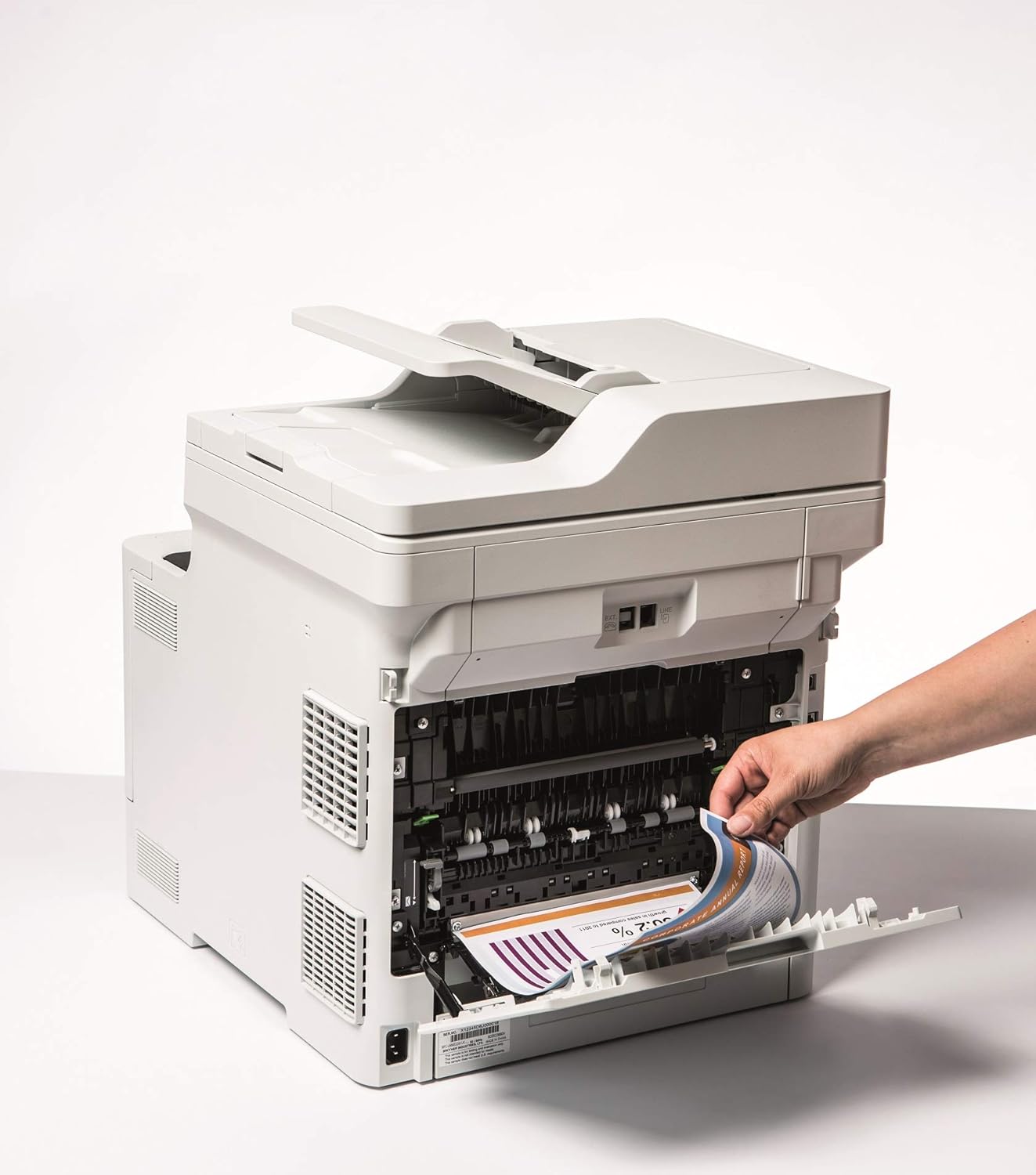
Image 5.1: Clearing a paper jam from the rear of the printer.
5.2. Problemi s kvalitetom ispisa
- Izblijedjeli otisci: Toner cartridge may be low. Replace if necessary.
- Pruge ili mrlje: Clean the corona wire or check for foreign objects on the drum unit.
- Netačne boje: Ensure genuine Brother toner cartridges are used and perform a color calibration from the printer's menu.
5.3. Problemi s povezivanjem
- Wi-Fi Disconnected: Check network settings on the printer and ensure your router is functioning correctly. Restart both devices if needed.
- Cannot Print from PC: Verify that the printer drivers are correctly installed and updated. Check cable connections for wired setups.
6. Specifikacije
| Feature | Specifikacija |
|---|---|
| Naziv modela | DCP-L8410CDW |
| Dimenzije proizvoda (DxŠxV) | 43.5P x 53.9Š x 52.6V cm |
| Maksimalna veličina medija | A4 |
| Maksimalni kapacitet listova | 300 listova |
| Maksimalna brzina kopiranja (crno-bijelo) | 31 stranica u minuti |
| Maksimalna rezolucija ispisa u boji | 61 dpcm |
| Maksimalna rezolucija crno-bijelog ispisa | 2400 dpi |
| Duplex Printing | Da |
| Tehnologija povezivanja | Ethernet, USB 2.0, Wireless LAN (Wi-Fi) |
| Tehnologija štampe | Laser |
| Izlaz štampača | Boja |
| Maksimalna brzina štampanja (u boji) | 31 stranica u minuti |
| Težina artikla | 27.6 kilograma |
| Potrošnja energije | 500 Watts |
| Tip skenera | Flatbed |
7. Informacije o garanciji
This Brother DCP-L8410CDW printer comes with a Ograničena garancija. For detailed information regarding the terms, conditions, and duration of your warranty, please refer to the warranty card included with your product or visit the official Brother webSačuvajte dokaz o kupovini za slučaj reklamacije.
8. Korisnička podrška
For further assistance, including driver downloads, FAQs, and contact information for technical support, please visit the official Brother support webstranica:
You can also find additional resources and troubleshooting guides specific to your model on the support page.


