Uvod
The MOOER Ocean Machine TDL3 is a versatile multi-effects pedal designed for electric guitar, combining two independent delays, a high-fidelity reverb, and an audio looper. This manual provides detailed instructions for setting up, operating, and maintaining your device to ensure optimal performance and creative expression.

Slika 1: Front view of the MOOER Ocean Machine TDL3 multi-effects pedal, showcasinnjegove kontrole i prikaz.
Setup
Zahtjevi za napajanje
The Ocean Machine TDL3 requires a 9V DC power supply with a minimum current of 500mA. Ensure the power supply is center-negative. Using an incorrect power supply can damage the unit and void the warranty.
- Voltage: 9 volti DC
- trenutno: 500mA (minimalno)
- polaritet: Centar-negativan
Veze
Connect your guitar and amplifier to the appropriate input and output jacks. The pedal supports both mono and stereo configurations.
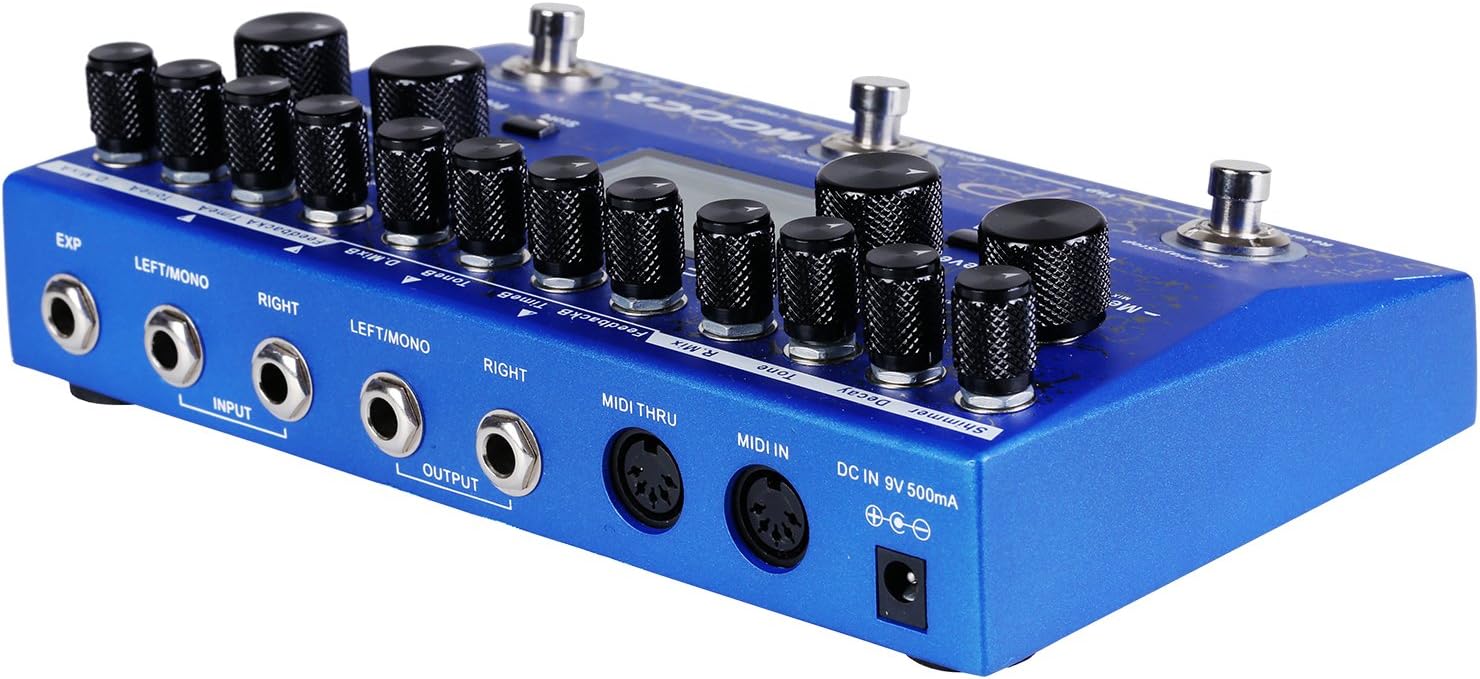
Slika 2: Pozadi view of the MOOER Ocean Machine TDL3, showing input/output jacks, MIDI ports, and power input.
- Input (LEFT/MONO, RIGHT): Connect your instrument to the LEFT/MONO input for mono operation. For stereo input, connect to both LEFT/MONO and RIGHT inputs.
- Output (LEFT/MONO, RIGHT): Povežite se sa svojim amplifier or audio interface. Use LEFT/MONO for mono output. For stereo output, connect to both LEFT/MONO and RIGHT outputs.
- EXP: Connect an external expression pedal for real-time control over various parameters.
- MIDI ULAZ/PROLAZ: Connect to MIDI devices for external control and synchronization.
- DC IN 9V 500mA: Connect the specified 9V DC power adapter.
Uputstvo za upotrebu
The Ocean Machine TDL3 offers extensive control over its delay, reverb, and looper functions. Familiarize yourself with the main controls and display.
Glavne kontroleview
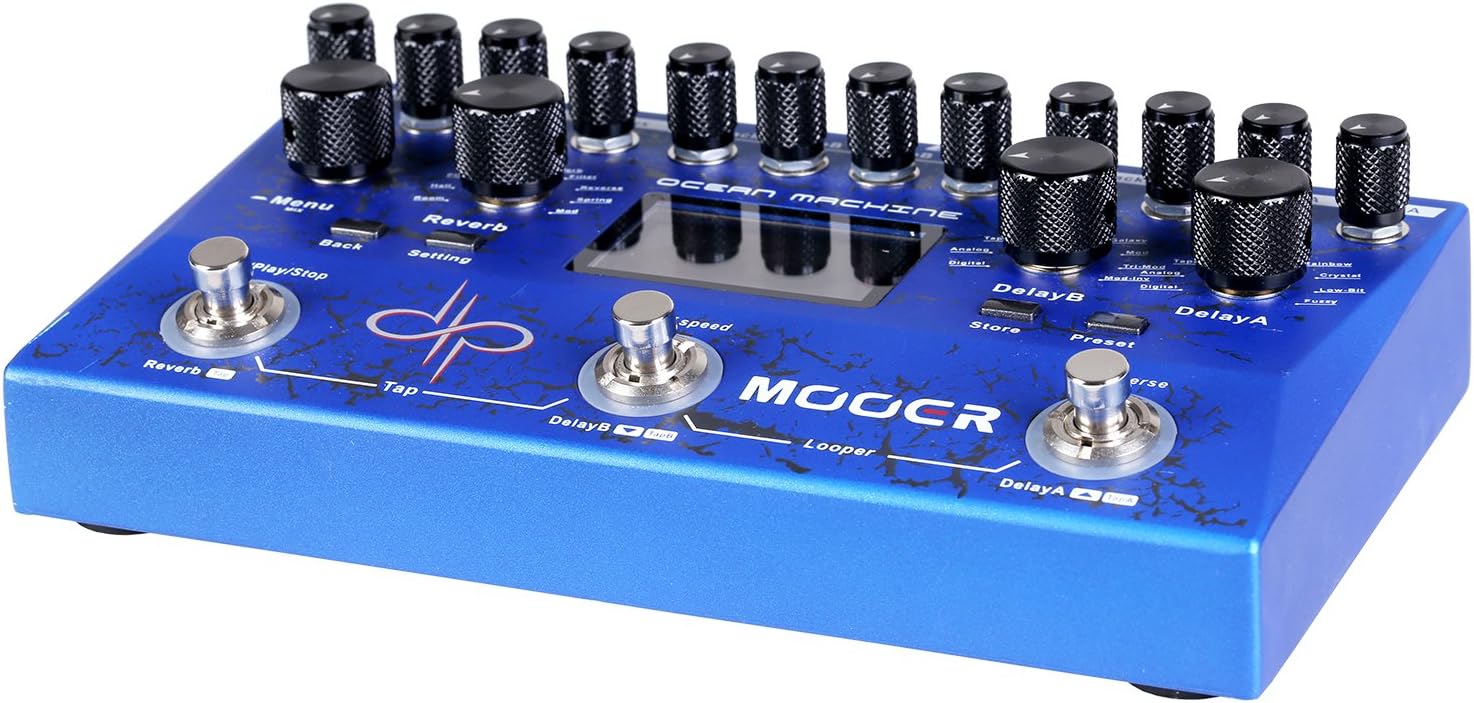
Slika 3: Top view of the MOOER Ocean Machine TDL3, highlighting the various knobs and footswitches.
- MENU Knob: Navigates through menus and adjusts parameters on the LCD screen.
- REVERB Section: Controls for Mix, Tone, Decay, Shimmer, and Reverb Type.
- DELAY A Section: Controls for Mix, Feedback, Time, and Delay Type.
- DELAY B Section: Controls for Mix, Feedback, Time, and Delay Type.
- Footswitches (REVERB, DELAY B, DELAY A): Activate/deactivate effects, tap tempo, and looper functions.
- LCD ekran: Shows current settings, preset information, and menu options.
Funkcije odgode
The pedal features two independent delays (Delay A and Delay B) with 15 different delay types and a delay time range of 0-2 seconds. Each delay can be configured with optional ping-pong effects.
- Delay Types: Explore various delay algorithms including Analog, Digital, Tape, Modulated, Reverse, and more.
- vrijeme: Adjusts the delay time. Can be synchronized via Tap Tempo.
- Povratne informacije: Kontroliše broj ponavljanja odgode.
- miksati: Adjusts the wet/dry balance of the delay effect.
Reverb Functions
A high-fidelity reverb section offers 9 different reverb types and a shimmer effect for ambient textures.
- Vrste reverbiranja: Includes Hall, Plate, Room, Spring, Modulated, Filter, Reverse, and Shimmer.
- raspadanje: Kontroliše dužinu repa reverba.
- ton: Adjusts the brightness or darkness of the reverb.
- svjetlucanje: Adds an octave-up effect to the reverb tail.
- miksati: Adjusts the wet/dry balance of the reverb effect.
Looper funkcija
The integrated audio looper provides 32 MB of storage memory, allowing up to 44 seconds of recording time.
- Record/Play/Stop: Controlled by the dedicated footswitch (typically the REVERB footswitch in Looper mode).
- Overdub: Layer additional guitar parts over your recorded loop.
- Poništi/Ponovi: Correct mistakes during overdubbing.
Modes of Operation and Presets
The Ocean Machine TDL3 features multiple operational modes and the ability to save and recall presets.

Slika 4: Close-up of the LCD screen showing various settings and parameters, including delay and reverb types.
- Način rada uživo: Allows direct control of effects via knobs and footswitches.
- Način rada: Recall saved combinations of delay, reverb, and looper settings. The pedal offers a multitude of programmable options via the LCD menu.
- Čuvanje unaprijed postavljenih postavki: To save a preset, adjust your desired settings, then navigate through the menu using the MENU knob to find the "Store" option. Confirm to save.
- Effect Chain Order: The pedal allows you to reorder the internal effect chain (Delay A, Delay B, Reverb) to customize your sound. This is accessible through the system menu.
MIDI kontrola
The Ocean Machine TDL3 is MIDI programmable, allowing integration with other MIDI-enabled devices for advanced control and synchronization.
- Poruke o promjeni programa (PC): Recall specific presets.
- Poruke o promjeni kontrole (CC): Control individual parameters in real-time.
- MIDI preko: Passes MIDI data to other devices in a chain.
Globalne postavke
Access the global settings menu to adjust overall parameters such as Global EQ, input/output levels, and other system configurations.
- Global EQ: Fine-tune the overall tonal response of the pedal.
- Input/Output Levels: Optimize signal levels for seamless integration with various instruments and setups.
Održavanje
To ensure the longevity and optimal performance of your MOOER Ocean Machine TDL3, follow these maintenance guidelines:
- čišćenje: Koristite meku, suhu krpu za čišćenje površine pedale. Izbjegavajte abrazivna sredstva za čišćenje ili rastvarače.
- Skladištenje: Čuvajte pedalu na hladnom i suhom mjestu, dalje od direktne sunčeve svjetlosti i ekstremnih temperatura.
- Snaga: Uvijek isključite napajanje kada pedala nije u upotrebi duži period.
- Knobs and Footswitches: Handle controls gently. If any knobs feel loose, they may need to be re-secured by a qualified technician.
Rješavanje problema
If you encounter issues with your Ocean Machine TDL3, refer to the following common troubleshooting steps:
- Nema zvuka:
- Provjerite sve kablovske spojeve (instrument, ampspasilac, moć).
- Ensure the power supply meets the 9V DC, 500mA, center-negative specifications.
- Verify that the pedal is powered on and effects are engaged.
- Check input/output levels in the global settings.
- Neočekivana buka/zujanje:
- Provjerite da li su svi kablovi pravilno zaštićeni i u dobrom stanju.
- Pokušajte s drugom utičnicom ili izoliranim izvorom napajanja.
- Provjerite ima li petlji uzemljenja u vašem signalnom lancu.
- Tap Tempo Not Working in Preset Mode:
- In Preset Mode, the tap tempo footswitch requires delay sub-divisions to be set.
- Navigate to the desired preset.
- Press REVERB + DELAY B footswitches simultaneously to enter preset edit mode.
- Press the MENU knob once.
- Rotate the MENU knob until "TempoB:" is highlighted and press the knob to enter sub-division settings.
- Press the MENU knob to turn sub-division on, select the desired sub-division, and press "back" to return.
- Press REVERB + DELAY B footswitches simultaneously to exit edit mode. Save the preset if satisfied.
- Problemi sa LCD ekranom:
- Ensure the pedal is receiving adequate power.
- If the display is unresponsive, try power cycling the unit.
Specifikacije
| Feature | Specifikacija |
|---|---|
| Broj modela | TDL3 |
| Dimenzije (D x Š x V) | 4.1 x 1.9 x 2.3 inča |
| Težina artikla | 6.4 unce |
| Power Requirement | 9V DC, 500mA, Center-Negative |
| Delay Types | 15 (2 independent delays) |
| Vrste reverba | 9 (with Shimmer effect) |
| Vrijeme snimanja loopera | Up to 44 seconds (32 MB storage) |
| Povezivanje | Stereo Input/Output, Expression Pedal Input, MIDI IN/THRU |
| Hardversko sučelje | Ethernet (Note: This specification from product data may refer to internal communication or a specific feature not typically user-facing for a guitar pedal.) |
| Format signala | Analog |
| Prvi raspoloživi datum | 10. marta 2017 |
Garancija i podrška
MOOER products are designed for reliability and performance. For warranty information and technical support, please refer to the official MOOER webstranicu ili kontaktirajte lokalnog distributera. Sačuvajte dokaz o kupovini za slučaj reklamacije.
- Zvanični MOOER Webstranica: www.mooeraudio.com
- Služba za korisnike: Contact information can typically be found on the official weblokacija ili ambalaža proizvoda.


