1. Uvod
Hvala na kupoviniasing the Candy X-Range CMXG20DS Microwave with Grill. This manual provides essential information for the safe and efficient operation of your appliance. Please read these instructions carefully before using the microwave oven and retain them for future reference.
Važna sigurnosna uputstva
- Ne pokušavajte koristiti ovu pećnicu s otvorenim vratima jer to može dovesti do štetnog izlaganja mikrovalnoj energiji.
- Nemojte stavljati nikakve predmete između prednje strane pećnice i vrata i ne dozvolite da se prljavština ili ostaci sredstva za čišćenje nakupljaju na zaptivnim površinama.
- Nemojte uključivati pećnicu ako je oštećena. Posebno je važno da se vrata pećnice pravilno zatvaraju i da nema oštećenja: (1) vrata (savijena), (2) šarke i zasune (polomljene ili olabavljene), (3) brtve vrata i zaptivne površine.
- Rernu ne bi trebalo podešavati ili popravljati niko osim odgovarajuće kvalifikovanog servisera.
- Uvjerite se da je uređaj pravilno uzemljen.
- Ne zagrijavajte tekućine ili drugu hranu u zatvorenim posudama jer mogu eksplodirati.
- Koristite samo pribor koji je prikladan za upotrebu u mikrotalasnim pećnicama.
- Prilikom zagrijavanja hrane u plastičnim ili papirnim posudama, pazite na pećnicu zbog mogućnosti zapaljenja.
2. Proizvod je gotovview
The Candy X-Range CMXG20DS is a 20-liter microwave oven with an integrated grill function, designed for versatile cooking. It features a digital display, multiple power levels, and automatic programs.
Komponente
- Mikrovalna pećnica
- Stakleni okretni tanjir (prečnika 25.5 cm)
- Okretni prsten
- Stalak za roštilj
- Uputstvo za upotrebu
Dijagram uređaja
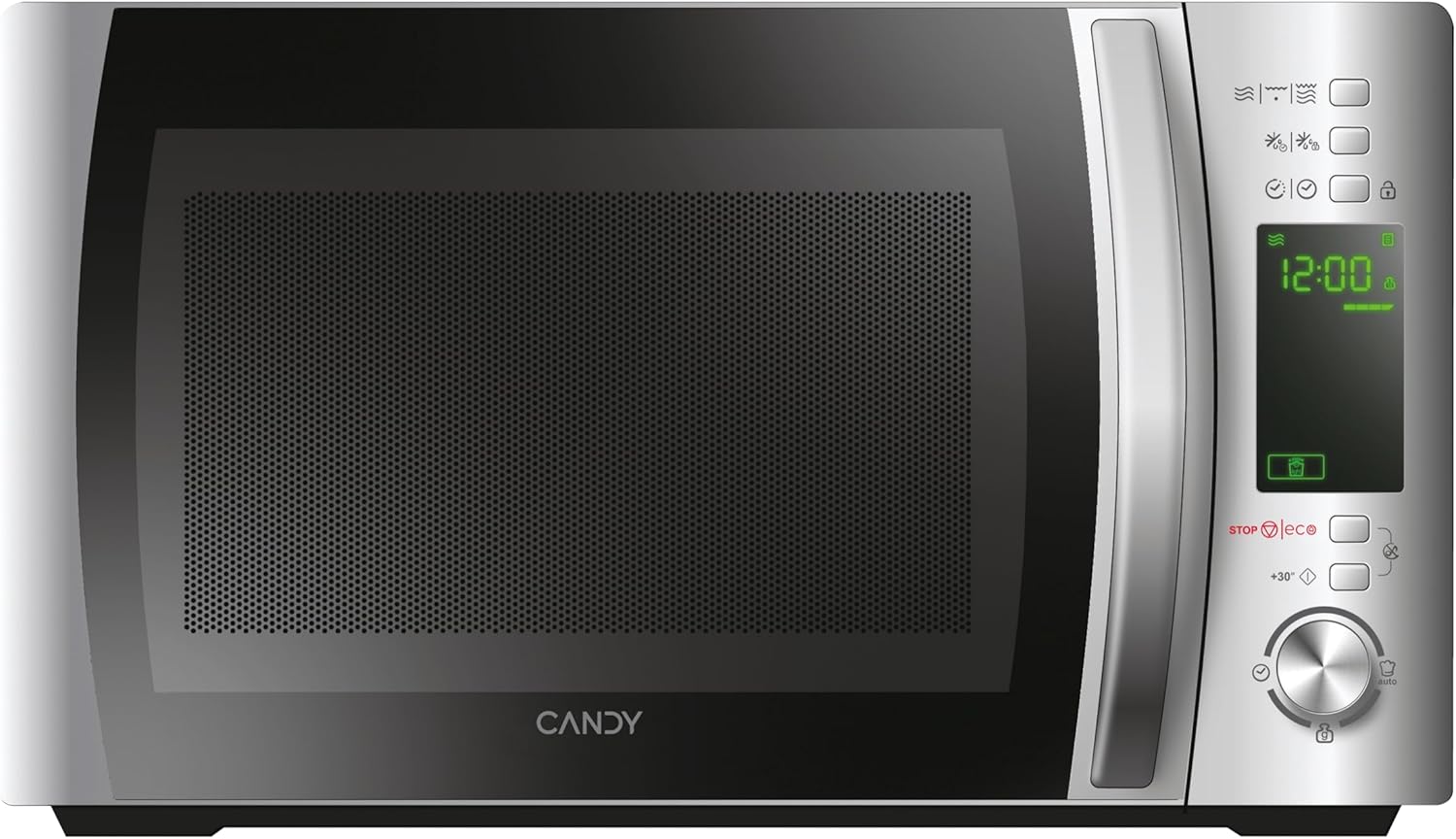

Control Panel
The control panel features a digital display and various buttons and a dial for setting cooking functions, time, and power levels. Specific functions include:
- Digitalni prikaz: Prikazuje vrijeme, nivo snage i indikatore programa.
- Dugmad za nivo snage: Adjust microwave power.
- Dugme za funkciju roštilja: Activates the grill.
- Dugme za odmrzavanje: Za odmrzavanje prema težini ili vremenu.
- Automatic Programs Button: Pristupa unaprijed postavljenim programima kuhanja.
- Safety Lock Button: Engages/disengages child lock.
- STOP/ECO Button: Zaustavlja kuhanje ili aktivira Eco način rada.
- +30 Seconds Button: Quick start or adds 30 seconds to cooking time.
- Rotary Dial: Adjusts time, weight, or program selection.
- Start dugme: Initiates cooking.
3. Podešavanje
Raspakivanje i postavljanje
- Uklonite sav materijal za pakovanje iz unutrašnjosti pećnice i pribora.
- Inspect the oven for any damage such as dents or a misaligned door. Do not operate if damaged.
- Place the microwave oven on a stable, level surface strong enough to hold the oven and the food being cooked.
- Ensure adequate ventilation. Maintain a minimum clearance of 20 cm above the oven, 10 cm at the rear, and 5 cm on both sides. Do not block any ventilation openings.
- Ne postavljajte pećnicu u blizini izvora topline ili uamp okruženje.

Električna veza
- Plug the power cord into a properly installed and earthed wall socket.
- Osigurajte voltage odgovara naljepnici s karakteristikama na uređaju.
Početno podešavanje: Podešavanje sata
- Kada se mikrovalna pećnica prvi put uključi u struju, na ekranu će se prikazati "0:00".
- Press the "Clock" button (if available, otherwise consult specific model instructions for clock setting, often combined with a time setting button).
- Rotate the dial to set the hour. Press the "Clock" button again.
- Rotate the dial to set the minutes. Press the "Clock" button to confirm.
4. Uputstvo za upotrebu
4.1. Osnovno kuhanje u mikrovalnoj pećnici
- Stavite hranu u posudu pogodnu za mikrovalnu pećnicu na stakleni rotirajući tanjir. Zatvorite vrata.
- Press the "Microwave" button (or equivalent power level button) repeatedly to select the desired power level (e.g., 700W, 500W, etc.). The display will show the selected power.
- Okrenite brojčanik da biste podesili vrijeme kuhanja.
- Pritisnite dugme "Start" da biste započeli kuhanje.
4.2. Funkcija roštilja
- Stavite hranu na rešetku roštilja, a zatim rešetku stavite na okretni tanjir.
- Press the "Grill" button. The display will show "G".
- Okrenite brojčanik da biste podesili vrijeme pečenja na roštilju.
- Pritisnite dugme "Start".
4.3. Combination Cooking (Microwave + Grill)
- Stavite hranu u odgovarajuću posudu na okretni tanjir ili rešetku roštilja.
- Press the "Combi" button (or press Microwave/Grill buttons in sequence to select a combination mode, e.g., C-1, C-2).
- Okrenite brojčanik da biste podesili vrijeme kuhanja.
- Pritisnite dugme "Start".
4.4. Funkcija odmrzavanja
The CMXG20DS offers defrosting by weight or by time.
Odmrzavanje po težini:
- Stavite smrznutu hranu na okretni tanjir.
- Press the "Defrost" button once. The display will show "dEF1" (or similar for weight defrost).
- Rotate the dial to set the weight of the food.
- Pritisnite dugme "Start".
Odmrzavanje po vremenu:
- Stavite smrznutu hranu na okretni tanjir.
- Press the "Defrost" button twice. The display will show "dEF2" (or similar for time defrost).
- Rotate the dial to set the defrosting time.
- Pritisnite dugme "Start".

4.5. Express Cooking (+30 Seconds)
For quick heating at full power, simply press the "+30 Seconds" button. Each press adds 30 seconds to the cooking time. This function can also be used to extend cooking time during operation.
4.6. Automatski programi (40 programa)
The microwave features 40 pre-set automatic cooking programs for various food types. These programs are designed to simplify cooking by automatically setting the optimal time and power.
- Press the "Auto Program" button. The display will show "A-1" (or similar).
- Rotate the dial to select the desired program (e.g., A-1 for pizza, B-1 for vegetables). A list of programs and their corresponding codes is typically found on the inside of the microwave door or in a separate section of this manual.
- Pritisnite dugme "Start".

4.7. Funkcija tajmera
The microwave can be used as a kitchen timer without cooking.
- Ensure the oven is not in cooking mode.
- Press the "Timer" button (or a dedicated clock/timer button).
- Rotate the dial to set the desired countdown time.
- Press the "Start" button. The timer will count down without activating the microwave function.
4.8. Safety Lock (Child Lock)
Da biste spriječili nenamjerno korištenje, posebno od strane djece:
- Za aktiviranje: Press and hold the "Safety Lock" button (often indicated by a lock icon) for 3 seconds. A lock indicator will appear on the display.
- Za deaktivaciju: Press and hold the "Safety Lock" button again for 3 seconds. The lock indicator will disappear.
4.9. Eko način rada
The Eco mode turns off the display to save energy when the microwave is not in use.
- Za aktiviranje: Press the "STOP/ECO" button once when the microwave is idle. The display will turn off.
- Za deaktivaciju: Press any button or open the door. The display will reactivate.
4.10. simply-Fi App Integration
The simply-Fi app provides additional functionality, including access to recipes, cooking tips, and product information. Refer to the app's instructions for pairing and usage.

5. Održavanje i čišćenje
Redovno čišćenje i održavanje osigurat će dugotrajnost i optimalne performanse vaše mikrovalne pećnice.
General Cleaning
- Uvijek isključite uređaj iz utičnice prije čišćenja.
- Očistite unutrašnjost pećnice nakon svake upotrebe pomoćuamp krpa. Za tvrdokorne mrlje može se koristiti blagi deterdžent.
- Vanjske površine treba očistiti adamp cloth. Prevent water from seeping into the ventilation openings.
- The door and door seals should be cleaned regularly to ensure proper closing and operation.
Pribor za čišćenje
- Stakleni okretni tanjir i prsten okretnog tanjira mogu se prati u toploj vodi sa sapunom ili u mašini za pranje posuđa.
- The grill rack should be cleaned with warm soapy water and a non-abrasive sponge.
- Ensure all parts are completely dry before reassembling and using the microwave.
6. Otkrivanje problema
Ako imate problema s mikrovalnom pećnicom, pogledajte sljedeću tabelu za uobičajene probleme i rješenja.
| Problem | Mogući uzrok | Rješenje |
|---|---|---|
| Pećnica se neće pokrenuti | Kabl za napajanje nije sigurno priključen. Vrata nisu pravilno zatvorena. Osigurač je pregorio ili je isključen prekidač. | Ensure power cord is plugged in. Close door securely. Check household fuse or reset circuit breaker. |
| Hrana se ne grije | Incorrect cooking time or power level set. Microwave-safe dish not used. | Adjust cooking time and power level. Use appropriate microwave-safe cookware. |
| Varnice unutar pećnice | Metal or foil in the oven. Food residue on cavity walls. | Remove any metal objects. Clean the oven cavity thoroughly. |
| Gramofon se ne rotira | Turntable not properly placed on the ring. Obstruction under the turntable. | Ensure turntable and ring are correctly positioned. Remove any obstructions. |
| Displej prikazuje kod greške | Unutrašnji kvar. | Isključite pećnicu iz struje na nekoliko minuta, a zatim je ponovo uključite. Ako greška i dalje postoji, obratite se korisničkoj podršci. |
Ako problem i dalje postoji nakon isprobavanja ovih rješenja, obratite se korisničkoj podršci.
7. Tehničke specifikacije
- Brand:
- Candy
- Broj modela:
- CMXG20DS
- Boja:
- Srebro
- Dimenzije proizvoda (D x Š x V):
- 44 x 29.5 x 26 cm
- Kapacitet:
- 20 litara
- Izlazna snaga mikrovalne pećnice:
- 700 Watts
- Voltage:
- 230 Volts
- Materijal:
- nerđajući čelik
- Nivo buke:
- 44 dB
- Posebne karakteristike:
- Control panel lock, Defrost, Eco mode, Turntable, Programmable, Quick access keys, Timer
- Prečnik gramofona:
- 25.5 cm
- Težina:
- 12.2 kg
8. Garancija i podrška
Informacije o garanciji
This Candy appliance is covered by a standard manufacturer's warranty. Please refer to the warranty card included with your purchase for specific terms and conditions, including the duration of coverage and what is covered.
Korisnička podrška
Za tehničku pomoć, rezervne dijelove ili zahtjeve za servisiranje, obratite se korisničkoj podršci Candyja. Kontakt podatke obično možete pronaći na službenim stranicama proizvođača. webweb stranici ili u garantnoj dokumentaciji.
When contacting support, please have your model number (CMXG20DS) and serial number ready.


