Uvod
This manual provides detailed instructions for the operation and maintenance of the LAUNCH Creader 8021 ABS SRS Scan Tool. Please read this manual thoroughly before operating the device to ensure proper use and to prevent damage.
Product Overview
The LAUNCH Creader 8021 is a professional diagnostic tool designed for automotive technicians and enthusiasts. It offers comprehensive OBD2 functions, along with advanced diagnostic capabilities for ABS (Anti-lock Braking System) and SRS (Supplemental Restraint System). Additionally, it supports various reset functions including Oil Service Light, Electronic Parking Brake (EPB), Steering Angle Sensor (SAS), and Battery Management System (BMS).
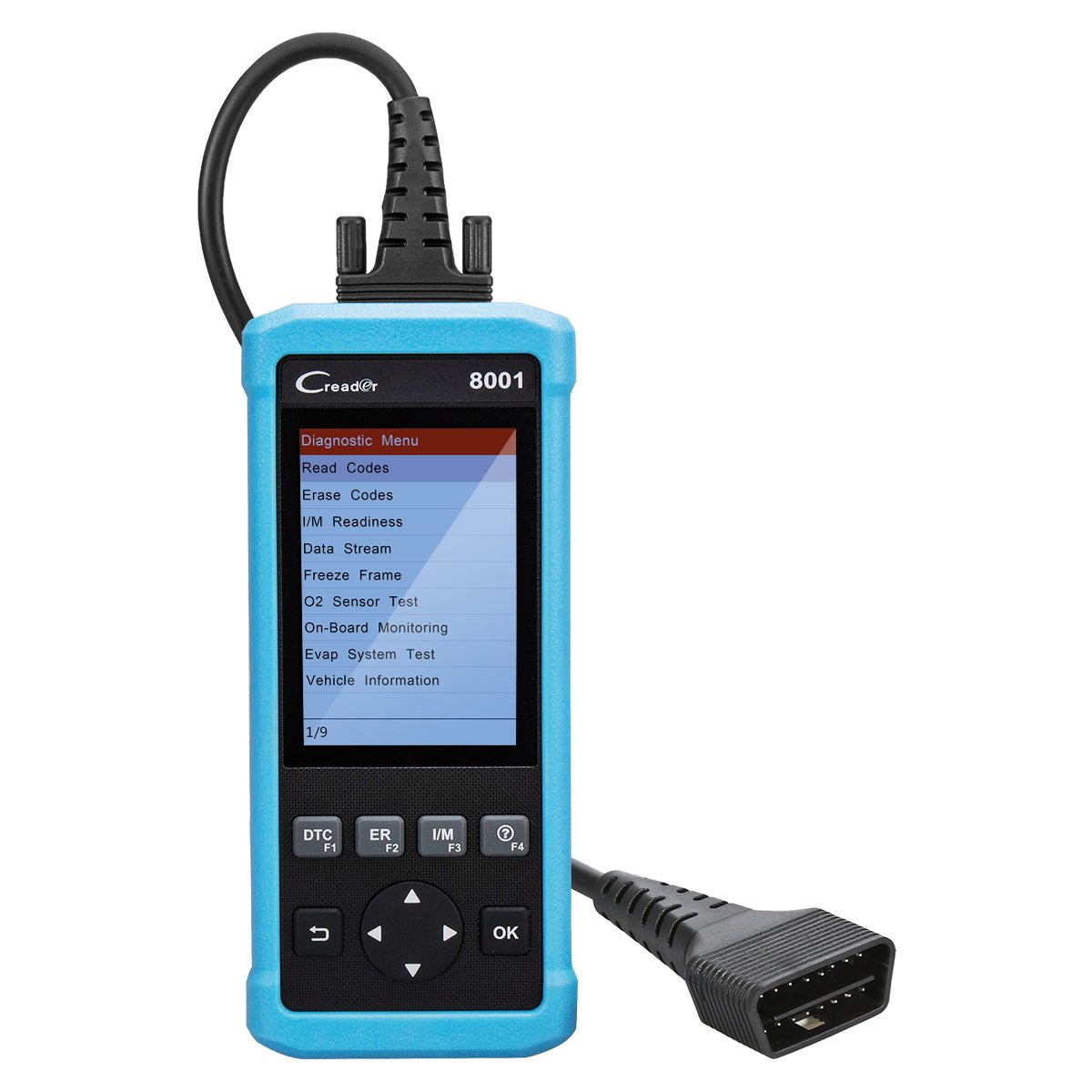
Slika 1: LAUNCH Creader 8021 Device Diagram. This image illustrates the main components of the Creader 8021, including the LCD screen, diagnostic cable, DB15 connector, and various control buttons such as I/M, Erase, DTC, ESC, Help, OK, and Selection buttons.
Ključne karakteristike:
- ABS & SRS Diagnostics: Reads and clears DTCs, and reads data streams for Anti-lock Braking System and Supplemental Restraint System.
- Resetiranje ulja: Resetuje lampicu za servis ulja nakon zamjene ulja.
- Resetovanje EPB-a: Resetuje sistem elektronske parkirne kočnice nakon zamjene kočionih pločica.
- Resetovanje SAS-a: Clears faulty steering angle sensor memories and calibrates the steering angle sensor.
- Resetovanje BMS-a: Performs a reset on the vehicle battery to clear fault information and re-match the battery.
- Potpune OBD2 funkcije: Supports all 10 OBD2 test modes for comprehensive vehicle diagnostics.
- Data Recording & Review: Allows recording of real-time DTCs and data streams for later review.
- Široka pokrivenost vozila: Compatible with 46 vehicle brands for ABS/SRS diagnostics (2006-2016 models) and 40 car brands for Oil/EPB resets. Full OBD2 functions cover most 1996 US-Based, 2001 EU-Based, and newer vehicles.
- Podrška za više jezika: English, Spanish, French, Russian, German, Portuguese, Japanese.
Sadržaj paketa
Upon opening the package, verify that all items are present and in good condition. If any items are missing or damaged, contact your vendor immediately.

Slika 2: Package Contents. The image displays the LAUNCH Creader 8021 diagnostic tool, a diagnostic cable, a USB cable for updates, a quick start guide, and a protective carrying case.
- LAUNCH Creader 8021 Main Unit
- Diagnostic Cable (DB15 to OBD2)
- USB kabel (za ažuriranja)
- Vodič za brzi početak
- Zaštitna torbica za nošenje
Podešavanje i početna upotreba
- Uključeno: The Creader 8021 is powered directly from the vehicle's OBD2 port. No external power source is typically required during operation.
- Pronađite OBD2 priključak: Identify the 16-pin Data Link Connector (DLC) in your vehicle. This port is usually located under the dashboard on the driver's side.
- Povežite se s vozilom: Plug the diagnostic cable's DB15 connector into the Creader 8021 and the OBD2 connector into the vehicle's DLC. Ensure a secure connection.
- Inicijalizacija uređaja: Once connected, the Creader 8021 will automatically power on and initiate communication with the vehicle. The main menu will appear on the LCD screen.
- Odabir jezika: If prompted, select your preferred language from the available options (English, Spanish, French, Russian, German, Portuguese, Japanese).

Slika 3: Prednji i zadnji Views of the Device. This image shows the front display and control buttons, along with the rear label containing serial number and input specifications.
Uputstvo za upotrebu
Navigate through the menus using the directional buttons and confirm selections with the "OK" button. Use the "ESC" button to return to the previous screen.
1. OBD2 Diagnostics:
This function allows access to all 10 modes of OBD2 diagnostics for engine-related issues.
- Pročitajte kodove: Displays Diagnostic Trouble Codes (DTCs) stored in the vehicle's ECU.
- Obriši kodove: Clears DTCs from the vehicle's ECU and turns off the Malfunction Indicator Lamp (MIL).
- I/M spremnost: Provjerava spremnost sistema za praćenje emisija.
- Prijenos podataka: Prikazuje podatke u realnom vremenu sa senzora vozila u tekstualnom ili grafičkom formatu.
- Zamrzni okvir: Shows a snapshot of vehicle operating conditions at the time an emission-related fault occurred.
- Test O2 senzora: Dohvaća rezultate testa monitora O2 senzora.
- Nadzor na vozilu: Dohvaća rezultate dijagnostičkih testova nadzora na vozilu za određene komponente/sisteme.
- Test sistema za isparavanje: Pokreće testiranje sistema za isparavanje.
- Podaci o vozilu: Dohvaća identifikacijski broj vozila (VIN), ID kalibracije (CALID) i broj za verifikaciju kalibracije (CVN).
2. ABS & SRS System Diagnostics:
Access specific diagnostic functions for the Anti-lock Braking System and Supplemental Restraint System.
- Select "ABS System" or "SRS System" from the main menu.
- Choose "Read Codes" to view system-specific DTCs.
- Choose "Erase Codes" to clear system-specific DTCs.
- Odaberite "Stream podataka" za view real-time data from ABS/SRS sensors.
3. Reset Functions:
The Creader 8021 supports several maintenance reset functions.
- Resetiranje ulja: Follow on-screen prompts to reset the oil service light after an oil change.
- Resetovanje EPB-a: Follow on-screen prompts to reset the Electronic Parking Brake system. This is crucial after replacing brake pads or performing maintenance on the EPB system.
- Resetovanje SAS-a: Follow on-screen prompts to calibrate the Steering Angle Sensor. This is often required after steering system repairs or alignment.
- Resetovanje BMS-a: Follow on-screen prompts to reset the Battery Management System. This is necessary when replacing the vehicle battery to ensure proper charging and monitoring.
Održavanje i ažuriranja
Održavanje uređaja:
- Keep the device clean and dry. Avoid exposure to extreme temperatures, moisture, or direct sunlight.
- Do not use abrasive cleaners or solvents. Wipe with a soft, damp tkanina.
- Uređaj čuvajte u zaštitnoj futroli za nošenje kada se ne koristi.
Ažuriranja softvera:
The LAUNCH Creader 8021 offers free lifetime software updates via the internet. Regular updates ensure compatibility with newer vehicle models and provide enhanced features.
- Preuzmite alat za ažuriranje: Posjetite službeno PREDSTAVLJANJE website and download the update tool software to your computer.
- Instaliraj softver: Install the update tool on a computer running Windows 7, 8, 10, or XP.
- Povežite uređaj: Connect the Creader 8021 to your computer using the provided USB cable.
- Pokrenite alat za ažuriranje: Launch the update tool and follow the on-screen instructions to register your device and download the latest software.
- Transfer Updates: The update tool will guide you through transferring the updates to the device's TF card.
Napomena: You may also remove the TF card from the device and use a card reader to update it directly on your computer, then reinsert the card into the device.
Rješavanje problema
| Problem | Mogući uzrok | Rješenje |
|---|---|---|
| Uređaj se ne uključuje. |
|
|
| Greška u komunikaciji s vozilom. |
|
|
| Dugmad ne reagiraju. |
|
|
| Update process fails. |
|
|
Specifikacije
| Feature | Detalj |
|---|---|
| Model | Kreator 8021 |
| Display | 4-inčni LCD ekran u boji |
| Ulazni voltage | 9-18V DC (via OBD2) |
| Radna temperatura | 0°C do 50°C (32°F do 122°F) |
| Temperatura skladištenja | -20°C do 70°C (-4°F do 158°F) |
| Dimenzije (D x Š x V) | 26.16 x 19.3 x 8.38 cm (10.3 x 7.6 x 3.3 inča) |
| Težina | 458 g (1.01 lbs) |
| Povezivanje | OBD2, Mini USB |
| Podržani protokoli | ISO9141-2, ISO14230-4, SAEJ1850, ISO15765-4 |
| Metod ažuriranja | Free internet update via USB |
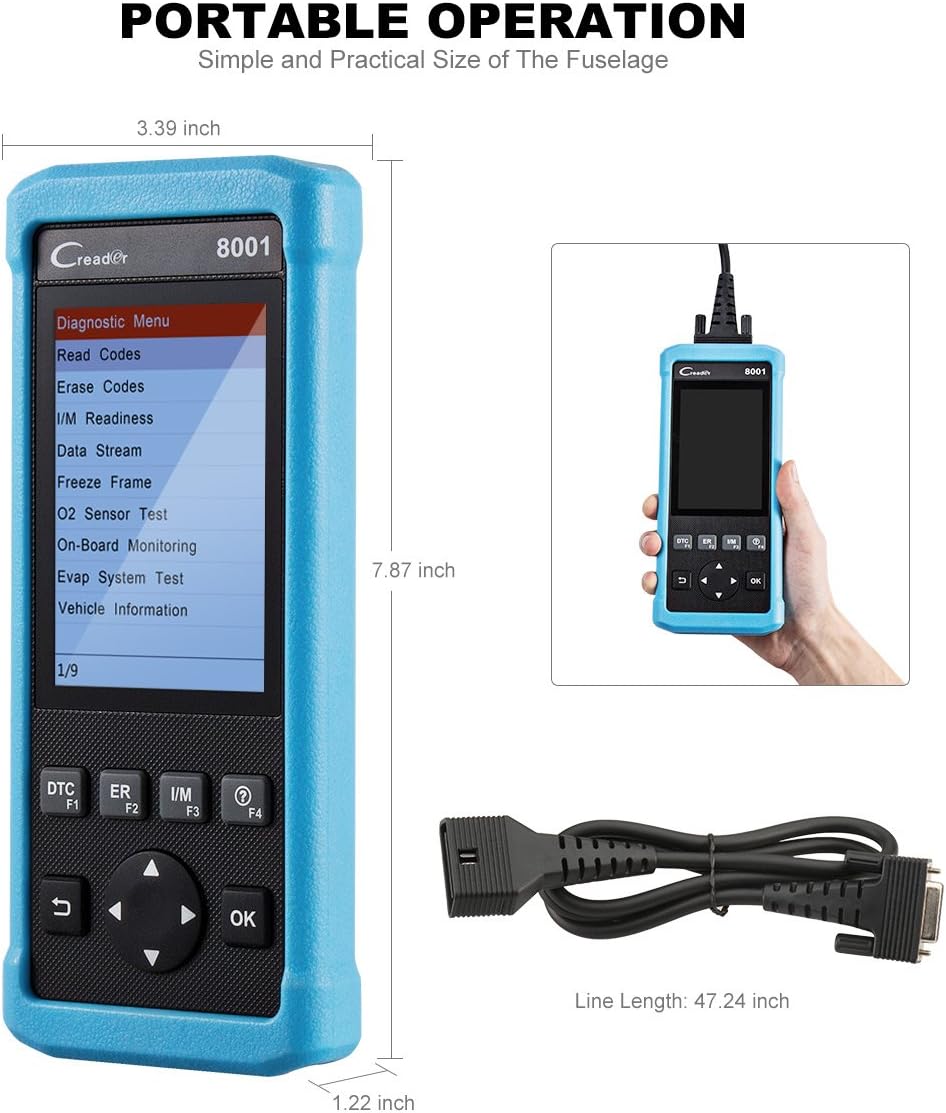
Slika 4: Product Dimensions. This image provides a visual representation of the Creader 8021's physical dimensions, including its length, width, and thickness, along with the length of the diagnostic cable.
Garancija i podrška
Informacije o garanciji:
The LAUNCH Creader 8021 comes with a 12-mjesečna garancija od datuma kupovine. Ova garancija pokriva proizvodne nedostatke i kvarove pri normalnoj upotrebi. Molimo sačuvajte dokaz o kupovini za reklamacije u slučaju garancije.
The warranty does not cover damage caused by misuse, accidents, unauthorized modifications, or improper maintenance.
tehnička podrška:
For technical assistance, troubleshooting, or warranty inquiries, please contact LAUNCH customer support. Refer to the official LAUNCH webstranicu za najnovije kontakt informacije.
Prilikom kontaktiranja podrške, pripremite serijski broj uređaja i dokaz o kupovini.


