1. Uvod
This manual provides essential information for the safe and efficient operation of your NEC NP-PA653U LCD Projector. Please read this manual thoroughly before using the projector and retain it for future reference. The NEC NP-PA653U is an advanced professional installation projector designed for higher education and corporate environments, offering high brightness and flexible installation options.
2. Sigurnosne informacije
Važna sigurnosna uputstva:
- Always connect the projector to a grounded power outlet.
- Ne blokirajte ventilacijske otvore. Osigurajte dovoljno prostora oko projektora za pravilan protok zraka.
- Ne gledajte direktno u sočivo projektora kada je lamp is on, as this can cause eye damage.
- Avoid placing the projector in direct sunlight, near heat sources, or in environments with excessive dust or humidity.
- Za sve servisne radove obratite se kvalifikovanom servisnom osoblju. Ne pokušavajte sami otvarati ili popravljati projektor.
- Koristite samo dodatke/pribor koje je odredio proizvođač.
3. Sadržaj paketa
Provjerite da li se u vašem paketu nalaze sve dolje navedene stavke:
- NEC NP-PA653U LCD Projector
- Poklopac rupe za sočivo
- Bežični daljinski upravljač
- Lens lock screw
- Kabl za napajanje
- Korisnički priručnik (ovaj dokument)
4. Proizvod je gotovview
The NEC NP-PA653U is a high-performance LCD projector designed for professional installations. It features 6500 lumens brightness, WUXGA (1920x1200) resolution, and advanced connectivity options including HDBaseT.
4.1 Prednji View

Slika 4.1: Front view of the NEC NP-PA653U LCD Projector. This image shows the main lens assembly and the overall white casing of the projector.
4.2 Pozadi View (Input/Output Panel)
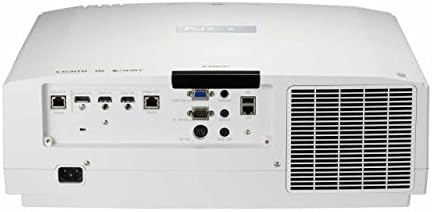
Slika 4.2: Pozadi view of the NEC NP-PA653U LCD Projector. This panel includes various connectivity options such as HDMI, HDBaseT, VGA, audio inputs/outputs, and network ports.
4.3 Strana View (Kontrolna tabla)
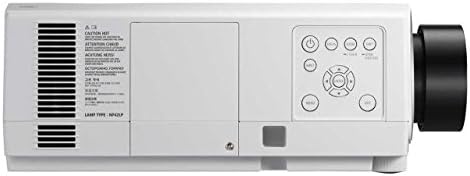
Slika 4.3: Side view of the NEC NP-PA653U LCD Projector. This image highlights the integrated control panel with buttons for power, menu navigation, and input selection.
5. Podešavanje
5.1 Fizički smještaj
The NP-PA653U offers flexible installation options, including tilt-free and portrait installation capabilities. Ensure the projector is placed on a stable, level surface or securely mounted. Maintain adequate ventilation space around the unit.
- Instalacija objektiva: This projector uses optional powered lenses. Align the lens with the lens mount and secure it according to the lens-specific instructions. Use the provided lens lock screw.
- Udaljenost projekcije: Adjust the distance from the screen to achieve the desired image size. The optional powered lenses allow for lens shift, focus, and zoom adjustments.
5.2 Povezivanje uređaja
Connect your source devices (e.g., computer, Blu-ray player) to the appropriate input ports on the projector's rear panel (refer to Figure 4.2).
- HDBaseT: For uncompressed Full HD digital video, audio, Ethernet, power, and control signals over a single cable. The HDBaseT input and separate HDBaseT loop out provide versatile connectivity.
- HDMI: Connect devices using HDMI cables for high-definition digital video and audio.
- VGA: Connect computers using a VGA cable for analog video signals.
- Mreža (Ethernet): Connect to a network for control and monitoring.
5.3 Uključivanje/isključivanje napajanja
- Spojite kabel za napajanje na projektor i uzemljenu električnu utičnicu.
- Pritisnite Snaga button on the projector's control panel or the remote control to turn on the projector. The power indicator light will change.
- Za isključivanje pritisnite Snaga button again. Confirm shutdown if prompted. Allow the projector to cool down before unplugging.
6. Uputstvo za upotrebu
6.1 Osnovni rad
- Odabir ulaza: Use the "Input" button on the remote or control panel to cycle through available input sources (HDMI, HDBaseT, VGA, etc.).
- Navigacija menijem: Press the "Menu" button to access the on-screen display (OSD) menu. Use the arrow keys to navigate and "Enter" to select options.
- Fokus i zumiranje: Adjust the focus and zoom using the controls on the optional powered lens or via the remote control/OSD menu.
- Pomak sočiva: Utilize the lens shift function (horizontal and vertical) to adjust the image position without moving the projector.
6.2 Napredne funkcije
- 4K Ready (HDR10, BT.2020): The projector supports HDR10 and BT.2020 signal formats, making it compatible with Ultra HD Blu-ray and 4K TV broadcasting content. Ensure your source device is configured for these formats.
- TileMatrix: This feature enables the creation of a large 4K x 2K resolution image by utilizing up to four projectors. Connect multiple projectors via the HDBaseT loop out and configure TileMatrix settings in the OSD menu.
- Mešanje ivica: For seamless multi-projector installations, use the built-in edge blending feature to smoothly combine images from adjacent projectors, eliminating visible seams.
- Slaganje: The projector supports stacking, allowing two or more projectors to be aligned to increase brightness or provide redundancy.
- High Performance Video Processing/Scaling: The projector incorporates advanced video processing to create life-like images from various input resolutions.
7. Održavanje
7.1 Čišćenje
- Projektor Casing: Obrišite casinObrišite mekom, suhom krpom. Za tvrdokornu prljavštinu koristite blago suhu krpu.amp krpom s blagim, neabrazivnim sredstvom za čišćenje.
- Objektiv: Gently clean the lens with a lens cleaning cloth or lens paper. Avoid using abrasive materials or harsh chemicals.
- Filteri zraka: Regularly check and clean the air filters to prevent dust buildup, which can affect performance and lamp life. Refer to the OSD menu for filter usage time.
7.2 Lamp Zamjena
Projektor lamp ima ograničen vijek trajanja. Kada lamp life approaches its end, a warning message will appear. Replace the lamp with an authentic NEC replacement lamp (Lamp Type: NP42LP) to ensure optimal performance and safety.
- Turn off the projector and unplug the power cord. Allow it to cool completely (at least 60 minutes).
- Pronađite lamp cover (refer to Figure 4.3 for general location on the side panel).
- Odvrnite lamp pokrijte i pažljivo uklonite stari lamp modul.
- Umetnite novi lamp modul, pazeći da je pravilno postavljen.
- Zamijenite lamp cover and secure it with screws.
- Resetujte lamp tajmer u OSD meniju projektora.
8. Otkrivanje problema
This section addresses common issues you might encounter. For more complex problems, contact NEC customer support.
| Problem | Mogući uzrok | Rješenje |
|---|---|---|
| Nema prikazane slike |
|
|
| Slika je mutna |
|
|
| Projektor se pregrijava i gasi |
|
|
9. Specifikacije
| Feature | Detalj |
|---|---|
| Broj modela | NP-PA653U |
| Brand | NEC |
| Osvetljenost | 6500 lumena |
| Rezolucija ekrana | 1920 x 1080 (supports 4K signals) |
| Tehnologija povezivanja | Ethernet, HDBaseT, HDMI, VGA |
| Dimenzije proizvoda | 19.8 x 16.2 x 6.6 inča |
| Težina artikla | 22.5 funte |
| Preporučena upotreba | Poslovanje, obrazovanje |
| Posebna karakteristika | Prijenosni |
| Proizvođač | NEC Solutions (Amerika), Inc. |
| Datum prve dostupnosti | 7. januara 2017 |
10. Garancija i podrška
For warranty information, technical support, or service inquiries, please refer to the official NEC website or contact your authorized NEC dealer. Keep your purchase receipt as proof of purchase for warranty claims.
Online resursi: Posjetite službeni NEC website for the latest drivers, firmware updates, and additional support documentation.


