1. Uvod
This manual provides essential instructions for the safe and efficient operation of your beFree Sound BFS-6445 Projection Party Light Dome Subwoofer Bluetooth Portable Speaker. Please read this manual thoroughly before using the product and retain it for future reference.
The beFree Sound BFS-6445 is a versatile portable speaker system featuring a 10-inch subwoofer, Bluetooth connectivity, USB/SD input, FM radio, and a unique projection light dome. It includes a wireless microphone and a remote control for enhanced functionality.
2. Proizvod je gotovview
2.1 Ključne karakteristike
- Vršna izlazna snaga od 800 W
- 10-inch Subwoofer for deep bass
- 7" x 4.5" LED Light Projection Dome
- Bluetooth bežična veza
- USB and SD Card Input for media playback
- FM radio tjuner
- Microphone and Guitar Inputs with priority switch
- Bass, Treble, Echo, Mic Volume, and Guitar Volume Controls
- Built-in Side Handles, Rolling Handle, and Wheels for portability
- Includes Wireless Microphone and Remote Control
Komponente i kontrole 2.2 zvučnika
Refer to the image below for a visual guide to the speaker's main components and control panel.

Slika 1: Front view of the beFree Sound BFS-6445 speaker, showing the projection light dome, control panel, 10-inch subwoofer grille, and included wireless microphone and remote control. The inset images highlight the light dome's color variations (green, blue, red), USB/SD card slots, Bluetooth logo, and FM radio icon.
The control panel, located on the top front of the speaker, provides access to various functions including volume, input selection, equalization, and light dome control.
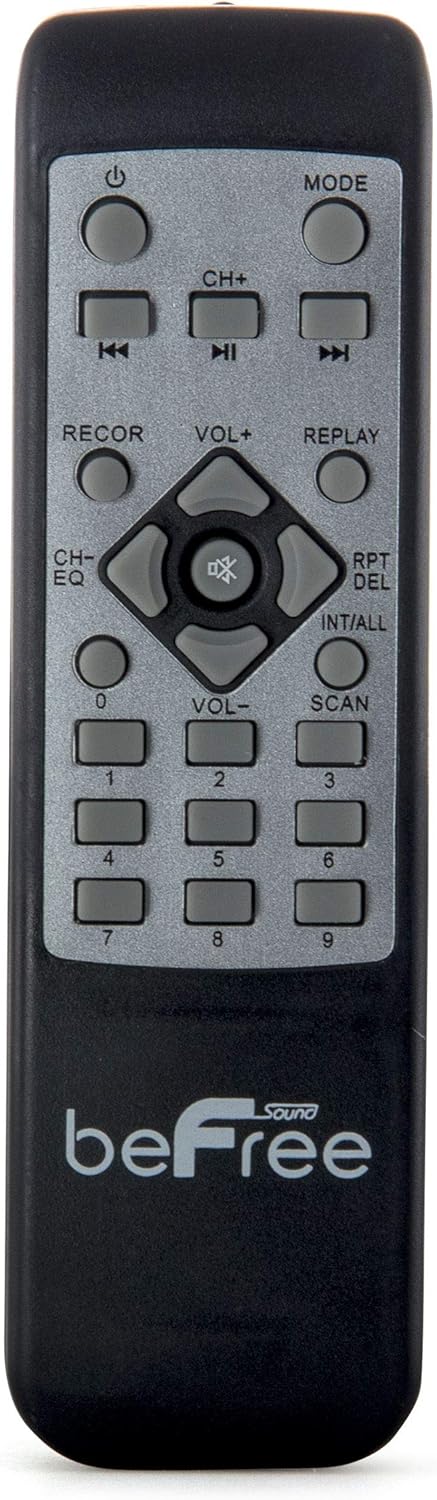
Slika 2: Close-up view of the beFree Sound BFS-6445 remote control. It features buttons for power, mode selection, track navigation, volume adjustment, EQ, record, replay, scan, and numerical input.
The remote control allows for convenient operation of the speaker from a distance.
3. Podešavanje
3.1 Raspakivanje i postavljanje
- Pažljivo izvadite zvučnik i svu dodatnu opremu iz ambalaže.
- Postavite zvučnik na stabilnu, ravnu površinu. Osigurajte odgovarajuću ventilaciju oko uređaja.
- The speaker is equipped with rolling wheels and an extendable handle for easy transport.
3.2 Priključak za napajanje
- Connect the provided AC power cord to the speaker's AC input port (AC 100-240V, 50/60Hz).
- Uključite drugi kraj kabla za napajanje u odgovarajuću zidnu utičnicu.
- The speaker can operate on AC power.
3.3 Battery Installation (Remote Control & Wireless Microphone)
- daljinski upravljač: Open the battery compartment on the back of the remote control. Insert 2 x AAA batteries, ensuring correct polarity (+/-). Close the compartment.
- Bežični mikrofon: Open the battery compartment on the microphone. Insert 2 x AA batteries, ensuring correct polarity (+/-). Close the compartment.
4. Uputstvo za upotrebu
4.1 Uključivanje/isključivanje napajanja
Pritisnite POWER dugme na kontrolnoj tabli ili daljinskom upravljaču da biste uključili ili isključili zvučnik.
4.2 Odabir načina unosa
Pritisnite MODE button on the control panel or remote control to cycle through available input modes: Bluetooth, USB, SD, FM Radio, and AUX (if an external device is connected via audio input).
4.3 Bluetooth uparivanje
- Uključite zvučnik i odaberite Bluetooth mode using the MODE button. The display will indicate Bluetooth mode, and a pairing tone may sound.
- Omogućite Bluetooth na svom mobilnom uređaju (pametnom telefonu, tabletu itd.).
- Traži available Bluetooth devices. The speaker will appear as "beFree Sound BFS-6445" or similar.
- Select the speaker from the list to pair. Once paired, a confirmation tone will sound.
- Sada možete reproducirati zvuk sa svog uređaja putem zvučnika.
4.4 Reprodukcija sa USB-a/SD kartice
- Insert a USB flash drive or SD card into the respective slot on the control panel.
- Zvučnik će se automatski prebaciti u USB ili SD način rada i početi reproducirati kompatibilni zvuk files. Ako ne, pritisnite MODE dugme da biste odabrali ispravan ulaz.
- Koristite PLAY/PAUSE, PRETHODNA, i NEXT buttons on the control panel or remote to control playback.
4.5 Rad FM radija
- Odaberite FM Radio mode using the MODE button.
- Pritisnite i držite SCAN button (often the PLAY/PAUSE button) to automatically scan and save available FM stations.
- Koristite PRETHODNA i NEXT dugmad za navigaciju kroz sačuvane stanice.
4.6 Ulazi za mikrofon i gitaru
- Connect a wired microphone to the MIC INPUT Jack.
- Spojite gitaru na GUITAR INPUT Jack.
- Podesite JAČINA MIK i VOLUME GITARE knobs on the control panel to set desired levels.
- Koristite PREKIDAČ PRIORITETA MIKROFONA to enable or disable microphone priority. When enabled, the music volume will automatically lower when the microphone is in use.
- Podesite ECHO knob for microphone echo effects.
4.7 Light Projection Dome
The speaker features an integrated LED light projection dome. Use the LIGHT POWER SWITCH on the control panel to turn the light dome on or off. The dome projects various colored patterns to enhance the ambiance.
4.8 Podešavanje zvuka
Koristite BASS i TREBLE knobs on the control panel to adjust the low and high frequencies of the audio output.
Glavni VOLUME knob controls the overall output level of the speaker.
4.9 Using as Main or Passive Speaker
This speaker supports dual audio input/output, allowing it to be used in conjunction with another unit. Connect the audio output of one speaker to the audio input of another using an AV cable to amplify sound or create a stereo setup.
5. Održavanje
5.1 Čišćenje
- Uvijek isključite zvučnik iz električne utičnice prije čišćenja.
- Za brisanje vanjskih površina zvučnika koristite meku, suhu krpu.
- Ne koristite abrazivna sredstva za čišćenje, voskove ili rastvarače jer mogu oštetiti završnu obradu.
- Održavajte rešetke zvučnika bez prašine i ostataka.
5.2 Skladištenje
Kada se ne koristi duži period, zvučnik čuvajte na hladnom i suhom mjestu, dalje od direktne sunčeve svjetlosti i ekstremnih temperatura. Ako je moguće, koristite originalno pakovanje radi zaštite.
6. Otkrivanje problema
| Problem | Mogući uzrok | Rješenje |
|---|---|---|
| Nema struje | Power cord not connected; outlet not active; power switch off. | Ensure power cord is securely connected. Check wall outlet with another device. Turn the speaker's power switch on. |
| Nema zvuka | Volume too low; incorrect input mode; device not paired (Bluetooth); media error (USB/SD). | Increase master volume. Select the correct input mode. Re-pair Bluetooth device. Check USB/SD card for compatible files and proper insertion. |
| Bluetooth se ne povezuje | Speaker not in Bluetooth mode; device too far; interference; speaker already paired to another device. | Provjerite je li zvučnik u Bluetooth načinu rada. Približite uređaj zvučniku. Isključite ostale Bluetooth uređaje. Isključite se s prethodnog uređaja. |
| Mikrofon ne radi | Microphone not powered; volume too low; incorrect input. | Check microphone batteries (if wireless) or connection (if wired). Increase MIC VOLUME. Ensure MIC PRIORITY switch is set correctly. |
| Light dome not working | Light power switch off. | Ensure the LIGHT POWER SWITCH is in the ON position. |
7. Specifikacije
- Vrsta zvučnika: Subwoofer
- Veličina zvučnika: 10 inča
- Maksimalna izlazna snaga zvučnika: 800 Watts
- Tehnologija povezivanja: Bluetooth, USB
- Posebne karakteristike: Portable, Projection Light Dome, FM Radio, USB/SD Input, Microphone/Guitar Input
- Metoda kontrole: Remote, On-unit controls
- Izvor napajanja: AC 100-240V, 50/60Hz
- Dimenzije proizvoda (D x Š x V): 13.5" x 12.5" x 29.75"
- Težina artikla: 30.3 funti
- Baterije za daljinski upravljač: 2 x AAA (uključeno)
- Wireless Microphone Batteries: 2 x AA (uključeno)
- Broj modela: BFS-6445
- UPC: 602573151884
8. Garancija i podrška
beFree Sound products are designed for reliability and performance. For warranty information, technical support, or service inquiries, please refer to the warranty card included with your purchase or contact beFree Sound customer service directly.
Molimo sačuvajte svoj dokaz o kupovini za zahtjeve u vezi s garancijom.


