1. Proizvod je gotovview
The Intermatic ST01 is a versatile 7-day heavy-duty programmable timer designed for a wide range of applications. It allows users to set precise ON/OFF schedules for electrical loads, offering convenience and energy savings. This timer is suitable for 120-277 VAC systems and can handle up to 15A, making it ideal for controlling lighting, fans, pumps, and other heavy-duty electrical equipment.
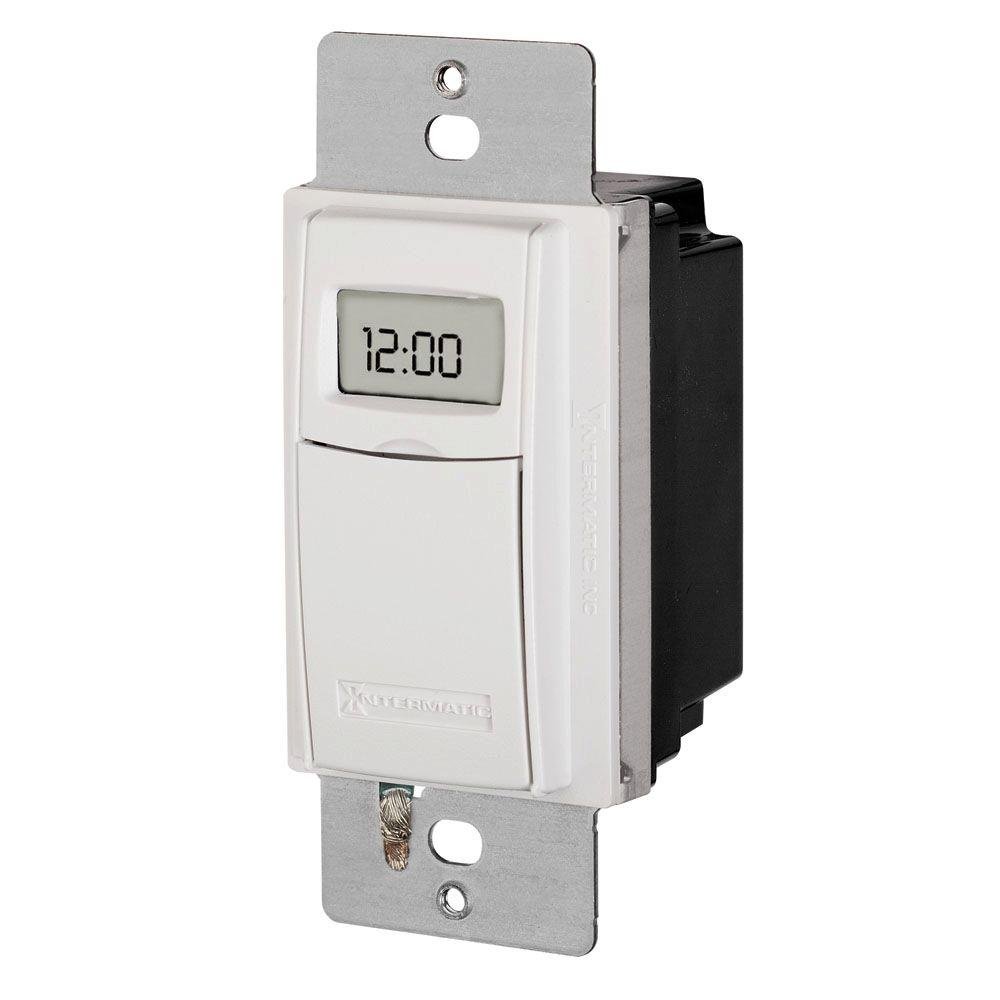
Slika 1: Prednja strana view of the Intermatic ST01 Programmable Timer, showing its digital display and white finish.
2. Važna sigurnosna uputstva
Please read and understand all instructions before installing or operating this timer. Failure to follow these instructions may result in electric shock, fire, or serious injury.
- Isključite napajanje: Always turn off power at the circuit breaker or fuse box before installing or servicing the timer.
- Kvalifikovani električar: Installation should be performed by a qualified electrician or trained personnel in accordance with all national and local electrical codes.
- Samo za unutrašnju upotrebu: This device is intended for indoor use in dry locations only. Do not expose to rain or moisture.
- Pravilno ožičenje: Ensure all wiring connections are secure and correctly matched to the terminal markings. A neutral wire is required for operation.
- Nosivost: Do not exceed the maximum electrical ratings of the timer (15A, 120-277 VAC).
- uzemljenje: Provjerite da li je tajmer pravilno uzemljen.
3. Sadržaj paketa
Prije početka instalacije provjerite da li su sve komponente prisutne:
- Intermatic ST01 7-Day Heavy-Duty Programmable Timer
- Uputstvo za upotrebu
- Mounting Screws (typically included with wall plate, not explicitly listed in product data)
4. Ključne karakteristike
- 7-dnevna programabilnost: Allows for different schedules on each day of the week.
- Heavy-Duty Rating: Capable of controlling loads up to 15 Amperes.
- Wide Voltage Raspon: Operates on 120-277 VAC.
- Digitalni prikaz: Clear and easy-to-read digital time and program display.
- Ručno poništavanje: Provides temporary or permanent manual control over programmed settings.
- Automatic Daylight Saving Time Adjustment: Simplifies time changes.
- Rezervna kopija baterije: Retains program settings during power outages.
5. Tehničke specifikacije
| Specifikacija | Vrijednost |
|---|---|
| Broj modela | ST01 |
| Voltage | 120-277 VAC |
| Current Rating | 15 Amperes |
| Dimenzije proizvoda | 2.3 x 4.9 x 3 inča |
| Težina artikla | 0.01 unce |
| Boja | Bijelo |
| Materijal | Plastika |
| Broj postavki | 3 (This refers to modes, not programs) |
6. Vodič za instalaciju
This section provides general guidelines for installing the Intermatic ST01 timer. For detailed wiring diagrams and specific instructions, refer to the diagram included with your product packaging or consult a qualified electrician.
6.1. Priprema
- Turn off power to the circuit at the main service panel (breaker or fuse box).
- Provjerite je li napajanje isključeno testiranjem strujnog kruga pomoću regulatora glasnoće.tage tester.
- Remove the existing wall switch or cover plate.
6.2. Ožičenje
The ST01 timer requires a neutral wire for operation. Identify the Line (hot), Load, and Neutral wires in your electrical box. The timer typically has corresponding colored wires or marked terminals.
- Povežite Linija (vruće) wire from the electrical box to the designated Line terminal/wire on the timer.
- Povežite Učitaj wire (to the light/appliance) from the electrical box to the designated Load terminal/wire on the timer.
- Povežite Neutralno wire from the electrical box to the designated Neutral terminal/wire on the timer.
- Povežite Ground wire from the electrical box to the ground screw on the timer or electrical box.
- Koristite žičane matice da učvrstite sve veze.
6.3. Montaža
- Pažljivo gurnite žičani tajmer u zidnu kutiju.
- Secure the timer to the wall box using the provided mounting screws.
- Attach the decorative wall plate (not included) over the timer.
- Vratite napajanje na prekidač.
7. Uputstvo za upotrebu
Once installed and powered, the timer's display will activate. Follow these steps for initial setup and programming.
7.1. Initial Setup: Setting Current Time and Date
- Pritisnite "CLOCK" dugme. Cifre sata će treptati.
- Koristite "SAT" i "MINUTA" buttons to set the current hour and minute.
- Pritisnite "DAY" dugme za postavljanje trenutnog dana u sedmici.
- Pritisnite "CLOCK" ponovo za spremanje i izlaz.
7.2. Programiranje rasporeda uključivanja/isključivanja
The ST01 allows for multiple ON/OFF programs per day. Refer to the specific button layout on your device for exact programming steps, as these can vary slightly.
- Pritisnite "PROG" dugme. Na displeju će se prikazati "1 UKLJUČENO".
- Koristi "SAT" i "MINUTA" buttons to set the desired ON time for program 1.
- Pritisnite "DAY" to select the days of the week for this program (e.g., Mon-Fri, Sat-Sun, or individual days).
- Pritisnite "PROG" ponovo. Na ekranu će se prikazati "1 ISKLJUČENO".
- Set the desired OFF time for program 1 using "SAT" i "MINUTA" dugmad.
- Repeat steps 3-5 for additional programs (2 ON/OFF, 3 ON/OFF, etc.).
- Pritisnite "CLOCK" button to exit programming mode and return to normal operation.
7.3. Ručno prebacivanje
The timer typically features a manual override button (often labeled "MANUAL" or "ON/OFF").
- Privremeno poništavanje: Pressing the manual button usually toggles the current state (ON to OFF, or OFF to ON) until the next programmed event.
- Trajno poništavanje: Some models allow holding the button or pressing it multiple times to enter a permanent ON or OFF state, overriding all programs until manually changed again. Consult your device's specific instructions for this feature.
8. Održavanje
The Intermatic ST01 timer is designed for long-term, maintenance-free operation. However, a few simple steps can ensure its longevity:
- čišćenje: Obrišite površinu mekom, suhom krpom. Ne koristite abrazivna sredstva za čišćenje ili rastvarače.
- Rezervna kopija baterije: The timer contains an internal battery for program retention during power outages. This battery is typically long-lasting and not user-replaceable. If the display goes blank or programs are lost frequently during power interruptions, the unit may need servicing or replacement.
- inspekcija: Povremeno provjeravajte spojeve ožičenja na čvrstoću i znakove istrošenosti.
9. Otkrivanje problema
If you experience issues with your Intermatic ST01 timer, refer to the table below for common problems and solutions.
| Problem | Mogući uzrok | Rješenje |
|---|---|---|
| Prikaz tajmera je prazan. | No power to the timer; incorrect wiring; internal battery depleted. | Check circuit breaker. Verify wiring connections (Line, Neutral). If power is present and wiring is correct, the unit may require replacement. |
| Tajmer se ne uključuje/isključuje u programirano vrijeme. | Incorrect programming; manual override engaged; incorrect current time/day. | Review and re-enter program settings. Check if manual override is active. Verify current time and day are set correctly. |
| Load (light/appliance) does not turn ON/OFF. | Load wire not connected; load device faulty; timer faulty. | Ensure load wire is securely connected. Test the load device directly (e.g., plug into a working outlet). If the load works directly, the timer may be faulty. |
| Programi se gube nakon nestanka strujetage. | Interna rezervna baterija je prazna ili neispravna. | The internal battery is not user-replaceable. The unit may need replacement if this issue persists. |
10. Informacije o garanciji
Intermatic products are manufactured to the highest quality standards. This product is covered by a limited warranty against defects in material and workmanship. The specific terms and duration of the warranty are typically provided with the product packaging or can be found on the official Intermatic webMolimo sačuvajte dokaz o kupovini za potrebe reklamacije.
11. Korisnička podrška
For technical assistance, troubleshooting beyond this manual, or warranty inquiries, please contact Intermatic Customer Support. Have your product model number (ST01) and purchase information ready when contacting support.
You can typically find contact information (phone number, email, or support portal) on the official Intermatic webstranica: www.intermatic.com


