Uvod
This manual provides essential information for the safe and effective use of your TASCAM DR-10L Micro Portable Digital Audio Recorder. Please read this manual thoroughly before using the product to ensure proper operation and to prevent damage. The TASCAM DR-10L is a compact, lightweight digital audio recorder designed for professional-quality audio capture, particularly for interviews, presentations, and field recording. It features a lavalier microphone for discreet placement and high-resolution recording capabilities.
Product Overview
The TASCAM DR-10L unit is a micro portable recorder with an integrated display and control buttons. It is designed for discreet, high-quality audio capture.

Front view of the TASCAM DR-10L recorder, showing the display and control buttons.
The included lavalier microphone connects to the recorder, offering flexibility for various recording scenarios.

The lavalier microphone with its clip and 3.5mm connector.
The back of the unit features a belt clip for secure attachment to clothing or other surfaces.

Pozadi view of the DR-10L, highlighting the integrated belt clip.
Setup
1. Instalacija baterije
The DR-10L operates on a single AAA battery. For optimal performance, use an alkaline or NiMH rechargeable battery. Open the battery compartment cover, insert the battery with the correct polarity, and close the cover securely.

Image showing the battery compartment open with a AAA battery being inserted.
2. Instalacija MicroSD kartice
The DR-10L records to microSD/SDHC cards (up to 32GB). Locate the microSD card slot on the side of the unit. Insert the card until it clicks into place. To remove, push the card in again until it springs out.

Side view of the DR-10L, indicating the USB port, microSD card slot, and headphone jack.
3. Pričvršćivanje lavalier mikrofona
Connect the included lavalier microphone to the DR-10L's microphone input jack located on the top of the unit. Ensure the connection is secure.
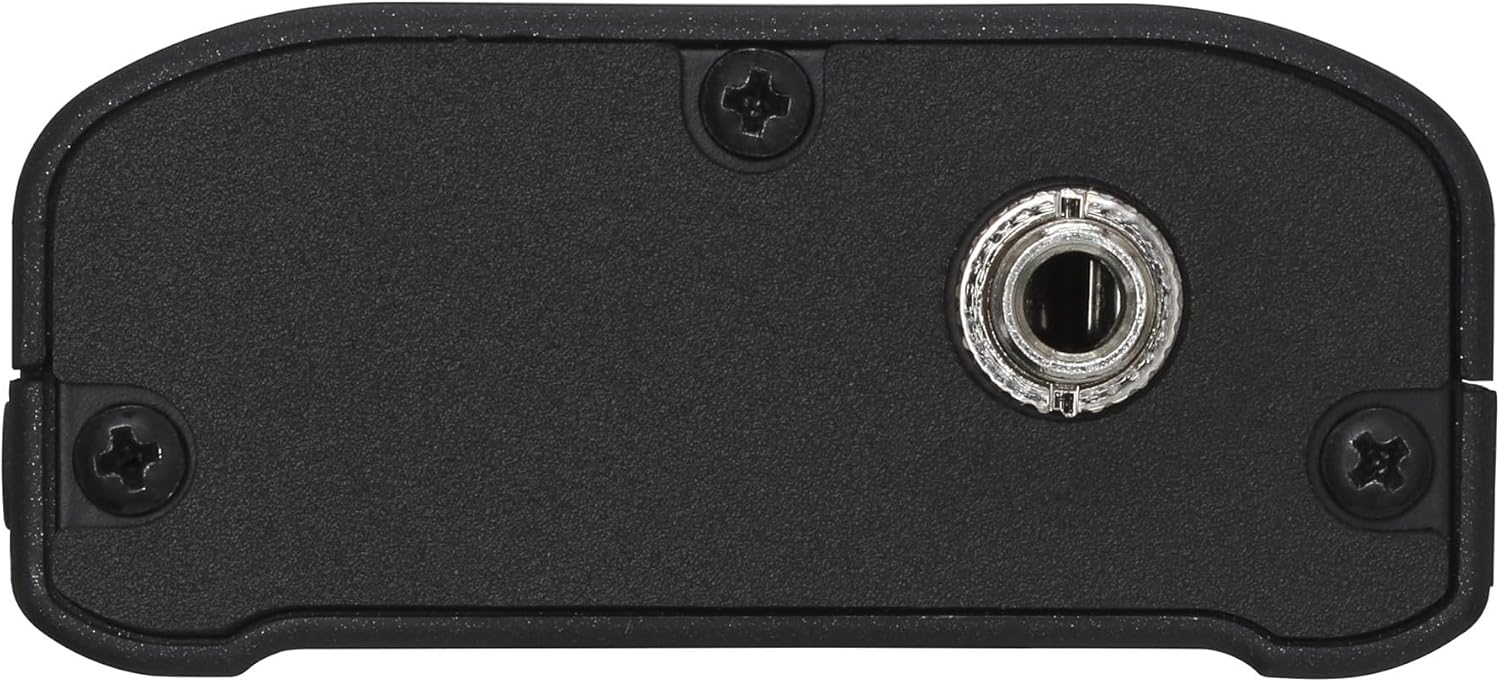
Top view of the DR-10L, showing the microphone input jack.
4. Uključivanje / isključivanje napajanja
To power on the unit, slide the POWER switch to the ON position. The display will light up. To power off, slide the switch to OFF. Always ensure the unit is powered off before removing the battery or microSD card.

Side view of the DR-10L, showing the power switch, record switch, and headphone volume controls.
Uputstvo za upotrebu
1. Osnovno snimanje
To start recording, slide the REC switch to the REC position. The recording indicator will illuminate, and the display will show recording time. To stop recording, slide the REC switch back to its original position. The recorded file će se automatski sačuvati.
2. Praćenje zvuka
Connect headphones to the PHONES jack to monitor the audio during recording or playback. Use the PHONES +/- buttons on the side of the unit to adjust the monitoring volume.
3. Navigacija menijem
Use the MENU button to access the system settings. The arrow buttons (left/right) navigate through options, and the ENTER button confirms selections. Common settings include recording level, low-cut filter, limiter, and dual recording.
4. Dual Recording Function
The DR-10L features a dual recording function that records a second, lower-level safety track simultaneously. This helps prevent clipping in situations where unexpected loud sounds occur. Activate this feature through the menu settings.
5. File Transfer
Za prijenos snimljenog files to a computer, connect the DR-10L using a USB cable. The unit will appear as a removable storage device, allowing you to copy files directly from the microSD card.
6. Instrukcijski videozapisi
Watch these videos for visual guidance on operating your TASCAM DR-10L.
Ovaj video daje krajview of the TASCAM DR-10L's features and basic operation.
A detailed guide on advanced settings and optimal usage of the DR-10L recorder.
Održavanje
Čišćenje
Wipe the unit with a soft, dry cloth. Do not use liquid cleaners, abrasive materials, or solvents, as these can damage the finish or internal components.
Skladištenje
When not in use for extended periods, remove the battery to prevent leakage and potential damage to the unit. Store the DR-10L in a cool, dry place away from direct sunlight and extreme temperatures.
Rješavanje problema
- Uređaj se ne uključuje: Check battery installation and charge level. Ensure the power switch is firmly in the ON position. Replace the battery if necessary.
- Nije snimljen zvuk: Verify that the lavalier microphone is securely connected. Check the recording level settings in the menu. Ensure a microSD card is inserted and has sufficient free space.
- Izobličen zvuk: Adjust the input level to prevent clipping. Ensure the microphone is not placed too close to the sound source. Activate the dual recording function for a safety track.
- Nije moguće prenijeti files na kompjuter: Ensure the USB cable is securely connected to both the DR-10L and the computer. Check if the DR-10L is in USB Mass Storage mode (refer to menu settings for activation). Try a different USB port or cable.
- Kratko trajanje baterije: Ensure you are using fresh alkaline batteries or fully charged NiMH rechargeable batteries. Extreme temperatures can affect battery performance.
Specifikacije
| Feature | Detalj |
|---|---|
| Format snimanja | WAV (BWF compatible) |
| Sampling Frekvencija | 44.1 kHz / 48 kHz |
| Dubina bita | 16/24-bit Linear PCM |
| Mediji | microSD/SDHC cards (supports up to 32GB) |
| Mikrofon | Lavalier (included) |
| Izvor napajanja | 1 x AAA battery (Alkaline or NiMH) |
| Trajanje baterije | Approximately 10 hours (alkaline, varies with usage) |
| Dimenzije (Š x V x D) | 1 cm D x 2 cm Š x 2.2 cm V (približno) |
| Težina | 1.76 grama (bez baterije) |
| Priključak za slušalice | 3.5 mm stereo mini priključak |
| Hardversko sučelje | USB 2.0 |
Garancija i podrška
For detailed warranty information, product registration, and technical support, please visit the official TASCAM website or contact your authorized TASCAM dealer. It is recommended to keep your purchase receipt as proof of purchase for warranty claims.


