1. Uvod
This manual provides essential information for the safe and effective use of your Panasonic AG-AC30 Full-HD AVCCAM Handheld Camera. Please read this manual thoroughly before using the product and retain it for future reference. The AG-AC30 is designed for high-quality video recording with advanced features for professional and enthusiast users.
2. Sigurnosne informacije
- Ne izlažite kameru kiši, vlazi ili ekstremnim temperaturama.
- Izbjegavajte ispuštanje ili izlaganje kamere jakim udarcima.
- Koristite samo dodatnu opremu i adaptere za napajanje koje je odobrio Panasonic.
- Držite kameru dalje od jakih magnetnih polja.
- Disconnect the power supply before cleaning or when not in use for extended periods.
3. Sadržaj paketa
Provjerite da li su sve stavke prisutne u paketu:
- Kamkorder
- (Other accessories such as power adapter, battery, lens hood, microphone, and cables may be included depending on the specific package.)
4. Kamera gotovaview
Familiarize yourself with the main components of your AG-AC30 camcorder.

Slika 4.1: Prednja i bočna view of the Panasonic AG-AC30 camcorder. This image illustrates the ergonomic design for handheld operation, highlighting the lens, handle, and primary controls accessible during use.

Slika 4.2: Front-angle view of the Panasonic AG-AC30 camcorder, showcasing the attached microphone, lens hood, and audio input ports. This view emphasizes the camera's readiness for professional audio and video capture.
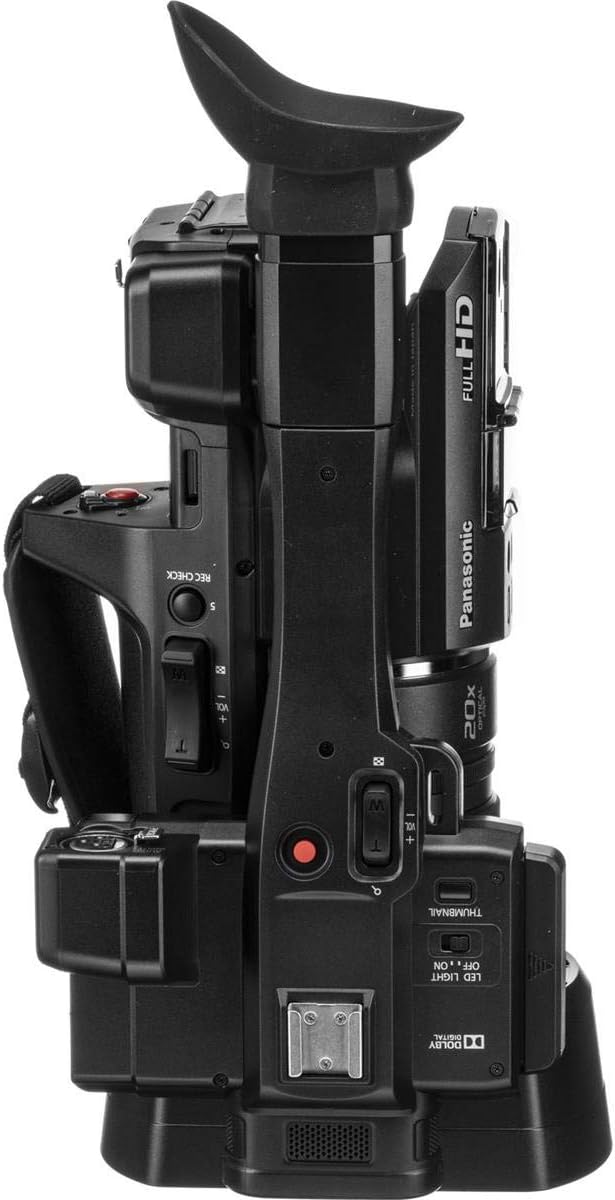
Slika 4.3: Top view of the Panasonic AG-AC30 camcorder. This perspective highlights the integrated handle, electronic viewfinder (EVF), and various control buttons for recording, zoom, and menu navigation.

Slika 4.4: Dno view of the Panasonic AG-AC30 camcorder. This image displays the standard tripod mounting screw hole and the location of the battery compartment, essential for stable shooting and power management.
5. Podešavanje
5.1. Instalacija baterije
- Uvjerite se da je kamera isključena.
- Open the battery compartment cover, typically located at the rear or bottom of the camera.
- Insert the battery pack, aligning it with the terminals, until it clicks into place.
- Čvrsto zatvorite poklopac odeljka za baterije.
5.2. SDXC Card Insertion
The AG-AC30 features dual SDXC card slots for extended recording and backup.
- Locate the SD card slot cover, usually on the side of the camera.
- Open the cover and gently insert an SDXC card into the slot with the label facing the correct direction until it locks.
- Close the SD card slot cover. Repeat for the second slot if using two cards.
5.3. Pričvršćivanje dodatne opreme
- Sjenilo: Attach the lens hood to the front of the lens by aligning the marks and twisting until it locks.
- mikrofon: Secure the external microphone to the cold shoe mount on the handle and connect it to the audio input port (XLR inputs are available).
- Naramenica: Attach the shoulder strap to the designated loops for comfortable carrying.
6. Upravljanje kamerom
6.1. Uključivanje/isključivanje
Slide the POWER switch to the ON position to turn on the camera. To power off, slide the switch to OFF.
6.2. Osnovno snimanje
- Set the camera to recording mode using the mode dial.
- Frame your shot using the 0.24" EVF or the 3" LCD Touch Screen.
- Press the REC START/STOP button to begin recording. Press it again to stop.
- The camera records Full HD (1920 x 1080) video at up to 59.94p.
6.3. Rad zumiranja
The AG-AC30 features a 20x optical zoom lens. Use the zoom rocker on the handle or the individual zoom ring on the lens for precise control.
6.4. Focus, Iris, and Gain Control
Adjust focus, iris (aperture), and gain using the dedicated rings on the lens and control buttons on the camera body. The individual focus, zoom, and iris lens rings allow for manual adjustments.
6.5. Using the Built-in LED Light
Activate the built-in LED light for illumination in low-light conditions. The control for the LED light is typically located near the light unit.
6.6. Stabilizacija slike
The 5-Axis Hybrid O.I.S. (Optical Image Stabilization) helps to reduce camera shake during handheld shooting. Ensure this feature is enabled in the camera settings for smoother footage.
7. Održavanje
7.1. Čišćenje
- Tijelo kamere: Koristite meku, suhu krpu za brisanje kućišta fotoaparata. Za tvrdokornu prljavštinu, laganoampnavlažite krpu vodom, a zatim obrišite suhom krpom.
- Objektiv: Koristite četkicu za objektive ili puhaljku za uklanjanje prašine. Za mrlje koristite specijaliziranu otopinu za čišćenje objektiva i krpu od mikrovlakana.
- LCD ekran: Gently wipe the LCD screen with a soft, lint-free cloth. Avoid pressing too hard.
7.2. Skladištenje
When not in use, store the camera in a cool, dry place, away from direct sunlight and excessive humidity. Remove the battery if storing for an extended period.
8. Otkrivanje problema
| Problem | Mogući uzrok | Rješenje |
|---|---|---|
| Kamera se ne uključuje | Battery depleted or incorrectly inserted; Power adapter not connected | Charge battery or insert correctly; Connect power adapter |
| Nije moguće snimiti video | SDXC card full or not inserted; Write protection enabled on card | Insert new card or delete files; Disable write protection; Format card (data will be lost) |
| Slika je mutna | Out of focus; Lens dirty; Image stabilization off | Adjust focus; Clean lens; Enable 5-Axis Hybrid O.I.S. |
| Nema audio snimanja | Microphone not connected or muted; Audio settings incorrect | Check microphone connection and volume; Adjust audio input settings |
9. Specifikacije
| Feature | Detalj |
|---|---|
| Broj modela | AG-AC30PJ |
| Dimenzije proizvoda | 7.87 x 7.87 x 7.87 inča |
| Težina artikla | 5.5 funte |
| Tehnologija foto senzora | BSI MOS |
| Rezolucija video snimanja | 1080p |
| Maksimalna žižna daljina | 29 mm |
| Maksimalni otvor blende | 1.8 f |
| Vrsta Flash memorije | SDXC |
| Format video snimanja | MPEG-4 |
| Podržani audio format | AAC |
| Veličina ekrana | 30 inča (LCD ekran osjetljiv na dodir) |
| Tehnologija povezivanja | USB |
| Optički zum | 20x |
| Stabilizacija slike | 5-Axis Hybrid O.I.S. |
10. Garancija i podrška
Za informacije o garanciji i korisničku podršku, pogledajte garantni list koji ste dobili uz proizvod ili posjetite službenu web stranicu Panasonic-a. webSačuvajte račun kao dokaz o kupovini za reklamacije u slučaju reklamacije.
Panasonic korisnička podrška: https://na.panasonic.com/us/support