1. Uvod
The Avantree Roxa Plus is an aptX Low Latency Bluetooth audio receiver designed to enable wireless audio streaming to your home stereo system, speakers, or other audio devices. It connects to an AC outlet for power and features a USB charging port for convenience.
2. Sadržaj paketa
- Avantree Roxa Plus Bluetooth Receiver
- 3.5 mm audio kabl
- RCA Audio Cable (3.5mm female to split RCA plugs)
- Vodič za brzi početak
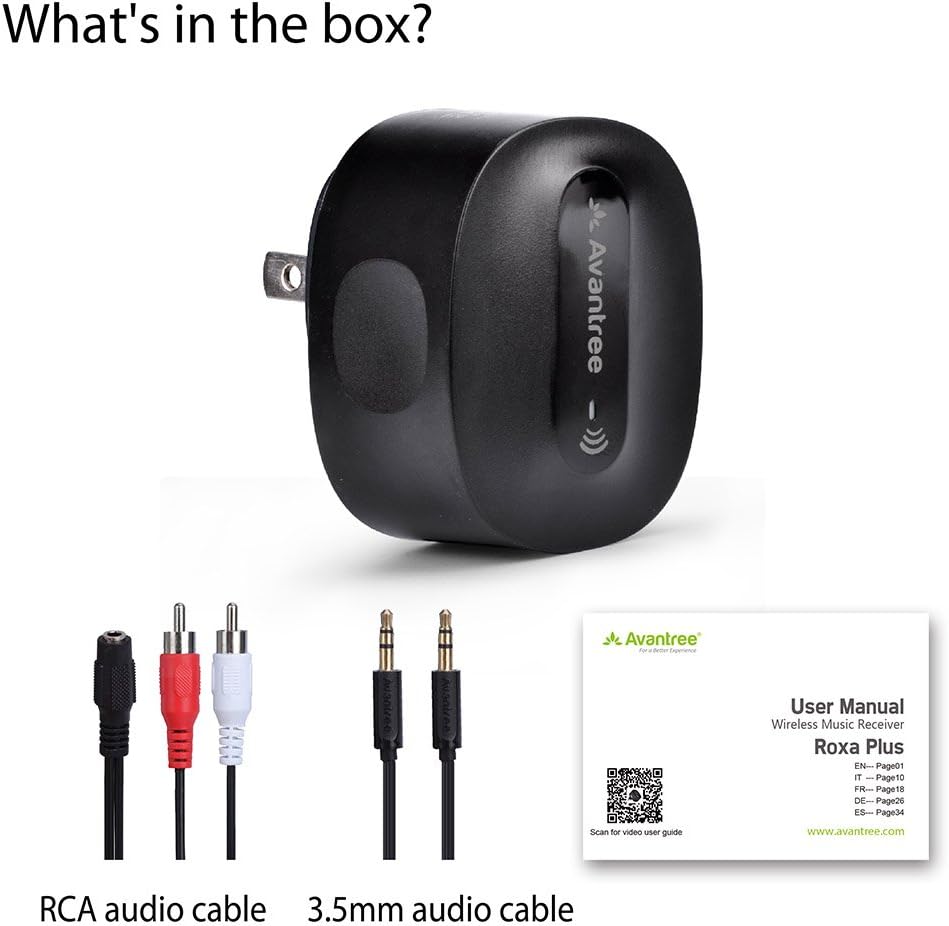
The package includes the Avantree Roxa Plus Bluetooth receiver, an RCA audio cable, a 3.5mm audio cable, and a quick start guide to assist with setup.
3. Proizvod je gotovview
Ključne karakteristike:
- Bluetooth-Enable Your Audio System: Stream audio wirelessly from any Bluetooth-enabled device to your home stereo or speakers.
- Plug & Play: Simple setup with automatic connection after initial pairing.
- AC napajanje: No internal battery, ensuring continuous operation without the need for charging.
- aptX niska latencija: Reduces Bluetooth audio delay for synchronized sound, ideal for watching TV and movies.
- USB priključak za punjenje: Charge your mobile devices simultaneously while using the receiver.
4. Podešavanje
4.1 Connecting to Your Audio System
- Plug the Avantree Roxa Plus directly into a standard AC wall outlet. The device will power on automatically.
- Connect the Roxa Plus to your home stereo system or speakers using one of the provided audio cables:
- For a 3.5mm AUX input on your audio system, use the 3.5mm to 3.5mm audio cable.
- For RCA (red/white) inputs on your audio system, use the 3.5mm female to split RCA cable.

The Avantree Roxa Plus allows you to stream audio wirelessly from your Bluetooth-enabled device to your home stereo or speaker system.
4.2 Uparivanje s Bluetooth uređajem
- Once powered on, the Roxa Plus will automatically enter pairing mode. The LED indicator will flash to show it is ready to connect.
- On your Bluetooth-enabled device (e.g., smartphone, tablet, PC), go to the Bluetooth settings and search for new devices.
- Select "RoxaPlus" from the list of available devices to connect.
- Once connected, the LED indicator on the Roxa Plus will turn solid, and you can begin streaming audio.

Setting up the Roxa Plus is straightforward. Plug it into an AC outlet, connect it to your audio system using the provided AUX or RCA cable, and then pair it with your smartphone via Bluetooth.
5. Uputstvo za upotrebu
5.1 Osnovni rad
- After initial pairing, the Roxa Plus will automatically reconnect to the last paired device when both are powered on and within range.
- Control audio playback (play/pause, skip tracks) and volume directly from your connected Bluetooth device.
5.2 Korištenje USB priključka za punjenje
The Roxa Plus features a USB charging port (5V/1A output) on its side. You can use this port to charge your smartphone, tablet, or other USB-powered devices while the Roxa Plus is plugged into an AC outlet and functioning as an audio receiver.

The Roxa Plus includes a convenient USB charging port, allowing you to charge your smartphone, tablet, or other USB-powered devices while the receiver is in use.
5.3 aptX Low Latency Audio
The Roxa Plus supports aptX Low Latency, which significantly reduces audio delay when paired with an aptX Low Latency enabled Bluetooth transmitter (e.g., Avantree Oasis). This ensures that audio and video are synchronized, providing a better experience for watching movies or playing games.

Featuring aptX Low Latency technology, the Roxa Plus minimizes audio delay, ensuring synchronized sound for an optimal viewing or listening experience, especially when paired with an aptX Low Latency transmitter.
6. Održavanje
- Keep the device dry. Moisture can damage the internal circuits.
- Ne izlažite uređaj ekstremnim temperaturama.
- Uređaj čistite mekom, suhom krpom. Ne koristite jake hemikalije ili deterdžente.
- Čuvajte uređaj na hladnom i suvom mestu kada se ne koristi.
7. Otkrivanje problema
7.1 Nije moguće uparivanje s Bluetooth uređajem
- Ensure the Roxa Plus is powered on and in pairing mode (LED flashing).
- Make sure your Bluetooth device is within range (up to 33 feet) and its Bluetooth function is enabled.
- Turn off Bluetooth on any other nearby devices that might be trying to connect to the Roxa Plus.
- Try restarting both the Roxa Plus (unplug and replug) and your Bluetooth device.
7.2 Nema zvuka
- Verify that the Roxa Plus is successfully paired with your Bluetooth device.
- Check that the audio cable is securely connected between the Roxa Plus and your audio system.
- Ensure your audio system is set to the correct input source (e.g., AUX, RCA).
- Adjust the volume on both your Bluetooth device and your audio system.
7.3 Kašnjenje zvuka
- For minimal audio delay, ensure your transmitting Bluetooth device also supports aptX Low Latency.
- Environmental factors or interference can sometimes cause minor delays. Try moving devices closer or away from other wireless electronics.
8. Specifikacije
| Model | BTRC-300L-BGY-US |
| Dimenzije proizvoda | 2.13 x 1.77 x 1.02 inča |
| Težina artikla | 1.9 unce |
| Tehnologija povezivanja | Bluetooth |
| Izvor napajanja | Corded Electric (AC Plug) |
| Proizvođač | Avantree |
9. Sigurnosne informacije
- Pažljivo rukujte uređajem. Izbjegavajte ispuštanje ili izlaganje jakim udarcima.
- Ne pokušavajte rastavljati ili modificirati uređaj. To može poništiti garanciju i uzrokovati oštećenje.
- Keep the device away from water, fire, and high voltage opremu.
- Dispose of the device responsibly according to local regulations. Do not dispose of with household waste.
- This device may cause interference with other wireless devices. Maintain a reasonable distance from other electronics to prevent disruption.
10. Garancija i podrška
Avantree proizvodi dolaze s garancijom proizvođača. Za detaljne informacije o garanciji, tehničku podršku ili registraciju proizvoda, posjetite službenu stranicu Avantree-a. webweb-mjesto ili direktno kontaktirajte njihovu korisničku službu.
Official Avantree Support: www.avantree.com/support