1. Uvod
This manual provides comprehensive instructions for the installation, operation, and maintenance of the HP Aruba 2930F 24G 4SFP+ Switch (Model JL253A). Please read this manual thoroughly before using the device to ensure proper setup and optimal performance. Retain this manual for future reference.
2. Proizvod je gotovview
The HP Aruba 2930F 24G 4SFP+ Switch is a high-performance network switch designed for enterprise edge deployments. It features 24 Gigabit Ethernet ports and 4 SFP+ ports for high-speed uplinks, providing reliable and secure connectivity.

Slika 2.1: Prednja strana view of the HP Aruba 2930F 24G 4SFP+ Switch, showing 24 RJ45 Gigabit Ethernet ports, 4 SFP+ uplink ports, and LED indicators.

Slika 2.2: Pod uglom view of the HP Aruba 2930F 24G 4SFP+ Switch, highlighting its compact design suitable for rack mounting.
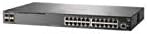
Slika 2.3: Bočna strana view of the HP Aruba 2930F 24G 4SFP+ Switch, showing ventilation slots for heat dissipation.
3. Podešavanje
3.1 Raspakivanje i provjera sadržaja
Pažljivo raspakujte prekidač i provjerite da li su sve komponente prisutne. Paket treba da sadrži:
- HP Aruba 2930F 24G 4SFP+ Switch (Model JL253A)
- Kabl za napajanje
- Komplet za nosač
- Kabl za konzolu
Ako bilo koji artikl nedostaje ili je oštećen, odmah se obratite svom prodavaču.
3.2 Fizička instalacija
- Montaža u stalak: Use the provided rack-mount kit to secure the switch in a standard 19-inch equipment rack. Ensure adequate ventilation around the switch.
- Priključak za napajanje: Connect the power cable to the switch's power input and then to a grounded AC power outlet.
- Početna mrežna veza: Connect a computer to the switch's console port using the console cable for initial configuration, or connect to any RJ45 port for network access if DHCP is available.
Ensure all cables are securely connected and routed to prevent accidental disconnections.
4. Uputstvo za upotrebu
4.1 Uključivanje i početno pokretanje
Once the power cable is connected, the switch will automatically power on. Observe the LED indicators on the front panel. The Power LED should illuminate, indicating the device is receiving power. Other LEDs will indicate port status and activity.
4.2 Povezivanje portova
- RJ45 Ports (10/100/1000BASE-T): Connect standard Ethernet cables (Cat5e or higher) to these ports for connecting network devices such as computers, servers, and other switches. These ports support auto-negotiation for speed and duplex settings.
- SFP+ Ports (10 Gigabit Ethernet): Use compatible SFP+ transceivers and fiber optic cables for high-speed uplinks to core switches or servers.
- PoE+ (Napajanje preko Etherneta Plus): If your model supports PoE+, these ports can provide power to compatible devices like IP phones, wireless access points, and security cameras, eliminating the need for separate power supplies.
4.3 LED indikatori
LED diode na prednjoj ploči prikazuju vizualni status prekidača i njegovih portova:
- LED za napajanje: Označava status napajanja (Uključeno/Isključeno).
- LED dioda greške: Indicates system errors or malfunctions.
- LED indikatori za vezu/aktivnost porta: Indicate link status (solid green for link) and network activity (flashing green). Different colors or patterns may indicate different speeds (e.g., amber for 100Mbps, green for 1Gbps). Refer to the device's specific LED guide for detailed interpretation.
5. Održavanje
5.1 Čišćenje
Redovno čistite vanjski dio prekidača mekom, suhom krpom. Nemojte koristiti tekuća ili aerosolna sredstva za čišćenje. Osigurajte da su ventilacijski otvori bez prašine i prepreka kako biste održali pravilan protok zraka.
5.2 Ažuriranja firmvera
Periodically check the Hewlett Packard (Aruba) support webstranica za ažuriranja firmvera. Održavanje firmvera ažurnim osigurava optimalne performanse, sigurnost i pristup novim funkcijama. Pažljivo slijedite upute koje ste dobili uz paket ažuriranja firmvera.
6. Otkrivanje problema
This section addresses common issues you might encounter with your HP Aruba 2930F switch.
- Nema napajanja:
- Verify the power cable is securely connected to both the switch and a working power outlet.
- Provjerite utičnicu s drugim uređajem kako biste se uvjerili da je funkcionalna.
- Nema veze na portu:
- Provjerite je li Ethernet kabel pravilno spojen na oba kraja.
- Pokušajte s drugim Ethernet kabelom.
- Test the connected device with another port or switch to isolate the issue.
- Provjerite je li povezani uređaj uključen i ispravno funkcionira.
- Spora mrežna veza:
- Provjerite ima li prekomjernog mrežnog prometa ili uskih grla.
- Ensure cables are Cat5e or higher for Gigabit speeds.
- Verify duplex settings on connected devices match the switch's auto-negotiated settings.
- Consider updating the switch firmware.
For more advanced troubleshooting or persistent issues, consult the official Hewlett Packard (Aruba) support documentation or contact technical support.
7. Specifikacije
| Feature | Vrijednost |
|---|---|
| Brand | HEWLETT PACKARD |
| Broj modela | JL253A |
| Težina artikla | 2.4 kilograma (5.28 funti) |
| Dimenzije proizvoda (DxŠxV) | 17.42 x 7.88 x 1.73 inča |
| Voltage | 200 Volts |
| Interface Type | RJ45, SFP+, PoE+ |
| Brzina prijenosa podataka | 100 Megabits Per Second (per port, supports Gigabit on RJ45 and 10 Gigabit on SFP+) |
| RAM | 1024 MB |
| Broj portova | 24 Gigabit Ethernet, 4 SFP+ (Total 28 logical ports) |
| Uključene komponente | Kabl za napajanje, komplet za montažu u rack, kabl za konzolu |
| Boja | Crna |
| Kompatibilni uređaji | Desktop (general network devices) |
Note: Data Transfer Rate of "100 Megabits Per Second" may refer to a baseline or specific port type; the switch supports Gigabit Ethernet on RJ45 ports and 10 Gigabit Ethernet on SFP+ ports.
8. Garancija i podrška
This HP Aruba 2930F 24G 4SFP+ Switch is manufactured by HEWLETT PACKARD. For warranty information, please refer to the warranty card included with your product or visit the official Hewlett Packard Enterprise (Aruba) website. Technical support and additional resources can be found on their support portal.
Za pomoć posjetite: Aruba Networks Support


