Product Overview
The AT&T EL52345 is an expandable cordless phone system featuring three handsets, an integrated digital answering system, and Caller ID/Call Waiting functionality. Designed for home or small office use, this system provides clear, interference-free communication using DECT 6.0 technology. The digital answering system offers up to 22 minutes of recording time, ensuring you never miss an important message. Each handset includes a backlit LCD screen for easy viewing of Caller ID entries and menu navigation.
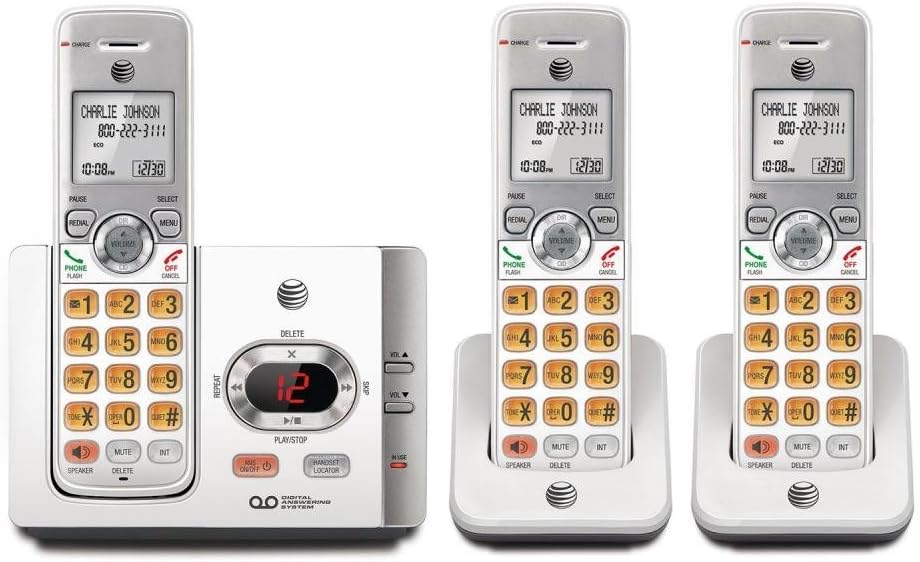
This image displays the complete AT&T EL52345 cordless phone system. It includes the main base unit with an integrated digital answering system, and three cordless handsets. Two of the handsets are shown in their individual charging cradles, while the third is docked in the main base unit. The handsets feature a backlit LCD screen, a full numeric keypad, and dedicated buttons for call functions, menu navigation, volume control, speakerphone, mute, and intercom. The main base unit has controls for the answering system, including message playback, skip, repeat, and volume adjustment, along with a message counter display.
Vodič za postavljanje
Follow these steps to set up your AT&T EL52345 cordless phone system:
- Instalacija baterije: Open the battery compartment on each handset. Insert the supplied AAA batteries, ensuring correct polarity. Close the compartment cover.
- Charging Handsets: Place each handset in its respective charging cradle or the main base unit. The CHARGE indicator on the handset will illuminate. Allow at least 16 hours for the initial charge before first use.
- Povežite osnovnu jedinicu:
- Spojite jedan kraj telefonskog kabela na TEL LINE priključak na stražnjoj strani bazne jedinice.
- Drugi kraj telefonskog kabla priključite na telefonsku utičnicu u zidu.
- Plug the large end of the power adapter into an electrical outlet not controlled by a wall switch.
- Plug the small end of the power adapter into the POWER jack on the back of the base unit.
- Handset Registration: Handsets are pre-registered to the base unit. If a handset displays "To register HS..." or similar, refer to the troubleshooting section for manual registration instructions.
- Postavite datum i vrijeme: After the initial charge, the handset will prompt you to set the date and time. Follow the on-screen instructions using the MENU and SELECT buttons.
Uputstvo za upotrebu
Upućivanje i primanje poziva
- Za upućivanje poziva: Pritisnite TELEFON / FLASH or SPEAKER, a zatim birajte broj.
- Da odgovorite na poziv: Pritisnite TELEFON / FLASH or SPEAKER kada telefon zazvoni.
- Za završetak poziva: Pritisnite OFF/CANCEL or place the handset in the charging cradle.
- Ponovno biranje: Pritisnite REDIAL to call the last dialed number.
Answering System
The digital answering system records messages when you are away or unable to answer calls.
- Uključi/isključi: Pritisnite ANS ON/OFF na bazi.
- Reprodukcija poruke: Pritisnite PLAY/STOP on the base unit to listen to new messages.
- Preskoči poruku: Tokom reprodukcije, pritisnite SKIP (right arrow) to skip to the next message.
- Ponovi poruku: Tokom reprodukcije, pritisnite REPEAT (left arrow) to repeat the current message. Press twice to go to the previous message.
- Obriši poruku: Tokom reprodukcije, pritisnite IZBRIŠI na bazi.
- Podesite glasnoću: Koristi JAČINA ▲ or VOL ▼ on the base unit to adjust playback volume.
Caller ID
The Caller ID feature displays the caller's name and number (if available) on the handset screen.
- Review Spisak poziva: Pritisnite CID on the handset to scroll through the call log.
- Povratni poziv: Dok viewunosa ID-a pozivaoca, pritisnite TELEFON / FLASH da pozovete broj.
Održavanje
- čišćenje: Očistite telefon i baznu jedinicu mekom, blago suhom krpom.amp krpom. Ne koristite sprejeve za čišćenje ili jake hemikalije.
- Održavanje baterije: To ensure optimal battery life, fully charge the handsets for 16 hours before first use. If the phone will not be used for an extended period, remove the batteries.
- Lokacija: Place the base unit in a central location away from other electronic devices (e.g., microwaves, Wi-Fi routers) to minimize interference.
Rješavanje problema
| Problem | Rješenje |
|---|---|
| Nema tona biranja. | Ensure the telephone line cord is securely plugged into the base unit and the wall jack. Check if the power adapter is properly connected to the base unit and a working electrical outlet. |
| Handset displays "To register HS..." | To manually register a handset: Place the handset in the base unit. Press and hold the LOKATOR SLUŠAJA button on the base unit for about 4 seconds until the IN USE light flashes. The handset will display "Registering..." and then "Handset Registered" when successful. |
| Loš kvalitet zvuka ili statički šum. | Move the handset closer to the base unit. Ensure the base unit is not near other electronic devices that may cause interference. Check the telephone line cord for damage. |
| Handset battery does not hold a charge. | Ensure the handset is properly seated in the charging cradle. Clean the charging contacts on both the handset and cradle with a dry cloth. If the issue persists, the battery may need replacement. |
| Telefonska sekretarica ne snima poruke. | Provjerite je li telefonska sekretarica UKLJUČENA. Provjerite je li memorija puna; po potrebi izbrišite stare poruke. |
Specifikacije
| Feature | Detalj |
|---|---|
| Broj modela | EL52345 |
| Tip telefona | Bežični |
| Broj slušalica | 3 (proširivo) |
| Tip sistema za odgovor | Digital |
| Kapacitet snimanja | Do 22 minuta |
| Caller ID / Call Waiting | Da |
| Tehnologija | DECT 6.0 |
| Baterije su potrebne | 3 AAA batteries (per handset) |
| Boja | Srebrna, bijela |
| Materijal | Plastika |
| Dimenzije proizvoda (osnovna jedinica) | 11.1 x 6.9 x 5.5 inča |
| Težina artikla | 1.3 funte |
| Kompatibilni uređaji | PSTN Networks |
Podrška i garancija
For further assistance, technical support, or warranty information regarding your AT&T EL52345 cordless phone system, please refer to the official AT&T product support channels. Typically, warranty details are provided with the product packaging or can be found on the manufacturer's official website.
Note: No official product videos were provided in the source data for embedding in this manual.


