1. Uvod
This manual provides detailed instructions for the installation, operation, and troubleshooting of your Neoteck 192kHz Digital to Analog Audio Converter (DAC) with Volume Control. This device is designed to convert digital coaxial or Toslink optical audio signals into analog stereo L/R RCA and 3.5mm jack audio outputs simultaneously.
Please read this manual thoroughly before using the product to ensure proper function and to prevent damage.
2. Proizvod je gotovview
The Neoteck NTK056 DAC allows you to connect modern digital audio sources, such as TVs, Blu-ray players, or game consoles, to older analog audio systems, headphones, or speakers. It features a high-grade aluminum alloy design for enhanced durability and signal integrity, along with gold-plated sockets for optimal connection.

Figure 2.1: Front and Back Panel Overview of the DAC
The device includes a volume control knob for adjusting the output level of both RCA and 3.5mm jack audio, offering convenience for various listening setups.
3. Karakteristike
- Converts Coaxial or Toslink digital audio signals to analog L/R RCA and 3.5mm Jack audio.
- Supports simultaneous output to RCA L/R and 3.5mm Jack.
- Integrated volume control for adjusting output audio levels.
- High-grade aluminum alloy design for durability and electromagnetic noise-free transmission.
- Gold-plated sockets for enhanced signal quality.
- Supports uncompressed 2-channel LPCM or PCM digital audio signal output.
- Plug and Play operation; no drivers required.
- Kompaktan i prenosiv dizajn.
4. Sadržaj paketa
Molimo Vas da prilikom prijema provjerite sadržaj paketa kako biste bili sigurni da su svi artikli prisutni:
- 1 x Neoteck Digital to Analog Audio Converter (NTK056)
- 1 x Optical Cable (Toslink)
- 1 x USB kabel za napajanje
- 1 x Uputstvo za upotrebu
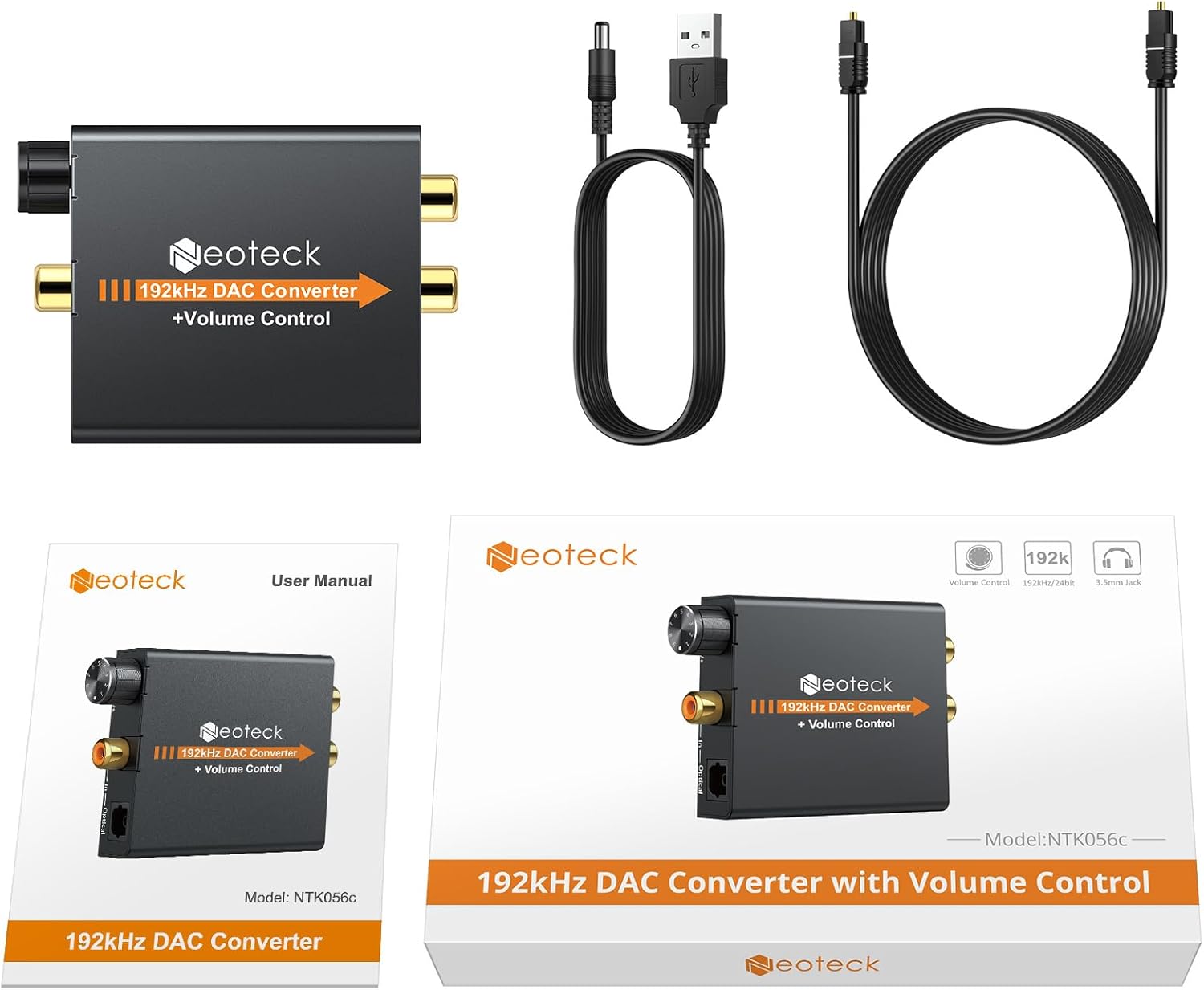
Slika 4.1: Sadržaj paketa
5. Upute za postavljanje
Follow these steps to set up your Neoteck DAC:
- Connect Digital Audio Input: Connect your digital audio source (e.g., TV, Blu-ray player) to the DAC using either a Coaxial cable or an Optical (Toslink) cable. Insert the cable into the corresponding "Coaxial In" or "Optical In" port on the DAC.
- Connect Analog Audio Output: Connect your analog audio receiver (e.g., amplifier, speakers, headphones) to the DAC.
- For RCA output: Use an RCA L/R cable to connect the "L Out" and "R Out" ports on the DAC to your amplifier ili aktivni zvučnici.
- For 3.5mm Jack output: Plug your headphones or 3.5mm speakers into the "Power" (headphone) jack on the DAC.
- Priključite napajanje: Connect the provided USB power cable to the "DC 5V" port on the DAC. Plug the other end of the USB cable into a 5V USB power adapter (not included) or a USB port on your TV/device. The red power indicator light will illuminate when power is supplied.
- Configure Audio Output on Source Device: It is crucial to set your source device's (e.g., TV) digital audio output format to PCM or LPCM. This DAC does not support 5.1 channel audio formats like Dolby or DTS. Refer to your source device's manual for specific instructions on how to change this setting.

Slika 5.1: Dijagram povezivanja

Figure 5.2: Setting TV Audio Output to PCM
Video 5.1: Setup and Operation Guide for Neoteck DAC. This video demonstrates how to connect the DAC to a TV and audio system, including setting the TV's audio output to PCM and adjusting the volume.
6. Uputstvo za upotrebu
Once the DAC is properly connected and powered on, and your source device is configured for PCM/LPCM output:
- Indikator napajanja: The red LED light on the DAC indicates that the device is receiving power.
- Kontrola jačine zvuka: Use the rotary knob on the front of the DAC to adjust the output volume for both the RCA and 3.5mm headphone outputs. Turn clockwise to increase volume (V+) and counter-clockwise to decrease volume (V-).
- Audio reprodukcija: Play audio from your digital source. Sound should now be output through your connected analog audio system or headphones.

Slika 6.1: Dugme za kontrolu jačine zvuka
7. Otkrivanje problema
- Nema izlaza zvuka:
- Ensure the DAC is powered on (red LED illuminated).
- Verify all cables (digital input, analog output, power) are securely connected.
- Crucially, check your source device's (TV, Blu-ray player) audio output settings. It must be set to PCM or LPCM. This converter does not support Dolby, DTS, or other 5.1 channel formats.
- Increase the volume on the DAC using the volume knob and on your connected audio system/headphones.
- Try a different digital input cable (optical or coaxial) if available, or test with a different source device.
- Iskrivljen ili isprekidan zvuk:
- Ensure the digital audio format is set to PCM/LPCM on your source device. Non-supported formats will result in noise or no sound.
- Provjerite ima li labavih kablovskih veza.
- While the DAC is rated for 192kHz, some users have reported optimal performance up to 96kHz 24bit. If experiencing severe clipping or audio issues at 192kHz, try reducing the sample rate on your source device if possible.
- Ensure the power supply is stable (use a dedicated 5V USB adapter if experiencing issues with TV USB ports).
- Volume Control Not Working:
- Confirm the volume knob is being rotated correctly (V+ for increase, V- for decrease).
- Ensure your connected audio device (headphones, speakers) is also turned on and its volume is not at minimum.
8. Specifikacije
| Parametar | Vrijednost |
|---|---|
| Brand | neotech |
| Broj modela | NTK056 |
| Ulazni zvuk | Koaksijalni ili Toslink digitalni zvuk |
| Izlazni zvuk | L/R RCA, 3.5mm Jack audio |
| Ulazni audio konektor | Toslink, 1x RCA (Coaxial) |
| Izlazni audio konektor | 2x RCA (R/L), 1x 3.5mm Jack |
| Sampling Rate | Do 192kHz |
| Materijal | Aluminijum |
| Dimenzije proizvoda (D x Š) | 2.95" x 2.17" (approx. 7.5cm x 5.5cm) |
| Težina artikla | 3.2 unci (otprilike 90 g) |

Slika 8.1: Dimenzije proizvoda
9. Sigurnosne informacije
Molimo pridržavajte se sljedećih sigurnosnih mjera opreza:
- Ne izlažite ovaj uređaj vodi, vlazi ili prekomjernoj vlažnosti.
- Ne pokušavajte rastavljati ili modificirati uređaj. To može poništiti garanciju i uzrokovati oštećenje.
- Use only the specified 5V DC power supply. Using an incorrect power adapter may damage the device.
- Držite uređaj dalje od izvora topline i direktne sunčeve svjetlosti.
- Osigurajte odgovarajuću ventilaciju oko uređaja tokom rada.
10. Garancija i podrška
Neoteck products are designed for reliability and performance. For warranty information or technical support, please refer to the contact details provided on the product packaging or the official Neoteck webSačuvajte račun kao dokaz o kupovini za reklamacije u slučaju reklamacije.


