1. Uvod
The PreSonus AIR10 is a compact and lightweight 2-way active sound-reinforcement loudspeaker designed to deliver rich low-end and natural high-frequency extension. Its enclosure is engineered for portability and versatility, fitting easily into various setups.
Key features of the AIR10 include:
- 10-inčni prilagođeni niskofrekventni drajver sa 2-inčnom zvučnom zavojnicom.
- 1-inčni visokofrekventni kompresorski drajver.
- 90° horizontalna disperzija x 60° vertikalna disperzija.
- Hibridna snaga 1,200 W ampkonfiguracija lifiera (klasa D za niske frekvencije, klasa AB za visoke frekvencije).
- Ugrađeni mikser sa dva kombinovana XLR i ¼” ulaza, plus stereo 1/8” ulaz.
- Easy-to-use Digital Signal Processing (DSP) performance presets.
2. Sigurnosne informacije
Before operating your PreSonus AIR10 loudspeaker, please read and understand all safety instructions. Retain this manual for future reference.
- Izvor napajanja: Uređaj priključite samo na napajanje tipa opisanog u ovom priručniku ili na uređaju.
- uzemljenje: Osigurajte da je uređaj pravilno uzemljen kako biste spriječili strujni udar.
- ventilacija: Ne blokirajte otvore za ventilaciju. Instalirajte u skladu s uputama proizvođača.
- Voda i vlaga: Ne koristite ovaj uređaj u blizini vode niti ga izlažite kapanju ili prskanju.
- toplina: Ne postavljajte u blizini izvora toplote kao što su radijatori, grejni registri, peći ili drugi uređaji (uključujući ampLifiers) koji proizvode toplotu.
- servisiranje: Sve servise prepustite kvalificiranom servisnom osoblju. Servisiranje je potrebno ako je aparat na bilo koji način oštećen.
- Zaštita sluha: Dugotrajno izlaganje visokim nivoima zvučnog pritiska može uzrokovati trajno oštećenje sluha. Budite oprezni pri podešavanju nivoa jačine zvuka.
3. Podešavanje
Proper setup ensures optimal performance and safety for your AIR10 loudspeaker.
3.1 Raspakivanje
Carefully remove the AIR10 from its packaging. Inspect the unit for any signs of damage that may have occurred during shipping. If damage is found, contact your dealer or PreSonus immediately.
3.2 Postavljanje i montaža
The AIR10 is designed for versatile placement, including front-of-house (FOH), floor wedge monitoring, stand mounting, bracket mounting, or flown installations. Location presets optimize performance for these different configurations.

Slika 1: Prednja strana view of the PreSonus AIR10 Active Loudspeaker.

Slika 2: Bočna strana view of the PreSonus AIR10 Active Loudspeaker, showing integrated handles.
3.3 Priključak za napajanje
Connect the provided power cord to the AC inlet on the rear panel of the AIR10 and then to a suitable grounded power outlet. Ensure the voltage selector switch matches your local power supply before powering on the unit.
3.4 Ulazne veze
The AIR10 features an onboard mixer with various input options:
- Mic/Line 1 & 2: Two combo XLR and ¼” inputs for microphones or line-level sources.
- Pomoćni ulaz: A stereo 1/8” input for connecting portable media players or other consumer-level devices.
- Pomiješajte: An XLR output for sending the mixed signal to another AIR series loudspeaker or a subwoofer.
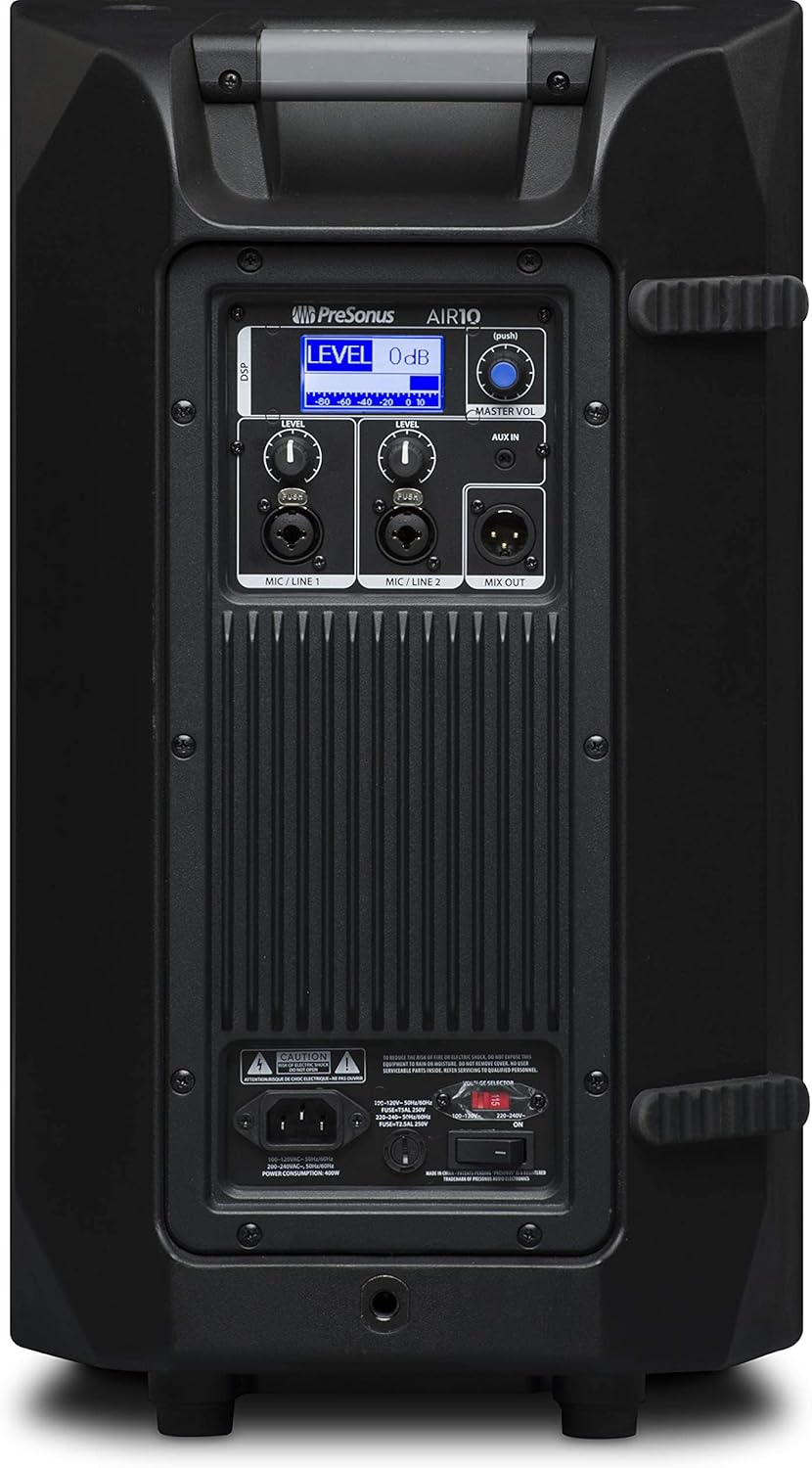
Figure 3: Rear panel of the PreSonus AIR10, showing input/output connections, level controls, DSP display, and power switch.
4. Operativni
The AIR10 is designed for straightforward operation with powerful DSP controls.
4.1 Uključivanje/isključivanje
After connecting the power cord, locate the power switch on the rear panel. Flip the switch to the 'ON' position. The front panel LED will illuminate to indicate power. Always power on your AIR10 after connecting all audio sources and power off before disconnecting.
4.2 Level Controls
Adjust the individual LEVEL knobs for Mic/Line 1 and Mic/Line 2 to set the input gain for your sources. The MASTER VOL knob controls the overall output level of the loudspeaker.
4.3 DSP Performance Presets
The AIR10 features easy-to-use DSP presets to optimize its performance for various applications. These presets include options for front-of-house use, floor wedge placement, music playback, enhanced low-end warmth, and improved speech intelligibility. Use the DSP button and display on the rear panel to navigate and select the appropriate preset for your environment.
4.4 EQ kontrole
The onboard EQ controls allow you to compensate for room anomalies and fine-tune the sound. Access these controls via the DSP menu to adjust frequency response as needed for your specific acoustic space.
4.5 Video prekoview
Video 1: Službenik prekoview of the PreSonus AIR series loudspeakers, demonstrating features and sound quality. This video provides a visual guide to the product's capabilities and design.
5. Održavanje
Regular maintenance helps prolong the life and performance of your AIR10 loudspeaker.
- čišćenje: Use a soft, dry cloth to clean the exterior of the loudspeaker. Do not use abrasive cleaners, waxes, or solvents.
- rešetka: Periodically check the front grille for dust or debris accumulation. Gently clean with a soft brush or vacuum if necessary.
- Skladištenje: Kada se ne koristi duži period, zvučnik čuvajte na suhom mjestu s kontroliranom temperaturom, idealno u originalnom pakovanju ili zaštitnoj navlaki.
6. Otkrivanje problema
This section addresses common issues you might encounter with your AIR10 loudspeaker.
6.1 Nema napajanja
- Check that the power cord is securely connected to both the loudspeaker and the power outlet.
- Proverite da li je utičnica za struju aktivna.
- Osigurajte voltagPrekidač za odabir na zadnjoj ploči je ispravno postavljen za vašu regiju.
- Check the fuse on the rear panel. Replace if blown with a fuse of the correct type and rating.
6.2 Nema zvuka
- Confirm the loudspeaker is powered on and the front LED is illuminated.
- Check all audio cable connections from your source to the AIR10 inputs.
- Ensure the input LEVEL knobs and the MASTER VOL knob are turned up.
- Verify that your audio source is active and producing sound.
- If using the Mix Out, ensure the connected device is receiving a signal and its volume is adjusted.
6.3 Hissing or Noise
- Reduce the input gain (LEVEL knobs) if the input signal is too strong.
- Provjerite da li su svi kablovi u dobrom stanju i pravilno zaštićeni.
- Try connecting the loudspeaker to a different power outlet to rule out ground loop issues.
- Disconnect all inputs and listen for the noise. If the noise persists, the issue may be internal.
7. Specifikacije
| Feature | Specifikacija |
|---|---|
| Naziv modela | AIR10 |
| Vrsta zvučnika | 2-Way Active Sound-Reinforcement Loudspeaker |
| Woofer Diameter | 10 inča |
| Prečnik visokotonca | 1 inča |
| Zvučnik Amplification Type | Active (Hybrid Class D/Class AB) |
| Maksimalna izlazna snaga zvučnika | 1200 Watts |
| Tehnologija povezivanja | XLR, 1/4", 1/8" |
| Način audio izlaza | Stereo |
| Težina artikla | 28.7 funti |
| Dimenzije proizvoda | 14.1 x 14.6 x 24.4 inča |
| Vrsta montaže | Car Mount, Floor Mount, Stand, Bracket, Suspend |
| Kontrolni metod | Touch (DSP) |
8. Šta se nalazi u kutiji
Your PreSonus AIR10 package should contain the following items:
- PreSonus AIR10 10" 2-Way Active Sound-Reinforcement Loudspeaker
- Kabl za napajanje
- Product Documentation (including this manual)
9. Garancija i podrška
PreSonus provides a limited warranty for the AIR10 loudspeaker. For detailed warranty information, please refer to the warranty card included with your product or visit the official PreSonus website.
For technical support, product registration, or to access additional resources, please visit the PreSonus support page or contact their customer service directly. Keeping your product registered can facilitate warranty claims and support.


