Uvod
Thank you for choosing the OldShark Dash Cam. This 1080P Full HD dashboard camera is designed to provide reliable and high-quality video recording of your journeys, enhancing driving safety and providing crucial evidence in case of incidents. Equipped with a 3-inch display, 170° wide-angle lens, G-Sensor, and loop recording, it's an essential companion for every driver.
Please read this manual thoroughly before operating the device to ensure proper usage and to maximize its performance and lifespan.
Sadržaj paketa
Prilikom raspakivanja, molimo Vas da provjerite da li se u Vašem paketu nalaze svi sljedeći artikli:
- OldShark Dash Cam Unit
- Car Charger
- Usisni nosač
- 32GB Micro SD kartica
- USB kabl za prenos podataka
- Korisnički priručnik (ovaj dokument)

Image: All components included in the OldShark Dash Cam package, neatly laid out.
Karakteristike proizvoda
- Ultra HD Video Recording: Captures clear 1080P Full HD video, ensuring detailed footage even in challenging light conditions.
- 170° Super Wide Angle Lens: Pruža široko polje view, minimizing blind spots and capturing more of the road.
- Ugrađeni G-senzor: Automatically detects sudden impacts or collisions and locks the current video footage to prevent overwriting, serving as crucial accident evidence.
- Bešavno snimanje petlje: Prepisuje najstariji otključani footage kada je memorijska kartica puna, osiguravajući kontinuirano snimanje bez ručne intervencije.
- 24-satni nadzor parkinga: Records short video clips when vibrations are detected while the vehicle is parked, offering surveillance even when you're away.
- Super noćni vid: Equipped with F1.6 large aperture, WDR (Wide Dynamic Range), and HDR (High Dynamic Range) technology for enhanced clarity in low-light conditions.
- Jednostavna instalacija: Simple plug-and-play setup with included suction mount and car charger.
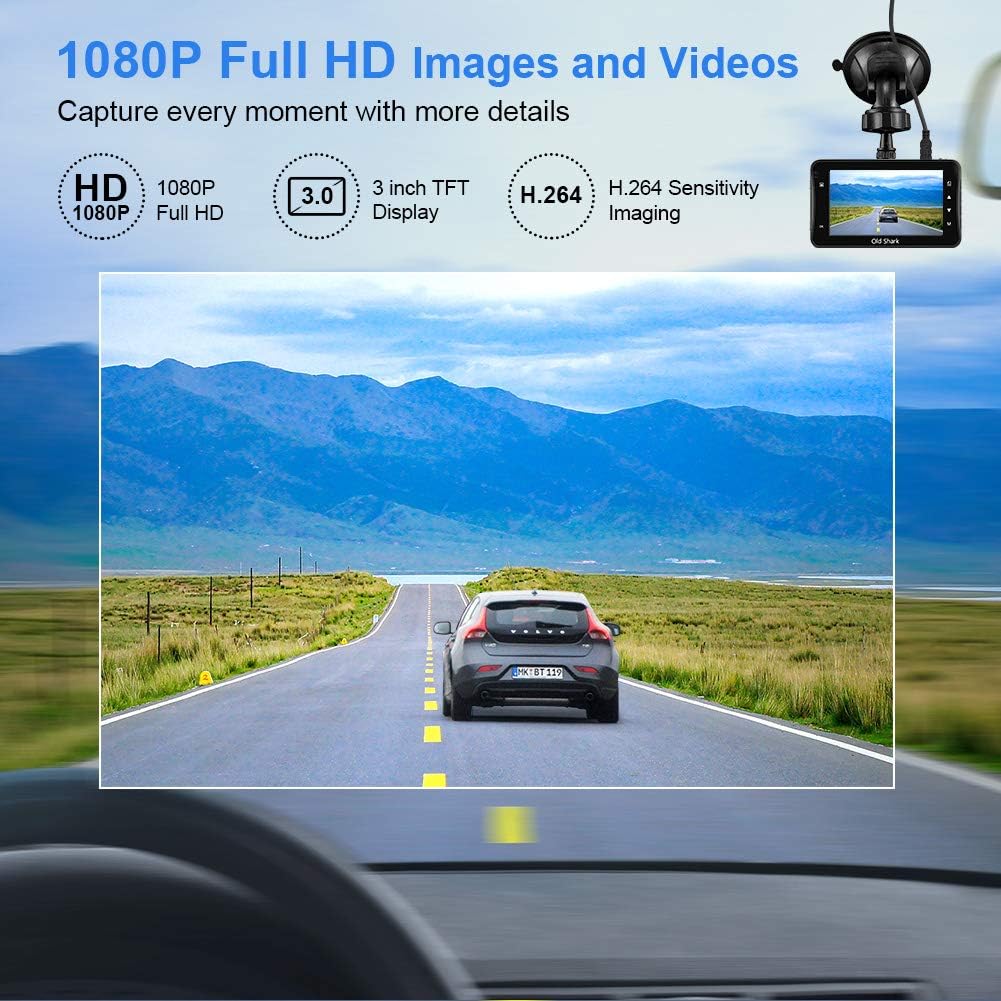
Image: Visual representation of the dash cam's 1080P Full HD video capabilities and display features.

Image: The G-Sensor feature, which automatically locks video footage during an impact to secure accident evidence.

Image: The 24-Hour Parking Monitor feature, which activates recording upon detecting vibrations while parked.

Image: The Super Night Vision capability, demonstrating improved low-light performance with its F1.6 aperture.

Image: The 170° wide-angle lens providing a broad view, sa bivšimamples of recorded footage during day and night.
Vodič za postavljanje
1. Montaža Dash Cam
- Očistite područje vjetrobranskog stakla gdje namjeravate montirati kameru za automobil. Provjerite da nema prašine i masnoće.
- Attach the suction mount to the dash cam unit.
- Press the suction cup firmly against the windshield and flip the lever to secure it. Position the camera to ensure a clear view ceste bez ometanja vaše vidljivosti prilikom vožnje.
2. Umetanje Micro SD kartice
- Pronađite utor za Micro SD karticu sa strane kamere za automobil.
- Insert the provided 32GB Micro SD card into the slot until it clicks into place. Ensure the card is inserted correctly with the gold contacts facing the back of the camera.
- For optimal performance, it is recommended to format the SD card within the dash cam's settings before first use and periodically thereafter.
3. Uključivanje
- Spojite punjač za automobil na ulazni priključak za napajanje kamere za automobil.
- Drugi kraj auto punjača priključite na utičnicu za upaljač u vozilu.
- The dash cam will automatically power on and begin recording when your vehicle's ignition is turned on. It will also power off automatically when the ignition is turned off.

Image: The OldShark Dash Cam, showing its compact design, the included suction mount for windshield attachment, and the 32GB Micro SD card for storage.
Uputstvo za upotrebu
Basic Operation
- Uključivanje/isključivanje: The camera powers on/off automatically with the car ignition. You can also manually power it on/off by pressing and holding the Power button.
- Snimanje: Once powered on, the dash cam automatically starts loop recording. A red flashing dot or similar indicator on the screen confirms recording is active.
- Zaustavi snimanje: Press the OK button to stop recording. Press it again to resume.
- Promjena načina rada: Use the Mode button to switch between Video Recording, Still Photo, and Playback modes.
- Reprodukcija: In Playback mode, use the Up/Down buttons to navigate through recorded files. Press OK to play a selected video.
Navigacija izbornikom
- Press the Menu button to access settings.
- Use the Up/Down buttons to scroll through menu options.
- Press OK to select an option or confirm a setting.
- Press Menu again to exit the menu.
Ključne funkcije
- Snimanje u petlji: Set the duration for video segments (e.g., 1, 3, 5 minutes). When the card is full, the oldest unlocked file će biti prepisana.
- Osetljivost G-senzora: Adjust the sensitivity of the G-Sensor (Low, Medium, High). A higher sensitivity means the camera will lock footage more easily upon detecting bumps or impacts.
- Parking monitor: Enable this feature to allow the dash cam to automatically record a short video when it detects a vibration while the car is parked and turned off.
- Detekcija pokreta: When enabled, the camera will start recording automatically if it detects movement in front of the lens while parked.
- Datum/Vrijeme Stamp: Ensure the correct date and time are set in the menu for accurate timestampna vašim snimcima.
Održavanje
- čišćenje: Za čišćenje sočiva i ekrana kamere koristite meku, suhu krpu. Izbjegavajte upotrebu abrazivnih sredstava za čišćenje ili rastvarača.
- Održavanje SD kartice: Regularly format the Micro SD card (at least once a month) within the dash cam's settings to maintain optimal recording performance and prevent data corruption. Use only high-quality Class 10 or higher Micro SD cards.
- temperatura: Avoid exposing the dash cam to extreme temperatures (very hot or very cold) for extended periods, as this can affect battery life and component integrity.
- Ažuriranja firmvera: Check the official OldShark website periodically for any available firmware updates to ensure your dash cam has the latest features and bug fixes.
Rješavanje problema
| Problem | Rješenje |
|---|---|
| Kamera za automobil se ne uključuje. | Ensure the car charger is securely connected to both the dash cam and the vehicle's cigarette lighter. Check if the vehicle's cigarette lighter is receiving power. Try a different power source if available. |
| Snimanje se neočekivano prekida. | Check if the Micro SD card is full. Format the SD card. Ensure you are using a Class 10 or higher SD card. Reduce G-Sensor sensitivity if it's triggering too often. |
| Video footage je mutno ili nejasno. | Clean the camera lens and your car's windshield. Ensure the protective film has been removed from the lens. Check video resolution settings. |
| Dash cam freezes or becomes unresponsive. | Press the reset button (if available, usually a small pinhole) or disconnect and reconnect the power. Format the Micro SD card. |
| Datum i vrijeme su netačni. | Go to the system settings menu and manually set the correct date and time. Save the settings. |
Specifikacije
| Feature | Detalj |
|---|---|
| Naziv modela | GS505 |
| Broj modela stavke | A1OS-GS505-T032 |
| Rezolucija video snimanja | 1080p full HD |
| Lens Angle | 170° širokokutni |
| Veličina ekrana | 3 inča |
| Posebne karakteristike | G-Sensor, Loop Recording, Parking Guard, Motion Detection, Auto On/Off, Time Stamp, Screensaver, Night Vision (F1.6 Aperture) |
| Tehnologija povezivanja | USB |
| Vrsta montaže | Usisni nosač |
| Dimenzije proizvoda | 3.46 x 1 x 0.59 inča |
| Težina artikla | 4.4 unce |
| Proizvođač | Old Shark |
Informacije o garanciji
OldShark products are manufactured with high-quality standards. For specific warranty terms and conditions, please refer to the warranty card included in your product packaging or contact OldShark customer support. The warranty typically covers manufacturing defects for a specified period from the date of purchase.
Molimo sačuvajte račun kao dokaz o kupovini u slučaju bilo kakvih reklamacija po garanciji.
Korisnička podrška
If you encounter any issues or have questions regarding your OldShark Dash Cam that are not covered in this manual, please do not hesitate to contact our customer support team.
For the most up-to-date contact information and support resources, please visit the official OldShark store on Amazon or their official website.
Online resursi:
- OldShark Amazon Store: Posjetite trgovinu


