Uvod
The INIM Alien/GN is a sophisticated 7-inch touchscreen user interface designed for seamless integration with I-Bus security and automation systems. It provides intuitive control and monitoring capabilities, enhancing user interaction with the system. Key features include a built-in proximity reader for convenient access, a room temperature sensor for environmental monitoring, and integrated microphone and speaker for communication functions.
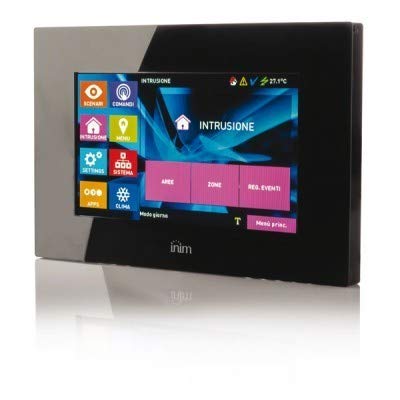
Slika 1: Prednja strana view of the INIM Alien/GN touchscreen user interface. This image shows the sleek design and the 7-inch display.
Postavljanje i instalacija
Proper installation is crucial for the optimal performance of your INIM Alien/GN touchscreen. Please follow these guidelines carefully.
1. Montaža uređaja
Select a suitable indoor location, away from direct sunlight, heat sources, and areas with high humidity. Ensure the mounting surface is flat and stable. The device is designed for wall mounting.
- Carefully remove the front cover of the Alien/GN unit to expose the mounting holes.
- Position the backplate on the desired wall location and mark the drilling points.
- Drill holes using an appropriate drill bit for your wall type. Insert wall plugs if necessary.
- Pričvrstite stražnju ploču na zid pomoću priloženih vijaka.
2. Ožičenje i priključci
The Alien/GN connects to the I-Bus system. Ensure power is disconnected from the main control panel before making any connections.
- Connect the I-Bus communication wires to the designated terminals on the Alien/GN backplate. Observe polarity (typically + and -).
- If external power is required (check system specifications), connect the power supply wires to the appropriate terminals.
- Uvjerite se da su svi priključci sigurni i pravilno izolirani.
3. Početno uključivanje
Once all connections are made and verified, restore power to the main control panel.
- The Alien/GN display should illuminate, and the device will begin its boot sequence.
- Follow the on-screen prompts for initial configuration, such as language selection and network settings (if applicable).
- Refer to your main I-Bus system manual for specific device enrollment procedures.
Uputstvo za upotrebu
This section details the basic operation of the INIM Alien/GN touchscreen user interface.
1. Navigacija putem ekrana osjetljivog na dodir
The 7-inch display is a capacitive touchscreen, responding to light touches. Navigate through menus and options by tapping icons and swiping across the screen.
- Početni ekran: Displays system status, quick access icons, and current time/date.
- Pristup meniju: Tap the menu icon (usually three horizontal lines or a gear) to access system settings and advanced functions.
- Dugme za povratak: A dedicated back arrow icon allows you to return to the previous screen.
2. Proximity Reader Functionality
The integrated proximity reader allows for quick arming/disarming of the system or access control using compatible RFID tags or cards.
- To use, present your registered RFID tag or card within a few centimeters of the designated proximity reader area on the touchscreen.
- The device will emit an audible confirmation tone and display a visual indicator upon successful reading.
- Ensure your RFID credentials are properly enrolled in the I-Bus system for them to be recognized.
3. Senzor sobne temperature
The Alien/GN includes an ambient room temperature sensor. The current temperature is typically displayed on the home screen or within a dedicated environmental monitoring section.
- The temperature reading provides local environmental data.
- This data can be used by the I-Bus system for automation rules (e.g., activating heating/cooling based on temperature thresholds).
4. Microphone and Speaker
The built-in microphone and speaker facilitate two-way audio communication, often used for intercom functions or voice prompts from the security system.
- interfon: If configured, tap the intercom icon to initiate communication with other connected devices or the central monitoring station.
- Glasovni upiti: The speaker will play system alerts, status confirmations, and other audio notifications.
- Adjust speaker volume through the system settings menu.
Održavanje
Regular maintenance ensures the longevity and reliable operation of your INIM Alien/GN touchscreen.
1. Cleaning the Touchscreen
To maintain screen clarity and responsiveness:
- Power off the device or put it into cleaning mode (if available in settings) before cleaning.
- Koristite meku krpu koja ne ostavlja dlačice, laganoampočišćen vodom ili sredstvom za čišćenje posebnim za ekrane.
- Nemoj use abrasive cleaners, alcohol, ammonia, or spray cleaners directly onto the screen.
- Gently wipe the screen to remove dust, fingerprints, and smudges.
2. Ažuriranja softvera
Periodically check for software updates for your I-Bus system and connected devices, including the Alien/GN. Updates can provide new features, performance improvements, and security enhancements. Consult your system integrator or the INIM webstranica za postupke ažuriranja.
3. Razmatranja životne sredine
Ensure the device remains within its specified operating temperature and humidity ranges. Avoid exposing it to extreme conditions, direct water spray, or excessive dust.
Rješavanje problema
This section provides solutions to common issues you might encounter with your INIM Alien/GN touchscreen.
| Problem | Mogući uzrok | Rješenje |
|---|---|---|
| Ekran je prazan ili ne reaguje. | No power, loose I-Bus connection, device malfunction. |
|
| Touchscreen is unresponsive or inaccurate. | Dirty screen, temporary software glitch, physical damage. |
|
| Proximity reader not recognizing tags. | Tag not enrolled, tag damaged, reader malfunction. |
|
| Netačna očitanja temperature. | Device location, sensor obstruction, calibration issue. |
|
Specifikacije
Key technical specifications for the INIM Alien/GN touchscreen user interface:
| Feature | Detalj |
|---|---|
| Proizvođač | INIM ELECTRONICS |
| Model | Alien/GN |
| Interface Type | 7-inčni zaslon osjetljiv na dodir |
| Bus Compatibility | I-Bus |
| Integrisane karakteristike | Proximity Reader, Room Temperature Sensor, Microphone, Speaker |
| Baterije uključene | br |
| Baterije su potrebne | br |
| ASIN | B01CNOYI6M |
| Prvi raspoloživi datum | 15. oktobar 2022 |
Informacije o garanciji
The INIM Alien/GN touchscreen user interface is covered by a manufacturer's limited warranty. The specific terms and duration of the warranty may vary by region and point of purchase. Please retain your proof of purchase for warranty claims.
For detailed warranty information, please refer to the documentation provided with your product or visit the official INIM ELECTRONICS website.
Tehnička podrška
Should you encounter any issues not covered in the troubleshooting section or require further assistance, please contact your authorized INIM ELECTRONICS dealer or system installer. They possess the expertise to provide specialized support for your I-Bus system and connected devices.
You may also visit the official INIM ELECTRONICS website for additional resources, FAQs, and contact information for technical support.


