1. Uvod
This manual provides essential information for the safe and efficient installation, operation, and maintenance of your FANTECH prioAir 8 Inline Mixed Flow Duct Fan. Please read these instructions thoroughly before installation and retain this manual for future reference.
The FANTECH prioAir 8 is an 8-inch inline mixed flow duct fan designed for ventilation applications. It features a compact design, high efficiency, and quiet operation, making it suitable for various residential and light commercial settings. Constructed from a special composite material, the fan is lightweight and durable.
2. Važna sigurnosna uputstva
UPOZORENJE: Da biste smanjili rizik od požara, strujnog udara ili ozljeda osoba, obratite pažnju na sljedeće:
- Read all instructions before installing or servicing this fan.
- Instalaciju mora izvršiti kvalificirani električar u skladu sa svim lokalnim i nacionalnim električnim propisima.
- Always disconnect power at the service panel before wiring, cleaning, or servicing the unit.
- Ensure the fan is properly grounded.
- Ne koristite ovaj ventilator s bilo kojim uređajem za kontrolu brzine u čvrstom stanju, osim ako nije posebno dizajniran za ovaj ventilator.
- Do not use this fan in potentially explosive atmospheres.
- Keep fingers and foreign objects away from the fan blades during operation.
- Ovaj ventilator je namijenjen samo za opću upotrebu u ventilaciji. Ne koristiti ga za ispuhivanje opasnih ili eksplozivnih materijala i para.
3. Šta se nalazi u kutiji
Prilikom raspakivanja, molimo Vas da provjerite da li su sve komponente prisutne i neoštećene:
- FANTECH prioAir 8 Inline Mixed Flow Duct Fan unit
- Mounting hardware (e.g., screws, brackets) - (Specific hardware may vary, refer to packaging)
- Korisnički priručnik (ovaj dokument)

Figure 1: FANTECH prioAir 8 Inline Mixed Flow Duct Fan unit.
4. Tehničke specifikacije
| Feature | Specifikacija |
|---|---|
| Broj modela | prioAir 8 |
| Dimenzije proizvoda | 6 x 5 x 7 inča |
| Težina | 8 funti |
| Brand | FANTECH |
| Voltage | 120 Volts |
| Wattage | 35 vati |
| Metoda hlađenja | Forced Air |
| Nivo buke | 45 decibela |
| Materijal | Kompozitni |
| Maksimalna brzina rotacije | 2400 RPM |
| Kapacitet protoka zraka | 647 kubnih stopa u minuti (CFM) |
| Vrsta konektora za napajanje | 3-Pin |
5. Instalacija i podešavanje
5.1 Kontrolna lista pred instalaciju
- Ensure the installation location is suitable for an 8-inch duct fan.
- Verify that the power supply matches the fan's requirements (120V).
- Gather necessary tools: screwdriver, wire strippers, drill, duct tape/clamps.
5.2 Montiranje ventilatora
The prioAir 8 fan is designed for inline installation within ductwork. It can be mounted at any angle.
- Select a secure location in your duct system where the fan can be easily accessed for maintenance.
- Cut a section of the ductwork to accommodate the fan's length. Ensure the cut is clean and straight.
- Insert the fan into the ductwork. The fan can be oriented to push or pull air, depending on your ventilation needs. Observe the airflow direction arrow on the fan housing.
- Secure the fan to the ductwork using appropriate duct clamps or heavy-duty duct tape to ensure an airtight seal.
- If additional support is needed, use the provided mounting brackets to secure the fan to a joist or other structural element.
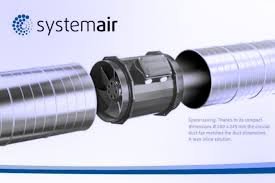
Slika 2: Prample of the prioAir 8 fan installed inline with ductwork.
5.3 Električni priključak
CAUTION: Ensure power is disconnected at the circuit breaker before proceeding with electrical wiring.
- Locate the electrical connection box on the fan housing.
- Open the cover of the connection box.
- Connect the power supply wires to the fan's terminals according to the wiring diagram provided inside the connection box cover. Typically, this involves connecting Live (L), Neutral (N), and Ground (G) wires. The fan uses a 3-pin power connector type.
- Uvjerite se da su svi priključci sigurni i pravilno izolirani.
- Close the connection box cover securely.

Slika 3: Eksplodirao view illustrating the internal structure and location of the electrical connection box.

Slika 4: Detaljno view of the fan's internal components, including the impeller and motor housing.
6. Uputstvo za upotrebu
Once the FANTECH prioAir 8 fan is properly installed and wired, operation is straightforward:
- Restore power to the circuit at the service panel.
- If connected to a wall switch or thermostat, activate the switch or set the thermostat to the desired operating conditions.
- The fan will begin to operate, moving air through the duct system.
The prioAir 8 is designed for continuous operation. Monitor the airflow and noise level to ensure proper function.
7. Održavanje
WARNING: Always disconnect power to the fan at the service panel before performing any maintenance or cleaning.
Redovno održavanje osigurava optimalne performanse i produžava vijek trajanja vašeg ventilatora.
7.1 Cleaning the Fan Blades and Housing
Dust and debris can accumulate on the fan blades and inside the housing, reducing efficiency. Clean the fan periodically, depending on the operating environment.
- Disconnect power to the fan.
- Carefully remove the fan from the ductwork or access the internal components if possible.
- Use a soft brush or a vacuum cleaner with a brush attachment to remove dust and debris from the fan blades and the interior of the housing.
- Za tvrdokornu prljavštinu, oglasamp cloth with mild detergent can be used, ensuring no moisture enters the motor or electrical components.
- Allow all parts to dry completely before reassembling or restoring power.

Slika 5: Krupni plan view of the fan's impeller, highlighting the blades that require periodic cleaning.
7.2 Podmazivanje motora
The fan motor is permanently lubricated and does not require additional lubrication.
8. Otkrivanje problema
Before contacting technical support, please review sljedeći uobičajeni problemi i rješenja:
| Problem | Mogući uzrok | Rješenje |
|---|---|---|
| Ventilator se ne pokreće | Nema napajanja Slabo ožičenje Faulty switch/thermostat | Check circuit breaker and power source Provjerite da li su svi električni priključci sigurni (s isključenim napajanjem) Test or replace switch/thermostat |
| Smanjeni protok vazduha | Clogged fan blades/housing Ductwork obstruction Nepravilna orijentacija ventilatora | Očistite lopatice ventilatora i kućište Inspect ductwork for blockages Ensure fan is oriented for desired airflow direction |
| Neobična buka ili vibracija | Labava montaža Otpad u ventilatoru Oštećen impeler | Zategnite montažni pribor Disconnect power and remove any debris Contact FANTECH support if impeller is damaged |
9. Garancija i podrška
FANTECH products are manufactured to high-quality standards and are backed by a manufacturer's warranty. For specific warranty terms and conditions, please refer to the warranty card included with your product or visit the official FANTECH website.
For technical assistance, replacement parts, or warranty claims, please contact FANTECH customer support:
- Webstranica: www.fantech.net
- Telefon: Refer to the FANTECH webstranica za regionalne kontakt brojeve.
When contacting support, please have your product model number (prioAir 8) and purchase date available.


