Uvod
Intermec PB51 je robusni, 4-inčni direktni termalni mobilni štampač računa dizajniran za zahtjevne terenske usluge, računovodstvo ruta i primjene na mjestu pružanja usluga. Nudi brze i pouzdane performanse štampanja kako bi se povećala produktivnost mobilnih radnika.
Ovaj priručnik pruža bitne informacije za pravilno podešavanje, rad, održavanje i rješavanje problema vašeg PB51 štampača.
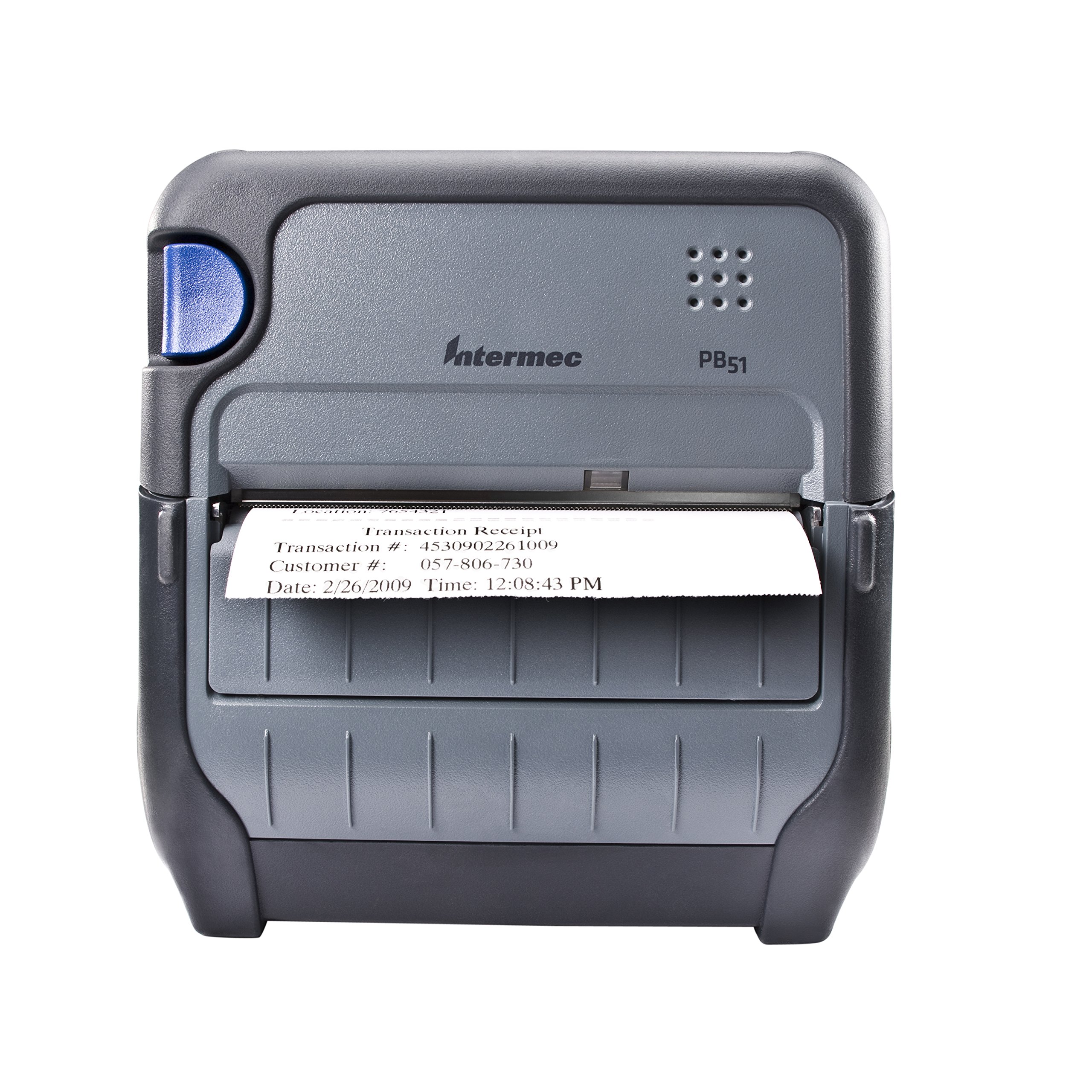
Slika 1: Prednja strana view mobilnog štampača računa Intermec PB51. Račun je djelimično izbačen iz prednjeg utora, prikazujući "Potvrda o transakciji", "Broj transakcije: 4530902261009", "Broj kupca: 057-806-730" i "Datum: 26.2.2009. Vrijeme: 12:08:43". Štampač ima tamno sivi casing s plavim dugmetom na lijevoj strani i logotipom "Intermec PB51" na gornjoj ploči.
Setup
1. Raspakivanje i pregled
- Pažljivo izvadite štampač i svu dodatnu opremu iz ambalaže.
- Provjerite da li su prisutne sve komponente navedene u otpremnici.
- Pregledajte štampač na bilo kakva vidljiva oštećenja. Ako pronađete oštećenja, odmah se obratite dobavljaču.
2. Ugradnja i punjenje baterije
- Uverite se da je štampač isključen.
- Pronađite odjeljak za bateriju na štampaču.
- Umetnite bateriju, pazeći da kontakti budu pravilno poravnati.
- Čvrsto zatvorite odeljak za baterije.
- Spojite AC adapter na štampač i utičnicu. Indikatorska lampica baterije će pokazivati status punjenja. Ostavite bateriju da se potpuno napuni prije prve upotrebe.
3. Ubacivanje termalnog papira
- Otvorite poklopac odeljka za papir.
- Umetnite rolu termalnog papira sa stranom za štampanje okrenutom prema glavi za štampanje.
- Izvucite malu količinu papira iza mehanizma za štampanje.
- Čvrsto zatvorite poklopac pretinca za papir dok se ne zaključa.
- Senzori papira u štampaču će detektovati papir, što će smanjiti gubitak transakcija.
4. Podešavanje povezivanja (Bluetooth / USB / Serijski)
- Bluetooth: Uključite štampač i omogućite Bluetooth na svom glavnom uređaju (npr. pametnom telefonu, tabletu ili računaru). Traži dostupne uređaje i odaberite PB51. Uparite pomoću zadanog PIN-a (pogledajte ekran ili dokumentaciju štampača za određeni PIN).
- USB: Povežite štampač sa glavnim uređajem pomoću standardnog USB kabla. Instalirajte potrebne upravljačke programe za štampač na glavni uređaj ako se to od vas zatraži.
- serijal: Povežite štampač sa glavnim uređajem pomoću serijskog kabla. Konfigurišite postavke serijskog porta (brzina prijenosa podataka, podatkovni bitovi, paritet, stop bitovi) i na štampaču i na glavnom uređaju da se podudaraju.
Uputstvo za upotrebu
1. Uključivanje / isključivanje napajanja
- Da biste uključili, pritisnite i držite dugme za napajanje sve dok ekran ne zasvetli.
- Za isključivanje uređaja, pritisnite i držite dugme za napajanje dok se na ekranu ne prikaže poruka o isključenju, a zatim ga otpustite.
2. Štampanje računa
- Provjerite je li štampač uključen i povezan s vašim glavnim uređajem.
- Otvorite aplikaciju na svom host uređaju koja generira račune ili fakture.
- Pokrenite naredbu za štampanje iz vaše aplikacije. PB51 je dizajniran za 20-30% brže vrijeme do štampanja računa.
- Štampač će automatski uvući i odštampati račun.
- Otkinite račun duž nazubljenog ruba.
3. Korištenje LCD ekrana
Standardni LCD ekran pruža važne informacije o statusu štampača, nivou baterije, povezivosti i porukama o greškama. Koristite navigacijske tipke (ako postoje) za listanje kroz opcije menija i postavke.
Održavanje
1. Čišćenje glave za štampanje
- Isključite štampač i iskopčajte ga iz bilo kojeg izvora napajanja.
- Otvorite odjeljak za papir.
- Pažljivo obrišite površinu glave za štampanje krpom koja ne ostavlja dlačice dampnapunjen izopropil alkoholom.
- Ostavite glavu za štampanje da se potpuno osuši prije nego što zatvorite poklopac i uključite štampač.
- Redovno obavljajte ovo čišćenje, posebno ako se kvalitet ispisa pogorša.
2. Održavanje baterije
- Da biste maksimalno produžili vijek trajanja baterije, izbjegavajte često potpuno pražnjenje baterije.
- Štampač i bateriju čuvajte na hladnom i suhom mjestu kada ih ne koristite duži period.
- Koristite samo originalne Intermec zamjenske baterije.
3. Generalno čišćenje
Obrišite vanjski dio štampača mekom,amp krpom. Ne koristite jake hemikalije ili abrazivna sredstva za čišćenje. Pazite da tekućina ne uđe u otvore štampača.
Rješavanje problema
| Problem | Mogući uzrok | Rješenje |
|---|---|---|
| Štampač se ne uključuje | Slaba ili prazna baterija; neispravan adapter za napajanje; labav kontakt baterije. | Napunite bateriju; provjerite priključak adaptera za napajanje; ponovo umetnite bateriju. |
| Nema izlaza za ispis | Nema papira; papir je nepravilno umetnut; problem s povezivanjem; glava za štampanje je prljava. | Ispravno umetnite papir; provjerite Bluetooth/USB/serijsku vezu; očistite glavu za štampanje. |
| Loš kvalitet štampe | Prljava glava za štampanje; pogrešna vrsta papira; slaba baterija. | Očistite glavu za štampanje; provjerite da li se koristi termalni papir; napunite bateriju. |
| Problemi sa povezivanjem | Nepravilno uparivanje; problemi s upravljačkim programom; izvan dometa. | Ponovo uparite Bluetooth; ponovo instalirajte upravljačke programe; približite se glavnom uređaju. |
Ako problem i dalje postoji nakon isprobavanja ovih rješenja, obratite se korisničkoj podršci Intermec-a.
Specifikacije
| Feature | Detalj |
|---|---|
| Naziv modela | PB51B33004100 |
| Tehnologija štampe | Direct Thermal |
| Izlaz štampača | Monochrome |
| Maksimalna veličina medija | 4 inča |
| Tehnologija povezivanja | USB, serijski, Bluetooth |
| Težina artikla | 42 unce (otprilike 2.63 funte) |
| Dimenzije paketa | 10.2 x 10 x 5 inča |
| Tip kontrolera | Android (kompatibilan) |
| Proizvođač | Intermec |
Garancija i podrška
Specifične informacije o garanciji za Intermec PB51 štampač nisu dostupne u ovom dokumentu. Molimo pogledajte garantni list koji je priložen uz vaš proizvod ili posjetite službenu web stranicu Intermeca (sada Honeywell). webstranicu za detaljne uslove i odredbe garancije.
Za tehničku podršku, servis ili kupovinu dodatne opreme, obratite se ovlaštenom Intermec/Honeywell prodavaču ili posjetite njihov službeni portal za podršku.


