1. Važne informacije o sigurnosti
Before using the FITFIU Fitness BEST-100 Static Bicycle, please read and understand all instructions in this manual. Keep this manual for future reference.
- Konsultujte se sa lekarom pre nego što započnete bilo koji program vežbanja.
- Ensure the bicycle is placed on a flat, stable surface.
- Držite djecu i kućne ljubimce podalje od opreme tokom upotrebe.
- The maximum recommended user weight is 100 kg.
- The maximum recommended user height is 1.65 m.
- Nosite odgovarajuću odjeću i obuću za vježbanje.
- Odmah prestanite s vježbanjem ako osjetite nesvjesticu, vrtoglavicu ili bol.
- Regularly inspect the bicycle for wear and tear, especially moving parts and connections.
2. Proizvod je gotovview
The FITFIU Fitness BEST-100 is an ultra-compact static bicycle designed for moderate exercise at home or for rehabilitation purposes. It features a 5 kg inertia disc and 8 levels of adjustable magnetic resistance.
The integrated LCD display provides essential workout data, including speed, time, distance, and calories burned. The pedals are equipped with adjustable straps for secure foot placement.

Slika 2.1: Gotovoview of the FITFIU Fitness BEST-100 Static Bicycle.
3. Šta se nalazi u kutiji
Pažljivo raspakujte sve komponente i provjerite da li imate sljedeće stavke:
- 1x BEST-100 Static Bicycle (Grey)
- 1x Uputstvo za upotrebu (ovaj dokument)
- 1x Assembly Kit (includes necessary tools and fasteners)
Ako bilo koji dijelovi nedostaju ili su oštećeni, nemojte nastaviti sa sastavljanjem. Za pomoć se obratite korisničkoj podršci.
4. Upute za sastavljanje
Assembly of the BEST-100 static bicycle requires careful attention to the provided diagrams and instructions. It is recommended to have a second person assist with certain steps.
- Osnovni stabilizatori: Attach the front and rear stabilizer bars to the main frame using the provided bolts and nuts. Ensure they are securely tightened.
- Pedale: Identify the left (L) and right (R) pedals. Thread the left pedal counter-clockwise and the right pedal clockwise into their respective crank arms. Tighten firmly. Attach the foot straps to the pedals.
- Seat Post and Seat: Insert the seat post into the main frame. Adjust the height to your preference using the adjustment knob and secure it. Attach the seat to the seat post.
- Držač volana i volani: Connect the handlebar post to the main frame. Attach the handlebars to the handlebar post. Ensure all connections are secure.
- Console/Display: Connect the sensor cables from the main frame to the LCD display unit. Mount the display unit onto the handlebar assembly.
- Konačna provjera: Before first use, verify that all bolts, nuts, and connections are securely tightened. Ensure the bicycle is stable and does not wobble.

Image 4.1: Seat height adjustment mechanism. Adjust to ensure comfortable and effective pedaling.

Image 4.2: Pedals with adjustable straps for secure foot placement during exercise.
5. Uputstvo za upotrebu
5.1 Podešavanje otpora
The BEST-100 features 8 levels of magnetic resistance. To adjust the resistance, turn the knob located on the main frame below the handlebars. Turn clockwise to increase resistance for a more challenging workout, and counter-clockwise to decrease resistance for an easier workout.

Image 5.1: Resistance adjustment knob. Turn to select one of 8 resistance levels.
5.2 Korištenje LCD ekrana
The LCD display tracks your workout progress. It typically shows the following metrics:
- BRZINA: Trenutna brzina bicikliranja.
- VRIJEME: Trajanje vašeg treninga.
- RAZDALJINA: Ukupna pređena udaljenost tokom treninga.
- KALORIJE: Procijenjene sagorene kalorije.
The display is battery-powered. If the display becomes dim or unresponsive, replace the batteries (type usually AAA, refer to the battery compartment for specifics).

Image 5.2: LCD display showing workout metrics and handlebars for support.
6. Održavanje
Regular maintenance ensures the longevity and safe operation of your static bicycle.
- čišćenje: Wipe down the bicycle with a damp Nakon svake upotrebe obrišite krpom kako biste uklonili znoj i prašinu. Izbjegavajte abrazivna sredstva za čišćenje ili rastvarače.
- inspekcija: Povremeno provjeravajte zategnutost svih vijaka, matica i pokretnih dijelova. Zategnite sve labave pričvršćivače.
- podmazivanje: The magnetic resistance system is generally maintenance-free. Do not attempt to lubricate internal components unless specifically instructed by the manufacturer.
- Skladištenje: Store the bicycle in a dry, cool place away from direct sunlight and extreme temperatures.
7. Otkrivanje problema
If you encounter issues with your BEST-100 static bicycle, refer to the following common problems and solutions:
| Problem | Mogući uzrok | Rješenje |
|---|---|---|
| Bicycle is unstable or wobbles. | Loose assembly bolts; uneven floor. | Check and tighten all assembly bolts. Ensure the bicycle is on a level surface. |
| Pedaling movement is not smooth or makes noise. | Loose components; internal friction. | Verify all connections are tight. If noise persists, contact customer support. |
| LCD display is not working or shows incorrect data. | Prazne baterije; labav kontakt senzora. | Replace the batteries in the display unit. Check that the sensor cable is securely connected. |
| Resistance adjustment is not effective. | Problem sa unutrašnjim mehanizmom. | Ensure the resistance knob is turning freely. If the issue persists, contact customer support. |
If the problem is not listed or persists after attempting the solutions, contact FITFIU Fitness customer support.
8. Specifikacije
| Feature | Specifikacija |
|---|---|
| Broj modela | 1100005 |
| Dimenzije (D x Š x V) | 60 x 40 x 85 cm |
| Težina proizvoda | 9 kg |
| Maksimalna težina korisnika | 100 kg |
| Inertia Disc Weight | 5 kg |
| Nivoi otpora | 8 (podesivo) |
| Mehanizam otpora | Magnetic |
| Materijal | legirani čelik |
| Display Type | LCD |
| Funkcije prikaza | Brzina, vrijeme, udaljenost, kalorije |
| Boja | Grey |
| Izvor napajanja (Ekran) | Radi na baterije |
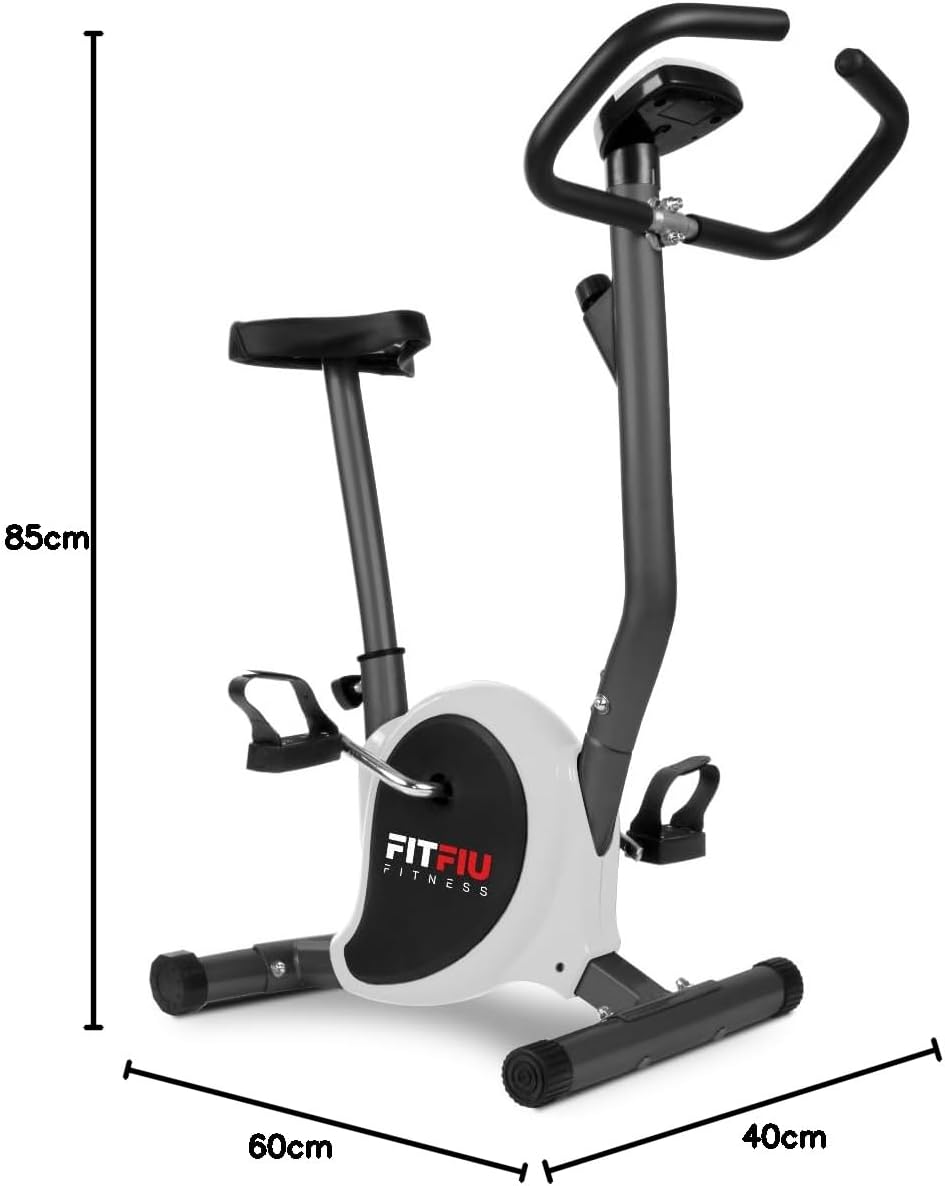
Image 8.1: Diagram showing the dimensions of the static bicycle.
9. Garancija i podrška
For warranty information, product support, or to purchase replacement parts, please contact FITFIU Fitness customer service. Refer to your purchase documentation for specific warranty terms and contact details.
You can typically find support information on the official FITFIU Fitness webweb-mjestu ili putem prodavača gdje ste kupili proizvod.


