1. Uvod
This manual provides detailed instructions for the installation, operation, and maintenance of your Alpine CDE-163BT Advanced Bluetooth CD Receiver. Please read this manual thoroughly before using the unit to ensure proper operation and to prevent damage. Keep this manual for future reference.
The Alpine CDE-163BT is a versatile car stereo receiver featuring advanced Bluetooth connectivity for hands-free calling and audio streaming, CD playback, USB input, and FM/AM tuner capabilities. It is designed to deliver high-quality audio performance and user-friendly control.
2. Postavljanje i instalacija
2.1 Sadržaj paketa
Prije početka instalacije, provjerite da li su sve komponente prisutne:
- Alpine CDE-163BT Head Unit
- kabelskog svežnja
- Mounting Sleeve and Trim Ring
- Mikrofon za Bluetooth hands-free pozive
- Uputstvo za upotrebu (ovaj dokument)
- Pribor za montažu (vijci, nosači)
2.2 Dijagram ožičenja
Refer to the wiring diagram provided with the unit's installation guide for specific connections. Key connections include:
- Snaga: Yellow (constant 12V), Red (switched 12V), Black (ground).
- Zvučnici: White/White-Black (Front Left), Gray/Gray-Black (Front Right), Green/Green-Black (Rear Left), Purple/Purple-Black (Rear Right).
- antena: Blue (power antenna/amplifier remote turn-on).
- mikrofon: Connect the supplied microphone to the dedicated input for hands-free calling.
Oprez: Incorrect wiring can cause damage to the unit or vehicle's electrical system. If you are unsure about any wiring connections, consult a qualified professional installer.
2.3 Početno uključivanje
After installation, turn on your vehicle's ignition. The unit should power on. Follow any on-screen prompts for initial setup, such as language selection or clock setting.
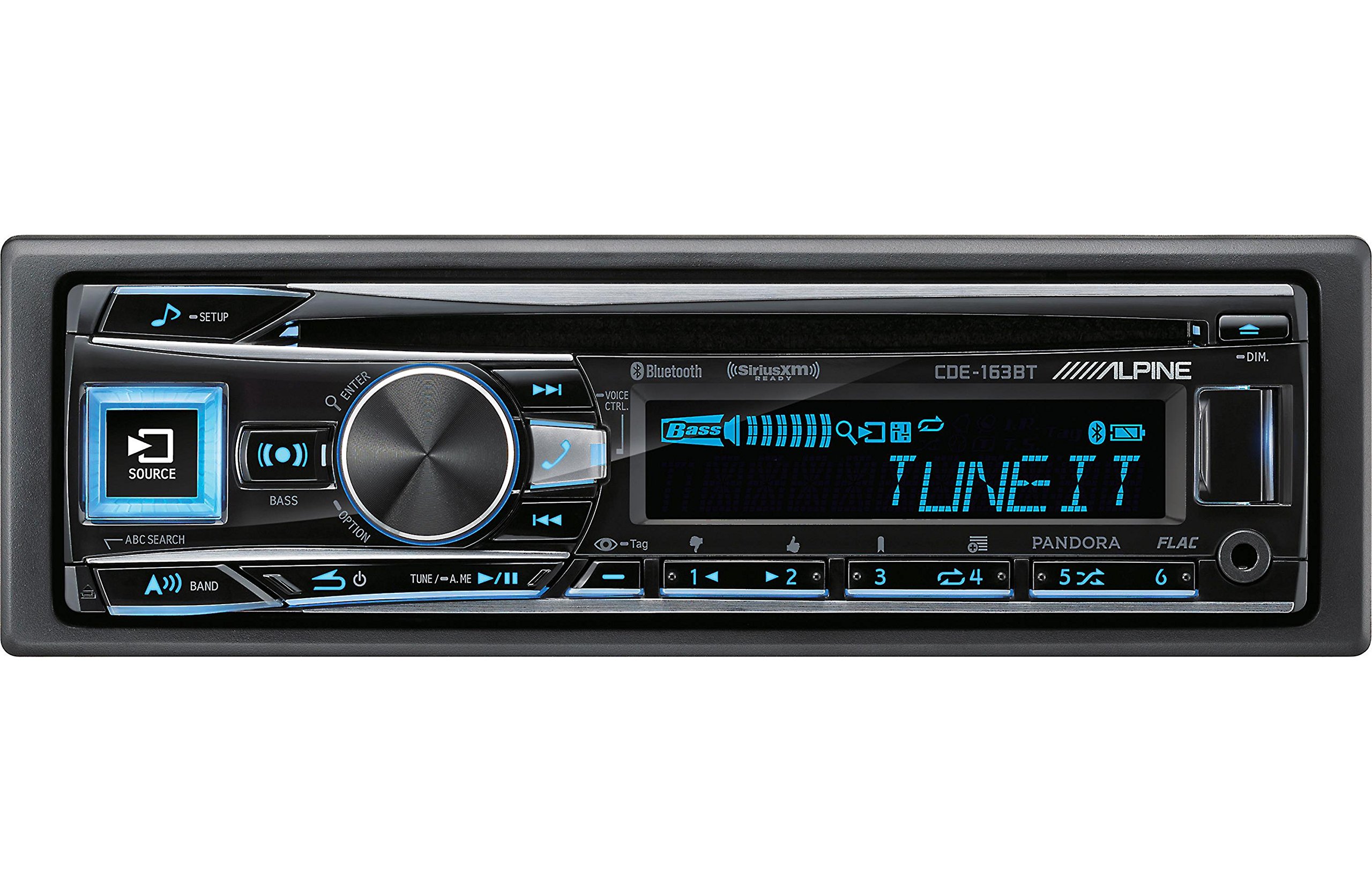
Figure 2.3.1: Front panel of the Alpine CDE-163BT receiver. This image displays the main controls, including the large rotary knob, source button, setup button, and display screen showing "TUNEIT" and "Bass" indicators.
3. Operacija
3.1 Kontrole na prednjoj pločiview
Familiarize yourself with the main controls on the front panel:
Slika 3.1.1: Detaljno view of the Alpine CDE-163BT front panel. Key controls include the SOURCE button (left, illuminated), SETUP button (top left), large central rotary knob for volume and selection, BASS/OPTION button, VOICE CTRL button, and various preset/track skip buttons along the bottom.
- Dugme SOURCE: Selects the audio source (CD, Tuner, USB, Bluetooth Audio, AUX).
- Dugme SETUP: Accesses the main setup menu for system adjustments.
- Rotary Knob (Volume/ENTER): Turns to adjust volume. Press to confirm selections in menus.
- BASS/OPTION Button: Provides quick access to bass settings or other options depending on the current mode.
- VOICE CTRL Button: Activates voice control features on connected smartphones.
- Dugme BAND: Switches between FM1, FM2, FM3, and AM bands in tuner mode.
- TUNE/A.ME/II Buttons: Used for manual tuning, auto memory, and play/pause functions.
- Track Skip/Preset Buttons (1-6): Used for skipping tracks or selecting radio presets.
- DIM dugme: Podešava svjetlinu ekrana.
3.2 Uključivanje/isključivanje i odabir izvora
- Za okretanje jedinice ON, press any button (e.g., SOURCE or the Rotary Knob).
- Za okretanje jedinice OFF, press and hold the power button (often integrated with the TUNE/A.ME button).
- Pritisnite IZVOR button repeatedly to cycle through available audio sources: CD, Tuner, USB, Bluetooth Audio, AUX.
3.3 Kontrola jačine zvuka
Okrenite veliki centralni Rotacijski gumb u smjeru kazaljke na satu za povećanje jačine zvuka i suprotno od smjera kazaljke na satu za smanjenje jačine zvuka.
3.4 Audio postavke
Pritisnite BASS/OPTION button or navigate through the SETUP menu to adjust audio settings such as Bass, Treble, Balance (left/right), and Fader (front/rear). Use the Rotary Knob to adjust values and press it to confirm.
3.5 Rad radija (FM/AM tjuner)
- Select "Tuner" as the source using the IZVOR dugme.
- Pritisnite BAND dugme za prebacivanje između FM1, FM2, FM3 i AM opsega.
- Ručno podešavanje: Pritisnite TUNE buttons (◀ / ▶) to manually tune frequencies.
- Tražite ugađanje: Pritisnite i držite TUNE dugmad za automatsko traženje sljedeće stanice s jakim signalom.
- Unaprijed postavljene stanice: To store a station, tune to the desired frequency, then press and hold one of the numbered preset buttons (1-6) until you hear a beep. To recall a preset, simply press the corresponding numbered button.
3.6 Reprodukcija CD-a
- Insert a CD into the disc slot. The unit will automatically switch to CD source and begin playback.
- Use the ◀ / ▶ buttons to skip tracks.
- Pritisnite TUNE/A.ME/II button for Play/Pause.
- Pritisnite ABC SEARCH button to search for tracks by name.
3.7 Bluetooth povezivost
The CDE-163BT features built-in Bluetooth for hands-free calling and audio streaming.
3.7.1 Uparivanje Bluetooth uređaja
- Provjerite je li Bluetooth omogućen na vašem mobilnom uređaju.
- On the CDE-163BT, go to the SETUP menu and select "Bluetooth Setup".
- Choose "Pairing" or "Device Search".
- On your mobile device, search for available Bluetooth devices and select "Alpine CDE-163BT".
- Confirm the pairing code if prompted. Once paired, the Bluetooth icon on the receiver's display will illuminate.
3.7.2 Pozivi bez upotrebe ruku
- Kada pristigne poziv, uređaj će prikazati ID pozivaoca. Pritisnite ENTER button (Rotary Knob) to answer.
- Da biste prekinuli poziv, pritisnite ENTER ponovo dugme.
- Use the supplied microphone for clear communication.
- Pritisnite VOICE CTRL button to activate your smartphone's voice assistant.
3.7.3 Bluetooth audio streaming
- Select "Bluetooth Audio" as the source.
- Start playback on your paired mobile device. Audio will stream through the receiver.
- Use the ◀ / ▶ buttons on the receiver to skip tracks.
3.8 Reprodukcija s USB-a
- Connect a USB storage device (e.g., USB flash drive) to the USB port.
- Select "USB" as the source. The unit will automatically detect and begin playing compatible audio files (including FLAC format).
- Use the ◀ / ▶ buttons to skip tracks.
- The unit supports various audio formats.
3.9 Pandora and SiriusXM Ready
- Pandora: Connect your iPhone or Android smartphone via USB or Bluetooth and launch the Pandora app. Select Pandora as the source on the receiver to control the app.
- SiriusXM: This unit is SiriusXM Ready. An optional SiriusXM Connect Vehicle Tuner and subscription are required for satellite radio reception. Connect the tuner and select SiriusXM as the source.
3.10 Postavke ekrana
- Pritisnite DIM dugme za podešavanje svjetline ekrana.
- Access the SETUP menu to customize display colors for buttons and the screen.
4. Održavanje
4.1 Čišćenje jedinice
Wipe the front panel with a soft, dry cloth. For stubborn stains, dampen the cloth lightly with water. Avoid using harsh chemicals, abrasive cleaners, or solvents as they can damage the finish.
4.2 Njega diska
Handle CDs by their edges. Keep discs clean and free of scratches. If a disc is dirty, wipe it gently from the center outwards with a soft, lint-free cloth. Do not use solvents or abrasive cleaners on discs.
5. Otkrivanje problema
If you experience issues with your CDE-163BT, refer to the table below for common problems and solutions.
| Problem | Mogući uzrok | Rješenje |
|---|---|---|
| Nema struje | Neispravno ožičenje; Pregoreli osigurač; Paljenje vozila isključeno. | Check power connections; Replace fuse; Turn vehicle ignition on. |
| Nema zvuka | Preniska jačina zvuka; Aktivirano isključivanje zvuka; Nepravilno ožičenje zvučnika; Ampdizalica isključena. | Povećajte jačinu zvuka; Deaktivirajte utišavanje; Provjerite priključke zvučnika; Provjerite ampsnaga oslobađanja. |
| Bluetooth se ne povezuje | Device not in pairing mode; Bluetooth off on phone; Interference. | Ensure phone Bluetooth is on and discoverable; Re-attempt pairing; Move closer to unit. |
| CD skips or won't play | Dirty or scratched disc; Disc inserted incorrectly. | Clean disc; Insert disc correctly; Try a different disc. |
| USB uređaj nije prepoznat | Nekompatibilan format; Oštećen USB uređaj; Labava veza. | Osigurati files are compatible; Try a different USB device; Reconnect USB device. |
If the problem persists after attempting these solutions, please contact Alpine customer support.
6. Specifikacije
Below are the technical specifications for the Alpine CDE-163BT Advanced Bluetooth CD Receiver:
- Broj modela: 79380
- Dimenzije proizvoda: 5 x 11 x 10 inča
- Težina artikla: 4.05 funti (4.1 funti)
- Bežične komunikacijske tehnologije: Bluetooth
- Tehnologije povezivanja: Bluetooth
- Posebne karakteristike: Built-In Bluetooth, FM Tuner
- Ostale karakteristike ekrana: Bežični
- Boja: BLACK
- Proizvođač: Alpine
- Tehnologija povezivanja: Bluetooth
- Kompatibilni uređaji: Smartphone
- Tip konektora: 3.5 mm priključak, USB
- Način audio izlaza: Mono, stereo
- Konfiguracija kanala surround zvuka: 4 Channel
- Wattage: 200 vati
- Datum prve dostupnosti: 19. januara 2016
7. Garancija i korisnička podrška
7.1 Informacije o garanciji
Alpine products are manufactured to the highest quality standards. This product is covered by a limited warranty. Please refer to the separate warranty card included with your purchase for specific terms, conditions, and duration of coverage. Retain your proof of purchase for warranty claims.
7.2 Korisnička podrška
For technical assistance, troubleshooting beyond this manual, or warranty service, please contact Alpine customer support:
- Webstranica: Visit the official Alpine webstranica za resurse podrške, često postavljana pitanja i kontakt obrasce.
- Telefon: Refer to the Alpine website or your warranty card for regional customer service phone numbers.
- Ovlašteni servisni centri: For repairs, locate an authorized Alpine service center through the official website.
When contacting support, please have your product model number (CDE-163BT) and serial number ready.


