Uvod
The Electro-Harmonix Lester K is a stereo rotary speaker emulator pedal designed to replicate the classic sound of a rotating speaker cabinet. It features tube-style overdrive, adjustable fast and slow modes, and fine-tunable speaker balance, offering a lush and realistic sound for both stereo and mono inputs.
Setup
To set up your Lester K pedal, follow these steps:
- Priključak za napajanje: Connect the included 9.6V power adapter to the 9V power jack on the pedal. Ensure the power source is stable.
- Audio ulaz: Connect your instrument (e.g., guitar, keyboard) to the MONO/L INPUT jack using a standard 1/4-inch instrument cable. For stereo input, connect the right channel to the R INPUT jack.
- Audio izlaz: Connect the MONO/L OUTPUT jack to your amplifier or audio interface. For stereo output, connect the right channel to the R OUTPUT jack.
- plasman: Position the pedal on a flat, stable surface, such as a pedalboard, ensuring easy access to footswitches and controls.
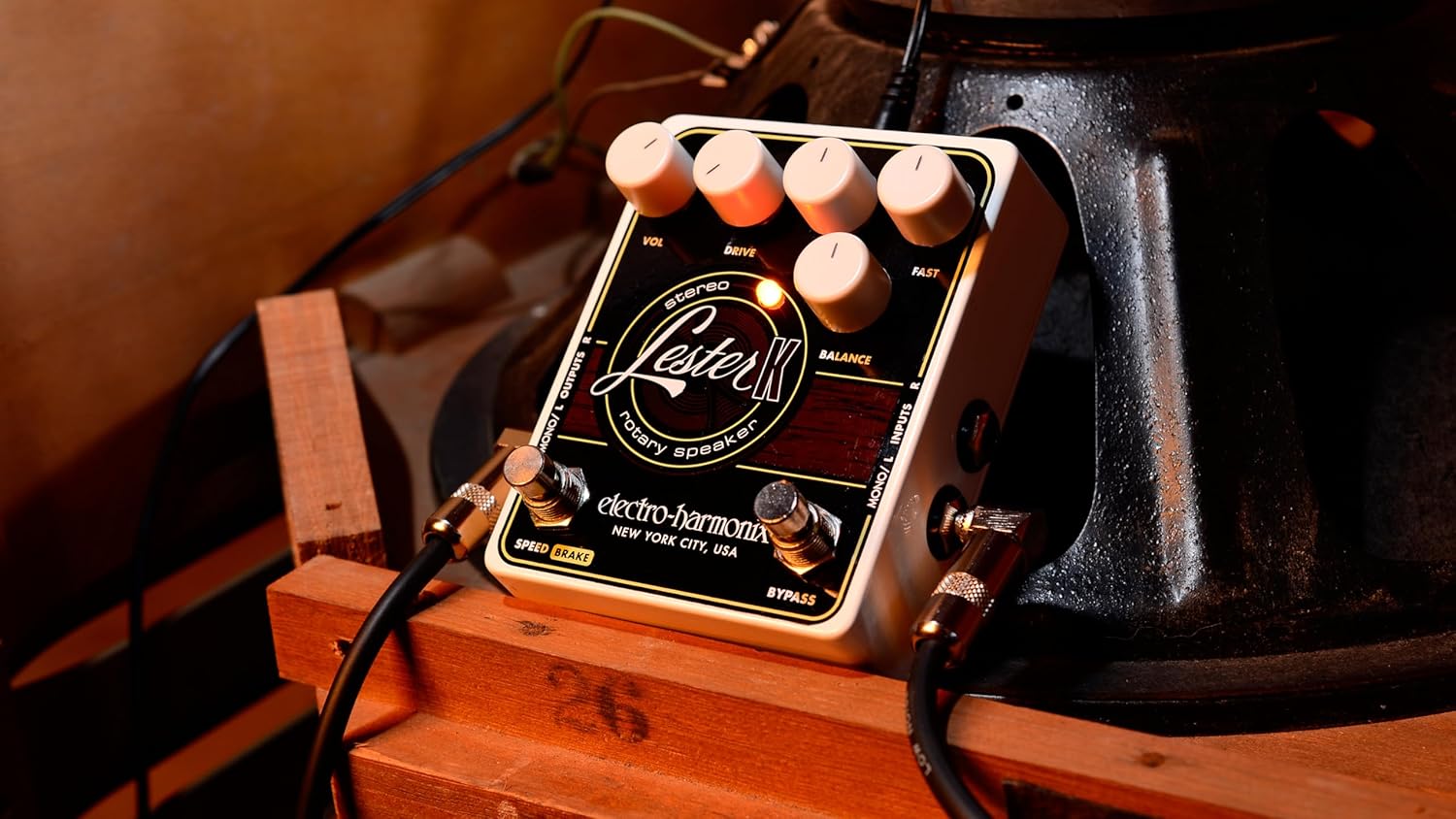
Image: The Lester K pedal connected to audio cables, showing its compact size and input/output jacks.
Operativne kontrole
The Lester K features several controls to shape your rotary speaker sound:
- VOL (volumen): This knob controls the overall output level of the pedal. Adjust it to match the volume of your bypassed signal or to boost your sound.
- POGON: This control adjusts the amount of tube-emulated overdrive. Turn it clockwise for more grit and saturation, replicating the sound of an overdriven tube amplifier.
- SPORO: This knob sets the speed of the rotary effect when in the slow mode.
- BRZO: This knob sets the speed of the rotary effect when in the fast mode.
- BILANS: This control fine-tunes the balance between the emulated horn and bass rotor elements of the rotary speaker effect. Adjust to achieve your desired tonal character.
- SPEED/BRAKE Footswitch: Toggles between the adjustable slow and fast rotary speeds. Holding this footswitch down engages the brake, gradually slowing the rotation to a stop.
- BYPASS nožni prekidač: Engages or disengages the Lester K effect. When bypassed, the pedal provides a true bypass signal.

Slika: Jasna view of the Lester K's control layout, including the VOL, DRIVE, SLOW, FAST, and BALANCE knobs, and the SPEED/BRAKE and BYPASS footswitches.
Savjeti za korištenje
The Lester K is versatile and can enhance various instruments and styles:
- Organ Sounds: The Lester K excels at emulating classic rotary speaker effects for organ sounds, providing a rich, swirling texture. Experiment with different SLOW and FAST settings to achieve the desired modulation speed.
- Synth Sounds: For percussive synth sounds, the Lester K can add depth and movement. Combining it with a compressor/sustainer pedal, such as the Electro-Harmonix Soul Preacher, can further enhance the percussive attack and sustain.
- Overdrive: Utilize the DRIVE knob to introduce a warm, tube-like overdrive, adding character to your rotary sound. This can range from subtle warmth to aggressive distortion.
- Speed Transitions: The SPEED/BRAKE footswitch allows for dynamic transitions between slow and fast rotary speeds, or a gradual stop, mimicking the mechanical acceleration and deceleration of a physical rotary speaker.
Video: This demonstration showcases the Electro-Harmonix Lester K Stereo Rotary Speaker Pedal's capabilities with a keyboard. It illustrates the transition between slow and fast rotary speeds, the effect of the tube-emulated overdrive, and how the pedal can be used to enhance both organ and synth sounds, including a combination with the Soul Preacher compressor/sustainer pedal. The video also briefly mentions the Lester G model, which includes a built-in compressor and adjustable speed control for advanced users.
Održavanje
To ensure the longevity and optimal performance of your Lester K pedal:
- čišćenje: Za čišćenje vanjske strane pedale koristite meku, suhu krpu. Izbjegavajte abrazivna sredstva za čišćenje ili rastvarače.
- Skladištenje: Čuvajte pedalu na suhom mjestu, dalje od ekstremnih temperatura i vlage.
- Veze: Povremeno provjeravajte sve kablovske spojeve na čvrstoću i istrošenost. Labavi spojevi mogu dovesti do gubitka signala ili šuma.
- Napajanje: Always use the specified 9.6V power supply to prevent damage to the unit.
Rješavanje problema
If you encounter issues with your Lester K pedal, consider the following:
- Nema zvuka: Check all audio cables and power connections. Ensure the pedal is receiving power (LEDs should illuminate). Verify that the BYPASS footswitch is engaged.
- Slab ili izobličen zvuk: Check the VOL and DRIVE knob settings. Ensure your instrument's output and amplifier's input levels are appropriate.
- No Rotary Effect: Confirm the SPEED/BRAKE footswitch is not in the 'Brake' position. Adjust the SLOW and FAST knobs to ensure they are not set to minimum.
- Neželjena buka: Ensure all cables are properly shielded and connected. Try using a different power outlet or power supply to rule out electrical interference.
Specifikacije
| Težina artikla | 14.1 unci (0.4 kilograma) |
| Dimenzije proizvoda | 7.25 x 6.2 x 3.25 inča (5.75"D x 4.75"Š x 2.5"V) |
| Izvor napajanja | Električni sa kablom (9V) |
| Format signala | Analog |
| Tip konektora | Barrel Jack |
Garancija i podrška
The Electro-Harmonix Lester K pedal comes with a power supply and an instruction manual. For warranty information, technical support, or service inquiries, please refer to the official Electro-Harmonix webweb-mjesto ili direktno kontaktirajte njihovu korisničku službu. Sačuvajte račun za potvrdu garancije.


